Running PHP code
Create a file
index.php containing the following code.
<!DOCTYPE html>

<html lang="en">

<head>
    <meta charset="utf-8" />
    <meta name="viewport" content="width=device-width, initial-scale=1">
    <title> CSE104 </title>
</head>

<body>

<?php
$a = "Hello";
print "This text is written by PHP! $a";
?>

</body>

</html>
To run this code, we need a server with PHP interpretor. If you upload this file on your online directory on
cse104.org server, it will work, but this process is not convenient for local development.
The simplest solution to run PHP is to use
Xampp. Follow these steps to prepare your machine:
- 1- Go to Xampp website and install the version adapted to your OS
(windows/Mac/Linux).
- 2- Move your PHP file in the directory [xampp-directory]/htdocs/
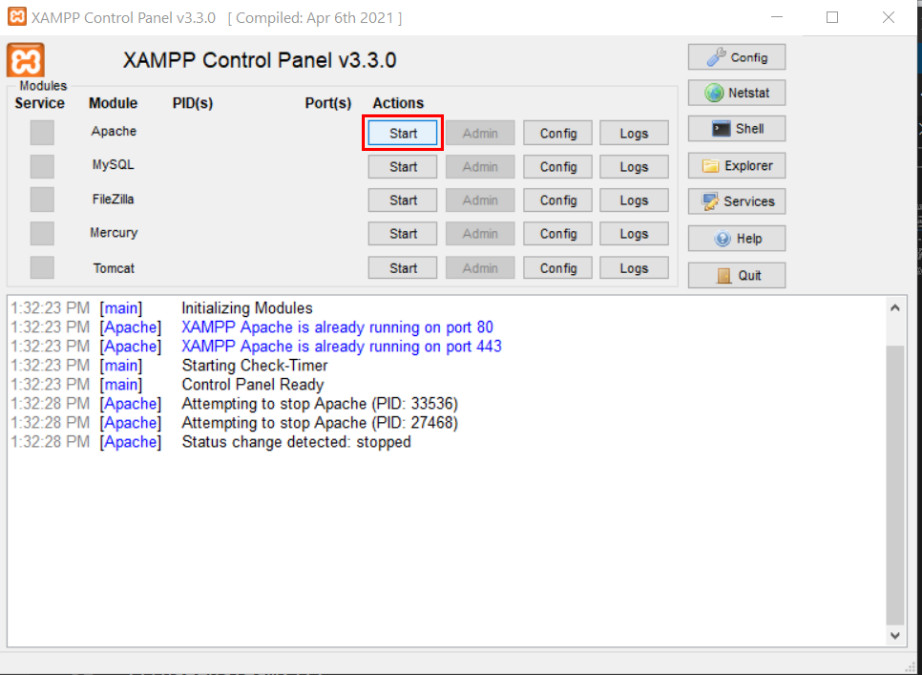
- 3- Start the PHP local server using Xampp: Click "Start" in front on Apache line.
A detailed video tutorial is available here:
You should now see the result of the PHP interpretation.
A few notes:
- - To see the result, you need to query the adress http://localhost, and not open directly your php file from your browser.
-
- - localhost is a keyword indicating a server running on the local machine.
- - All your php files (html, php, images, etc) should be placed in the directory htdocs/ (or a subdirectory of it) otherwise they are not
visible to xampp.
-
- - If your file is not called index.php, you do not need to explicitly type index.php, but http://localhost is enough (index.php is automatically
found).
- - If your file filename.php is in a subdirectory subdir/, then the full url will be http://localhost/subdir/filename.php
Alternative to xampp: Another possibility in Linux/Mac is to install the command line tool PHP (ex.
sudo apt install php on Ubuntu) in case you don't want/cannot use xampp.
- - Then run in command line in the directory containing your php file: php -S localhost:8000
- - Open your browser at the url http://localhost:8000/
A detailed video tutorial is available here: