The C++ language, created in the early 1980s by researcher Bjarne Stroustrup at Bell Labs, is initially introduced as an extension of the C language with which it is intrinsically linked. The C language is a so-called “low-level” language, being close to the hardware (processor, memory) particularly suited for coding efficient applications related to the operating system. The C++ language was introduced to preserve the capabilities of C, while extending it with mechanisms of structuring and abstraction for the description of large-scale software.
The C++ stands out from other programming languages by its unique ability to combine low-level performance and high-level abstraction. Direct successor to C, it enables precise control of memory and hardware, essential in domains where efficiency is critical (embedded systems, scientific computing, game engines, etc.). Unlike languages like Python or Java, which rely on a virtual machine or an interpreter that adds a level of indirection during execution, C++ is a compiled language that produces optimized machine code directly read and executed by the processor, thus ensuring very fast execution.
Another major specificity of C++ is its simultaneous support for several ways of programming, called programming paradigms:
This mix of paradigms today makes C++ a language recognized as extremely flexible, capable of adapting to a wide variety of contexts. It remains essential for domains where performance and fine memory management are crucial, such as game engines, embedded software, numerical simulation, high-performance computing or finance.
The C++ language continues to undergo regular evolutions.
auto
(type deduction), the appearance of smart pointers (e.g.,
std::unique_ptr, std::shared_ptr) and lambda
functions (anonymous functions).C++ is currently one of the indispensable languages when it comes to designing applications with stringent performance, real-time, or computationally intensive requirements.
We consider the following C++ program:
// bibliothèque standard pour les entrées/sorties
#include <iostream>

int main() {
    // affichage d’un message sur la ligne de commande
    std::cout << "Hello, world!" << std::endl;

    // fin du programme
    return 0;
}#include <iostream>
std::cin, std::cout, etc.).int main()
main function.int indicates that the main
function returns an integer to the operating system (0 on success,
another value on error).std::cout << "Hello, world!" << std::endl;
std::cout is the standard output stream (usually the
screen).<< operator allows sending data into the
stream."Hello, world!" is a string.std::endl inserts a newline and forces immediate
display.return 0;
Note: Each statement ends with a semicolon “;” in C++. Indentation and line breaks are optional; they are useful for readability but do not change the program’s structure.
To transform the C++ source file (for example hello.cpp)
into an executable, we use a C++ compiler. Under Linux
or macOS, the most common compilers are:
Suppose the file is named hello.cpp. Type on the command
line in the directory containing the file hello.cpp
g++ hello.cpp -o hellog++ : invokes the C++ compiler.hello.cpp : source file to be compiled.-o hello : option that specifies the name of the
produced executable (hello).The program execution is performed with the command
./helloWhat should display the following result
Hello, world!In C++, a variable is a region of memory that
contains a value and that is identified by a name.
Each variable has a type that defines
the nature of the values it can contain (integers, floating-point
numbers, text, etc.).
#include <iostream>
#include <string>

int main() {
    int age = 20;                  // entier
    float taille = 1.75f;          // nombre à virgule (simple précision)
    double pi = 3.14159;           // nombre à virgule (double précision)
    std::string nom = "Alice";     // chaîne de caractères

    std::cout << "Nom : " << nom << std::endl;
    std::cout << "Age : " << age << std::endl;
    std::cout << "Taille : " << taille << " m" << std::endl;
    std::cout << "Valeur de pi : " << pi << std::endl;

    return 0;
}You will mainly use two fundamental types in your code:
int: integer. On our machines, an
int is encoded in 4 bytes.
int entier = 325;float : a floating-point number, called “single precision”. Encoded on 4 bytes.
float reel = 3.2f;You will also encounter the following types :
bool : boolean value (true or
false). Introduced by C++ (absent from C), it makes the
code more readable than an integer.
bool estEtudiant = true;double : floating-point number with “double precision”, encoded on 8 bytes.
double pi = 3.14159;By default, a decimal number without a suffix is interpreted as a
double.
> In our context, we will more often use a float to stay
compatible with the graphics card.
char : character (1 byte). The correspondence between values and characters is given by the ASCII table.
char initiale = 'A';A char can also be used to manipulate memory directly at
the byte level.
Integer division vs floating-point division
When two integers are divided, the result is truncated (Euclidean division):
int a = 5 / 2;  // vaut 2
int b = 5 % 2;  // vaut 1 (reste de la division)
To obtain a decimal result, at least one of the operands must be floating-point:
float c = 5 / 2.0f;     // 2.5
float d = 5.0f / 2;     // 2.5
float e = float(5) / 2; // 2.5
The auto keyword
It allows the compiler to deduce the type automatically:
auto a = 5;    // int
auto b = 8.4f; // float
auto c = 4.2;  // double
For simple types, it remains preferable to explicitly indicate the
type for greater readability.
auto is mainly useful for generic functions or complex
types.
int compteur;    // non initialisé
compteur = 10;  // affectation d'une valeur plus tard
Warning: An uninitialized variable contains an undefined value and must not be used before it is assigned.
const)In C++, a variable can be declared constant using
the keyword const. Such a variable must be
initialized at the moment of its declaration and
can no longer be modified afterward.
const int joursParSemaine = 7;
const float pi = 3.14159f;

int main() {
    std::cout << "Pi = " << pi << std::endl;
    // pi = 3.14; // ERREUR : impossible de modifier une constante
    return 0;
}In C++, it is common to convert a value from one type to another: this is called a cast (type conversion).
Examples: implicit and explicit conversions
int i = 3;
float f = i;               // conversion implicite : int -> float

double d = 3.9;
int j = (int)d;            // cast C-style : tronque la partie décimale (narrowing)
int k = static_cast<int>(d); // cast C++-style : recommandé car plus sécurisé
Conversion conventions :
static_cast<T>(expr) for conversions
between numeric types and between compatible pointers.(int)d is the C-style cast notation; one can also find
int(d) which is the function-style cast form. For
fundamental types, both behave equivalently (they truncate the decimal
part).double -> int truncates, an unsigned integer may
overflow.reinterpret_cast<T>(expr), which
reinterprets the binary representation of an object as another type.
This is a low-level operation, potentially dangerous (risks of
alignment, aliasing or undefined behavior); use it only for
interoperability or clearly documented binary read/write.This notion is useful for explicitly controlling conversions and avoiding surprising behaviors during arithmetic operations or argument passing.
printf and
scanf (inherited from C)In addition to std::cout and std::cin, C++
preserves the classic functions of the C language:
printf (print formatted) :
for formatted output.scanf (scan formatted) : for
formatted input.They are defined in the header <cstdio> (or
<stdio.h> in C). Their usage relies on format
specifiers (%d, %f, %s,
etc.) which indicate the type of the variable.
printf#include <cstdio>
int main() {
int age = 20;
float taille = 1.75f;
printf("Age : %d ans, taille : %.2f m\n", age, taille);
return 0;
}Output:
Age : 20 ans, taille : 1.75 m%d : integer (int)%f : floating-point (float or
double)%.2f : floating-point displayed with two decimal
placesscanf#include <cstdio>
int main() {
int age;
printf("Entrez votre age : ");
scanf("%d", &age); // & = adresse mémoire
printf("Vous avez %d ans.\n", age);
return 0;
}In scanf, it is necessary to provide the
address of the variable (here &age), because
the function directly modifies its value.
printf / scanf)| Specifier | Expected type | Example usage | Displayed result |
|---|---|---|---|
%d |
signed integer (int) |
printf("%d", 42); |
42 |
%u |
unsigned integer (unsigned) |
printf("%u", 42u); |
42 |
%f |
floating-point (float or double) |
printf("%f", 3.14); |
3.140000 |
%.nf |
floating-point with n decimals |
printf("%.2f", 3.14159); |
3.14 |
%e |
floating-point in scientific notation | printf("%e", 12345.0); |
1.234500e+04 |
%c |
character (char) |
printf("%c", 'A'); |
A |
%s |
string (char*) |
printf("%s", "Bonjour"); |
Bonjour |
%x |
integer in hexadecimal (lowercase) | printf("%x", 255); |
ff |
%X |
integer in hexadecimal (uppercase) | printf("%X", 255); |
FF |
%p |
memory address (pointer) | printf("%p", &a); |
0x7ffee3c8a4 |
%% |
literal % character |
printf("%%d"); |
%d |
In C++, the standard library (STL, Standard Template
Library) defines several containers allowing storage of
collections of values.
Among them, two structures are particularly important:
std::array<T, N>: static array
of fixed size.
N must be known at compile
time and cannot change.std::vector<T>: dynamic array.
T var[N]) :
size(), push_back,
etc.).std::vector#include <iostream>
#include <vector>
int main() {
// Création d’un vecteur vide d’entiers
std::vector<int> vec;
// Ajout d’éléments (redimensionnement automatique)
vec.push_back(5);
vec.push_back(6);
vec.push_back(2);
// Taille du vecteur
std::cout << "Le vecteur contient " << vec.size() << " éléments" << std::endl;
// Accès aux éléments par indice
std::cout << "Premier élément : " << vec[0] << std::endl;
// Modification d’un élément
vec[1] = 12;
// Parcours du vecteur avec une boucle
for (int k = 0; k < vec.size(); ++k) {
std::cout << "Élément " << k << " : " << vec[k] << std::endl;
}
return 0;
}Accessing an element out of bounds is undefined behavior, which can cause the program to crash.
// Mauvais usage : peut provoquer une erreur ou un comportement imprévisible
// vec[8568] = 12;

// Accès sécurisé (vérification des bornes)
vec.at(0) = 42;A vector can be dynamically resized with the .resize(N)
method:
vec.resize(10000);
// Les anciens éléments sont conservés
// Les nouveaux sont initialisés à 0std::array, std::vector and C arrays
#include <array>
#include <vector>
#include <iostream>

int main() {
    // Tableau C classique
    int tab[5] = {1, 2, 3, 4, 5};

    // std::array (statique, taille fixe)
    std::array<int, 5> arr = {1, 2, 3, 4, 5};

    // std::vector (dynamique, taille variable)
    std::vector<int> vec = {1, 2, 3};

    std::cout << "Taille du tab : " << 5 << " (fixe, connue à la compilation)" << std::endl;
    std::cout << "Taille du array : " << arr.size() << std::endl;
    std::cout << "Taille du vector : " << vec.size() << std::endl;

    vec.push_back(10); // possible
    // arr.push_back(10); // impossible : taille fixe
    // tab.push_back(10); // impossible : fonction inexistante

    return 0;
}T var[N]): simple, but
limited and not very safe.std::array<T, N>: static array,
size fixed at compile time, stored on the stack (stack memory).std::vector<T>: dynamic array,
size modifiable, stored on the heap (heap memory).std::array for small fixed sizes known in
advance.std::vector for data whose size may vary during the
program.General structure :
if (condition) {
    // instructions si la condition est vraie
} else {
    // instructions si la condition est fausse
}
The braces {} are optional if only a
single statement is present:
if (x > 0)
    std::cout << "x est positif" << std::endl;
Example :
int age = 20;

if (age >= 18) {
    std::cout << "Vous êtes majeur." << std::endl;
} else {
    std::cout << "Vous êtes mineur." << std::endl;
}General structure :
if (condition1) {
    // instructions
} else if (condition2) {
    // instructions
} else {
    // instructions par défaut
}
Example :
int note = 15;

if (note >= 16)
    std::cout << "Très bien !" << std::endl;
else if (note >= 10)
    std::cout << "Suffisant." << std::endl;
else
std::cout << "Échec." << std::endl;General structure:
while (condition) {
    // instructions répétées tant que la condition est vraie
}
Example :
int i = 0;
while (i < 5) {
    std::cout << "i = " << i << std::endl;
    i++;
}General structure:
do {
    // instructions exécutées au moins une fois
} while (condition);
Example :
int i = 0;
do {
    std::cout << "i = " << i << std::endl;
    i++;
} while (i < 5);General structure:
for (initialisation; condition-continuation; incrément) {
    // instructions répétées
}
Example :
for (int i = 0; i < 5; i++) {
    std::cout << "i = " << i << std::endl;
}General structure:
for (type variable : conteneur) {
    // instructions utilisant la variable
}
Example :
#include <vector>

int main() {
    std::vector<int> valeurs = {1, 2, 3, 4, 5};

    for (int v : valeurs)
        std::cout << v << std::endl;
}The switch allows testing several values of the same
integer or character variable.
General structure :
switch (variable) {
    case valeur1:
        // instructions
        break;
    case valeur2:
        // instructions
        break;
    default:
        // instructions par défaut
}
Limitation: switch only works with integer or character
types. The keyword break avoids executing the following
blocks.
std::mapA std::map is an associative container from the standard
library that stores key/value pairs sorted by key. Each key is unique
and provides efficient access to the corresponding value (search in
O(log n)).
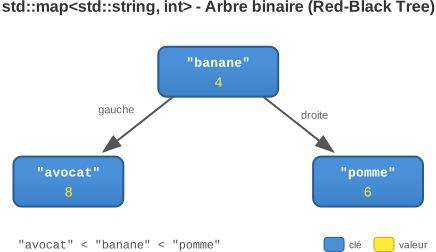
#include <map>operator<).operator[] creates a default
value if the key does not exist; find allows checking for
existence without creating it.Simple example: counting word frequencies
#include <iostream>
#include <map>
#include <string>

int main() {
    std::map<std::string, int> counts;

    // Insertion / incrémentation
    counts["pomme"] = 5;
    counts["banane"] = 4;
    counts["avocat"] = 8;
    counts["pomme"]++;

    // Parcours et affichage
    for (auto pair : counts) {
        std::cout << pair.first << " : " << pair.second << std::endl;
    }
    // Affiche:
    // avocat : 8
    // banane : 4
    // pomme : 6

    // Recherche sans création
    auto it = counts.find("orange");
    if (it == counts.end())
        std::cout << "orange non trouvé" << std::endl;

    // Suppression
    counts.erase("banane");

    return 0;
}
Notes:
operator[] to insert/access quickly. An entry is
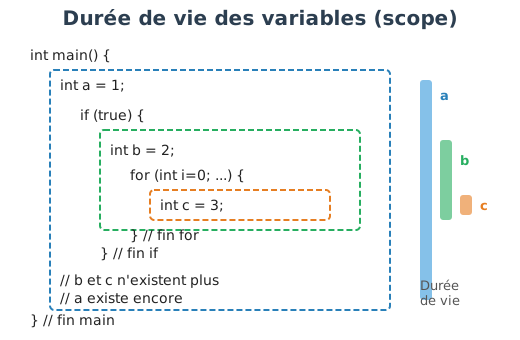
automatically created if the key is absent.find.In C++, the lifetime (or scope) of a variable is
determined by the block of statements in which it is
declared.
A block is defined by curly braces { ... }.
The variable exists from its declaration up to the closing brace
} of the block.
int main()
{
    if (true) {
        int x = 5; // x est défini dans le bloc "if"
        std::cout << x << std::endl;
    }
    // Ici, x n’existe plus : il est détruit à la fin du bloc
}int main()
{
int x = 5; // x est défini dans le bloc de la fonction main()
if (true) {
std::cout << x << std::endl; // x peut être utilisé dans ce sous-bloc
}
// x existe toujours jusqu’à la fin de main()
}if or a loop remains accessible
until the end of the function.This is possible in sub-blocks:
int x = 5;
{
    int x = 10; // autorisé mais à éviter, car peu lisible
    std::cout << x << std::endl; // affiche 10
}
std::cout << x << std::endl; // affiche 5In C++, a function is a reusable block of code that
performs a particular task.
The general syntax is as follows:
typeRetour nomFonction(type nomArgument1, type nomArgument2, ...)
{
    // corps de la fonction
    return valeur;
}int addition(int a, int b)
{
return a + b;
}void.In C++, it is necessary for the signature of a function to be declared before its use. Otherwise, there will be a compilation error.
int addition(int a, int b)
{
    return a + b;
}
int main()
{
int c = addition(5, 3); // OK
}int addition(int a, int b); // Déclaration
int main()
{
int c = addition(5, 3); // OK
}
int addition(int a, int b) // Définition
{
return a + b;
}int main()
{
int c = addition(5, 3); // ERREUR : addition n’est pas encore déclarée
}
int addition(int a, int b)
{
return a + b;
}normLet’s write a function that computes the Euclidean
norm of a 3D vector with coordinates
(x, y, z):
#include <iostream>
#include <cmath> // pour std::sqrt

float norm(float x, float y, float z)
{
    return std::sqrt(x*x + y*y + z*z);
}

int main()
{
    std::cout << "Norme de (1,0,0) : " << norm(1.0f, 0.0f, 0.0f) << std::endl;
    std::cout << "Norme de (0,3,4) : " << norm(0.0f, 3.0f, 4.0f) << std::endl;
    std::cout << "Norme de (1,2,2) : " << norm(1.0f, 2.0f, 2.0f) << std::endl;
}
Expected output:
Norme de (1,0,0) : 1
Norme de (0,3,4) : 5
Norme de (1,2,2) : 3float x2 = x * x;float y = std::sqrt(x);float y = std::pow(x, p);Do not use ^ or ** in C++ : these are
not power operators.
In C++, several functions can share the same name as long as their parameters differ. This is what we call the overloading.
#include <iostream>
#include <cmath>

// Résout ax + b = 0
float solve(float a, float b) {
    return -b / a;
}

// Résout ax^2 + bx + c = 0 (une racine)
float solve(float a, float b, float c) {
    float delta = b*b - 4*a*c;
    return (-b + std::sqrt(delta)) / (2*a);
}

int main() {
    float x = solve(1.0f, 2.0f);       // Appelle la 1ère version
    float y = solve(1.0f, 2.0f, 1.0f); // Appelle la 2ème version

    std::cout << "Solution linéaire : " << x << std::endl;
    std::cout << "Solution quadratique : " << y << std::endl;
}return) or be
void.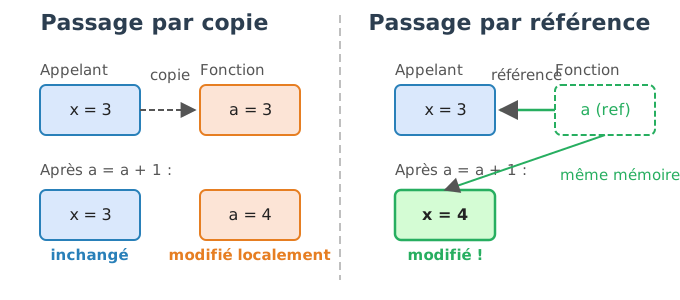
In C++, the function arguments are passed by copy by default: - The changes made inside the function remain local. - For large objects (vectors, arrays, structures), copying can be costly in terms of performance.
#include <iostream>

void increment(int a) {
    a = a + 1;
}

int main() {
    int x = 3;
    increment(x);
    std::cout << x << std::endl; // affiche 3 (x n'est pas modifié)
}
Here, the variable x is not modified in
main because increment operates on a
copy.
We can use the symbol & in the signature to pass an
argument by reference.
This enables direct modification of the original variable:
#include <iostream>

void increment(int& a) {
    a = a + 1;
}

int main() {
    int x = 3;
    increment(x);
    std::cout << x << std::endl; // affiche 4 (x est modifié)
}
A reference is an alias: the function accesses the original variable and not a copy.
std::vectorLet us consider a function that multiplies the values of a vector:
#include <iostream>
#include <vector>

std::vector<float> generate_vector(int N)
{
    std::vector<float> values(N);
    for (int k = 0; k < N; ++k)
        values[k] = k / (N - 1.0f);
    return values;
}

void multiply_values(std::vector<float> vec, float s)
{
    for (int k = 0; k < vec.size(); ++k) {
        vec[k] = s * vec[k];
    }
    std::cout << "Last value in the function: " << vec.back() << std::endl;
}

int main()
{
    int N = 101;
    std::vector<float> vec = generate_vector(N);

    multiply_values(vec, 2.0f);

    std::cout << "Last value in main: " << vec.back() << std::endl;
}
Expected output :
Last value in the function: 2
Last value in main: 1
Here, vec is passed by copy to
multiply_values.
The modification is made on a local copy, so vec in
main remains unchanged.
Let’s modify the signature to pass the vector by reference:
void multiply_values(std::vector<float>& vec, float s)
{
    for (int k = 0; k < vec.size(); ++k) {
        vec[k] = s * vec[k];
    }
    std::cout << "Last value in the function: " << vec.back() << std::endl;
}
Expected result :
Last value in the function: 2
Last value in main: 2If one wishes to avoid copying without modifying the vector, one can use a constant reference:
float sum(std::vector<float> const& T) {
    float value = 0.0f;
    for (int k = 0; k < T.size(); k++)
        value += T[k];
    return value;
}
This type of parameter passing enables: 1. To avoid copying data. 2. To ensure that the values will not be modified in the function.
Good practice: use const references for large objects that should not be modified.
In C++, a class (or a struct) is a way to group together in a single entity:
We then refer to an object to designate an instance of the class.
#include <iostream>
#include <cmath>

// Déclaration d’une structure
struct vec3 {
    float x, y, z;
};

int main()
{
    // Création d’un vec3 non initialisé
    vec3 p1;

    // Création et initialisation d’un vec3
    vec3 p2 = {1.0f, 2.0f, 5.0f};

    // Accès et modification des attributs
    p2.y = -4.0f;

    std::cout << p2.x << "," << p2.y << "," << p2.z << std::endl;

    return 0;
}In C++, objects can be defined using the keyword
struct or
class:
struct vec3 {
    float x, y, z; // Par défaut : public
};

class vec3 {
  public:
    float x, y, z; // Doit être indiqué explicitement
};
Main difference :
In practice :
struct for simple objects that aggregate
public data.class when we want to encapsulate private
data with accessor methods.A class can define methods, i.e., functions that directly manipulate its attributes.
#include <iostream>
#include <cmath>

struct vec3 {
    float x, y, z;

    float norm() const;    // méthode qui ne modifie pas l’objet
    void display() const;  // idem
    void normalize();      // méthode qui modifie (x,y,z)
};

// Implémentation des méthodes
float vec3::norm() const {
    return std::sqrt(x * x + y * y + z * z);
}

void vec3::normalize() {
    float n = norm();
    x /= n;
    y /= n;
    z /= n;
}

void vec3::display() const {
    std::cout << "(" << x << "," << y << "," << z << ")" << std::endl;
}

int main()
{
    vec3 p2 = {1.0f, 2.0f, 5.0f};

    // Norme
    std::cout << p2.norm() << std::endl;

    // Normalisation
    p2.normalize();

    // Affichage
    p2.display();

    return 0;
}this->, although this is possible.NomClasse::NomMethode).const placed after a
method indicates that it does not modify the object. This improves
robustness and readability.A class can define constructors to initialize its objects and a destructor to execute code upon their destruction.
#include <iostream>
#include <cmath>

struct vec3 {
    float x, y, z;

    // Constructeur vide
    vec3();

    // Constructeur personnalisé
    vec3(float v);

    // Destructeur
    ~vec3();
};

// Initialisation à 0
vec3::vec3() : x(0.0f), y(0.0f), z(0.0f) { }

// Initialisation avec une valeur commune
vec3::vec3(float v) : x(v), y(v), z(v) { }

// Destructeur
vec3::~vec3() {
    std::cout << "Goodbye vec3" << std::endl;
}

int main() {
    vec3 a;      // appelle vec3()
    vec3 b(1.0f); // appelle vec3(float)

    return 0; // appelle ~vec3()
}= default)In some cases, we do not wish to redefine a constructor or a
destructor, but simply explicitly request the compiler to automatically
generate the default implementation. We then use the
syntax = default.
struct vec3 {
    float x, y, z;

    // Génère automatiquement un constructeur par défaut
    vec3() = default;

    // Génère automatiquement un destructeur par défaut
    ~vec3() = default;
};
This is equivalent to writing nothing, but has two advantages:
Readability : this makes explicit that a constructor or destructor exists and must be the one provided by the compiler.
Robustness : helps avoid certain implicit deletions of constructors/destructors if others are defined in the class.
In C++, the choice between a method (member function) and a non-member function is left to the developer. For example, the standard can also be defined as an independent function:
#include <cmath>

struct vec3 {
    float x, y, z;
};

// Norme comme fonction non-membre
float norm(const vec3& p) {
    return std::sqrt(p.x*p.x + p.y*p.y + p.z*p.z);
}

int main() {
    vec3 p = {1.0f, 2.0f, 3.0f};
    float n = norm(p); // appel en tant que fonction
}
The use of const& avoids copying the object
unnecessarily.
In C++, the <fstream> library
enables writing to and reading from files. This library provides three
main classes:
std::ifstream (input file
stream) : for reading a file (input).std::ofstream (output file
stream) : for writing to a file (output).std::fstream : for combining reading
and writing.We want to save the coordinates of a vec3 to a text
file.
#include <iostream>
#include <fstream>
#include <cmath>

struct vec3 {
    float x, y, z;
};

int main() {
    vec3 p = {1.0f, 2.0f, 3.5f};

    std::ofstream file("vec3.txt"); // ouverture en écriture
    if (!file.is_open()) {
        std::cerr << "Erreur : impossible d’ouvrir le fichier !" << std::endl;
        return 1;
    }

    file << "Bonjour C++ !" << std::endl;
    file << p.x << " " << p.y << " " << p.z << std::endl;
    file.close(); // fermeture du fichier


    return 0;
}
After execution, the file vec3.txt contains:
Bonjour C++ !
1 2 3.5We can then re-read this vec3 from the file:
#include <iostream>
#include <fstream>
#include <cmath>

struct vec3 {
    float x, y, z;
};

int main() {
    vec3 p;

    std::ifstream file("vec3.txt"); // ouverture en lecture
    if (!file) {
        std::cerr << "Erreur : fichier introuvable !" << std::endl;
        return 1;
    }

    std::string line;
    std::getline(file, line);
    file >> p.x >> p.y >> p.z; // lecture des trois valeurs
    file.close();

    std::cout << "vec3 relu : (" << p.x << ", " << p.y << ", " << p.z << ")" << std::endl;
    return 0;
}
Expected output :
vec3 relu : (1, 2, 3.5)When opening a file, you can specify modes:
std::ios::in : read (default for
ifstream).std::ios::out : write (default for
ofstream).std::ios::app : append to the end of the file without
erasing it.std::ios::binary : read/write in binary mode (e.g.,
images).Example:
std::ofstream file("log.txt", std::ios::app); // ouverture en ajout
file << "Nouvelle entrée" << std::endl;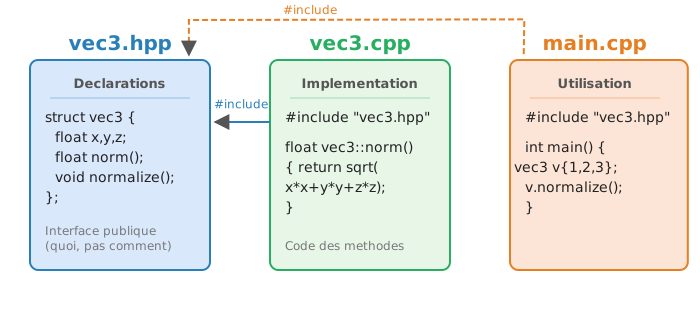
Introduction to C++ > Organization of code files
When a program becomes large, it is necessary to separate the code into multiple files in order to preserve readability, modularity, and to facilitate maintenance.
A typical organization with classes in C++ rests on three types of files:
Header file (.hpp or .h)
Implementation file (.cpp)
.hpp.Main or usage file (main.cpp, etc.)
main() function and uses the
classes/functions by including the header file.vec3 classvec3.hpp#pragma once
#include <cmath>
// Déclaration de la classe
struct vec3 {
float x, y, z;
float norm() const;
void normalize();
};
// Fonction non-membre
float dot(vec3 const& a, vec3 const& b);vec3.cpp#include "vec3.hpp"
// Méthodes de vec3
float vec3::norm() const {
return std::sqrt(x*x + y*y + z*z);
}
void vec3::normalize() {
float n = norm();
x /= n; y /= n; z /= n;
}
// Fonction non-membre
float dot(vec3 const& a, vec3 const& b) {
return a.x*b.x + a.y*b.y + a.z*b.z;
}main.cpp#include "vec3.hpp"
#include <iostream>
int main() {
vec3 v = {1.0f, 2.0f, 3.0f};
std::cout << "Norme : " << v.norm() << std::endl;
v.normalize();
std::cout << "Norme après normalisation : " << v.norm() << std::endl;
vec3 w = {2.0f, -1.0f, 0.0f};
std::cout << "Produit scalaire v.w = " << dot(v, w) << std::endl;
return 0;
}#include "vec3.hpp"
copies the content of the .hpp file at
compile time.vec3 must include
its header file (vec3.hpp)..cpp file directly in another
file.#pragma onceThe #pragma once directive is used in headers to prevent
multiple inclusions of the same file. When a .hpp file is
included multiple times (directly or indirectly), it can cause
compilation errors related to redefinitions of classes or functions.
With #pragma once, the compiler guarantees that the
contents of the file will be included only once, even if several files
attempt to include it.
It is a more concise and readable alternative to the classic include
guards using #ifndef, #define and
#endif.
In practice, it is recommended to systematically add
#pragma once at the top of your header files.
In C++, the compilation is the process that
transforms human-readable source code (files .cpp and
.hpp) into an executable program understandable by the
computer. This transformation takes place in several steps. The compiler
begins by analyzing the code and translating it into assembly
code.
The assembly code is a low-level language that corresponds directly to the instructions understandable by the processor. Unlike C++ which is portable across systems and processors, assembly is architecture-dependent (Intel x86, ARM, etc.). Each line of C++ can thus give rise to one or more assembly instructions, such as arithmetic operations, memory copy operations, or conditional jumps.
Next, this assembly code is converted into machine code binary that constitutes the processor’s native language. This code is stored in a binary object file. Finally, a linker (linker) assembles the different object files and the libraries used to produce the final executable.
Thus, the role of compilation is to translate a high-level language (C++) into low-level instructions (assembly, then machine) that the processor can execute directly, while optimizing performance.
Fichier source (.cpp)
        ↓ (compilateur)
   Fichier objet (.o)
        ↓ (linker / éditeur de liens)
   Exécutable (programme binaire)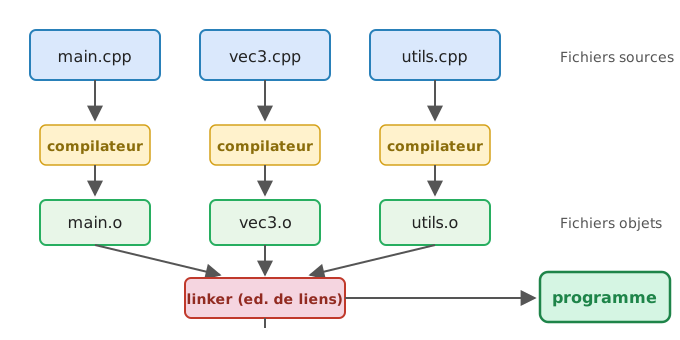
int add(int a, int b) {
    return a + b;
}

int main() {
    int x = add(2, 3);
    return x;
}add(int, int): # Début de la fonction add
mov eax, edi # Copier le 1er argument (a) dans eax
add eax, esi # Ajouter le 2ème argument (b)
ret # Retourner eax (résultat)
main: # Début de la fonction main
push rbp # Sauvegarde du pointeur de base
mov edi, 2 # Charger 2 dans le registre edi (1er argument)
mov esi, 3 # Charger 3 dans le registre esi (2e argument)
call add(int, int) # Appeler la fonction add
pop rbp # Restaurer le pointeur de base
ret # Retourner le résultat dans eaxedi and esi : registers
used to pass the 1st and 2nd arguments to functions (x86-64 System V
calling convention).eax : the register where the result is
stored and returned by the function.mov : copies a value into a
register.add : performs an addition between two
registers.ret : returns from the function, using
the value present in eax as the return value.On Linux and macOS, the most commonly used compilers are
g++ (GNU) and clang++ (LLVM).
To compile a simple program (a single file):
g++ main.cpp -o programmeou
clang++ main.cpp -o programmemain.cpp : C++ source file to compile.-o programme : name of the produced executable.If the project contains several files, it becomes tedious to compile everything by hand. We then use a Makefile with the tool make, which describes the dependencies and the compilation rules.
Minimal example of a Makefile:
Here is your annotated Makefile with the general syntax in comments:
# Cible par défaut (ici : "main")
all: main
# Syntaxe générale :
# cible: dépendances
#     commande(s) à exécuter

# Construction de l'exécutable "main"
main: main.o vec3.o
    g++ main.o vec3.o -o main
# Syntaxe générale :
# executable: fichiers_objets
#     compilateur fichiers_objets -o executable

# Règle pour générer l'objet main.o
main.o: main.cpp vec3.hpp
    g++ -c main.cpp
# Syntaxe générale :
# fichier.o: fichier.cpp fichiers_inclus.hpp
#     compilateur -c fichier.cpp

# Règle pour générer l'objet vec3.o
vec3.o: vec3.cpp vec3.hpp
    g++ -c vec3.cpp
# Syntaxe générale :
# fichier.o: fichier.cpp fichiers_inclus.hpp
#     compilateur -c fichier.cpp

# Nettoyage des fichiers intermédiaires
clean:
    rm -f *.o main
# Syntaxe générale :
# clean:
# commande pour supprimer les fichiers générésOn Windows, the compiler is provided directly by Microsoft
Visual Studio (MSVC). It does not rely on make nor
on Makefiles. Instead, the code is organized in a Visual Studio
project (.sln) that describes the files,
dependencies and compilation options.
The Visual Studio IDE automatically handles launching the MSVC
compiler when you press “Build” or “Run”. Thus, it is not necessary (and
not practical) to manually invoke cl.exe from the command
line.
Pour éviter d’écrire un Makefile spécifique à Linux et un projet Visual Studio spécifique à Windows, on utilise CMake.
CMake est un outil de génération de projet.
Il lit un fichier de configuration (CMakeLists.txt)
et génère automatiquement les fichiers adaptés à votre système :
make..sln).Exemple d’utilisation sous Linux/MacOS:
# Depuis le répertoire du projet
mkdir build
cd build
cmake ..
make # sous Linux/MacOSg++ or
clang++, build automation via
Makefile..sln).In C++, variables are typed: each variable corresponds to an memory space (one or more cells) interpreted according to a type. Examples of fundamental types:
int a = 5;        // entier signé (typiquement 4 octets)
float b = 5.0f;   // flottant simple précision (4 octets)
double c = 5.0;   // flottant double précision (8 octets)
char d = 'k';     // caractère (1 octet = 8 bits), équivaut à 107 en ASCII
size_t e = 100;   // entier non signé permettant d'encoder une position en mémoire (8 octets sur machines 64 bits), il est utilisé pour indiquer les tailles de tableaux ex. size() d'un std::vector.
Note:
char guaranteed to be 1 byte).At its core, a computer’s memory stores only 0 and
1: this is the binary system (base 2). Each position is
called a bit (binary digit). Bits are grouped into
packets of 8, forming an octet (byte in English). An
octet is the smallest addressable unit in memory.
To represent an integer in binary, we use powers of 2, in the same
way that in base 10 we use powers of 10. For example, the decimal number
156 is written as 10011100 in binary, because
:
\[ 1 \times 2^7 + 0 \times 2^6 + 0 \times 2^5 + 1 \times 2^4 + 1 \times 2^3 + 1 \times 2^2 + 0 \times 2^1 + 0 \times 2^0 = 156 \] Here are some correspondences between decimal and binary on 8 bits:
| Decimal | Binary (8 bits) |
|---|---|
| 0 | 00000000 |
| 1 | 00000001 |
| 2 | 00000010 |
| 3 | 00000011 |
| 4 | 00000100 |
| 156 | 10011100 |
In practice, an integer often occupies several bytes
in memory. The C++ type int typically uses 4 bytes (32
bits), which allows representing \(2^{32}\) distinct values. The type
long long uses 8 bytes (64 bits), i.e., \(2^{64}\) possible values.
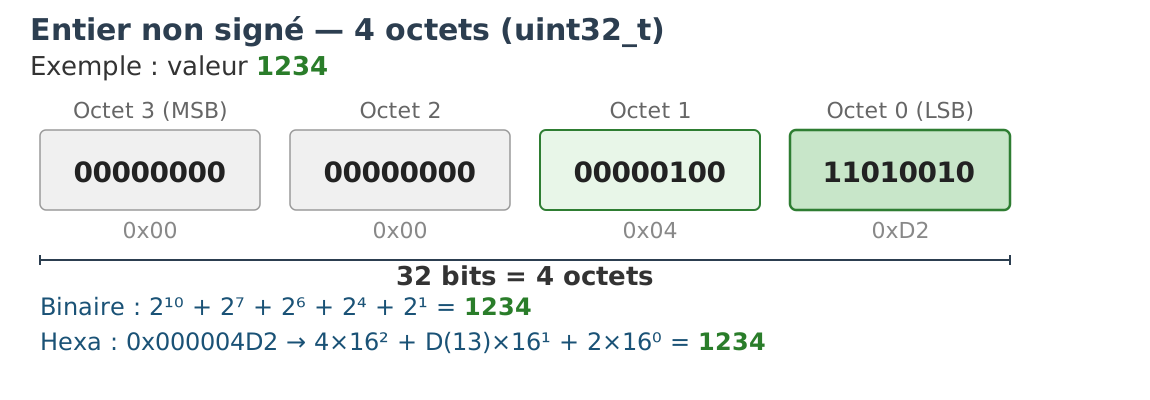
When an integer is unsigned (unsigned),
all bits are used to represent the value: there is no concept of sign.
An unsigned int on 4 bytes (32 bits) can thus encode values
from 0 to \(2^{32} - 1 =
4\,294\,967\,295\).
In programming, it is common to use the hexadecimal
notation (base 16) to represent bytes in a more compact way. Each
hexadecimal digit (0-9, A-F) represents
exactly 4 bits, so a byte is written with exactly 2 hexadecimal
characters. For example:
10011100 in binary = 9C in hexadecimal =
156 in decimal00000000 00000000 00000000 00000000 =
00000000 in hexadecimal → value 011111111 11111111 11111111 11111111 =
FFFFFFFF in hexadecimal → value
4294967295To represent negative numbers, signed integers (int,
short, etc.) use a convention called the two’s
complement. The leftmost bit (MSB, most
significant bit) indicates the sign: 0 for positive,
1 for negative.
The point of two’s complement, compared to a simple sign bit, is that addition works the same way for positive and negative numbers, without extra circuitry. To obtain the representation of a negative number:
0 become
1 and vice versa).Example in 8 bits to obtain -5:
  00000101 = +5
Inverse -> 11111010
Ajout +1 -> 11111011 = -5
We can verify: 11111011 + 00000101 = 100000000. The
extra 1 overflows into 9 bits and is ignored, yielding
00000000 = 0. It is this property that makes two’s
complement so practical for hardware.
Consequences for the ranges of values:
-128 to +127 (zero
occupies the positive side).int): from \(-2\,147\,483\,648\) to \(+2\,147\,483\,647\).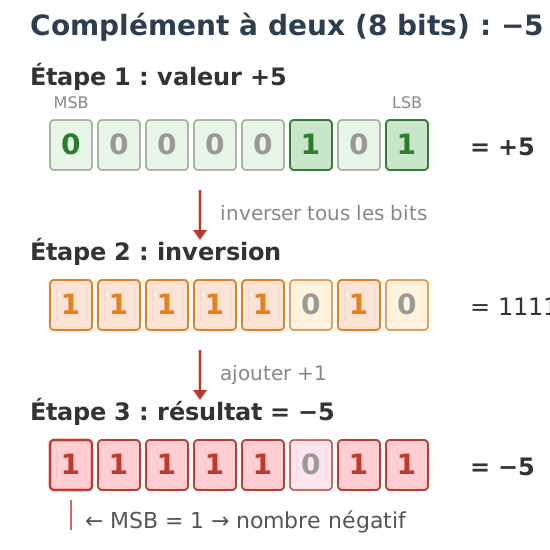
Let us consider the two-byte encoded integer whose hexadecimal
representation is C4 8D:
C4 8D (hexadécimal)
= 11000100 10001101 (binaire)
The same sequence of bits can be interpreted in two ways depending on the type:
In unsigned (unsigned short) : we
directly compute the value in base 2, which yields
50317.
In signed (short, two’s complement)
: the MSB is 1, so the number is negative. We apply the
inverse procedure:
00111011 0111001000111011 01110011 = 15219-15219.This example illustrates a fundamental point: the bits in memory have no intrinsic meaning. It is the type of the variable that determines how they are interpreted.
Floating-point numbers (float, double)
follow the IEEE 754 standard.
A floating-point number is represented by three parts:
float, 11 bits
for double)float, 52 bits
for double)Formula:
\[
x = (-1)^s \times (1 + mantisse) \times 2^{exposant - biais}
\] * float (32 bits) → bias = 127 *
double (64 bits) → bias = 1023
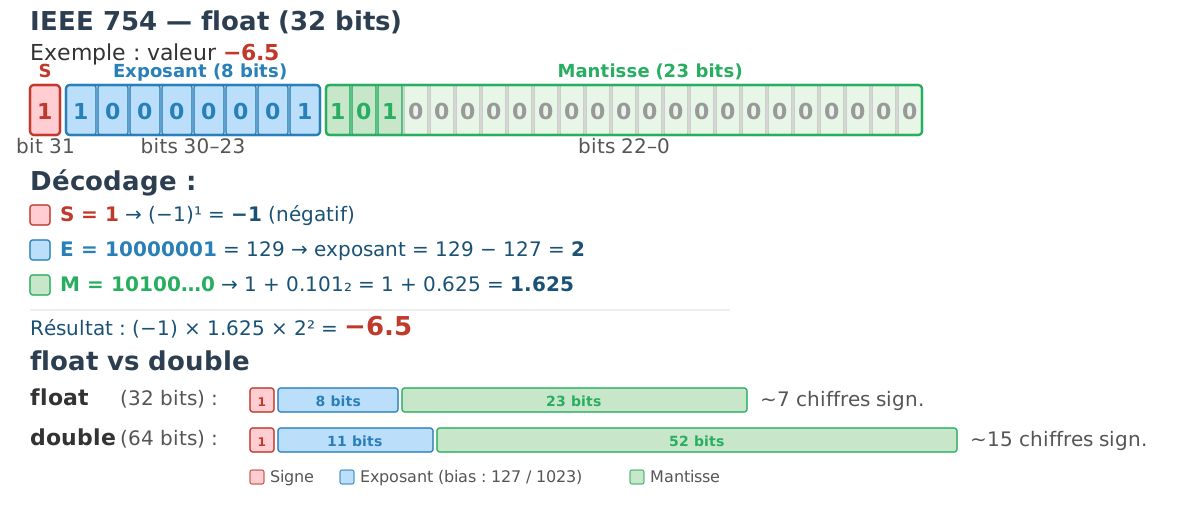
Example: 46 3F CC 30 (float in hexadecimal) =
12275.046875 in decimal.
Properties to know:
0.1, 0.4).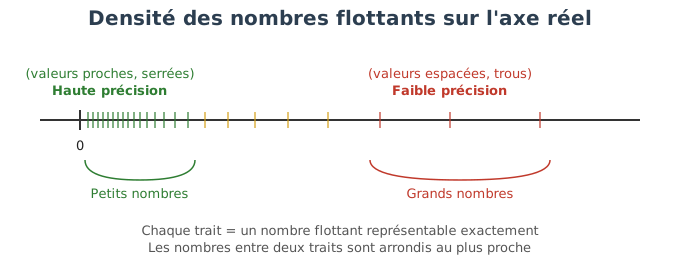
Due to floating-point representation, results that should be identical in mathematics are not in practice. Here are common errors to avoid:
// Ne JAMAIS comparer des flottants avec ==
if (a == 0.3) { ... }        // FAUX : risque d'erreur d'arrondi

// 0.1 + 0.2 n'est PAS égal à 0.3
double x = 0.1 + 0.2;
if (x == 0.3) { ... }        // FAUX ! (x vaut 0.30000000000000004...)

// Les erreurs s'accumulent dans les boucles
double sum = 0.0;
for (int i = 0; i < 1000; i++)
    sum += 0.1;
// sum != 100.0 (la valeur réelle sera légèrement différente)
Best practice: absolute tolerance. We compare the distance between two values with a threshold ε:
const double eps = 1e-9;
if (std::abs(a - b) < eps) { ... }  // OK
Relative tolerance for large numbers. When the values being manipulated are large, a fixed absolute ε may be too small. We then use a tolerance proportional to the magnitude of the values:
bool approx_equal(double a, double b, double eps = 1e-9) {
    return std::abs(a - b) <= eps * std::max(std::abs(a), std::abs(b));
}
This function adapts the tolerance threshold to the order of magnitude of the numbers being compared.
When an integer occupies several bytes (for example a 4-byte
int), the computer must decide in what order the bytes are
stored in memory. This is what we call endianness (or
byte order).
Big Endian (some network architectures, PowerPC, older processors)
The most significant byte is stored first (at the smallest address).
This is the order that seems the most natural: we write the number “from left to right”, as in decimal.
For the value 0x12345678 :
Adresse : 1000   1001   1002   1003
Contenu : 12     34     56     78
Little Endian (Intel x86, ARM in default mode)
The least significant (least significant byte) is stored first.
For the same value 0x12345678 :
Adresse : 1000   1001   1002   1003
Contenu : 78 56 34 12Big Endian seems more intuitive, but Little Endian has historically prevailed with Intel x86 processors, and ARM followed suit. In the era of the first 8-bit microprocessors, Little Endian simplified certain circuits (the address of a value remained the same regardless of its size, and arithmetic operations could start with the least significant byte read first).
Network compatibility : protocols (TCP/IP, etc.) impose Big Endian (network byte order). Conventional PCs (Intel) use Little Endian: therefore one must convert before sending or after receiving.
Binary files : if a program writes a binary file in Little Endian, it must specify this order. Otherwise, on a Big Endian machine, the values read will be incorrect.
Interoperability : any communication between heterogeneous machines must explicitly specify the byte order.
| Type | Description | Typical size (x86/64 bits) | Declaration example |
|---|---|---|---|
char |
ASCII character (or signed small integer) | 1 byte | char c = 'A'; |
bool |
Boolean value (true or false) |
1 byte (vector-optimized) | bool b = true; |
short |
signed short integer | 2 bytes | short s = 123; |
int |
standard signed integer | 4 bytes | int a = 42; |
long |
signed integer (size varies by architecture) | 4 bytes (Windows), 8 (Linux) | long l = 100000; |
long long |
signed long long integer (guaranteed >= 64 bits) | 8 bytes | long long x = 1000000000000LL; |
unsigned |
unsigned integer (non-negative only) | same size as signed | unsigned u = 42; |
float |
single-precision floating-point number (IEEE 754) | 4 bytes | float f = 3.14f; |
double |
double-precision floating-point number | 8 bytes | double d = 2.718; |
long double |
extended-precision floating-point (architecture-dependent) | 8, 12 or 16 bytes | long double pi = 3.14159; |
size_t |
unsigned integer for memory addressing | 8 bytes (64 bits) | size_t n = vec.size(); |
wchar_t |
wide character (Unicode, platform-dependent) | 2 bytes (Windows), 4 (Linux) | wchar_t wc = 'é'; |
Note: Size may vary depending on the compiler and the architecture,
except char which always occupies 1
byte.
sizeofIn C and C++, the sizeof operator returns the size in
bytes of a type or a variable.
Examples:
#include <stdio.h>

int main() {
    printf("sizeof(char)  = %zu\n", sizeof(char));
    printf("sizeof(int)   = %zu\n", sizeof(int));
    printf("sizeof(float) = %zu\n", sizeof(float));
    printf("sizeof(double)= %zu\n", sizeof(double));

    int a;
    double b;
    printf("sizeof(a)     = %zu\n", sizeof(a));
    printf("sizeof(b)     = %zu\n", sizeof(b));
    return 0;
}
Typical output on a 64-bit machine :
sizeof(char)  = 1
sizeof(int)   = 4
sizeof(float) = 4
sizeof(double)= 8
sizeof(a)     = 4
sizeof(b)     = 8
Note: the format specifier %zu is the one specified by
the standard for displaying a value of type size_t (e.g.,
the result of sizeof). It is also possible to convert to
unsigned long and use %lu.
Points to remember
sizeof(type) is evaluated at compile
time, without executing the program.structs.sizeof.To obtain deterministic sizes (architecture-independent), the C/C++
standard defines the types in the header <cstdint>
(C++11 / C99). These types guarantee a precise number of bits, which is
essential for serialization, binary formats, and network protocols.
Main fixed-width types:
uint8_t / int8_t : unsigned / signed 8-bit
integersuint16_t / int16_t : unsigned / signed
16-bit integersuint32_t / int32_t : unsigned / signed
32-bit integersuint64_t / int64_t : unsigned / signed
64-bit integersAdditional useful examples:
int_fast32_t, uint_fast32_t : integer
types at least 32 bits wide but chosen for better performance on the
platformint_least16_t, uint_least16_t : integer
types of at least 16 bits (minimum guarantee)intptr_t, uintptr_t : signed/unsigned
integers capable of holding a pointer valueExample of use:
#include <cstdint>
#include <cinttypes> // pour les macros PRIu32, PRId64, ...
#include <cstdio>

int main() {
  uint8_t  a = 255;
  int16_t  b = -12345;
  uint32_t c = 0xDEADBEEF;

  std::printf("sizeof(uint8_t)  = %zu\n", sizeof(uint8_t));
  std::printf("sizeof(int16_t)  = %zu\n", sizeof(int16_t));
  std::printf("sizeof(uint32_t) = %zu\n", sizeof(uint32_t));

  // utilisation sûre avec printf :
  std::printf("c = %" PRIu32 "\n", c);
  return 0;
}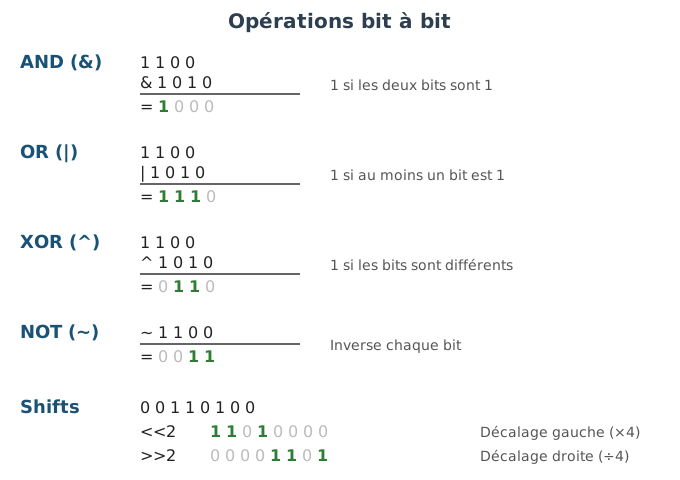
Bitwise operations allow direct manipulation of the bits of an integer. They are very useful for working with flags, masks, optimizing simple calculations, or for low-level data processing (compression, binary formats, etc.).
Main operations in C/C++ :
& : bitwise AND| : bitwise OR^ : XOR (exclusive OR) bitwise~ : bitwise NOT (negation)<< : left shift (shift left)>> : right shift (shift right)Simple examples:
unsigned a = 0b1100; // la notation 0bxxxx permet de définir une valeur en binaire, ici 1100 en binaire => 12 en base décimale.
unsigned b = 0b1010; // 1010 en binaire => 10 en décimale

unsigned and_ab = a & b; // 1000 (8)
unsigned or_ab  = a | b; // 1110 (14)
unsigned xor_ab = a ^ b; // 0110 (6)
unsigned not_a  = ~a;    // inversion de tous les bits

// décalements
unsigned left  = a << 1; // 11000 (24) : décalage vers la gauche (multiplication par 2)
unsigned right = a >> 2; // 0011 (3)  : décalage vers la droite (division par 4)

// affichez en hex / décimale selon besoin
Bit masks and bit tests
We use masks to isolate, set, or clear bits:
unsigned flags = 0;
const unsigned FLAG_A = 1u << 0; // bit 0 -> 0b0001
const unsigned FLAG_B = 1u << 1; // bit 1 -> 0b0010
const unsigned FLAG_C = 1u << 2; // bit 2 -> 0b0100

// activer un flag
flags |= FLAG_B; // flags = 0b0010

// tester si un flag est activé
bool hasB = (flags & FLAG_B) != 0;

// désactiver un flag
flags &= ~FLAG_B; // efface le bit 1

// basculer (toggle) un flag
flags ^= FLAG_C; // inverse l'état du bit 2
Important tips
unsigned, uint32_t,
uint64_t) for bitwise operations: the behavior of shifts on
negative signed integers can be undefined or depend on the
implementation.x << n multiplies by
2^n when it does not cause overflow. The right shift
x >> n divides by 2^n for unsigned
types.uint32_t w = 0x12345678;
uint8_t byte0 = (w >> 0) & 0xFF; // 0x78 (LSB)
uint8_t byte1 = (w >> 8) & 0xFF; // 0x56
uint8_t byte2 = (w >> 16) & 0xFF; // 0x34
uint8_t byte3 = (w >> 24) & 0xFF; // 0x12 (MSB)Using std::bitset to display/manipulate bits in a safe
and readable way:
#include <bitset>
#include <iostream>

std::bitset<8> bs(0b10110010);
std::cout << bs << "\n"; // affiche 10110010
bs.flip(0); // bascule le bit 0
bs.set(3);  // met à 1 le bit 3
bs.reset(7);// met à 0 le bit 7To understand pointers, one must first understand how variables are
actually stored in the machine. When we write int a = 42;
in C++, this value does not exist “in the abstract”: it is physically
written somewhere in the RAM (random-access memory) of
the computer.
Memory can be viewed as a large linear array of cells, where each cell contains exactly one byte (8 bits). Each cell has a unique address — an integer that allows the processor to locate it. One can imagine memory as a long ribbon of numbered cells:
Adresse   Contenu (binaire)
1000      10101010
1001      00001111
1002      11110000
1003      01010101
...
When we declare a variable, the compiler allocates it a region of
consecutive memory cells. The size of this region depends on the type: a
char occupies 1 byte, an int typically
occupies 4, a double occupies 8. For example, if we
declare:
int b = 12;
char c = 'a';
short d = 8;
The compiler places these three variables in different locations in memory. They are not necessarily side by side: other variables, padding, or unused areas can interleave. The important thing is that each variable occupies a contiguous block of bytes, and that the compiler (and the programmer, via pointers) can locate this block by the address of its first byte.
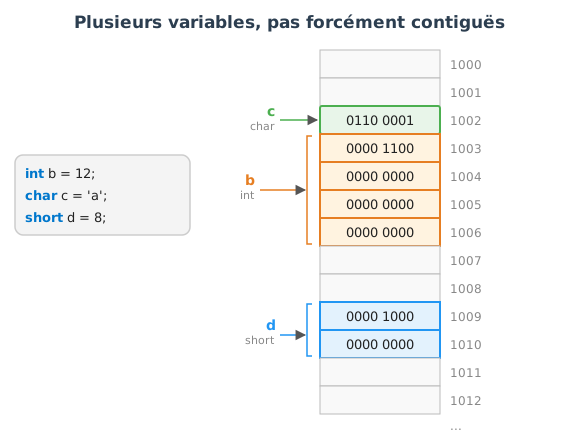
In this figure, we can see that c (1 byte, in green) is
at address 1002, b (4 bytes, in orange) starts at address
1003, and d (2 bytes, in blue) is located further at
address 1009. The gray boxes between the variables are zones not used by
these variables — they may contain other data or padding.
For performance reasons, the compiler may introduce padding (padding bytes) so that certain variables start at addresses that are multiples of 2, 4 or 8. This alignment mechanism allows the processor to access data more efficiently, because memory buses are optimized for reading aligned blocks.
Each variable in memory has an address, that is, the
position of its first byte in the large memory array. In the C language
(and therefore also in C++), one can access this address thanks to the
& operator (called address
of).
#include <stdio.h>

int main() {
    int a = 42;

    printf("Valeur de a : %d\n", a);
    printf("Adresse de a : %p\n", &a);

    return 0;
}
Possible output (the address depends on the execution and on the machine) :
Valeur de a : 42
Adresse de a : 0x7ffee3b5a9c
%d displays the integer value (42
here).%p displays a memory address (pointer format).&a means “the address of the variable
a”.scanfWhen using scanf, one must provide the address
of the variable in which to store the result.
#include <stdio.h>

int main() {
    int age;

    printf("Entrez votre age : ");
    scanf("%d", &age); // &age = adresse de age

    printf("Vous avez %d ans.\n", age);

    return 0;
}scanf("%d", &age) places the value read
directly into the memory cell of age.scanf("%d", age) (without
&), the program would crash, because scanf
needs the address to modify the variable.One can observe that two successive variables in memory have different addresses, separated by their size in bytes.
#include <stdio.h>

int main() {
    int x = 10;
    int y = 20;

    printf("Adresse de x : %p\n", &x);
    printf("Adresse de y : %p\n", &y);

    return 0;
}
Example output:
Adresse de x : 0x7ffee3b5a98
Adresse de y : 0x7ffee3b5a94
Note: The addresses are close to each other but not necessarily in increasing order, because the compiler and the system may arrange the variables differently (stack, memory alignment, etc.).
A pointer is a variable that contains a memory address. However, if a pointer is not initialized, it may contain an arbitrary address, which leads to unpredictable behaviors (segmentation fault, memory corruption).
Essential rule: always initialize pointers.
In modern C++, we use nullptr to indicate that a pointer
points to nothing:
#include <iostream>

int main() {
    int* p = nullptr; // pointeur initialisé, mais ne pointe vers rien

    if(p == nullptr) {
        std::cout << "Le pointeur est vide, pas d'accès dangereux." << std::endl;
    }

    return 0;
}int* p; // pointeur non initialisé (dangereux !)
*p = 10; // comportement indéfini -> crash probableHere, p contains an indeterminate value: accessing
*p is dangerous.
int* p = nullptr;   // pointeur sûr, mais vide
if(p != nullptr) {
    *p = 10;        // on accède uniquement si p pointe vers une variable valide
}In C and C++, the function arguments are passed by value :
Example :
#include <stdio.h>

void increment(int x) {
    x = x + 1;  // modifie uniquement la copie locale
}

int main() {
    int a = 5;
    increment(a);
    printf("a = %d\n", a); // affiche toujours 5
    return 0;
}
Memory explanation:
a in main occupies a memory region.increment(a), the value
5 is copied into a new local variable x within
the function.x does not change a, because
they are two independent variables.If we want a function to be able to modify the original variable, we must pass to it not the value, but the address of the variable.
Example:
#include <stdio.h>

void increment(int* p) {
    *p = *p + 1; // modifie la valeur à l'adresse pointée
}

int main() {
    int a = 5;
    increment(&a); // on passe l'adresse de a
    printf("a = %d\n", a); // affiche 6
    return 0;
}
Detailed explanation:
In main, we have the variable a (value
5) stored at a certain memory address (e.g., 1000).
The expression &a yields this address
(1000).
When calling increment(&a), it is not
a that is copied, but its
address (1000).
p, which is a copy of the address.Inside increment, *p means “the value
stored at the address p”.
*p = *p + 1; will fetch the value 5 at
address 1000, increment it, and store 6 in the same
place.Since p designates the memory of a, the
variable a is actually modified.
In summary:
*p.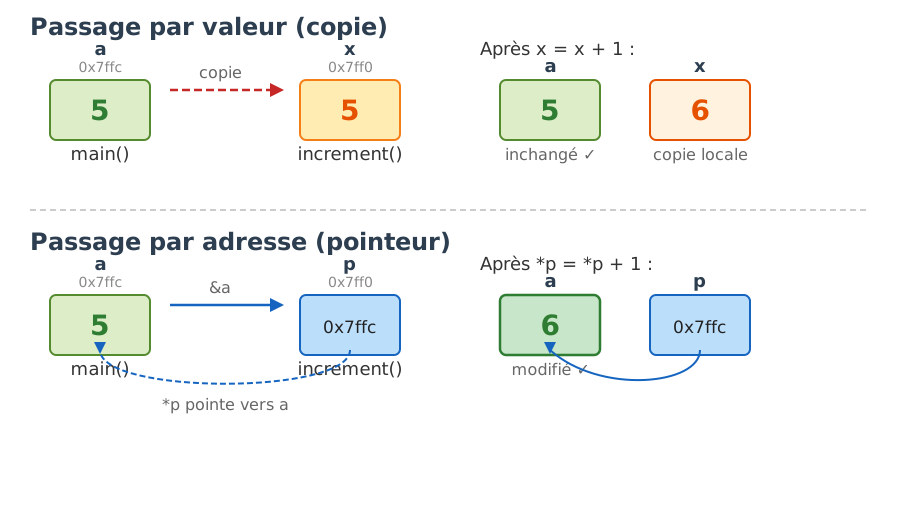
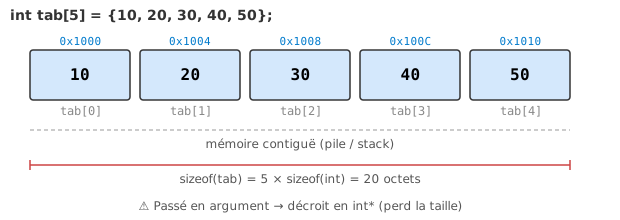
Arrays are a fundamental case for understanding the relationship between pointers and memory. Unlike individual variables that can be scattered in memory (as we saw in the previous section), the elements of an array are always stored side by side, with no space between them. This property, called memory contiguity, is what makes arrays very efficient: the processor can access any element by directly computing its address from the address of the first element and the index.
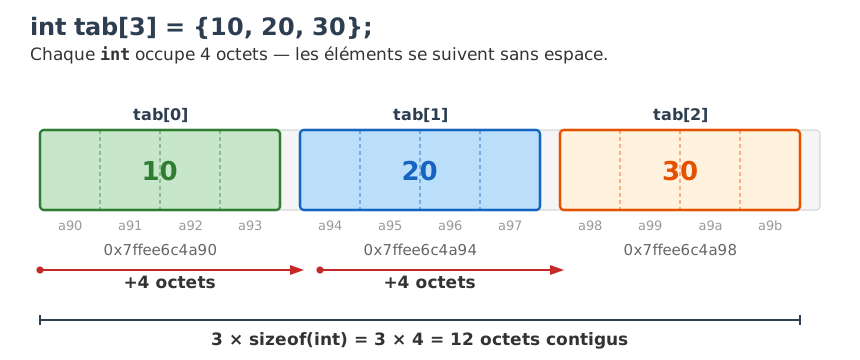
In C and C++, an array is always stored in memory as
a sequence contiguous bytes. If an array of 3
int starts at address 0x1000, the first
element occupies the bytes 0x1000 to 0x1003,
the second 0x1004 to 0x1007, and the third
0x1008 to 0x100B. There is never a “gap”
between elements.
Example:
#include <stdio.h>

int main() {
    int tab[3] = {10, 20, 30};

    printf("Adresse de tab[0] : %p\n", &tab[0]);
    printf("Adresse de tab[1] : %p\n", &tab[1]);
    printf("Adresse de tab[2] : %p\n", &tab[2]);

    return 0;
}
Possible output:
Adresse de tab[0] : 0x7ffee6c4a90
Adresse de tab[1] : 0x7ffee6c4a94
Adresse de tab[2] : 0x7ffee6c4a98
We notice that the addresses are spaced by 4 bytes (the size of an
int), which confirms the memory
contiguity.
It is memory contiguity that makes possible pointer
arithmetic, one of the central mechanics of C and C++. The name
of an array (tab) is automatically converted to a
pointer to its first element (&tab[0]). From
this pointer, one can navigate to any element by simple address
calculation:
p + N does not mean “add N bytes”, but “advance by N
elements”. The compiler automatically multiplies N by
sizeof(type) to obtain the offset in bytes.*(p + N) dereferences the shifted pointer, which yields
the value of the N-th element.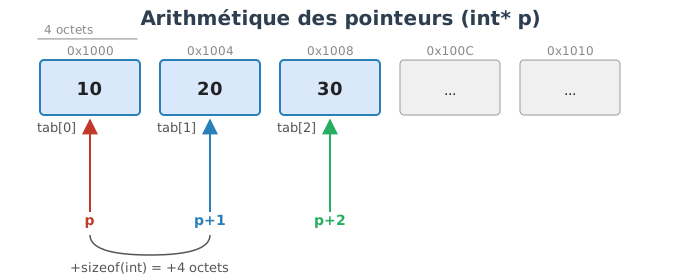
Thus, tab[N] and *(tab + N) are strictly
equivalent — this is, in fact, how the compiler implements the
[] operator internally.
Example:
#include <stdio.h>

int main() {
    int tab[3] = {10, 20, 30};
    int* p = tab; // équivaut à &tab[0]

    printf("%d\n", *(p + 0)); // 10
    printf("%d\n", *(p + 1)); // 20
    printf("%d\n", *(p + 2)); // 30

    return 0;
}
These two notations are equivalent:
tab[i] <=> *(tab + i)Adresse : 1000 1004 1008
Contenu : 10 20 30
Indice : tab[0] tab[1] tab[2]
p = 1000
*(p+0) -> valeur à 1000 -> 10
*(p+1) -> valeur à 1004 -> 20
*(p+2) -> valeur à 1008 -> 30Memory contiguity applies to any type of array, not only to integers.
If we define an array of larger objects (for example double
or struct), the elements remain stored one after
another.
double#include <stdio.h>
int main() {
double tab[3] = {1.1, 2.2, 3.3};
printf("Adresse de tab[0] : %p\n", &tab[0]);
printf("Adresse de tab[1] : %p\n", &tab[1]);
printf("Adresse de tab[2] : %p\n", &tab[2]);
return 0;
}Possible output (each double = 8 bytes) :
Adresse de tab[0] : 0x7ffee6c4a90
Adresse de tab[1] : 0x7ffee6c4a98
Adresse de tab[2] : 0x7ffee6c4aa0
We can see that the addresses are 8 bytes apart, because a
double occupies 8 bytes.
std::vectorIn modern C++, we use std::vector rather than static
arrays, because it offers:
push_back),Example :
#include <iostream>
#include <vector>

int main() {
    std::vector<int> v = {10, 20, 30};

    std::cout << "Adresse de v[0] : " << &v[0] << std::endl;
    std::cout << "Adresse de v[1] : " << &v[1] << std::endl;
    std::cout << "Adresse de v[2] : " << &v[2] << std::endl;
}
Typical output:
Adresse de v[0] : 0x7ffee6c4a90
Adresse de v[1] : 0x7ffee6c4a94
Adresse de v[2] : 0x7ffee6c4a98
We observe the same contiguity as with classical arrays.
std::vectorA pointer to the internal data can be obtained via
v.data() or &v[0], then use the same logic
as for C arrays.
#include <iostream>
#include <vector>

int main() {
    std::vector<int> v = {10, 20, 30};
    int* p = v.data(); // pointeur vers le premier élément

    std::cout << *(p+0) << std::endl; // 10
    std::cout << *(p+1) << std::endl; // 20
    std::cout << *(p+2) << std::endl; // 30
}
Summary:
std::vectors store their elements in a
contiguous fashion.tab[i]) or via
pointer arithmetic (*(p+i)).std::vectors also provide a dynamic
size and safe memory management, but preserve the same
fundamental properties of contiguity.In C and C++, the structures (struct)
and classes group together several variables (members)
into a single block of memory. By default, the fields are laid out one
after another, which guarantees a memory
contiguity.
#include <stdio.h>

struct Point2D {
    int x;
    int y;
};

int main() {
    struct Point2D p = {1, 2};

    printf("Adresse de p.x : %p\n", &p.x);
    printf("Adresse de p.y : %p\n", &p.y);

    return 0;
}
Possible output :
Adresse de p.x : 0x7ffee3b5a90
Adresse de p.y : 0x7ffee3b5a94
Here, the two integers x and y (4 bytes
each) are stored one after another contiguously.
For performance reasons, the compiler may insert padding bytes between members in order to maintain an optimal memory alignment.
Example:
struct Test {
    char a;   // 1 octet
    int b;    // 4 octets
};
Memory layout :
Adresse   Contenu
1000      a (1 octet)
1001-1003 padding (3 octets inutilisés)
1004-1007 b (4 octets)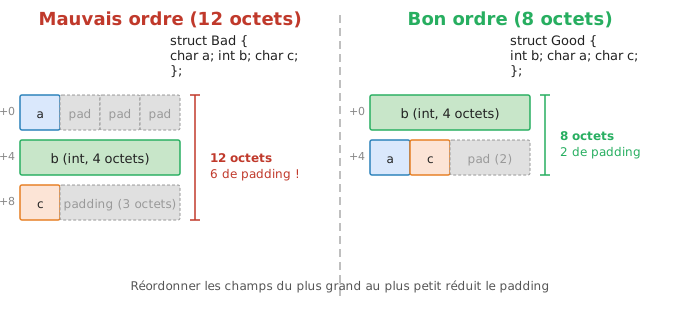
struct Mixed {
    char c;    // 1 octet
    double d;  // 8 octets
    int i;     // 4 octets
};
Typical layout on a 64-bit machine:
Adresse   Champ
1000      c (1 octet)
1001-1007 padding (7 octets)
1008-1015 d (8 octets)
1016-1019 i (4 octets)
1020-1023 padding (4 octets pour alignement global)
Total size: 24 bytes.
In C++, a class behaves like a struct with
regard to memory:
struct and class is
only in the default visibility (public vs
private).std::vector of
structuresIn modern C++, one can store several struct or
class objects in a
std::vector. The vector
guarantees that the elements are placed contiguously in
memory, just as for a C array.
Example:
#include <iostream>
#include <vector>

struct Point2D {
    int x;
    int y;
};

int main() {
    std::vector<Point2D> points = {{1,2}, {3,4}, {5,6}};

    std::cout << "Adresse du premier Point2D : " << &points[0] << std::endl;
    std::cout << "Adresse du deuxième Point2D : " << &points[1] << std::endl;
    std::cout << "Adresse du troisième Point2D : " << &points[2] << std::endl;
}std::vector<Point2D>Each Point2D occupies sizeof(Point2D) bytes
(here, 8 bytes: 2 4-byte integers). The elements of the
std::vector are laid out back-to-back in
memory:
Mémoire d'un std::vector<Point2D> avec 3 éléments

Adresse : 2000       2008       2016
Contenu : [x=1, y=2] [x=3, y=4] [x=5, y=6]
Taille  :  8 octets   8 octets   8 octets
We can see that each element is a structured block, but the blocks remain contiguous.
Summary:
struct or class are stored
contiguously, with possible padding to maintain
alignment.std::vector<struct> enables
creating a dynamic array of structures that is also contiguous in
memory.points.data().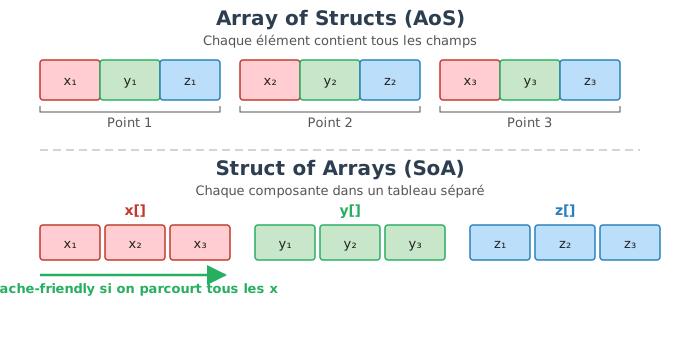
When handling large quantities of structured data (for example, 3D coordinates, particles, vertices in graphics), there are two classic ways to organize data in memory:
This is the classic representation with a
std::vector<struct>. Each element of
the array is a complete structure.
Example:
struct Point3D {
    float x, y, z;
};

std::vector<Point3D> points = {
    {1.0f, 2.0f, 3.0f},
    {4.0f, 5.0f, 6.0f},
    {7.0f, 8.0f, 9.0f}
};
Memory (each Point3D = contiguous block of 12 bytes)
:
[x=1, y=2, z=3] [x=4, y=5, z=6] [x=7, y=8, z=9]Here, contiguity applies at the level of structures:
Point3Ds are stored back-to-back.Point3D itself contains its x, y, z
fields contiguously.Advantage: convenient for manipulating a complete
point. Disadvantage: if one only wants to process the
x values, one would have to unnecessarily traverse the
y and z.
Here, we invert the organization: instead of storing an array of structures, we store a structure that contains an array per field.
Example:
struct PointsSoA {
    std::vector<float> x;
    std::vector<float> y;
    std::vector<float> z;
};
Memory (each field is contiguous separately) :
x : [1, 4, 7]
y : [2, 5, 8]
z : [3, 6, 9]
Here, contiguity applies at the field level:
x values are stored consecutively.y values are contiguous, and the same for the
z.Advantage : very efficient if one performs mass
processing on a single field (e.g., applying a transformation to all
coordinates x). Disadvantage : less
natural if one wants to work on a complete point (x,y,z
grouped).
{x,y,z}), and the
blocks follow each other.Thus, the two approaches use memory contiguity, but not at the same level of structuring.
So far, we have seen automatic variables (declared in a function), stored on the stack (stack) and automatically destroyed at the end of the block.
But in some cases, we need data whose lifetime extends beyond the end of a block (for example: to keep an array created in a function, to manage large structures, or to build dynamic graphs). In this case, we use the dynamic memory, allocated on the heap (heap).
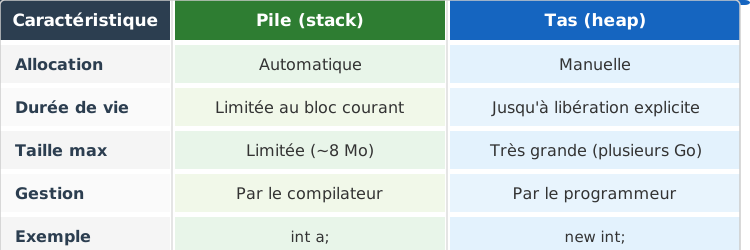
| Characteristic | Stack | Heap |
|---|---|---|
| Allocation | Automatic | Manual (or controlled by objects) |
| Lifetime | Limited to the current block | Until explicit release |
| Maximum size | Limited (a few MB) | Very large (several GB) |
| Management | By the compiler | By the programmer |
| Example | int a; or int tab[10]; |
new int; or new int[n]; |
On most systems, the stack has a limited size (~8 MB by default), whereas the heap can use several gigabytes. Dynamic allocation thus allows you to create large structures or variable sizes at runtime.
#include <iostream>

int* createValue() {
    int a = 42;   // variable locale sur la pile
    return &a;    // Dangereux : a est détruit à la fin de la fonction
}

int main() {
    int* p = createValue();
    std::cout << *p << std::endl; // comportement indéfini !
}
a is destroyed upon exit from
createValue(). The returned pointer becomes
dangling (dangerous).
#include <iostream>

int* createValue() {
    int* p = new int(42); // alloué sur le tas
    return p;             // valide même après la fin de la fonction
}

int main() {
    int* q = createValue();
    std::cout << *q << std::endl; // 42
    delete q; // libération obligatoire
}
Here, the variable *q persists after the end of
createValue(). But the programmer must free the
memory with delete.
malloc and freeIn C, we use the functions of the C standard library
<stdlib.h>.
#include <stdlib.h>

int* p = (int*)malloc(sizeof(int));
Here :
malloc reserves a block of memory of
sizeof(int) bytes,void*,int*.Usage :
#include <stdio.h>
#include <stdlib.h>

int main() {
    int* p = (int*)malloc(sizeof(int));
    if (p == NULL) {
        return 1; // échec de l'allocation
    }

    *p = 42;
    printf("%d\n", *p);

    free(p); // libération
    return 0;
}
Important points:
malloc does not initialize
memory,free must be called exactly once for
each successful allocation.int* tab = (int*)malloc(10 * sizeof(int));Access :
tab[0] = 1;
tab[1] = 2;
Deallocation:
free(tab);new et deleteIn C++, we have the operators new and
delete, which are type-aware and call the
constructors and destructors.
Allocation of an object:
int* p = new int(42);Deallocation :
delete p;For an array :
int* tab = new int[10];Corresponding deallocation :
delete[] tab;Fundamental rule :
new ↔︎ deletenew[] ↔︎ delete[]Mixing them leads to a undefined behavior.
struct Point {
    float x, y;
    Point(float a, float b) : x(a), y(b) {}
};

int main() {
    Point* p = new Point(1.0f, 2.0f); // constructeur appelé
    delete p;                        // destructeur appelé
}#include <iostream>
int* createArray(int n) {
int* arr = new int[n]; // allocation de n entiers
for(int i=0; i<n; ++i)
arr[i] = i * 10;
return arr;
}
int main() {
int n = 5;
int* arr = createArray(n);
for(int i=0; i<n; ++i)
std::cout << arr[i] << " ";
delete[] arr; // libération obligatoire
}Usefulness: n is known only at runtime
→ it is impossible to use a static array.
Pile (stack)                   Tas (heap)
------------                   ------------
int main() {                   new int[3]
  int n = 3;                   ---------------
  int* arr = new int[n]; -->   | 0 | 1 | 2 | ...
                               ---------------
}n,
arr).delete[] arr; is mandatory.Manual memory management with new and
delete is a major source of bugs in C++. Unlike languages
such as Java or Python that have a garbage collector that
automatically frees unused memory, in C++ it is the
programmer who is responsible for freeing every allocation.
Three categories of bugs recur systematically:
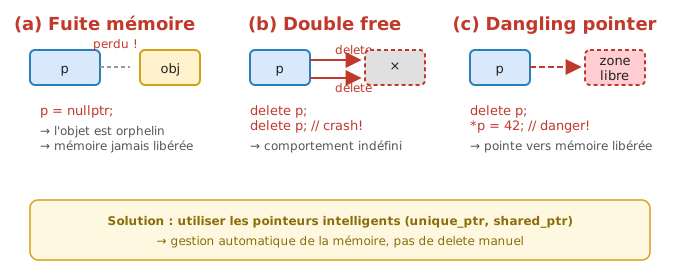
Memory leak (memory leak) : memory is allocated but it is not freed. The allocated space remains reserved for nothing, and if the function is called in a loop, memory consumption grows until the system resources are exhausted.
void f() {
    int* p = new int(10);
    // oubli de delete -> fuite mémoire
}
The problem is particularly insidious because the program continues to run — it does not crash immediately, it slows down progressively.
Double free (double free) : one calls
delete twice on the same pointer. The second time, the
memory has already been returned to the system, and attempting to free
it again corrupts the allocator’s internal structures.
int* p = new int(5);
delete p;
delete p; // erreur : libération double
This causes undefined behavior: the program may crash immediately, silently corrupt other data, or seem to function correctly before crashing much later.
Use-after-free (use after free / dangling pointer) : one accesses memory via a pointer after it has been freed. The pointer still points to the same address, but that address may have been reassigned to another use.
int* p = new int(5);
delete p;
std::cout << *p; // comportement indéfini
This bug is difficult to detect because it can work “by chance” in some executions and crash in others.
nullptr after deallocationA simple technique to limit dangling pointers is to set the
pointer to nullptr immediately after the
delete. Thus, any access attempt will cause an immediate
and identifiable crash (rather than silent corruption), and a
delete on nullptr is guaranteed to have no
effect by the standard.
int* p = new int(5);
delete p;
p = nullptr;
It remains a partial solution — if several pointers share the same
address, the other copies remain dangling. This is why
smart pointers (unique_ptr,
shared_ptr) are the real solution, as will be seen in the
next section.
When resizing a dynamic array manually, you must:
Ancien tableau (@100) : [10 20 30]
Nouveau tableau (@320) : [10 20 30 40]
delete[] @100
Note: Expanding an array always requires a new allocation + copy, hence the cost.
Modern containers (std::vector) automate this process
efficiently.
Dynamic allocation also allows creating linked or hierarchical structures, where each element contains pointers to others.
struct Node {
    int value;
    Node* next;
};

int main() {
    Node* n1 = new Node{5, nullptr};
    Node* n2 = new Node{8, nullptr};
    // Remarque : l'opérateur `->` permet d'accéder à un membre via un pointeur.
    // `p->membre` est équivalent à `(*p).membre`.
    n1->next = n2;

    // parcours
    for(Node* p = n1; p != nullptr; p = p->next)
        std::cout << p->value << " ";

    // libération
    delete n2;
    delete n1;
}
Each element (Node) is allocated separately on the heap.
Note: you must remember to free each element to avoid
leaks.
In C++, today we avoid directly using new /
delete.
We prefer:
std::vector for
dynamic arraysExample:
#include <vector>
#include <iostream>

std::vector<int> createVector(int n) {
    std::vector<int> v(n);
    for(int i=0; i<n; ++i)
        v[i] = i * 10;
    return v; // gestion automatique
}

int main() {
    auto v = createVector(5);
    for(int x : v)
        std::cout << x << " ";
}
→ Memory is managed automatically (constructor / destructor).
std::unique_ptr, std::shared_ptr)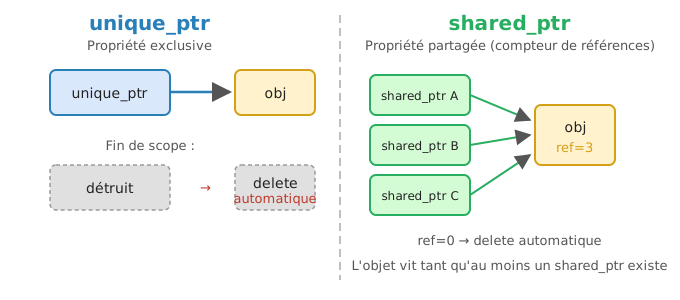
The smart pointers are classes from the C++ standard
library (<memory>) that encapsulate a raw pointer
(T*) and automatically manage the lifetime of the
pointed-to resource.
They follow the RAII principle: the resource is automatically
released when the pointer goes out of scope (destruction of the object).
Thus, there is no longer a need to call delete manually:
the memory is released as soon as the object is no longer used.
std::unique_ptrExample:
#include <memory>
#include <iostream>

int main() {
    std::unique_ptr<int> p = std::make_unique<int>(42);
    std::cout << *p << std::endl;
} // delete automatique ici
Explanation :
std::unique_ptr<int> has exclusive ownership of
the resource: a single pointer manages the allocated object.std::make_unique<int>(42) dynamically creates an
int containing 42 and returns a
unique_ptr that becomes the owner of it.p goes out of scope (end of the
main), its destructor automatically calls
delete on the object it manages.Characteristics of std::unique_ptr
:
std::shared_ptrExample:
#include <memory>
#include <iostream>

int main() {
    auto p1 = std::make_shared<int>(10);
    auto p2 = p1; // partage de la ressource
    std::cout << *p2 << std::endl;
} // mémoire libérée quand le dernier shared_ptr disparaît
Detailed explanation :
std::shared_ptr allows multiple
pointers to share the same resource.p2 = p1;) increases an internal
reference counter.shared_ptr is destroyed, the counter is
decremented.delete on the
resource.Thus, memory is freed exactly when it is no longer used by anyone.
Characteristics of std::shared_ptr
:
unique_ptr (internal atomic
counter).std::unique_ptr<T> |
std::shared_ptr<T> |
|
|---|---|---|
| Copyable | Non | Yes |
| Sharing | Non | Yes (reference counter) |
| Destruction | À la sortie de portée | Quand le dernier propriétaire est détruit |
| Use case | Possession exclusive | Ressources partagées |
Cas unique_ptr :
+---------------------+
| unique_ptr<int> p   |──► [42]
+---------------------+
           │
    delete automatique à la fin du bloc


Cas shared_ptr :
+---------------------+        +---------------------+
| shared_ptr<int> p1  |───┐    | compteur = 2        |
| shared_ptr<int> p2  |───┘──► [10]
+---------------------+        +---------------------+
                      │
delete automatique quand compteur = 0new and deletedelete.std::vector, std::map,
std::thread, etc.).In C and C++, we often need to copy a block of bytes
(array, struct, buffer received from the network/file, etc.). The
standard function for that is memcpy, in
<string.h> (C) or <cstring>
(C++).
#include <string.h>

void* memcpy(void* dest, const void* src, size_t n);
src : source addressdest : destination addressn : number bytes copieddest#include <stdio.h>
#include <string.h>
int main() {
int a[3] = {10, 20, 30};
int b[3] = {0, 0, 0};
memcpy(b, a, 3 * sizeof(int));
for(int i=0; i<3; ++i)
printf("%d ", b[i]); // 10 20 30
return 0;
}Here, memcpy copies exactly 3 * sizeof(int)
bytes.
#include <stdio.h>
#include <string.h>

typedef struct {
    int x;
    int y;
} Point2D;

int main() {
    Point2D p1 = {1, 2};
    Point2D p2;

    memcpy(&p2, &p1, sizeof(Point2D));

    printf("%d %d\n", p2.x, p2.y); // 1 2
    return 0;
}memcpyTypical case: we receive a byte array (network, binary file, sensor…) and we want to extract typed values from it.
Suppose a binary message in the following format :
uint32_t idfloat temperatureuint16_t countThat is: 4 + 4 + 2 = 10 bytes.
#include <stdint.h>
#include <stdio.h>
#include <string.h>

int main() {
    // Buffer brut simulé (par ex. reçu du réseau)
    uint8_t buf[10] = {
        0xD2, 0x04, 0x00, 0x00,   // id = 1234 en little-endian
        0x00, 0x00, 0x48, 0x42,   // float 50.0f en IEEE-754 (little-endian)
        0x07, 0x00                // count = 7 en little-endian
    };

    size_t offset = 0;

    uint32_t id;
    float temp;
    uint16_t count;

    memcpy(&id, buf + offset, sizeof(uint32_t));
    offset += sizeof(uint32_t);

    memcpy(&temp, buf + offset, sizeof(float));
    offset += sizeof(float);

    memcpy(&count, buf + offset, sizeof(uint16_t));
    offset += sizeof(uint16_t);

    printf("id=%u, temp=%.2f, count=%u\n", id, temp, count);
    return 0;
}void*In C and C++, there exists a special kind of pointer type:
void*, called the generic
pointer. A void* can contain the address
of any data type, without knowing its nature.
It thus represents a raw address, without any associated type information.
void* p;Here:
p can store the address of an int, a
float, a struct, etc.p
points to.This means that:
p,#include <stdio.h>
int main() {
int a = 42;
float b = 3.14f;
void* p;
p = &a; // p pointe vers un int
p = &b; // p pointe maintenant vers un float
return 0;
}In this example:
p can successively contain the address of
a and then that of b,It is forbidden to do:
void* p = &a;
printf("%d\n", *p); // ERREUR
Why?
*p means « accessing the pointed value »,The type void literally means: absence of type
information.
To access the value pointed to, you must explicitly
convert the void* to the proper pointer type.
#include <stdio.h>

int main() {
    int a = 42;
    void* p = &a;

    int* pi = (int*)p;      // cast explicite
    printf("%d\n", *pi);    // OK

    return 0;
}
Steps :
p contains the address of a,int* »,#include <stdio.h>
void print_value(void* data, char type)
{
if (type == 'i') {
printf("int : %d\n", *(int*)data);
}
else if (type == 'f') {
printf("float : %f\n", *(float*)data);
}
}
int main() {
int a = 10;
float b = 2.5f;
print_value(&a, 'i');
print_value(&b, 'f');
return 0;
}Here:
void* allows passing any
type,Unlike other pointers (int*, double*,
etc.), pointer arithmetic is forbidden on void* in
C++.
void* p;
p + 1; // ERREUR en C++
Reason:
p + 1 requires knowing sizeof(type),void has no size.In C (but not in C++), some compilers allow void* as a
non-standard extension, treating it as a char*.
void* and arrays / raw
memoryThe void* is often used to manipulate raw
memory, for example with malloc,
memcpy, or low-level APIs.
Example:
#include <stdlib.h>

int main() {
    void* buffer = malloc(100); // 100 octets de mémoire brute

    // interprétation explicite
    int* tab = (int*)buffer;
    tab[0] = 42;

    free(buffer);
    return 0;
}
Here:
malloc returns a void*,void*Here is a typical example of using void*: we receive a
raw block of bytes (network, file, sensor frame, image, …), stored in a
void*, and then we reconstruct an “interpretable” structure.
Imagine a server that sends a binary message composed of:
an header (header) with:
uint32_t iduint16_t widthuint16_t heightfollowed by data (payload): here, for example, a grayscale image
of size width * height bytes.
We receive the information as a raw buffer
(typically void* + size) that we must “restructure”.
uint8_t* to
perform arithmetic in bytes),#include <stdint.h>
#include <stdio.h>
#include <stdlib.h>
#include <string.h>
#pragma pack(push, 1) // pour éviter le padding (dépendant compilateur/ABI)
typedef struct {
uint32_t id;
uint16_t width;
uint16_t height;
} Header;
#pragma pack(pop)
int main() {
// --- Simulation : "réception réseau" d'un bloc brut ---
// On fabrique un buffer qui contient : Header + pixels
Header h = { .id = 1234, .width = 4, .height = 3 };
uint8_t pixels[12] = {
10, 20, 30, 40,
50, 60, 70, 80,
90,100,110,120
};
size_t total = sizeof(Header) + sizeof(pixels);
void* buffer = malloc(total);
memcpy(buffer, &h, sizeof(Header));
memcpy((uint8_t*)buffer + sizeof(Header), pixels, sizeof(pixels));
// --- Reconstruction / interprétation ---
// 1) Lire l'en-tête
Header header;
memcpy(&header, buffer, sizeof(Header));
printf("id=%u, width=%u, height=%u\n",
header.id, header.width, header.height);
// 2) Accéder au payload (image) après l'en-tête
size_t image_size = (size_t)header.width * (size_t)header.height;
// Vérification minimale de cohérence
if (sizeof(Header) + image_size > total) {
printf("Buffer incomplet ou corrompu !\n");
free(buffer);
return 1;
}
uint8_t* image = (uint8_t*)buffer + sizeof(Header);
// Exemple : afficher les pixels (ligne par ligne)
for (uint16_t y = 0; y < header.height; ++y) {
for (uint16_t x = 0; x < header.width; ++x) {
printf("%3u ", image[y * header.width + x]);
}
printf("\n");
}
free(buffer);
return 0;
}The void* is primarily used:
qsort,
bsearch).In modern C++, we prefer:
std::vector,
std::array),std::unique_ptr,
std::shared_ptr).In the previous examples, we used the C cast to
convert a void* to a concrete type:
int* pi = (int*)p; // cast C-styleThis cast works, but it is dangerous: the compiler performs no checks. It silently accepts absurd conversions, which can lead to bugs that are difficult to detect.
C++ introduces four explicit cast operators, each
with a well-defined role. Their verbose syntax is deliberate: it makes
the conversions visible in the code and facilitates
their search (one can search for _cast across an entire
project).
static_cast
— conversion between compatible typesIt is the most common cast. It covers the classic
conversions: between numeric types, from void* to a pointer
type, etc.
double d = 3.14;
int i = static_cast<int>(d);  // 3 (troncature)

void* p = &i;
int* pi = static_cast<int*>(p);  // conversion void* -> int*
The compiler checks that the conversion is reasonable (compatible types). This is the cast to use by default.
dynamic_cast
— polymorphic cast (inheritance)Allows converting a base pointer to a derived pointer, with
runtime checking (RTTI — Run-Time Type
Information). Requires at least one virtual method in
the base class.
struct Base { virtual ~Base() {} };
struct Derived : Base { int x; };

Base* b = new Derived();
Derived* d = dynamic_cast<Derived*>(b);
// d != nullptr si b pointe bien sur un objet Derived
If the conversion is invalid, dynamic_cast returns
nullptr (for pointers) or throws std::bad_cast
(for references), instead of causing undefined behavior.
const_cast — add or
remove constUsed to remove (or add) the const qualifier from a
pointer or a reference. Rarely used, mainly to interface C++ code with
old C APIs that do not use const.
void legacy_api(char* s);  // API C sans const

const char* msg = "hello";
legacy_api(const_cast<char*>(msg));  // retire const pour l'appel
Warning: modifying an object that is actually declared
const after a const_cast is undefined
behavior.
reinterpret_cast
— raw reinterpretation of memoryReinterpret the bits of a pointer as another type, without any verification. Useful for working with binary buffers (networks, files, images) where one must access memory byte by byte.
int a = 42;
char* bytes = reinterpret_cast<char*>(&a);
// Accès octet par octet à la représentation mémoire de a
It is the most dangerous cast: it signals code that manipulates
memory at a low level. It should be used only when
static_cast is not sufficient.
| Cast | Usage | Safety |
|---|---|---|
static_cast |
Classic conversions between compatible types | Checked at compile time |
dynamic_cast |
Polymorphic downcast (inheritance) | Checked at runtime |
const_cast |
Add/remove const |
Rare, potentially dangerous |
reinterpret_cast |
Raw reinterpretation of memory | No checks |
Practical rule : prefer
static_castin the vast majority of cases. If you needconst_castorreinterpret_cast, it’s often a sign that the design deserves to be reconsidered.
In C++, references are introduced as a simpler and safer alternative to pointers. They can be seen as an alias to an existing variable, and above all as a syntactic sugar for the notion of a pointer:
* or
->: the reference is manipulated like the variable
itself.As seen previously, pass-by-value creates a copy of the argument — the original variable is never modified. Let’s compare the three approaches:
#include <iostream>

void ma_fonction(int* b) {
    *b = *b + 2; // modifie la valeur pointée
}

int main() {
    int a = 5;
    ma_fonction(&a); // on passe l'adresse de a
    std::cout << a << std::endl; // affiche 7
}
Here :
b is a copy of the pointer to a.*b to access/modify the value.*).#include <iostream>
void ma_fonction(int& b) {
b = b + 2; // on a l'impression de manipuler b comme une variable
}
int main() {
int a = 5;
ma_fonction(a); // pas de &
std::cout << a << std::endl; // affiche 7
}Here :
b is a reference alias of
a.b as if it were a
local variable.A reference must always be initialized at the moment of its declaration:
int main() {
    int a = 5;
    int& ref_a = a; // OK : ref_a est un alias de a
    ref_a = 9;      // modifie a

    int& ref_b;     // ERREUR : une référence doit être initialisée
}
Unlike a pointer, a reference:
A constant reference (const &)
allows you to:
#include <iostream>
#include <string>

void printMessage(const std::string& msg) {
    std::cout << msg << std::endl;
}

int main() {
    std::string text = "Bonjour";
    printMessage(text); // pas de copie, et sécurité garantie
}
Const references are widely used to pass large objects (vectors, strings, structures) without copying.
#include <iostream>

struct vec4 {
    double x, y, z, w;
};

// passage par référence pour modifier
void multiply(vec4& v, double s) {
    v.x *= s; v.y *= s; v.z *= s; v.w *= s;
}

// passage par référence constante pour éviter une copie
void print(const vec4& v) {
    std::cout << v.x << " " << v.y << " " << v.z << " " << v.w << std::endl;
}

int main() {
    vec4 v = {1.1, 2.2, 3.3, 4.4};
    multiply(v, 2.0); // modifie v
    print(v);         // affiche sans recopier
}In C++, references are very convenient for writing accessors:
class Vec50 {
private:
    float T[50];
public:
    void init() {
        for(int k=0; k<50; ++k)
            T[k] = static_cast<float>(k);
    }

    // accesseur read-only
    float value(unsigned int i) const {
        return T[i];
    }

    // accesseur read/write : retourne une référence
    float& value(unsigned int i) {
        return T[i];
    }
};

int main() {
    Vec50 v;
    v.init();

    std::cout << v.value(10) << std::endl; // lecture
    v.value(10) = 42;                      // écriture via référence
    std::cout << v.value(10) << std::endl;
}To do
const & to pass heavy objects (vectors,
strings, classes).set accessor).To be avoided
In C++, a class allows grouping within a single entity of data (called attributes) and of functions (called methods) that manipulate these data. An instance of a class is called an object. This organization facilitates the structuring of code, its readability and its maintenance.
structWe often start with a struct to represent a simple
object:
struct vec3 {
    float x;
    float y;
    float z;
};
Here, vec3 groups three values representing a 3D vector.
The members are public by default, which means that
they are directly accessible:
vec3 v;
v.x = 1.0f;
v.y = 2.0f;
v.z = 3.0f;
This type of structure is well suited for simple data aggregates, very common in computer graphics.
A class or a struct can also contain member functions :
#include <cmath>

struct vec3 {
    float x, y, z;

    float norm() const {
        return std::sqrt(x*x + y*y + z*z);
    }
};
The norm() method operates directly on the object’s
x, y and z attributes:
vec3 v{1.0f, 2.0f, 2.0f};
float n = v.norm(); // n = 3
Note: the const placed after a method’s signature (here
norm() const) indicates that the method does not
modify the object’s state. A const method can be
called on a const object, and the compiler forbids any
modification of non-mutable members inside this method.
thisIn the methods of a class, the compiler implicitly provides a pointer
named this that points to the current object. It is useful
for explicitly accessing members, disambiguating parameters, and
returning a reference to the object.
Example:
struct S {
        int x;
        void set(int x) { this->x = x; }      // désambiguïse le champ x
        int get() const { return this->x; }   // this est const
};
This notion is basic but important: this allows you to
manipulate the current object inside methods and makes explicit certain
operations (transfer of ownership, return of
*this, …).
struct vs
classThe keyword class works exactly like
struct, with the difference that: The members are
private by default.
class vec3 {
    float x, y, z; // privés par défaut
};
This code does not compile:
vec3 v;
v.x = 1.0f; // ERREUR : x est privé
To make certain members accessible, you must specify their access levels.
We use the keywords public and private to
control access to members:
class vec3 {
  public:
    vec3(float x_, float y_, float z_) : x(x_), y(y_), z(z_) {}

    float norm() const {
        return std::sqrt(x*x + y*y + z*z);
    }

  private:
    float x, y, z;
};
Usage :
vec3 v(1.0f, 2.0f, 2.0f);

float n = v.norm(); // OK
// v.x = 3.0f;      // ERREUR : x est privé
Here :
Through this encapsulation, the object guarantees its internal coherence. For example, we can enforce certain rules :
class Circle {
  public:
    Circle(float radius) {
        set_radius(radius);
    }

    float area() const {
        return 3.14159f * r * r;
    }

    void set_radius(float radius) {
        if (radius > 0.0f)
            r = radius;
    }

  private:
    float r;
};
Here, the radius can never become negative, because direct access to
r is forbidden.
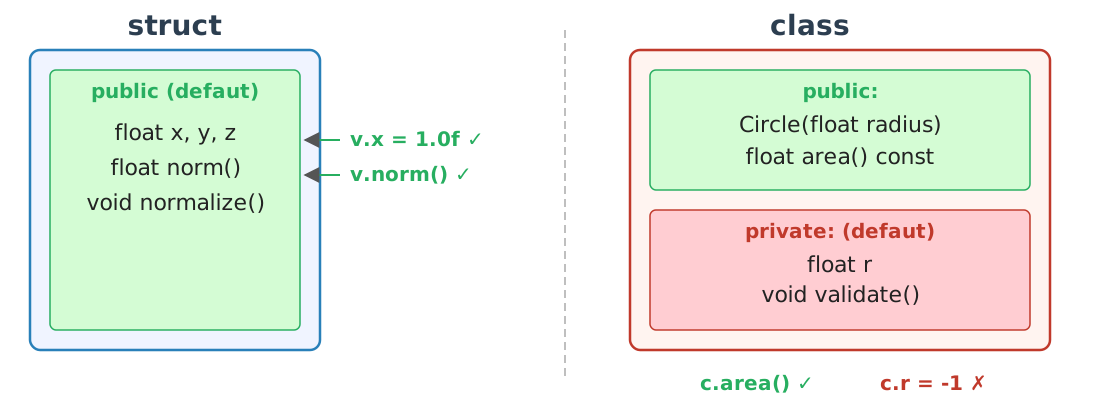
In practice, we will reserve struct for simple data
aggregates (without complex invariants), and class as soon
as there is a need for encapsulation or access control.
In C++, the initialization of an object is handled by the constructors. A constructor is a special function (same name as the class, no return type) that is automatically called at the creation of the object. Its purpose is to ensure that the object is in a valid state from the outset.
If a class or struct contains primitive types (int,
float, etc.), they are not necessarily initialized
automatically.
#include <iostream>

struct vec3 {
    float x, y, z;
};

int main() {
    vec3 v; // x,y,z indéfinis !
    std::cout << v.x << std::endl; // comportement indéterminé
}
In the case of an aggregate struct, we can force zero
initialization with {} :
vec3 v{}; // x=y=z=0But as soon as we want to precisely control the state of the object, we use constructors.
The default constructor takes no arguments. It is often used to initialize with consistent values.
struct vec3 {
    float x, y, z;

    vec3() : x(0.0f), y(0.0f), z(0.0f) {}
};

int main() {
    vec3 v; // appelle vec3()
}
Here, v is guaranteed to be valid: its fields are equal
to 0.
The syntax : x(...), y(...), z(...) is the
initialization list. It initializes the attributes before entering the
constructor body.
struct vec3 {
    float x, y, z;

    vec3(float x_, float y_, float z_) : x(x_), y(y_), z(z_) {}
};
Usage :
vec3 v(1.0f, 2.0f, 3.0f);
vec3 w{1.0f, 2.0f, 3.0f}; // uniforme (souvent recommandé)
This initialization list is preferable to an assignment in the constructor body, because it avoids a “two-step” (construction followed by reassignment) and it is required for certain members.
We can define several constructors to provide different ways of creating an object.
struct vec3 {
    float x, y, z;

    vec3() : x(0), y(0), z(0) {}
    vec3(float v) : x(v), y(v), z(v) {}
    vec3(float x_, float y_, float z_) : x(x_), y(y_), z(z_) {}
};

int main() {
    vec3 a;              // (0,0,0)
    vec3 b(1.0f);         // (1,1,1)
    vec3 c(1.0f,2.0f,3.0f); // (1,2,3)
}explicitA single-argument constructor can serve as an implicit conversion,
which can cause side effects. The keyword explicit prevents
these automatic conversions.
struct vec3 {
    float x, y, z;

    explicit vec3(float v) : x(v), y(v), z(v) {}
};
vec3 a(1.0f); // OK
// vec3 b = 1.0f; // interdit grâce à explicitThis makes the code safer and more readable.
const
Members and References: Constructor RequiredThe const members and references must be initialized via
the initializer list.
struct sample {
    int const id;
    float& ref;

    sample(int id_, float& ref_) : id(id_), ref(ref_) {}
};
Without an initialization list, this code does not compile, because
id and ref cannot be “assigned” after the
fact: they must be initialized immediately.
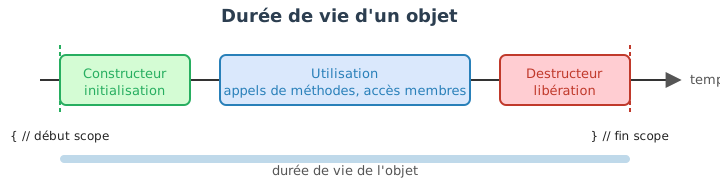
The destructor is automatically called when the object is destroyed
(end of scope, delete, etc.). It is mainly used to release
resources (files, memory, GPU…).
#include <iostream>

struct tracer {
    tracer()  { std::cout << "Constructed\n"; }
    ~tracer() { std::cout << "Destroyed\n"; }
};

int main() {
    tracer t; // "Constructed"
} // "Destroyed"
It should be noted that it is preferable to systematically initialize
the attributes (via constructor or {}), to favor the
initializer list :, and to use explicit for
one-argument constructors unless the implicit conversion is desired.
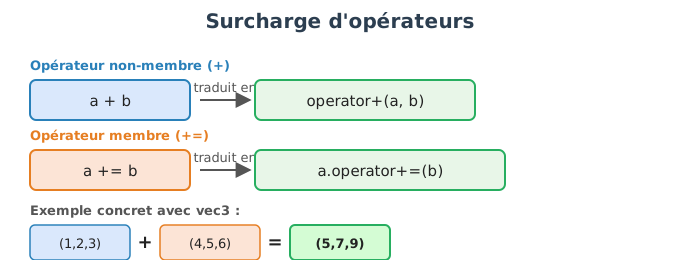
In C++, it is possible to overload operators for
classes and structures to make their use more natural and expressive.
This feature is particularly useful in computer graphics, where vectors,
matrices, colors, or transformations are frequently manipulated, and
where expressions such as v1 + v2 or 2.0f * v
are much more readable than an explicit function call.
Operator overloading consists in defining a special
function whose name is operator<symbole>.
From the compiler’s point of view, an expression such as:
a + bis translated into:
operator+(a, b);or, in the case of a member operator :
a.operator+(b);Overloading does not create a new operator: it simply redefines the behavior of an existing operator for a given type.
An operator can be defined :
Common rule :
+=,
*=, [], etc.) are often member methods ;+, -,
*) are often non-member functions.struct vec3 {
float x, y, z;
vec3() : x(0), y(0), z(0) {}
vec3(float x_, float y_, float z_) : x(x_), y(y_), z(z_) {}
vec3& operator+=(vec3 const& v) {
x += v.x;
y += v.y;
z += v.z;
return *this;
}
};The += operator modifies the current object and returns
a reference to it.
We then define + as a non-member operator by reusing
+=:
vec3 operator+(vec3 a, vec3 const& b) {
    a += b;
    return a;
}
Usage :
vec3 a{1,2,3};
vec3 b{4,5,6};

vec3 c = a + b; // (5,7,9)
a += b; // a devient (5,7,9)We can define operators between different types, for example the multiplication by a scalar:
vec3 operator*(float s, vec3 const& v) {
    return vec3{s*v.x, s*v.y, s*v.z};
}

vec3 operator*(vec3 const& v, float s) {
    return s * v;
}
This allows for natural writing:
vec3 v{1,2,3};
vec3 w = 2.0f * v;The comparison operators allow you to compare objects:
bool operator==(vec3 const& a, vec3 const& b) {
    return a.x == b.x && a.y == b.y && a.z == b.z;
}

bool operator!=(vec3 const& a, vec3 const& b) {
    return !(a == b);
}
Since C++20, there is also the <=> operator
(three-way comparison), but its use is beyond the scope of this
introduction.
[]The [] operator is often used to provide indexed access
to internal data:
struct vec3 {
    float x, y, z;

    float& operator[](int i) {
        return (&x)[i]; // accès contigu
    }

    float const& operator[](int i) const {
        return (&x)[i];
    }
};
Usage:
vec3 v{1,2,3};
v[0] = 4.0f;
float y = v[1];
The const version is indispensable to enable read access
to a constant object.
<<To facilitate debugging, we often overload the <<
operator with std::ostream :
#include <iostream>

std::ostream& operator<<(std::ostream& out, vec3 const& v) {
    out << "(" << v.x << ", " << v.y << ", " << v.z << ")";
    return out;
}
Usage :
vec3 v{1,2,3};
std::cout << v << std::endl;
Some principles to follow: always pass parameters by const
reference, return *this by reference for modifying
operators (+=, *=, etc.), and not overload an
operator if its mathematical or logical meaning is not clear. Operator
overloading allows writing code that is more readable, but it must
remain simple, coherent and predictable.
The inheritance is a central mechanism of object-oriented programming that enables defining a new class from an existing class. The derived class inherits the attributes and methods of the base class, which promotes the code reuse and the hierarchical structuring of concepts. In C++, inheritance is often used to factor out common behaviors while allowing specializations.
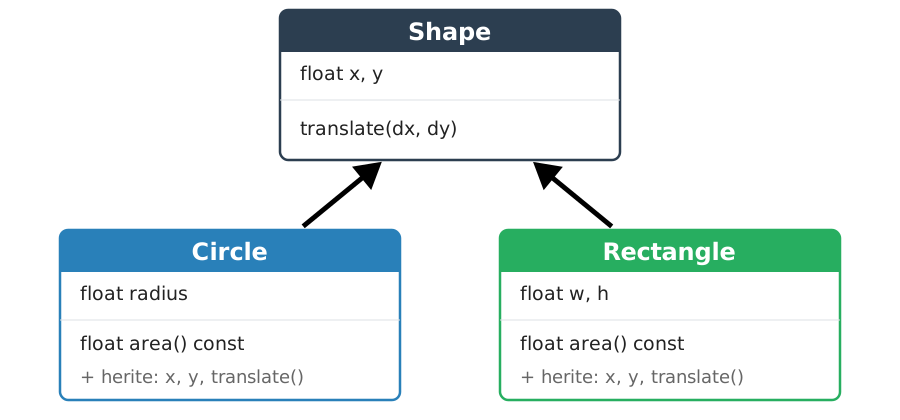
We define a derived class by indicating the base class after
:.
class Derived : public Base {
    // contenu spécifique à Derived
};
The public keyword indicates that the public interface
of the base class remains public in the derived class. This is the most
common case and the one used in the majority of object-oriented
designs.
Let us consider a base class representing a geometric shape:
class Shape {
  public:
    float x, y;

    Shape(float x_, float y_) : x(x_), y(y_) {}

    void translate(float dx, float dy) {
        x += dx;
        y += dy;
    }
};
We can define a derived class that specializes this behavior:
class Circle : public Shape {
  public:
    float radius;

    Circle(float x_, float y_, float r_)
        : Shape(x_, y_), radius(r_) {}
};
Usage :
Circle c(0.0f, 0.0f, 1.0f);
c.translate(1.0f, 2.0f); // méthode héritée de Shape
The Circle class automatically inherits from x,
y and the translate method.
The constructor of the derived class must explicitly call the constructor of the base class in its initializer list.
Circle(float x_, float y_, float r_)
    : Shape(x_, y_), radius(r_) {}
If the base class constructor is not explicitly called, the compiler will attempt to call the default constructor, which may result in an error if it does not exist.
public, protected, private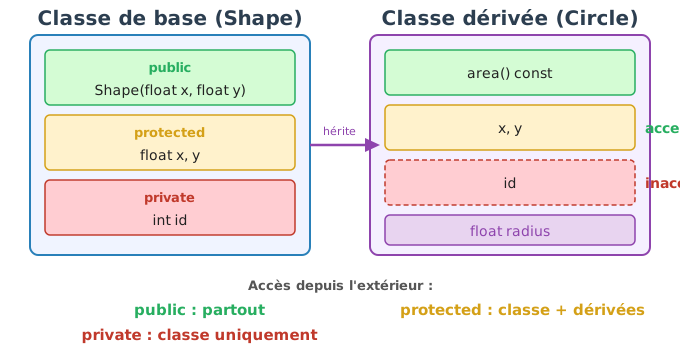
The access level of the base class members determines their visibility in the derived class:
public : accessible everywhere, including in derived
classes.protected : accessible only within the class and its
derived classes.private : accessible only within the base class.Example :
class Shape {
  protected:
    float x, y;

  public:
    Shape(float x_, float y_) : x(x_), y(y_) {}
};
class Circle : public Shape {
public:
float radius;
Circle(float x_, float y_, float r_)
: Shape(x_, y_), radius(r_) {}
float center_x() const {
return x; // autorisé car x est protected
}
};A derived class can redefine a method of the base class in order to provide a specific behavior.
class Shape {
  public:
    float x, y;

    Shape(float x_, float y_) : x(x_), y(y_) {}

    float area() const {
        return 0.0f;
    }
};
class Rectangle : public Shape {
public:
float w, h;
Rectangle(float x_, float y_, float w_, float h_)
: Shape(x_, y_), w(w_), h(h_) {}
float area() const {
return w * h;
}
};Here, Rectangle::area hides the version defined in
Shape. This mechanism naturally prepares the introduction
to polymorphism, which will be studied in the next
chapter.
Inheritance helps avoid duplication:
class Vehicle {
  public:
    float speed;

    void accelerate(float dv) {
        speed += dv;
    }
};

class Car : public Vehicle {
    // comportement spécifique
};

class Plane : public Vehicle {
    // comportement spécifique
};
Classes Car and Plane share the same basic
behavior without duplication.
Inheritance serves to express a relationship is-a (is-a). We will ensure that the base classes remain simple and stable.
Polymorphism allows manipulating objects of different types through a common interface, while automatically calling the correct implementation according to the actual type of the object. In C++, it relies on inheritance, the virtual functions and the use of pointers or references to a base class. It is particularly useful when one wishes to store heterogeneous objects in the same container and treat them uniformly.
Suppose we want to represent different geometric shapes and calculate their total area.
struct Circle {
    float r;
    float area() const {
        return 3.14159f * r * r;
    }
};

struct Rectangle {
    float w, h;
    float area() const {
        return w * h;
    }
};
These two types possess a method area(), but
they have no type relationship. It is therefore
impossible to write:
std::vector<Circle> shapes;    // uniquement des cercles
std::vector<Rectangle> shapes; // uniquement des rectangles
and above all, it is impossible to do:
std::vector</* Circle et Rectangle */> shapes; // impossibleWithout polymorphism, we are constrained to either:
Polymorphism provides an elegant solution to this problem.
We begin by defining a base class representing the general concept of “shape”:
class Shape {
  public:
    virtual float area() const = 0; // méthode virtuelle pure
    virtual ~Shape() = default;
};
This class is abstract :
Each concrete shape inherits from Shape and implements
area():
// Remarque : le mot-clé `override` (C++11) indique au compilateur
// que la méthode redéfinit une méthode virtuelle de la classe de base.
// Il provoquera une erreur de compilation si la signature ne correspond pas.
class Circle : public Shape {
  public:
    float r;

    explicit Circle(float r_) : r(r_) {}

    float area() const override {
        return 3.14159f * r * r;
    }
};
class Rectangle : public Shape {
public:
float w, h;
Rectangle(float w_, float h_) : w(w_), h(h_) {}
float area() const override {
return w * h;
}
};Through inheritance and virtual functions, we can now store pointers to the base class in the same container:
#include <vector>
#include <memory>

int main() {
    std::vector<std::unique_ptr<Shape>> shapes;

    shapes.push_back(std::make_unique<Circle>(2.0f));
    shapes.push_back(std::make_unique<Rectangle>(3.0f, 4.0f));

    float total_area = 0.0f;
    for (auto const& s : shapes) {
        total_area += s->area(); // appel polymorphique
    }
}
Here:
Shape,area() is resolved
dynamically according to the real type
(Circle or Rectangle).virtual and dynamic dispatchThe call:
s->area();is resolved at runtime thanks to the virtual table :
s points to a Circle,
Circle::area() is called,s points to a Rectangle,
Rectangle::area() is called.This is the heart of dynamic polymorphism.
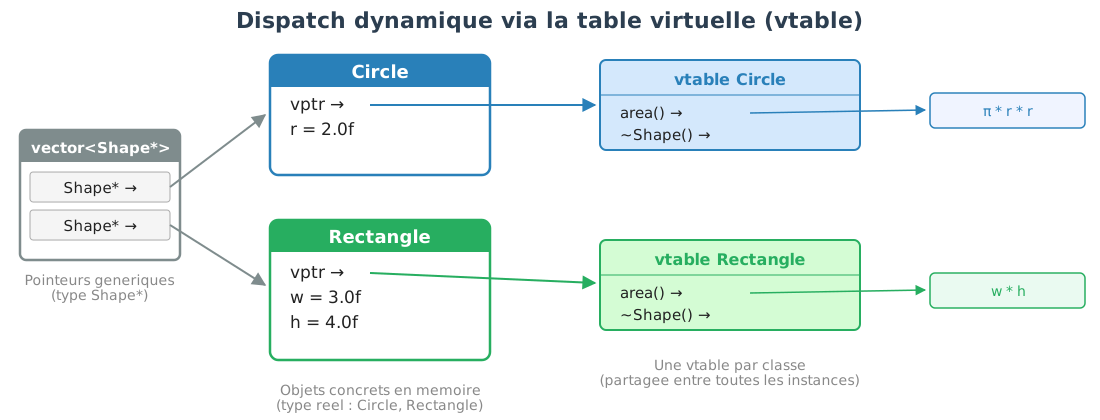
Objects are destroyed via a pointer to the base class. Therefore the destructor must be virtual:
class Shape {
  public:
    virtual ~Shape() = default;
};
Without this, the destructor of the derived class would not be called, which could lead to resource leaks.
One cannot directly store derived objects in a container of type
std::vector<Shape> because that would cause slicing
(loss of the derived part). Pointers (often smart pointers) avoid this
problem and enable dynamic binding.
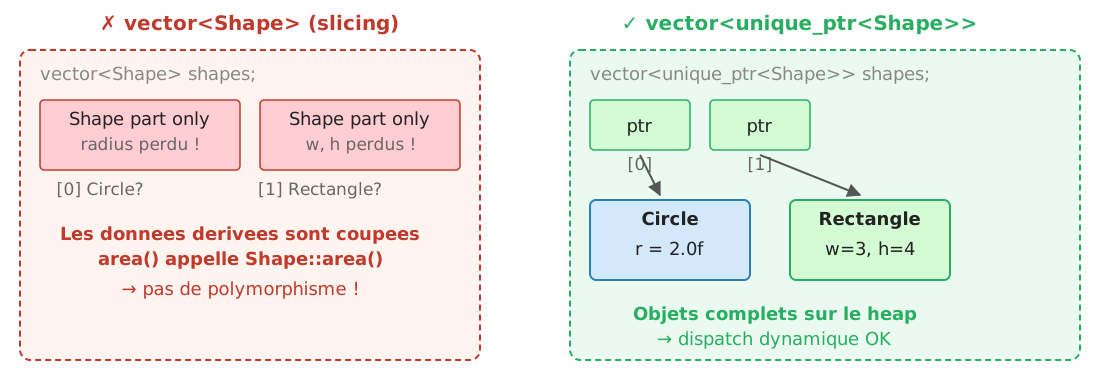
Dynamic polymorphism involves:
In performance-critical loops, we will sometimes favor static polymorphism via templates, which will be discussed later.
In the previous examples, we used smart pointers
(std::unique_ptr) to automatically manage the lifetime of
objects. It is nevertheless important to understand that polymorphism in
C++ has historically relied on raw pointers (Shape*). These
offer more freedom, but require manual memory management, which greatly
increases the risk of errors.
#include <vector>

int main() {
    std::vector<Shape*> shapes;

    shapes.push_back(new Circle(2.0f));
    shapes.push_back(new Rectangle(3.0f, 4.0f));

    float total_area = 0.0f;
    for (Shape* s : shapes) {
        total_area += s->area(); // appel polymorphique
    }

    // Libération manuelle de la mémoire
    for (Shape* s : shapes) {
        delete s;
    }
}
Here:
new,Shape,area() are resolved dynamically,delete.With raw pointers, the virtual destructor is absolutely indispensable:
class Shape {
  public:
    virtual ~Shape() = default;
};
Without a virtual destructor, the call:
delete s;It would only destroy the Shape part of the object, and
not the derived part (Circle, Rectangle),
leading to resource leaks and undefined behavior.
The use of raw pointers exposes several common errors:
delete → memory leak ;delete → undefined behavior
;These problems are difficult to detect and fix, especially in large-scale projects.
To summarize: polymorphism serves the uniform treatment of
heterogeneous objects. We will define abstract base classes as
interfaces, we will consistently declare a virtual destructor, we will
use override to safeguard redefinitions, and we will
combine all of this with smart pointers (std::unique_ptr).
This mechanism enables designing extensible systems where new types can
be added without modifying existing code.
constIn C++, the keyword const applied to
class methods plays a central role in access control
and in code safety. It is not merely a documentary indicator: a method
const and a non-const method are considered by
the compiler as two different methods, capable of
coexisting in the same class with the same name.
const
methodA method declared with const after its signature
guarantees that it does not modify the object’s
state.
class vec3 {
  public:
    float x, y, z;

    float norm() const {
        return std::sqrt(x*x + y*y + z*z);
    }
};
The const here means that the method cannot modify
x, y or z. Any attempt to modify
would result in a compilation error.
float norm() const {
x = 0.0f; // ERREUR : modification interdite
return 0.0f;
}An object declared const can call only
const methods.
const vec3 v{1.0f, 2.0f, 3.0f};
v.norm(); // OK
// v.normalize(); // ERREUR si normalize() n'est pas constThis naturally imposes a clear separation between:
const and non-const: two different
signaturesA const method and a non-const method
bearing the same name are not the same function. They
can be defined simultaneously in a class.
class vec3 {
public:
float x, y, z;
float& operator[](int i) {
return (&x)[i];
}
float const& operator[](int i) const {
return (&x)[i];
}
};Here:
const version is called on a
modifiable object,const version is called on a
constant object.Usage:
vec3 a{1,2,3};
a[0] = 5.0f; // appelle la version non const
const vec3 b{1,2,3};
float x = b[0]; // appelle la version constThe compiler automatically selects the appropriate version based on the const-ness of the object.
class Buffer {
public:
float& value() {
return data;
}
float value() const {
return data;
}
private:
float data;
};Here:
value() (non const) allows modifying the
data,value() const only reads it.Buffer b;
b.value() = 3.0f; // version non const
const Buffer c;
// c.value() = 3.0f; // ERREUR
float v = c.value(); // version constThis distinction allows:
In a well-structured design, the majority of methods should be
const. Non-const methods correspond to
explicit modification operations.
As a general rule, any method that does not modify the object should
be marked const. When access can be read or written, both
versions are provided. const is, above all, a design tool,
not a mere syntactic constraint.
static keyword in classes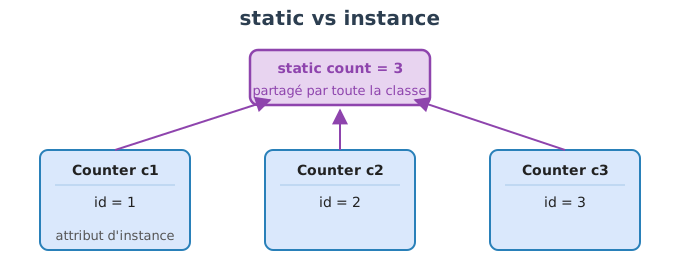
The keyword static, applied to the
members of a class, profoundly changes their nature and
their lifetime. A member static does not
belong to an object, but to the class itself. It is
therefore shared by all instances of this class. This
mechanism is essential for representing global data or behaviors related
to a concept, rather than to a particular object.
A static attribute is unique to the class, regardless of how many objects are created.
class Counter {
public:
Counter() {
++count;
}
static int get_count() {
return count;
}
private:
static int count;
};The declaration in the class is not enough. The
static attribute must be defined only once in a
.cpp file:
int Counter::count = 0;Usage :
Counter a;
Counter b;
Counter c;
int n = Counter::get_count(); // n = 3All Counter objects share the same
variable count.
A static attribute:
Counter::get_count(); // forme recommandéeThis underscores the fact that the data belongs to the class, and not to a particular instance.
A static method is a function associated with the class, but independent of any instance.
class MathUtils {
public:
static float square(float x) {
return x * x;
}
};Usage :
float y = MathUtils::square(3.0f);A static method:
this pointer,class Example {
public:
static void f() {
// x = 3; // ERREUR : x n'est pas statique
y = 4; // OK
}
private:
int x;
static int y;
};static and
initializationSince C++17, it is possible to directly initialize certain static
attributes in the class if they are constexpr or of literal
type.
class Physics {
public:
static constexpr float gravity = 9.81f;
};Usage :
float g = Physics::gravity;In this case, no additional definition in a .cpp file is
necessary.
The keyword static is used for:
Example: a unique identifier per object
class Object {
public:
Object() : id(next_id++) {}
int get_id() const {
return id;
}
private:
int id;
static int next_id;
};
int Object::next_id = 0;Each object receives a unique identifier, generated from a shared counter.
Static members can be accessed via NomClasse::membre, we
will limit the use of modifiable static attributes to avoid hidden
dependencies, and we will prefer constexpr static for
constants known at compile time.
A static member is unique and shared: it belongs to the class, not to objects.
namespace)When a project grows, it becomes common to have identical names in
different parts of the code: vec3, add,
normalize, load, etc. In C++, a
namespace (namespace) allows to
group functions, types and constants under a common
prefix, in order to:
The most well-known example is the standard library:
std::vector, std::string,
std::cout.
A namespace creates a logical “box”:
namespace math {
struct vec3 {
float x, y, z;
};
float dot(vec3 const& a, vec3 const& b)
{
return a.x*b.x + a.y*b.y + a.z*b.z;
}
} // namespace mathUsage :
math::vec3 a{1,2,3};
math::vec3 b{4,5,6};
float p = math::dot(a, b);Here, math:: is the qualifier: it
disambiguates the symbols.
Two libraries may offer a load() function, but for
different uses. Without a namespace, this becomes ambiguous.
namespace io {
int load(char const* filename) { /* ... */ return 0; }
}
namespace gpu {
int load(char const* shader_file) { /* ... */ return 1; }
}Explicit and unambiguous usage:
int a = io::load("mesh.obj");
int b = gpu::load("shader.vert");using :
importing names (with caution)There are two syntaxes:
using math::vec3;
vec3 v{1,2,3}; // équivalent à math::vec3using namespace std;This allows you to write vector instead of
std::vector, but it can create conflicts.
Bonne pratique :
using namespace ...; is acceptable in a small local
.cpp,.hpp, because it
pollutes all files that include this header.We can structure by modules:
namespace engine {
namespace math {
struct vec2 { float x, y; };
}
namespace io {
void save();
}
}Since C++17, it is possible to write more simply:
namespace engine::math {
struct vec2 { float x, y; };
}An anonymous namespace makes symbols visible only in the
current file (equivalent to static for global
functions, but more general).
namespace {
int helper(int x) { return 2*x; }
}
int f(int a)
{
return helper(a);
}Rationale :
Useful if a name is long :
namespace em = engine::math;
em::vec2 v{1,2};In C++, functions can be manipulated as values: they can be stored in variables, passed as arguments to other functions, or returned. This mechanism is fundamental for writing generic and flexible code (callbacks, strategies, parameterizable algorithms).
A function pointer is a variable that contains the address of a function. Just as a regular pointer designates a variable in memory, a function pointer designates the executable code of a function.
#include <iostream>
int add(int a, int b) { return a + b; }
int mul(int a, int b) { return a * b; }
int main() {
int (*op)(int, int); // déclare un pointeur vers une fonction (int, int) -> int
op = add;
std::cout << op(3, 4) << std::endl; // 7
op = mul;
std::cout << op(3, 4) << std::endl; // 12
}The declaration syntax int (*op)(int, int) reads as:
op is a pointer (*) to a function taking two
ints and returning an int.
A type alias makes the code more readable:
using BinaryOp = int (*)(int, int);
BinaryOp op = add;
std::cout << op(3, 4) << std::endl;Function pointers enable writing functions that accept a behavior as a parameter:
void apply_to_array(int* data, int size, int (*f)(int)) {
for (int i = 0; i < size; ++i)
data[i] = f(data[i]);
}
int doubler(int x) { return 2 * x; }
int negate(int x) { return -x; }
int main() {
int arr[] = {1, 2, 3, 4};
apply_to_array(arr, 4, doubler); // arr = {2, 4, 6, 8}
apply_to_array(arr, 4, negate); // arr = {-2, -4, -6, -8}
}It’s the same principle used by the standard library algorithms
(std::sort, std::transform, etc.) to accept
custom criteria.
Function pointers have two important limitations:
static functions), not instance methods,int seuil = 10;
// Impossible : un pointeur de fonction ne peut pas "voir" seuil
// bool above_seuil(int x) { return x > seuil; } // seuil doit être globalThese limitations motivate the introduction of functors and lambdas.
A functor is an object whose class overloads the
operator(). This allows it to be called with the same
syntax as a function, while being able to store internal
state.
struct AboveThreshold {
float threshold;
AboveThreshold(float t) : threshold(t) {}
bool operator()(float x) const {
return x > threshold;
}
};Usage :
AboveThreshold above10(10.0f);
std::cout << above10(5.0f) << std::endl; // 0 (false)
std::cout << above10(15.0f) << std::endl; // 1 (true)The functor above10 behaves like a function, but it
carries its threshold with it. This is the historical
solution to the problem of capturing context.
Example with an algorithm:
#include <algorithm>
#include <vector>
std::vector<float> v = {3.0f, 12.0f, 7.0f, 15.0f, 1.0f};
int n = std::count_if(v.begin(), v.end(), AboveThreshold(10.0f));
// n = 2 (12.0f et 15.0f)The lambda functions (C++11) are a compact syntax
for creating anonymous functors. The compiler automatically generates a
class with operator() and the necessary captures.
[captures](paramètres) -> type_retour { corps }The return type is often omitted (automatically inferred).
auto square = [](int x) { return x * x; };
std::cout << square(5) << std::endl; // 25Captures allow the lambda to access local variables from the enclosing scope:
float seuil = 10.0f;
auto above = [seuil](float x) { return x > seuil; }; // capture par copie
auto below = [&seuil](float x) { return x < seuil; }; // capture par référenceShortcuts :
[=] : capture all variables by value,[&] : capture all variables by reference,[=, &x] : everything by value except x
by reference.The lambda :
float seuil = 10.0f;
auto above = [seuil](float x) { return x > seuil; };is equivalent to the functor:
struct Lambda {
float seuil;
bool operator()(float x) const { return x > seuil; }
};
Lambda above{10.0f};The compiler automatically generates this structure. Each lambda has a unique type known to the compiler, which enables optimizations (inlining) that are impossible with function pointers.
std::function
: a uniform type for any callableFunction pointers, function objects (functors) and lambdas have
different types. To store either in the same variable, one uses
std::function (defined in <functional>)
:
#include <functional>
int add(int a, int b) { return a + b; }
struct Multiplier {
int factor;
int operator()(int a, int b) const { return factor * (a + b); }
};
int main() {
std::function<int(int, int)> op;
op = add; // pointeur de fonction
std::cout << op(3, 4) << std::endl; // 7
op = Multiplier{2}; // foncteur
std::cout << op(3, 4) << std::endl; // 14
op = [](int a, int b) { return a - b; }; // lambda
std::cout << op(3, 4) << std::endl; // -1
}std::function<int(int, int)> can contain
any callable whose signature is
int(int, int).
std::functionstd::function introduces an overhead
relative to a direct call: it uses type erasure internally, which
implies an indirection (similar to a virtual call). For
performance-critical code, templates are preferred:
// Version template : pas d'indirection, la fonction est inlinée
template <typename F>
void apply(int* data, int size, F f) {
for (int i = 0; i < size; ++i)
data[i] = f(data[i]);
}
apply(arr, 4, [](int x) { return x * 2; }); // inliné par le compilateurThis is, moreover, the approach used by the standard library algorithms.
// Exemple : callback de rendu
using RenderCallback = std::function<void(float dt)>;
class Engine {
public:
void set_render(RenderCallback cb) { render = cb; }
void frame(float dt) {
if (render) render(dt);
}
private:
RenderCallback render;
};The Standard Template Library (STL) is one of the pillars of modern C++. It provides a coherent set of containers (data structures), iterators (a uniform access mechanism) and algorithms (generic operations), all parameterized by templates.
A container is an object that stores a collection of elements. The STL offers several families of containers, each adapted to different uses. The choice of the right container rests on the program’s dominant operations: indexed access, frequent insertion, key-based search, etc.
Sequential containers store elements in a order determined by insertion.
std::vector<T>The std::vector is a dynamic array with memory
contiguous. It offers \(O(1)\) indexed access and an amortized
\(O(1)\) insertion at the end of the
array (push_back). Insertion or deletion in the middle of
the array is \(O(n)\) because it
requires shifting the subsequent elements.
std::deque<T>The std::deque (double-ended queue) allows insertion and
deletion in \(O(1)\) at the two
ends (push_front, push_back,
pop_front, pop_back). Unlike the
std::vector, its memory is not contiguous: it is organized
into blocks. Indexed access remains \(O(1)\), but with an overhead due to the
indirection between blocks.
#include <deque>
std::deque<int> dq;
dq.push_back(1);
dq.push_front(0);
// dq contient {0, 1}Use cases: work queues, circular buffers, situations where we add at both ends.
std::list<T>The std::list is a doubly linked list.
Each element is allocated separately on the heap and contains pointers
to the previous and next element. Insertion and deletion at any position
are \(O(1)\) if one already has an
iterator to the position.
#include <list>
std::list<int> lst = {1, 2, 3, 4};
auto it = lst.begin();
std::advance(it, 2); // avance de 2 positions
lst.insert(it, 99); // insère 99 avant la position 2
// lst contient {1, 2, 99, 3, 4}On the other hand:
In practice, std::vector is almost always faster than
std::list, even for insertions in the middle of a sequence,
thanks to memory locality. We will reserve std::list for
cases where we need iterator stability (an iterator to an element
remains valid even after insertions/deletions elsewhere in the
list).
std::forward_list<T>Singly linked version of std::list. Each element points
only to the next. More memory-efficient, but only allows traversing the
list in a single direction.
The adapters are not containers in their own right: they encapsulate an existing container and restrict its interface to guarantee a specific use.
std::stack<T>LIFO stack (Last In, First Out). By default, it encapsulates a
std::deque.
#include <stack>
std::stack<int> s;
s.push(1);
s.push(2);
s.push(3);
int top = s.top(); // 3
s.pop(); // retire 3std::queue<T>Queue FIFO (First In, First Out). Encapsulates a
std::deque by default.
#include <queue>
std::queue<int> q;
q.push(1);
q.push(2);
int front = q.front(); // 1
q.pop(); // retire 1std::priority_queue<T>Priority queue: the element with the highest priority is always at
the top. By default, the largest element is at the front (max-heap).
Encapsulates a std::vector.
#include <queue>
std::priority_queue<int> pq;
pq.push(3);
pq.push(1);
pq.push(4);
int top = pq.top(); // 4
pq.pop();Associative containers store elements according to a key, and enable efficient lookup.
std::set<T> and
std::multiset<T>A std::set stores sorted unique keys.
It is implemented by a red-black tree. Insertion, lookup, and deletion
are in \(O(\log n)\).
#include <set>
std::set<int> s = {3, 1, 4, 1, 5};
// s contient {1, 3, 4, 5} — doublons éliminés, trié
s.insert(2);
bool found = s.count(3) > 0; // true
s.erase(4);std::multiset allows duplicates.
std::map<K, V>
et std::multimap<K, V>The std::map associates unique keys
with values, sorted by key. The complexity is the same
as that of std::set. std::multimap allows
multiple values for the same key.
std::unordered_set<T>
et std::unordered_map<K, V>Variants based on hash tables. The elements are not sorted, but the operations of search, insertion and deletion are on average \(O(1)\) (compared to \(O(\log n)\) for the ordered versions).
#include <unordered_map>
std::unordered_map<std::string, int> ages;
ages["Alice"] = 25;
ages["Bob"] = 30;
if (ages.find("Alice") != ages.end()) {
int a = ages["Alice"]; // 25
}We prefer the unordered_ versions when order is not
important and when search performance is critical.
| Container | Structure | Access | Insertion | Search | Order |
|---|---|---|---|---|---|
vector |
contiguous array | \(O(1)\) | \(O(1)\) at end, \(O(n)\) in middle | \(O(n)\) | insertion |
deque |
blocks | \(O(1)\) | \(O(1)\) begin/end | \(O(n)\) | insertion |
list |
linked list | \(O(n)\) | \(O(1)\) (with iterator) | \(O(n)\) | insertion |
set |
tree | — | \(O(\log n)\) | \(O(\log n)\) | sorted |
map |
tree | — | \(O(\log n)\) | \(O(\log n)\) | sorted by key |
unordered_set |
hash table | — | \(O(1)\) avg. | \(O(1)\) avg. | none |
unordered_map |
hash table | — | \(O(1)\) avg. | \(O(1)\) avg. | none |
A critical point when manipulating containers is the iterator invalidation. Some operations render existing iterators invalid :
std::vector : any insertion that
causes a reallocation invalidates all iterators. An
insertion without reallocation invalidates the iterators
after the insertion point.std::deque : any insertion invalidates
all iterators (but not references if the insertion is
at the ends).std::list : iterators are
never invalidated by insertions or deletions (except
the iterator pointing to the deleted element).std::set, std::map :
iterators are invalidated only for the deleted element.std::unordered_* : an insertion that
causes a rehash invalidates all iterators.Using an invalidated iterator is a undefined behavior: the program may crash, produce wrong results, or appear to work correctly.
// ERREUR classique : suppression pendant l'itération
std::vector<int> v = {1, 2, 3, 4, 5};
for (auto it = v.begin(); it != v.end(); ++it) {
if (*it == 3)
v.erase(it); // it est invalidé ! UB au ++it suivant
}
// Version correcte : erase retourne l'itérateur suivant
for (auto it = v.begin(); it != v.end(); ) {
if (*it == 3)
it = v.erase(it);
else
++it;
}Iterators constitute the link between containers and algorithms. An iterator is an object that generalizes the notion of a pointer: it allows designating an element in a container and advancing to the next element, without the code needing to know the container’s internal structure.
At a minimum, every iterator provides the following operations:
*it : access to the element pointed to
(dereferencing),++it : advance to the next element,it1 != it2 : compare two iterators.With these three operations, one can traverse any container in a uniform manner:
template <typename Container>
void print_all(Container const& c) {
for (auto it = c.begin(); it != c.end(); ++it) {
std::cout << *it << " ";
}
std::cout << std::endl;
}This function works for a vector, a list, a
set, a deque, etc. It is the range-based
for (auto& x : c) loop that uses this mechanism
internally.
begin /
endEach container provides :
begin() : iterator to the first
element,end() : iterator to the position after the
last element (sentinel).The range is half-open : [begin, end).
This convention simplifies loops (the termination condition is
it != end()) and allows representing an empty container
(begin() == end()).
Const versions exist: cbegin() / cend()
return iterators that disallow modification of the elements.
For bidirectional containers (list, set,
map, deque, vector), reverse
iterators are also available: rbegin() /
rend() traverse the container backwards.
Not all iterators support the same operations. The STL defines a hierarchy of categories, from the most restrictive to the most powerful:
| Category | Operations | Examples of containers |
|---|---|---|
| Input | *it (read), ++it, != |
input stream (istream_iterator) |
| Forward | Input + multiple passes | forward_list, unordered_set |
| Bidirectional | Forward + --it |
list, set, map |
| Random Access | Bidirectional + it + n, it[n],
it1 - it2, < |
vector, deque, array |
A higher-category iterator supports all the operations of the lower categories.
Practical consequences:
std::vector<int> v = {3, 1, 4, 1, 5};
std::list<int> lst = {3, 1, 4, 1, 5};
// OK : vector a des itérateurs random access
auto it_v = v.begin() + 3;
// ERREUR : list a des itérateurs bidirectional, pas d'opérateur +
// auto it_l = lst.begin() + 3;
// Version correcte pour list :
auto it_l = lst.begin();
std::advance(it_l, 3); // avance de 3 positionsThe function std::advance(it, n) (defined in
<iterator>) works for all categories: it performs
n increments for non-random-access iterators, and a direct
jump for random-access ones.
The header <iterator> provides useful
functions:
std::advance(it, n) : advances it by
n positions.std::distance(first, last) : returns the number of
elements between two iterators.std::next(it, n) / std::prev(it, n) :
returns a new iterator advanced/backward by n positions
(without modifying it).#include <iterator>
std::list<int> lst = {10, 20, 30, 40, 50};
auto it = std::next(lst.begin(), 2); // pointe sur 30
int d = std::distance(lst.begin(), it); // d = 2The <algorithm> header provides a vast collection
of generic functions that operate on ranges of
iterators [begin, end). These algorithms are independent of
the container used: they know only the iterators. It is this separation
that makes the STL so powerful and extensible.
The STL algorithms often accept a predicate or a transformation function as a parameter. For this, one uses lambdas, functors or function pointers, as presented in the previous chapter.
#include <algorithm>
#include <vector>
std::vector<int> v = {3, 1, 4, 1, 5, 9};
// Recherche d'une valeur
auto it = std::find(v.begin(), v.end(), 4);
if (it != v.end())
std::cout << "Trouvé à la position " << std::distance(v.begin(), it) << std::endl;
// Recherche avec prédicat
auto it2 = std::find_if(v.begin(), v.end(), [](int x) { return x > 4; });
// it2 pointe sur 5
// Compter les occurrences
int n = std::count(v.begin(), v.end(), 1); // n = 2
// Tester si tous/certains/aucun éléments satisfont une condition
bool all_pos = std::all_of(v.begin(), v.end(), [](int x) { return x > 0; }); // true
bool has_neg = std::any_of(v.begin(), v.end(), [](int x) { return x < 0; }); // falsestd::vector<int> v = {3, 1, 4, 1, 5, 9};
// Tri croissant
std::sort(v.begin(), v.end());
// v = {1, 1, 3, 4, 5, 9}
// Tri avec comparateur personnalisé (décroissant)
std::sort(v.begin(), v.end(), [](int a, int b) { return a > b; });
// v = {9, 5, 4, 3, 1, 1}
// Tri stable (préserve l'ordre relatif des éléments égaux)
std::stable_sort(v.begin(), v.end());std::sort requires random access
iterators. It therefore does not work directly on a
std::list (which provides its own method
lst.sort()).
std::vector<int> v = {1, 2, 3, 4, 5};
std::vector<int> result(v.size());
// Appliquer une transformation à chaque élément
std::transform(v.begin(), v.end(), result.begin(),
[](int x) { return x * x; });
// result = {1, 4, 9, 16, 25}
// Appliquer une action sans produire de résultat
std::for_each(v.begin(), v.end(), [](int& x) { x *= 2; });
// v = {2, 4, 6, 8, 10}The <numeric> header provides accumulation
operations:
#include <numeric>
std::vector<int> v = {1, 2, 3, 4, 5};
// Somme
int sum = std::accumulate(v.begin(), v.end(), 0);
// sum = 15
// Produit
int prod = std::accumulate(v.begin(), v.end(), 1, std::multiplies<int>());
// prod = 120
// Accumulation avec lambda
int sum_squares = std::accumulate(v.begin(), v.end(), 0,
[](int acc, int x) { return acc + x * x; });
// sum_squares = 55std::vector<int> v = {3, 1, 4, 1, 5, 9, 2, 6};
// Supprimer les éléments égaux à 1
// std::remove ne supprime pas réellement : il déplace les éléments à garder
// au début et retourne un itérateur vers la nouvelle fin
auto new_end = std::remove(v.begin(), v.end(), 1);
v.erase(new_end, v.end());
// v = {3, 4, 5, 9, 2, 6}
// Supprimer selon un prédicat (idiome erase-remove)
v.erase(
std::remove_if(v.begin(), v.end(), [](int x) { return x < 4; }),
v.end()
);
// v = {4, 5, 9, 6}
// Inverser l'ordre
std::reverse(v.begin(), v.end());
// Remplir avec une valeur
std::fill(v.begin(), v.end(), 0);
// Copier
std::vector<int> src = {1, 2, 3};
std::vector<int> dst(3);
std::copy(src.begin(), src.end(), dst.begin());Sorted containers or sorted sequences can benefit from specific algorithms:
std::vector<int> a = {1, 2, 3, 4, 5};
std::vector<int> b = {3, 4, 5, 6, 7};
std::vector<int> result;
// Intersection
std::set_intersection(a.begin(), a.end(), b.begin(), b.end(),
std::back_inserter(result));
// result = {3, 4, 5}
// Recherche dichotomique (séquence triée)
bool found = std::binary_search(a.begin(), a.end(), 3); // true
// Bornes
auto lo = std::lower_bound(a.begin(), a.end(), 3); // premier >= 3
auto hi = std::upper_bound(a.begin(), a.end(), 3); // premier > 3std::back_inserter (in <iterator>)
creates an inserter iterator that calls push_back on the
target container, which allows algorithms to fill a container without
knowing its size in advance.
The STL principle rests on the separation between containers and algorithms, linked by iterators:
Conteneurs ──> Itérateurs ──> AlgorithmesThis architecture allows combining \(M\) containers with \(N\) algorithms via a single interface, instead of writing \(M \times N\) implementations.
For a class to be compatible with range-based loops
(for (auto& x : obj)) and STL algorithms, it suffices
that it provides begin() and end() methods
returning iterators. An iterator is an object that
supports at minimum *it, ++it and
!=.
Let us consider a 2D grid that stores values in a linear array:
#include <cstddef>
template <typename T>
class Grid {
public:
Grid(int width, int height)
: w(width), h(height), data(new T[width * height]{}) {}
~Grid() { delete[] data; }
T& operator()(int x, int y) { return data[y * w + x]; }
T const& operator()(int x, int y) const { return data[y * w + x]; }
int width() const { return w; }
int height() const { return h; }
int size() const { return w * h; }
// --- Itérateur ---
class iterator {
public:
iterator(T* ptr) : p(ptr) {}
T& operator*() { return *p; }
iterator& operator++() { ++p; return *this; }
bool operator!=(iterator const& other) const { return p != other.p; }
private:
T* p;
};
class const_iterator {
public:
const_iterator(T const* ptr) : p(ptr) {}
T const& operator*() const { return *p; }
const_iterator& operator++() { ++p; return *this; }
bool operator!=(const_iterator const& other) const { return p != other.p; }
private:
T const* p;
};
iterator begin() { return iterator(data); }
iterator end() { return iterator(data + w * h); }
const_iterator begin() const { return const_iterator(data); }
const_iterator end() const { return const_iterator(data + w * h); }
private:
int w, h;
T* data;
};Usage:
Grid<float> g(3, 2);
g(0, 0) = 1.0f;
g(1, 0) = 2.0f;
g(2, 1) = 6.0f;
// Boucle range-based
for (float v : g) {
std::cout << v << " ";
}
std::cout << std::endl;
// Compatible avec les algorithmes STL
float sum = std::accumulate(g.begin(), g.end(), 0.0f);
auto it = std::find(g.begin(), g.end(), 6.0f);iterator_traitsThe example above is sufficient for range-based loops and many
algorithms. However, some STL algorithms (such as std::sort
or std::distance) rely on the iterator
traits to choose the optimal implementation. These
traits are declared by defining aliases in the iterator or by
specializing std::iterator_traits.
#include <iterator>
class iterator {
public:
using iterator_category = std::forward_iterator_tag;
using value_type = T;
using difference_type = std::ptrdiff_t;
using pointer = T*;
using reference = T&;
iterator(T* ptr) : p(ptr) {}
reference operator*() { return *p; }
pointer operator->() { return p; }
iterator& operator++() { ++p; return *this; }
iterator operator++(int) { iterator tmp = *this; ++p; return tmp; }
bool operator==(iterator const& other) const { return p == other.p; }
bool operator!=(iterator const& other) const { return p != other.p; }
private:
T* p;
};The five aliases (iterator_category,
value_type, difference_type,
pointer, reference) allow algorithms to know
the iterator type and adapt their behavior. For example,
std::distance will use direct subtraction for a
random_access_iterator_tag, but an incrementing loop for a
forward_iterator_tag.
For an iterator over a contiguous array (like our grid), one can use
std::random_access_iterator_tag and add the corresponding
operations (+, -, [],
<) :
class iterator {
public:
using iterator_category = std::random_access_iterator_tag;
using value_type = T;
using difference_type = std::ptrdiff_t;
using pointer = T*;
using reference = T&;
iterator(T* ptr) : p(ptr) {}
reference operator*() { return *p; }
pointer operator->() { return p; }
reference operator[](difference_type n) { return p[n]; }
iterator& operator++() { ++p; return *this; }
iterator operator++(int) { iterator tmp = *this; ++p; return tmp; }
iterator& operator--() { --p; return *this; }
iterator operator--(int) { iterator tmp = *this; --p; return tmp; }
iterator operator+(difference_type n) const { return iterator(p + n); }
iterator operator-(difference_type n) const { return iterator(p - n); }
difference_type operator-(iterator const& other) const { return p - other.p; }
iterator& operator+=(difference_type n) { p += n; return *this; }
iterator& operator-=(difference_type n) { p -= n; return *this; }
bool operator==(iterator const& other) const { return p == other.p; }
bool operator!=(iterator const& other) const { return p != other.p; }
bool operator<(iterator const& other) const { return p < other.p; }
bool operator>(iterator const& other) const { return p > other.p; }
bool operator<=(iterator const& other) const { return p <= other.p; }
bool operator>=(iterator const& other) const { return p >= other.p; }
private:
T* p;
};With this complete iterator, the Grid class is fully compatible with
all STL algorithms, including std::sort:
Grid<int> g(4, 3);
// ... remplissage ...
std::sort(g.begin(), g.end());
std::reverse(g.begin(), g.end());
int n = std::count_if(g.begin(), g.end(), [](int x) { return x > 0; });Iterators are not limited to traversing raw memory. One can design an iterator that generates or transforms values on the fly.
Example: an iterator that generates a sequence of integers (similar
to range in Python):
class IntRange {
public:
IntRange(int start, int stop) : start_(start), stop_(stop) {}
class iterator {
public:
using iterator_category = std::forward_iterator_tag;
using value_type = int;
using difference_type = std::ptrdiff_t;
using pointer = int const*;
using reference = int;
iterator(int val) : v(val) {}
int operator*() const { return v; }
iterator& operator++() { ++v; return *this; }
bool operator!=(iterator const& other) const { return v != other.v; }
private:
int v;
};
iterator begin() const { return iterator(start_); }
iterator end() const { return iterator(stop_); }
private:
int start_, stop_;
};Usage :
for (int i : IntRange(0, 10)) {
std::cout << i << " ";
}
// Affiche : 0 1 2 3 4 5 6 7 8 9
// Compatible avec les algorithmes
IntRange r(1, 6);
int sum = std::accumulate(r.begin(), r.end(), 0); // 15This iterator does not store any data in memory: it computes each
value at the moment of dereferencing. This pattern is used in modern
ranges libraries (C++20 std::views).
The parallelism designates the capacity of a program to execute several tasks simultaneously. In C++, this notion is directly linked to the threads, which allow exploiting the multiple cores of modern processors. Understanding threads is essential for writing high-performance programs, but also safe and correct.
Historically, processors had only one core: programs executed instruction by instruction, and the only way to speed up a program was to increase the processor frequency. Since the mid-2000s, processor manufacturers have reached physical limits (thermal dissipation, power consumption) that prevent increasing the frequency indefinitely. The solution was to multiply the cores on a single chip: instead of one very fast core, there are 4, 8, 16 cores or more, capable of working in parallel. But to take advantage of it, the program must be explicitly designed to distribute its work across several execution threads.
It is important to distinguish two notions:
A multithreaded program is always concurrent, but it is truly parallel only if the machine has enough cores and the operating system distributes the threads across those cores.
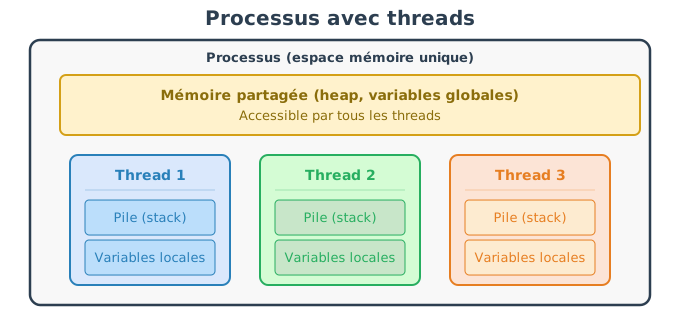
A thread (or executing thread) is an execution unit inside a process. Each thread has its own instruction pointer (it knows where it is in the code) and its own execution stack (for local variables and function calls). On the other hand, all threads of the same process share the same address space: they access the same global variables, the same heap, and the same open files.
main to the return.This architecture — shared memory with separate stacks — is both the strength and the difficulty of multithreading: it enables very fast communication between threads (since they access the same data directly), but it requires careful management of concurrent access to avoid inconsistencies.
Before C++11, the language did not offer any standard mechanism to
create threads: one had to resort to OS-specific libraries (POSIX
threads on Linux/macOS, Win32 threads on Windows), which made the code
non-portable. Since C++11, the standard library
provides std::thread (defined in
<thread>), a portable abstraction that encapsulates a
thread of execution provided by the system.
Simple example:
#include <iostream>
#include <thread>
void task() {
std::cout << "Hello depuis un thread" << std::endl;
}
int main() {
std::thread t(task); // création du thread
t.join(); // attendre la fin du thread
return 0;
}The lifecycle of a std::thread follows strict rules:
std::thread object. There is no start()
method: as soon as the object is created, the operating system launches
the execution thread.join() blocks the calling thread (here
main) until the thread t has finished its
execution. This is the most common way to wait for the end of a thread.
After a join(), the thread is considered finished and the
std::thread object no longer represents an active
thread.detach() detaches the thread from the
std::thread object: the execution thread continues in the
background autonomously, and the std::thread object can no
longer be joined. You use detach() for tasks “fire and
forget” (for example a logging thread), but it’s riskier because you
lose control over the thread’s lifetime.std::thread
object is destroyed (end of scope, function exit), you must have called
join() or detach() unconditionally. If neither
has been called, the destructor triggers std::terminate(),
which abruptly stops the entire program. This rule prevents “forgotten”
threads.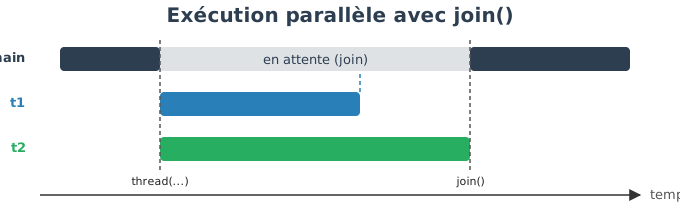
Let us now consider two threads executing a task that is observable over time.
#include <iostream>
#include <thread>
#include <chrono>
void task(int id) {
for(int i = 0; i < 5; ++i) {
std::cout << "Thread " << id << " : étape " << i << std::endl;
std::this_thread::sleep_for(std::chrono::milliseconds(100));
}
}
int main() {
std::thread t1(task, 1);
std::thread t2(task, 2);
t1.join();
t2.join();
return 0;
}(Note: std::chrono (in <chrono>)
provides types for durations and clocks,
e.g. milliseconds.)
Typical output (the exact order may vary) :
Thread 1 : étape 0
Thread 2 : étape 0
Thread 1 : étape 1
Thread 2 : étape 1
Thread 2 : étape 2
Thread 1 : étape 2
Thread 1 : étape 3
Thread 2 : étape 3
Thread 2 : étape 4
Thread 1 : étape 4What we observe:
sleep_for), the other can execute.This non-determinism is a fundamental property of multithreading: one can never presume the order of execution between two threads, unless you explicitly introduce synchronization mechanisms.
When a std::thread is created, one can pass arguments to
the function executed by the thread. The general syntax is:
std::thread t(fonction, arg1, arg2, arg3, ...);The arguments are copied into the thread’s internal storage. This is a deliberate design choice: as the thread runs asynchronously, the original variable could be destroyed or modified before the thread accesses it. The copy guarantees that the thread has its own data, independent of the calling thread.
void print(int x) {
std::cout << x << std::endl;
}
std::thread t(print, 42);
t.join();If the function expects a reference (for example to
modify a variable in the calling thread), the default copy poses a
problem: the thread would modify its local copy, not the original
variable. To force a true pass-by-reference, we use
std::ref() (defined in
<functional>) which creates a wrapper indicating
explicitly that we want to pass a reference:
#include <functional>
void increment(int& x) {
x++;
}
int main() {
int a = 5;
std::thread t(increment, std::ref(a));
t.join();
// a vaut maintenant 6
}The use of std::ref is a deliberate act : it signals to
the reader of the code that the thread will access a shared variable,
which requires ensuring that the access is properly synchronized (or, as
here, that the main thread waits for the thread to finish before reading
the variable).
In practice, we often launch a variable number of threads, which we
store in a container and then join them. The typical pattern consists of
using a std::vector<std::thread>:
#include <thread>
#include <vector>
void work(int id) {
// calcul indépendant
}
int main() {
std::vector<std::thread> threads;
for(int i = 0; i < 4; ++i)
threads.emplace_back(work, i);
for(auto& t : threads)
t.join();
}Each thread can be executed on a different physical core — it’s the
operating system that decides the assignment. The function
std::thread::hardware_concurrency() returns the number of
hardware threads available (typically the number of cores, or double if
the processor supports hyper-threading). This is a good indicator for
choosing how many threads to launch:
unsigned int n = std::thread::hardware_concurrency();
// n vaut typiquement 4, 8, 16... selon la machineA common use case is the data partitioning (data parallelism) : we divide a large array into equal portions, and each thread processes its portion. For example, to apply a transformation to an array of 1 million elements, one can launch 4 threads, each processing 250,000 elements. Since each thread works on a distinct memory region, there is no need for synchronization.
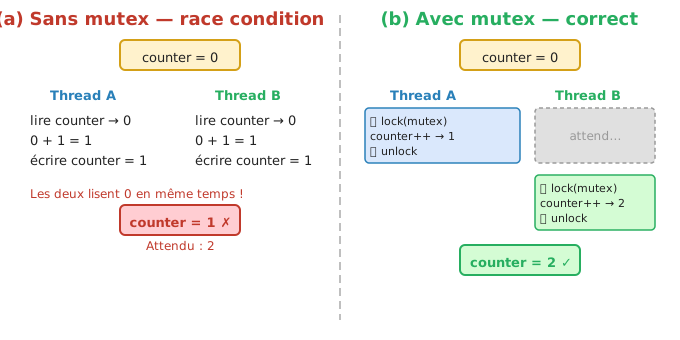
Sharing memory between threads is a double-edged sword. On one hand, it enables very efficient communication (no need to copy data between processes). On the other hand, it introduces a fundamental problem: the race conditions (race conditions).
A race condition occurs when two threads or more access the same data simultaneously, and at least one of the accesses is a write. The result then depends on the exact order of instruction execution, which is unpredictable.
Dangerous example:
int counter = 0;
void increment() {
counter++; // non atomique
}The instruction counter++ seems elementary, but it
actually decomposes into three operations at the processor level:
counter from
memory into a register.If two threads execute these three steps at the same time, an example of a problematic scenario:
Thread A: lire counter (= 0)
Thread B: lire counter (= 0) <- lit AVANT que A n'ait écrit
Thread A: incrémenter -> 1
Thread A: écrire counter = 1
Thread B: incrémenter -> 1 <- calcule à partir de l'ancienne valeur
Thread B: écrire counter = 1 <- écrase le résultat de AResult: counter is 1 instead of 2. Both increments
occurred, but one was “lost”. This type of bug is particularly insidious
because it does not manifest itself on every execution — the program can
function correctly 99 times and fail on the 100th execution, depending
on the vagaries of the scheduler.
To solve race conditions, it is necessary to guarantee that only one thread at a time accesses the shared data. The area of code in question is called a critical section: it is a portion of code that must be executed by only one thread at a time.
The basic mechanism to protect a critical section is the mutex (mutual exclusion). A mutex is a lock that threads can acquire or release:
In C++, we use std::mutex (defined in
<mutex>) :
#include <mutex>
int counter = 0;
std::mutex m;
void increment() {
std::lock_guard<std::mutex> lock(m);
counter++;
}std::lock_guard is an RAII wrapper that locks the mutex
at construction and unlocks it automatically at destruction (end of the
block {}). This guarantees that the mutex is always
released, even if an exception is raised in the critical
section. This is the recommended way to use a mutex — you never call
m.lock() / m.unlock() manually, because
forgetting to call unlock() would block all other threads
indefinitely.
A classic multithreading pitfall is the deadlock (interblocage): two threads each wait for a mutex held by the other, and neither can progress. This typically happens when a program uses several mutexes and the threads acquire them in a different order. To avoid deadlocks, a simple rule is to always acquire the mutexes in the same order throughout the program.
Mutexes are powerful but introduce an overhead: every locking/unlocking involves a system call to the operating system. For simple operations on a single variable (incrementing a counter, reading/writing a flag), this overhead is disproportionate.
C++ offers a lightweight alternative: atomic
variables (std::atomic, defined in
<atomic>). An atomic variable guarantees that any
operation on it (read, write, increment) is
indivisible: it executes entirely without another
thread being able to interrupt it. The processor provides special
hardware instructions (such as lock cmpxchg on x86) to
perform these operations in a single step.
#include <atomic>
std::atomic<int> counter(0);
void increment() {
counter++; // opération atomique, pas besoin de mutex
}With std::atomic<int>, the operation
counter++ translates into a single atomic processor
instruction that performs the read, the increment, and the write
atomically. No other thread can observe an intermediate state.
Atomic variables are faster than a mutex for elementary operations (counters, boolean flags, shared indices), because they avoid the cost of system calls. However, they are unsuitable for compound operations: if a critical section involves modifying several variables that must remain coherent with each other, a mutex remains necessary.
Multithreading is not free. Each thread has an unavoidable cost:
It is also important to understand that the sequential part of a program limits the maximal gain of parallelism. If 20% of the execution time is inherently sequential, even with an infinite number of cores, the program will never be able to go faster than 5× (Amdahl’s law). In other words, parallelizing a program that spends 90% of its time in a section protected by a mutex will hardly bring anything.
In practice, to take advantage of parallelism:
std::thread::hardware_concurrency()).
Beyond that, the threads contend for the cores and the context-switching
overhead cancels the gains.The generic programming enables writing code type-independent, while preserving the performance of compiled C++. In C++, this paradigm relies mainly on the templates, which allow defining functions and classes parameterized by types (or values). Templates are ubiquitous in the standard library (STL) and constitute a fundamental tool for writing reusable, expressive, and efficient code.
To understand why templates exist, consider a concrete problem. Suppose we want to write a function that adds two values. Without templates, we would be forced to write a version for each type:
int add(int a, int b) { return a + b; }
float add(float a, float b) { return a + b; }
double add(double a, double b) { return a + b; }These three functions have exactly the same logic — only the type changes. This code duplication is a source of bugs (if one version is corrected but not the others) and increases maintenance burden. Templates solve this problem by allowing the logic to be written once, independently of the type.
A template is a piece of code that is not directly compiled as such. It defines a pattern that the compiler uses to automatically generate a specialized version of the code each time a new type is used. One can view the template as a “mold”: the mold itself produces nothing, but it allows one to manufacture as many pieces as needed, each adapted to a particular type.
template <typename T>
T add(T a, T b) {
return a + b;
}The syntax template <typename T> introduces a
type parameter named T. This
T is a placeholder : it will be replaced by a
concrete type at the moment of its use. The keyword
typename indicates that T represents a type
(one can also write class in its place — the two are
equivalent in this context, but typename is more
explicit).
Usage :
int a = add(2, 3); // T = int
float b = add(1.5f, 2.5f); // T = floatWhen the compiler encounters add(2, 3), it deduces that
T = int and generates a function
int add(int a, int b). For add(1.5f, 2.5f), it
generates float add(float a, float b). Each generated
version is optimized native code, with no run-time
overhead compared to a manually written function for that type
— unlike dynamic polymorphism (virtual functions) which introduces an
indirection at run time.
Function templates enable writing generic algorithms without duplicating code. The compiler is responsible for verifying that the type used supports the operations required by the template.
template <typename T>
T maximum(T a, T b) {
return (a > b) ? a : b;
}This function works for any type that supports the >
operator:
maximum(3, 5); // int
maximum(2.0f, 1.5f); // floatIf the type does not support the required operator, the error is
detected at compile time. For example, calling
maximum with a structure that does not have an
> operator will cause a compiler error at the moment of
template instantiation — and not at runtime. This is an important
property: errors related to templates are compilation errors, never
runtime errors.
Templates can also be used to define classes (or
struct) generic. The principle is the same
as for functions: we parameterize the class by one or more types, and
the compiler generates a concrete version for each combination of types
used.
template <typename T>
struct Box {
T value;
explicit Box(T v) : value(v) {}
};Usage :
Box<int> a(3);
Box<float> b(2.5f);Unlike template functions (where the compiler often deduces
T automatically from the arguments), template classes
generally require you to explicitly specify the type between the angle
brackets <>. Here, Box<int> and
Box<float> are two completely distinct
types in the eyes of the compiler: they have no inheritance
relationship between them, and a variable of type
Box<int> cannot be assigned to a variable of type
Box<float>.
This is exactly the mechanism underpinning the containers of the
standard library: std::vector<int>,
std::vector<std::string>,
std::map<std::string, double> are all instantiations
of class templates.
In computer graphics, templates are widely used for:
float,
double).Example of a generic vector:
template <typename T>
struct vec3 {
T x, y, z;
vec3(T x_, T y_, T z_) : x(x_), y(y_), z(z_) {}
T norm2() const {
return x*x + y*y + z*z;
}
};Usage :
vec3<float> vf(1.0f, 2.0f, 3.0f);
vec3<double> vd(1.0, 2.0, 3.0);Template parameters are not limited to types. A template can also take constant values (integers, booleans, pointers, etc.) known at compile time. These non-type parameters allow encoding information such as a dimension, a buffer size, or a configuration flag directly into the type, with no runtime cost.
template <typename T, int N>
struct Array {
T data[N];
T& operator[](int i) { return data[i]; }
T const& operator[](int i) const { return data[i]; }
};Usage :
Array<float, 3> v; // taille connue à la compilationHere, N is not an argument passed to the constructor —
it is a type parameter itself.
Array<float, 3> and
Array<float, 4> are distinct types, and the size of
the internal array data is fixed at compile time. The
compiler can thus allocate exactly the right amount of memory on the
stack, without dynamic allocation. This is exactly the principle behind
std::array<T, N> in the standard library.
A template defines a general behavior, but there are cases where that behavior is not well-suited for certain specific types. The specialization allows providing an alternative implementation for a given type, without modifying the generic template. The compiler automatically selects the most specific available version.
template <typename T>
struct Printer {
static void print(T const& v) {
std::cout << v << std::endl;
}
};
// spécialisation pour bool
template <>
struct Printer<bool> {
static void print(bool v) {
std::cout << (v ? "true" : "false") << std::endl;
}
};When we call Printer<int>::print(5), the compiler
uses the generic version. When we call
Printer<bool>::print(true), it uses the
specialization. This choice is entirely resolved at compile time.
Specialization is a powerful mechanism that will be described in more
detail later in this chapter.
The compilation of templates in C++ follows specific rules, different from those of conventional code. Understanding these principles is essential for interpreting the compiler’s error messages and organizing one’s code correctly.
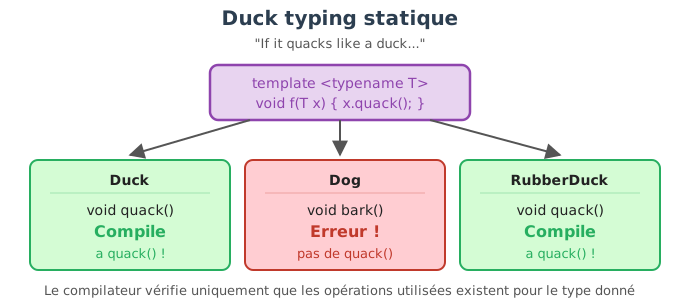
Templates rely on a principle called duck typing static.
The principle is as follows:
A type is valid if it provides all the operations used in the template.
For example:
template <typename T>
T square(T x) {
return x * x;
}This template imposes no explicit constraint on
T. However, during instantiation, the compiler requires
that the type used possess the * operator.
square(3); // OK : int supporte *
square(2.5f); // OK : float supporte *On the other hand :
struct A {};
square(A{}); // ERREUR de compilationThe error appears at the moment the template is instantiated, and not during its definition. This is a key characteristic of templates:
This mechanism explains why errors related to templates can be long and complex: the compiler tries to instantiate the code with a given type and fails when a required operation does not exist.
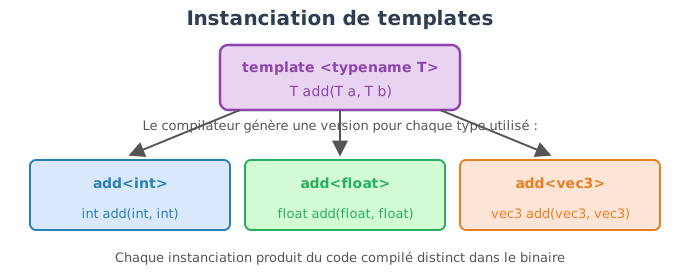
A template is not compiled until it is used. The actual compilation occurs during the instantiation, that is, when the compiler encounters a concrete use:
add<int>(2, 3);
add<float>(1.5f, 2.5f);Each instantiation generates:
Thus:
Box<int>
Box<float>are two distinct types, with no inheritance relationship between them.
For the compiler to instantiate a template, it must have access to the complete implementation of the template at compile time.
This has a major consequence for the organization of files.
.hpp)Unlike ordinary functions and classes, the body of templates must be visible wherever they are used. That is why:
.hpp),.hpp / .cpp.Correct example:
// vec.hpp
#pragma once
template <typename T>
T add(T a, T b) {
return a + b;
}// main.cpp
#include "vec.hpp"
int main() {
int a = add(2, 3);
}If the body of the template were placed in a .cpp, the
compiler would not be able to generate the specialized versions, because
the implementation would not be visible at the moment of
instantiation.
In traditional code:
.o) from a
.cpp,With templates:
The compiler cannot therefore produce in advance a single, generic version of the template. It must see at the same time:
There exist advanced techniques (explicit instantiation) that allow partial separation of the implementation, but they remain complex; in practice, the simple rule is:
All templates must be fully defined in a header file.
The static meta-programming refers to the set of
techniques that allow performing calculations at compile
time, even before the program’s execution. In C++, templates
and the expressions constexpr enable moving a portion of
the program’s logic to the compiler. The result is code that runs
faster at runtime, because some decisions and some
calculations are already resolved.
The central idea is the following:
use the compiler as a computational engine.
The values produced by metaprogramming:
The non-type template parameters (integers) are the first tool of metaprogramming.
template <int N>
int static_square()
{
return N * N;
}Usage :
int main()
{
const int a = static_square<5>(); // évalué à la compilation
float buffer[static_square<3>()]; // taille connue statiquement
std::cout << a << std::endl;
std::cout << sizeof(buffer) / sizeof(float) << std::endl;
}Here:
static_square<5>() is computed by the
compiler,constexpr
: computations evaluated by the compilerSince C++11, the keyword constexpr allows you to
explicitly request a compile-time evaluation, if the
arguments are constant.
constexpr int square(int N)
{
return N * N;
}The compiler :
Comparison with a conventional function :
int runtime_square(int N)
{
return N * N;
}Usage in a template parameter:
template <int N>
void print_value()
{
std::cout << N << std::endl;
}
int main()
{
print_value<square(5)>(); // OK : expression constante
// print_value<runtime_square(5)>(); // ERREUR : non constante
}Templates and constexpr enable writing recursive
calculations evaluated at compile time.
Example: factorial calculation.
constexpr int factorial(int N)
{
return (N <= 1) ? 1 : N * factorial(N - 1);
}Use as a template parameter:
template <typename T, int N>
struct vecN
{
T data[N];
};
int main()
{
vecN<float, factorial(4)> v;
for (int k = 0; k < factorial(4); ++k)
v.data[k] = static_cast<float>(k);
}The calculation of 4! is performed entirely at
compile time.
Before constexpr, metaprogramming relied exclusively on
recursive templates.
template <int N>
struct Factorial {
static constexpr int value = N * Factorial<N - 1>::value;
};
template <>
struct Factorial<0> {
static constexpr int value = 1;
};Usage :
int size = Factorial<5>::value; // évalué à la compilationThis technique is more complex and less readable, but it is historically important and still present in some libraries.
Static metaprogramming is used for:
if constexpr in
C++17),Example with if constexpr :
template <typename T>
void process(T v)
{
if constexpr (std::is_integral_v<T>)
std::cout << "Entier" << std::endl;
else
std::cout << "Non entier" << std::endl;
}
Note: `std::is_integral_v` est fourni par l'en-tête `<type_traits>`.The non-relevant branch is removed at compile time.
One of the major objectives of generic programming is to make code both generic and readable. In C++, the compiler is capable of automatically deducing template parameters in many cases, based on the arguments provided at the call. Understanding when this deduction works — and when it fails — is essential for writing efficient generic interfaces.
When a template is used without explicitly specifying its parameters, the compiler tries to deduce them from the types of the arguments.
template <typename T>
T add(T a, T b)
{
return a + b;
}Usage :
int a = add(2, 3); // T déduit comme int
float b = add(1.2f, 3.4f); // T déduit comme floatHere, the compiler automatically deduces T from the
arguments passed to the function.
Type deduction works only from the function parameters. It does not work from the return type.
template <typename T>
T identity();This template cannot be called without specifying
T, because the compiler has no information to deduce
it.
// identity(); // ERREUR
identity<int>(); // OKConsider a generic dot product function:
template <typename TYPE_INPUT, typename TYPE_OUTPUT, int SIZE>
TYPE_OUTPUT dot(TYPE_INPUT const& a, TYPE_INPUT const& b)
{
TYPE_OUTPUT val = 0;
for (int k = 0; k < SIZE; ++k)
val += a[k] * b[k];
return val;
}Usage :
vecN<float,3> v0, v1;
// Appel lourd et peu lisible
float p = dot<vecN<float,3>, float, 3>(v0, v1);In this case:
TYPE_INPUT, TYPE_OUTPUT and
SIZE cannot be automatically deduced,The deduction fails because:
TYPE_OUTPUT appears only in the return
type,SIZE appears only as a template
parameter, not in the function’s arguments.The compiler can deduce a template parameter only if it is directly tied to the types of the arguments.
One solution is to explicitly expose the template parameters in the generic class.
template <typename TYPE, int SIZE>
class vecN
{
public:
using value_type = TYPE;
static constexpr int size() { return SIZE; }
TYPE& operator[](int index);
TYPE const& operator[](int index) const;
private:
TYPE data[SIZE];
};We can then write a much more readable function:
template <typename V>
typename V::value_type dot(V const& a, V const& b)
{
typename V::value_type val = 0;
for (int k = 0; k < V::size(); ++k)
val += a[k] * b[k];
return val;
}Usage :
float p = dot(v0, v1); // types et taille déduits automatiquementHere:
V is deduced as vecN<float,3>,V::value_type,V::size().typenameWhen a type depends on a template parameter, it must be preceded by
typename to indicate to the compiler that it is indeed a
type.
typename V::value_typeWithout typename, the compiler cannot know whether
value_type is a type or a static value.
Templates can also use default parameters to reduce verbosity:
template <typename T, int N = 3>
struct vecN;This mechanism can simplify certain uses, but it does not replace good interface design.
auto
and C++17+Since C++17, auto can be used to deduce the return type
of a function template:
template <typename V>
auto norm2(V const& v)
{
auto val = typename V::value_type{};
for (int k = 0; k < V::size(); ++k)
val += v[k] * v[k];
return val;
}This improves readability while preserving genericity.
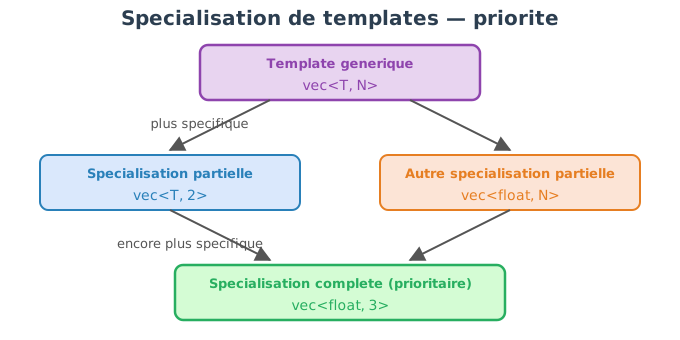
The template specialization allows adapting the behavior of a generic template to a particular case, without modifying the general implementation. It is used when, for a specific type or parameter, the default behavior is not suitable, inefficient, or incorrect.
The specialization is a compile-time mechanism, and forms an integral part of generic programming in C++.
We begin by defining a generic template (general case), then we provide a specialized implementation for a given type or value.
template <typename T>
struct Printer
{
static void print(T const& v)
{
std::cout << v << std::endl;
}
};This template works for any type compatible with
operator<<.
A complete specialization fully replaces the template’s implementation for a specific type.
template <>
struct Printer<bool>
{
static void print(bool v)
{
std::cout << (v ? "true" : "false") << std::endl;
}
};Usage :
Printer<int>::print(5); // utilise la version générique
Printer<bool>::print(true); // utilise la spécialisationThe compiler automatically selects the most specialized version available.
Function templates can also be specialized, but their use is more delicate.
template <typename T>
void display(T v)
{
std::cout << v << std::endl;
}
template <>
void display<bool>(bool v)
{
std::cout << (v ? "true" : "false") << std::endl;
}Here as well, the specialized version is used when
T = bool.
Partial specialization allows specializing a template for a family of types, but it is allowed only for class templates, not for functions.
Example: specialization based on an integer parameter.
template <typename T, int N>
struct Array
{
T data[N];
};Partial specialization for N = 0 :
template <typename T>
struct Array<T, 0>
{
// tableau vide
};Here, all types Array<T,0> use this specific
version.
Another classic example:
template <typename T>
struct is_pointer
{
static constexpr bool value = false;
};
template <typename T>
struct is_pointer<T*>
{
static constexpr bool value = true;
};Usage :
is_pointer<int>::value; // false
is_pointer<int*>::value; // trueThis type of specialization is widely used in the STL
(std::is_pointer, std::is_integral, etc.).
The full specialization consists in providing a specific implementation for a fully fixed combination of the template parameters (types and/or values). For this particular combination, the generic template is not used at all: the specialization replaces it entirely.
In the context of generic vectors, this allows, for example:
We first define a generic template for a vector of arbitrary size known at compile time.
template <typename T, int N>
struct vec
{
T data[N];
T& operator[](int i) { return data[i]; }
T const& operator[](int i) const { return data[i]; }
};This template works for any type T and
any size N.
Suppose that we want special treatment for 2D vectors, for example:
x and y,We then define a full specialization:
template <typename T>
struct vec<T, 2>
{
T x, y;
vec() : x(0), y(0) {}
vec(T x_, T y_) : x(x_), y(y_) {}
T& operator[](int i)
{
return (i == 0) ? x : y;
}
T const& operator[](int i) const
{
return (i == 0) ? x : y;
}
};Here:
vec<T,2> is a completely different
type from vec<T,N>,data[N] no longer exists,N = 2.vec<float, 3> v3;
v3[0] = 1.0f;
v3[1] = 2.0f;
v3[2] = 3.0f;
vec<float, 2> v2(1.0f, 4.0f);
std::cout << v2[0] << " " << v2[1] << std::endl;vec<float,3> uses the generic
template,vec<float,2> uses the full
specialization.The choice is made at compile time, with no runtime test.
It is also possible to specialize for a specific type and size.
template <>
struct vec<float, 3>
{
float x, y, z;
vec() : x(0.f), y(0.f), z(0.f) {}
vec(float x_, float y_, float z_) : x(x_), y(y_), z(z_) {}
float norm2() const
{
return x*x + y*y + z*z;
}
};Usage :
vec<float,3> v(1.f, 2.f, 3.f);
std::cout << v.norm2() << std::endl;Here:
vec<float,3>,vec<double,3>,
vec<float,4>, etc.) use the generic template.Total specialization All template parameters are
fixed (vec<float,3>). → a unique case, behavior
entirely redefined.
Partial specialization Only a part of the
parameters is fixed (vec<T,2>). → a family of types
sharing a specific behavior.
It is common to confuse overloading and template specialization, but they are two distinct mechanisms that come into play at different moments of compilation. Understanding their order of precedence is essential to avoid surprising behaviors.
The fundamental principle:
Overloading is resolved before template specialization.
In other words, the compiler first chooses which function to call, and only then which template version to instantiate.
When several functions share the same name, the compiler starts by applying the classical rules of overload resolution:
Example:
void display(int x)
{
std::cout << "fonction normale int\n";
}
template <typename T>
void display(T x)
{
std::cout << "template generique\n";
}Call :
display(3);Result:
fonction normale intA non-template function always takes priority over a template function if it matches exactly.
If no non-template function matches, the compiler considers the template functions and attempts to deduce the parameters.
template <typename T>
void display(T x)
{
std::cout << "template generique\n";
}
display(3.5); // T = doubleHere, the template is selected because no regular function matches.
Once a template has been chosen, the compiler checks whether there exists a more specific specialization for the deduced parameters.
template <typename T>
void display(T x)
{
std::cout << "template generique\n";
}
template <>
void display<bool>(bool x)
{
std::cout << "specialisation bool\n";
}Calls :
display(5); // template générique
display(true); // spécialisation boolResult:
template generique
specialisation boolSpecialization does not participate in overloading. It is selected after the generic template has been chosen.
Let us now consider:
template <typename T>
void display(T x)
{
std::cout << "template generique\n";
}
template <>
void display<int>(int x)
{
std::cout << "specialisation int\n";
}
void display(int x)
{
std::cout << "fonction normale int\n";
}Call :
display(3);Result :
fonction normale intExplanation : 1. the compiler sees a non-template function
display(int) → priority, 2. the template
is not even considered, 3. the template specialization is ignored.
A specialization can never beat a non-template overload.
Because:
C++ thus imposes a strict hierarchy.
Lors d’un appel de fonction :
Selection of candidate functions (name, scope).
Overload resolution :
If a template is chosen :
Instantiation of the corresponding code.
The overload selects the function. The specialization selects the template implementation.
In practice, we will use the overload to propose different interfaces, and the specialization to adapt internal behavior to a template. It is better to avoid mixing the two under the same name without a clear reason.
typedef and using)Type aliases allow giving a more readable or more expressive name to a type, often complex. They play a central role in generic programming, as they facilitate type deduction, the writing of generic functions and the readability of interfaces.
In C++, there are two equivalent mechanisms:
typedef (historical),using (modern, recommended).typedef (historical form)typedef unsigned int uint;This mechanism works, but quickly becomes difficult to read with complex types, particularly in the presence of templates.
using
(modern form)Since C++11, we prefer to use using, which is clearer
and more powerful.
using uint = unsigned int;This syntax is equivalent to typedef, but much more
readable, especially with templates.
Aliases are frequently used inside template classes to expose their internal parameters.
Example with a generic vector:
template <typename T, int N>
class vec
{
public:
using value_type = T;
static constexpr int size() { return N; }
T& operator[](int i) { return data[i]; }
T const& operator[](int i) const { return data[i]; }
private:
T data[N];
};Here:
vec<T,N>::value_type gives access to the stored
type,vec<T,N>::size() gives access to the size known
at compile time.These aliases make the class auto-descriptive and facilitate its use in generic code.
Thanks to aliases, one can write generic functions without explicitly knowing the template parameters.
template <typename V>
typename V::value_type sum(V const& v)
{
typename V::value_type s = 0;
for (int i = 0; i < V::size(); ++i)
s += v[i];
return s;
}Usage :
vec<float,3> v;
v[0] = 1.0f; v[1] = 2.0f; v[2] = 3.0f;
float s = sum(v);Here:
value_type,typename)When one accesses a dependent alias of a template parameter, it is
necessary to use the keyword typename to indicate that it
is indeed a type.
typename V::value_typeWithout typename, the compiler cannot know whether
value_type is a type or a static value.
The aliases themselves can be templates, which enables the simplification of very complex types.
template <typename T>
using vec3 = vec<T, 3>;Usage :
vec3<float> a;
vec3<double> b;Here:
vec3<float> is equivalent to
vec<float,3>,Aliases are widely used in the STL :
value_type,iterator,reference,const_reference.Adhering to these conventions helps render one’s classes compatible with generic algorithms.
Example :
template <typename Container>
void print_container(Container const& c)
{
for (typename Container::value_type const& v : c)
std::cout << v << " ";
}The Parallelism designates the ability of a program to execute several tasks simultaneously. In C++, this notion is directly related to the threads, which allow exploiting the multiple cores of modern processors. Understanding threads is essential for writing efficient programs, but also safe and correct ones.
Historically, processors had only a single core: programs executed instruction by instruction, and the only way to speed up a program was to increase the processor frequency. Since the mid-2000s, processor manufacturers have reached physical limits (thermal dissipation, power consumption) that prevent increasing the frequency indefinitely. The solution was to multiply the cores on a single chip: instead of one very fast core, there are 4, 8, 16 cores or more, capable of working in parallel. But to take advantage of it, the program must be explicitly designed to distribute its work across several execution threads.
It is important to distinguish two notions:
A multithreaded program is always concurrent, but it is truly parallel only if the machine has enough cores and the operating system distributes the threads across those cores.
An thread (or execution thread) is an execution unit inside a process. Each thread has its own instruction pointer (it knows where it is in the code) and its own execution stack (for local variables and function calls). On the other hand, all threads of the same process share the same address space: they access the same global variables, the same heap, and the same open files.
main to the return.This architecture — shared memory with separate stacks — is both the strength and the challenge of multithreading: it enables very fast communication between threads (since they access the same data directly), but it requires careful management of concurrent accesses to avoid inconsistencies.
Before C++11, the language did not offer any standard mechanism for
creating threads: one had to resort to system-specific libraries (POSIX
threads on Linux/macOS, Win32 threads on Windows), which made the code
non-portable. Since C++11, the standard library
provides std::thread (defined in
<thread>), a portable abstraction that encapsulates a
system execution thread.
Simple example:
#include <iostream>
#include <thread>
void task() {
std::cout << "Hello depuis un thread" << std::endl;
}
int main() {
std::thread t(task); // création du thread
t.join(); // attendre la fin du thread
return 0;
}The lifecycle of a std::thread follows strict rules:
std::thread object. There is no start()
method: as soon as the object is created, the operating system launches
the execution thread.join() blocks the calling thread (here
main) until the thread t has finished its
execution. This is the most common way to wait for the end of a thread.
After a join(), the thread is considered finished and the
std::thread object no longer represents an active
thread.detach() detaches the thread from the
std::thread object: the execution thread continues in the
background autonomously, and the std::thread object can no
longer be joined. We use detach() for tasks “fire and
forget” (for example a logging thread), but it is riskier because we
lose control over the thread’s lifetime.std::thread
object is destroyed (scope exit, function exit), you must have called
join() or detach(). If neither has been
called, the destructor triggers std::terminate(), which
abruptly stops the entire program. This rule prevents “forgotten”
threads.
Let us now consider two threads executing a task observable over time.
#include <iostream>
#include <thread>
#include <chrono>
void task(int id) {
for(int i = 0; i < 5; ++i) {
std::cout << "Thread " << id << " : étape " << i << std::endl;
std::this_thread::sleep_for(std::chrono::milliseconds(100));
}
}
int main() {
std::thread t1(task, 1);
std::thread t2(task, 2);
t1.join();
t2.join();
return 0;
}(Note: std::chrono (in <chrono>)
provides types for durations and clocks,
e.g. milliseconds.)
Typical output (the exact order may vary):
Thread 1 : étape 0
Thread 2 : étape 0
Thread 1 : étape 1
Thread 2 : étape 1
Thread 2 : étape 2
Thread 1 : étape 2
Thread 1 : étape 3
Thread 2 : étape 3
Thread 2 : étape 4
Thread 1 : étape 4What we observe:
sleep_for), the other can execute.This nondeterminism is a fundamental property of multithreading: one can never assume the order of execution between two threads, unless explicit synchronization mechanisms are introduced.
When creating a std::thread, one can pass arguments to
the function executed by the thread. The general syntax is:
std::thread t(fonction, arg1, arg2, arg3, ...);The arguments are copied into the thread’s internal storage. This is a deliberate design choice: as the thread runs asynchronously, the original variable could be destroyed or modified before the thread accesses it. The copy ensures that the thread has its own data, independent of the calling thread.
void print(int x) {
std::cout << x << std::endl;
}
std::thread t(print, 42);
t.join();If the function expects a reference (for example to
modify a variable from the calling thread), the default copying poses a
problem: the thread would modify its local copy, not the original
variable. To force a true pass-by-reference, one uses
std::ref() (defined in
<functional>) which creates a wrapper that explicitly
indicates that one wants to pass a reference:
#include <functional>
void increment(int& x) {
x++;
}
int main() {
int a = 5;
std::thread t(increment, std::ref(a));
t.join();
// a vaut maintenant 6
}The use of std::ref is a deliberate act: it signals to
the code reader that the thread will access a shared variable, which
requires ensuring that the access is properly synchronized (or, as here,
that the main thread waits for the end of the thread before reading the
variable).
In practice, we often launch a variable number of threads, which we
store in a container to join them afterwards. The typical pattern is to
use a std::vector<std::thread> :
#include <thread>
#include <vector>
void work(int id) {
// calcul indépendant
}
int main() {
std::vector<std::thread> threads;
for(int i = 0; i < 4; ++i)
threads.emplace_back(work, i);
for(auto& t : threads)
t.join();
}Each thread can be executed on a different physical core — it is the
operating system that decides the assignment. The function
std::thread::hardware_concurrency() returns the number of
available hardware threads (typically the number of cores, or double it
if the processor supports hyper-threading). It is a good indicator for
choosing how many threads to launch:
unsigned int n = std::thread::hardware_concurrency();
// n vaut typiquement 4, 8, 16... selon la machineA common use case is the data partitioning (data parallelism): we divide a large array into equal portions, and each thread processes its portion. For example, to apply a transformation to an array of 1 million elements, one can launch 4 threads, each handling 250,000 elements. Since each thread works on a distinct memory region, there is no need for synchronization.
Shared memory between threads is a double-edged sword. On one hand, it enables very efficient communication (no need to copy data between processes). On the other hand, it introduces a fundamental problem: race conditions (race conditions).
A race condition occurs when two or more threads access the same data simultaneously, and at least one of the accesses is a write. The result then depends on the exact order of instruction execution, which is unpredictable.
Dangerous example:
int counter = 0;
void increment() {
counter++; // non atomique
}The instruction counter++ seems elementary, but it
actually decomposes into three operations at the processor level:
counter from
memory into a register.If two threads execute these three steps at the same time, an example of a problematic scenario:
Thread A: lire counter (= 0)
Thread B: lire counter (= 0) <- lit AVANT que A n'ait écrit
Thread A: incrémenter -> 1
Thread A: écrire counter = 1
Thread B: incrémenter -> 1 <- calcule à partir de l'ancienne valeur
Thread B: écrire counter = 1 <- écrase le résultat de AResult: counter is 1 instead of 2. Both increments
occurred, but one was “lost.” This type of bug is particularly insidious
because it does not manifest on every run — the program can work
correctly 99 times and fail on the 100th, depending on the vagaries of
scheduling.
To resolve race conditions, it must be guaranteed that a single thread at a time accesses the shared data. The region of code in question is called a critical section: it is a portion of code that must be executed by one thread at a time.
The basic mechanism to protect a critical section is the mutex (mutual exclusion). A mutex is a lock that threads can acquire or release:
In C++, we use std::mutex (defined in
<mutex>):
#include <mutex>
int counter = 0;
std::mutex m;
void increment() {
std::lock_guard<std::mutex> lock(m);
counter++;
}std::lock_guard is an RAII wrapper that locks the mutex
on construction and automatically unlocks it on destruction (end of the
{} block). This guarantees that the mutex is always
released, even if an exception is thrown in the critical
section. This is the recommended way to use a mutex — you never call
m.lock() / m.unlock() manually, because
forgetting to call unlock() would block all other threads
indefinitely.
A classic pitfall of multithreading is the deadlock (interlock): two threads each wait for a mutex held by the other, and neither can progress. This typically happens when a program uses several mutexes and the threads acquire them in different orders. To avoid deadlocks, a simple rule is to always acquire the mutexes in the same order throughout the program.
Mutexes are powerful but introduce an overhead: each locking/unlocking involves a system call. For simple operations on a single variable (incrementing a counter, read/write a flag), this overhead is disproportionate.
C++ offers a lightweight alternative: atomic
variables (std::atomic, defined in
<atomic>). An atomic variable guarantees that any
operation on it (read, write, increment) is
indivisible: it executes entirely without another
thread being able to interrupt it. The processor provides special
hardware instructions (such as lock cmpxchg on x86) to
perform these operations in a single step.
#include <atomic>
std::atomic<int> counter(0);
void increment() {
counter++; // opération atomique, pas besoin de mutex
}With std::atomic<int>, the operation
counter++ translates into a single atomic processor
instruction that performs the read, the increment, and the write in an
indivisible manner. No other thread can observe an intermediate
state.
Atomic variables are faster than a mutex for elementary operations (counters, boolean flags, shared indices), because they avoid the cost of system calls. By contrast, they are unsuited for compound operations: if a critical section involves modifying several variables that must remain coherent with each other, a mutex remains necessary.
Multithreading is not free. Each thread has an inescapable cost:
It is also important to understand that the sequential portion of a program limits the maximal gain from parallelism. If 20% of the execution time is incompressibly sequential, even with an infinite number of cores, the program will never go faster than 5× (Amdahl’s law). In other words, parallelizing a program that spends 90% of its time in a section protected by a mutex will hardly bring anything.
In practice, to take advantage of parallelism:
std::thread::hardware_concurrency()).
Beyond that, threads compete for the cores and the overhead of context
switching cancels the gains.This chapter presents the fundamental methodological principles enabling the production of C++ code:
while respecting the performance and low-level constraints inherent to the language.
These principles apply just as well to small programs as to complex projects (simulation, graphics engine, parallel computing).
Code quality is not measured by perceived elegance, but by practical criteria:
Note that when working in a team, code readability should be the priority. Readable code:
In most cases, one should prioritize readability and simplicity over premature micro-optimizations. Efficiency can be pursued later, in a targeted and measured way, when a performance bottleneck is evident.
Best practices for readability: explicit names, short functions, comments when the code is not self-documenting, consistent formatting, and systematic code reviews.
Simple code is more reliable than complex code. Complexity is the main source of bugs in software: every level of indirection, every additional abstraction, every added edge case increases the number of possible execution paths and makes reasoning more difficult.
In C++, the temptation toward complexity is particularly strong: the language offers variadic templates, metaprogramming, SFINAE, concepts, multiple inheritance… These tools are powerful, but their premature use often yields code that only the author understands — and sometimes even more after a few weeks.
Concretely, KISS translates to:
Example (KISS):
// Version condensée et moins lisible : logique imbriquée, calcul d'index
// difficile à suivre, tout est condensé sur quelques lignes.
int count_neighbors_ugly(const std::vector<int>& grid, size_t w, size_t h,
size_t x, size_t y)
{
int c = 0;
// balayer un rectangle 3x3 centré sur (x,y) en jouant sur les bornes
size_t start = (y ? y - 1 : 0) * w + (x ? x - 1 : 0);
size_t end_y = (y + 1 < h ? y + 1 : h - 1);
size_t end_x = (x + 1 < w ? x + 1 : w - 1);
for (size_t idx = start;; ++idx) {
size_t cx = idx % w;
size_t cy = idx / w;
if (!(cx == x && cy == y)) c += grid[idx];
if (cy == end_y && cx == end_x) break; // logique subtle
}
return c;
}
// Version claire et simple : fonctions auxiliaires et boucles explicites
inline bool in_bounds(size_t x, size_t y, size_t w, size_t h) { return x < w && y < h; }
inline int at(const std::vector<int>& g, size_t w, size_t x, size_t y) { return g[y * w + x]; }
int count_neighbors(const std::vector<int>& grid, size_t w, size_t h,
size_t x, size_t y)
{
int c = 0;
size_t y0 = (y > 0) ? y - 1 : 0;
size_t y1 = (y + 1 < h) ? y + 1 : h - 1;
size_t x0 = (x > 0) ? x - 1 : 0;
size_t x1 = (x + 1 < w) ? x + 1 : w - 1;
for (size_t yy = y0; yy <= y1; ++yy) {
for (size_t xx = x0; xx <= x1; ++xx) {
if (xx == x && yy == y) continue; // ignorer la cellule centrale
c += at(grid, w, xx, yy);
}
}
return c;
}A piece of logic should exist in only one place. If the same operation is duplicated in two places of the code, any correction or evolution must be applied twice — and forgetting one of the two copies is a classic source of bugs. The larger the project grows, the more costly duplication becomes.
In C++, templates and generic functions are the natural tools for factoring out duplicated code. However, DRY should not be applied blindly: eliminating all duplication can lead to artificial abstractions that make the code harder to understand. Two blocks of code that look similar today may evolve in different directions tomorrow. A local and simple duplication (2-3 lines) is sometimes preferable to a complex generalization that couples parts of the code that have no reason to exist.
Example (DRY) :
// Duplication (moins bon) : deux fonctions très similaires
double average_int(const std::vector<int>& v) {
if (v.empty()) return 0.0;
long sum = 0;
for (int x : v) sum += x;
return double(sum) / v.size();
}
double average_double(const std::vector<double>& v) {
if (v.empty()) return 0.0;
double sum = 0;
for (double x : v) sum += x;
return sum / v.size();
}
// Refactorisation (DRY) : une implémentation générique évite la duplication
template<typename T>
double average(const std::vector<T>& v) {
if (v.empty()) return 0.0;
long double sum = 0;
for (T x : v) sum += x;
return double(sum / v.size());
}
// Usage :
// std::vector<int> vi = {1,2,3};
// std::vector<double> vd = {1.0,2.0,3.0};
// double a1 = average(vi); // fonctionne pour int
// double a2 = average(vd); // fonctionne pour doubleDo not implement features “just in case” if they are not needed today. Each prematurely added feature carries a cost: code to maintain, tests to write, complexity to understand, and often a heavier API for all users — including those who will never use this feature.
In practice, developers frequently overestimate future needs. A 3D vector generally does not need to be generalized into an N-dimensional vector from the outset. A file parser does not need to support 5 formats if only one is used. The right approach is to start with the simplest implementation that meets the current need, then generalize when the need actually arises — not before.
This principle is particularly important in C++, where templates, generics and metaprogramming make it very easy to construct sophisticated abstraction layers before even having a concrete use case.
Example (YAGNI):
// Prématurément généralisé (YAGNI)
template <typename T = float, int N = 3>
struct vec { T data[N]; };
// Version simple et suffisante pour l'usage courant
struct vec3 { float x, y, z; };A robust program does not simply “work in normal cases” : it explicitly expresses its assumptions and verifies that they are satisfied.
These hypotheses constitute what is called the code’s contract.
Lorsqu’une fonction est appelée, deux points de vue existent :
If these rules are implicit or only “in the developer’s head,” the code becomes fragile :
The contract makes it possible to formalize these rules. The set of these rules is what is called design by contract.
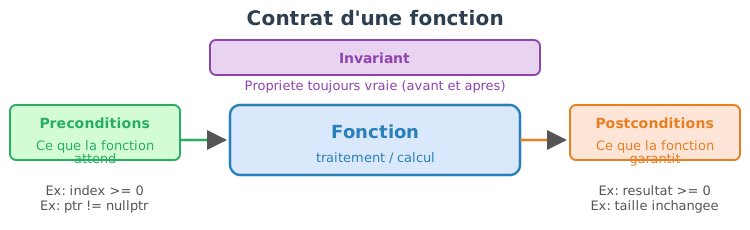
We distinguish three types of complementary rules.
A precondition is a condition that must be true before the call of a function.
Examples:
A postcondition is a condition that must be true after the execution of the function.
Examples:
An invariant is a property that must be always true for a valid object.
Examples:
Before we look at C++, here is a conceptual view of the contract of a stack.
Entité : Pile (Stack)
Invariant :
0 <= size <= capacity
Constructeur(capacity):
établit l'invariant
size := 0
capacity := capacity
push(value):
précondition : size < capacity
postcondition : top == value, size augmenté de 1
pop():
précondition : size > 0
postcondition : size diminué de 1The invariant must be true after every public call, regardless of the sequence of operations.
assert)The assertions allow you to verify these rules during runtime, primarily in the development phase.
In C++, we use assert to detect programming
errors.
#include <cassert>
float safe_div(float a, float b)
{
assert(b != 0.0f && "Division par zero");
return a / b;
}Here:
b != 0.0f is a precondition,assert?Assertions allow you to:
They are therefore a development tool, not a mechanism for handling user errors.
assertuse assert for programming errors.
The asserts are theoretically “useless” for the proper
functioning of the program; they serve only to facilitate programming by
detecting unexpected/unplanned cases that should never occur.
do not use assert for :
never write side effects :
assert(++i < 10); // interdit
// Ici la valeur de i est modifié après l'exécution de assert.
// Lors d'une compilation en mode "release", l'assertion n'est pas exécuté, et la valeur de i sera différente dans le programme.provide an explicit message:
assert(ptr && "ptr ne doit pas être nul");assert statements are
activeNDEBUG)Note: The program must never depend on assertions to function correctly.
static_assert)Some rules can be verified even before execution, at compile time.
That is the role of static_assert.
#include <type_traits>
template <typename T>
T square(T x)
{
static_assert(std::is_arithmetic_v<T>,
"square attend un type arithmetique");
return x * x;
}Here:
static_assert ?General rule : prefer compile-time checks when possible.
#include <cassert>
#include <vector>
struct Stack {
std::vector<int> data;
size_t capacity;
// Invariant :
// 0 <= data.size() <= capacity
explicit Stack(size_t cap) : capacity(cap)
{
assert(capacity > 0 && "capacity doit être positive");
}
void push(int v)
{
// précondition
assert(data.size() < capacity && "push: pile pleine");
data.push_back(v);
// postcondition
assert(data.back() == v && "push: sommet incorrect");
}
int pop()
{
// précondition
assert(!data.empty() && "pop: pile vide");
int v = data.back();
data.pop_back();
// invariant toujours valide
assert(data.size() <= capacity && "invariant violé");
return v;
}
};A contract describes what the code expects and guarantees.
The preconditions are the responsibility of the caller.
The postconditions are the responsibility of the function.
The invariants define the valid states of an object.
assert checks the contract at runtime
(debug).
static_assert checks the contract at compile
time.
Used correctly, they make the code:
The function assert remains fairly limited in terms of
functionality. Alternative tools can help express and verify contracts
in a more readable, safer, and maintainable way for large-scale
code:
Expects() / Ensures() (macros or functions) to
document pre/postconditions, as well as not_null<T>
and span<T> for safe pointers and views.tl::expected / Outcome or
std::expected when available to explicitly represent
recoverable errors instead of exceptions or magic codes.static_assert /
constexpr : move the checks to compile time when
possible (templates, type constraints), reducing the need for runtime
assertions.Boost.Contract
and other frameworks offer richer require/ensure/invariant annotations
(activatable/deactivatable contracts, centralized diagnostics).Expects(condition) to standardize messages and
enable different behaviors depending on configuration (throw, abort,
log).A program may seem correct on a few simple examples, yet be wrong in
edge cases or after a subsequent modification.
The tests allow automatically verifying that the code
respects its expected behavior, and above all that this behavior
remains correct over time.
Testing does not consist in proving that the program is perfect, but in reducing the risk of error and in detecting problems as early as possible.
Without tests, the only way to verify that a program works is to run it manually and observe the results. This approach does not scale: as soon as the project grows beyond a few hundred lines, it becomes impossible to manually verify all cases after every modification. Automated tests solve this problem by codifying the verifications once and for all.
Tests enable the following:
In a real project, tests are often run automatically at every change via a system of continuous integration (CI): at every commit, a server compiles the code and runs the entire test suite. If a test fails, the developer is immediately notified.
A good test is:
A unit test verifies a function or a class in isolation.
They are fast and very precise.
They are ideal for testing: - mathematical functions, - algorithms, -
data structures.
An integration test checks the interaction between several components:
They are slower but closer to real-world behavior.
A non-regression test is added after a bug fix.
These tests are extremely valuable in the long term.
A readable test generally follows the following structure:
Example:
// Arrange
float x = -1.0f;
// Act
float y = clamp(x, 0.0f, 1.0f);
// Assert
assert(y == 0.0f);Cette structure améliore la lisibilité et la maintenance des tests.
Pour une fonction donnée, il est recommandé de tester :
Tester uniquement le cas nominal est rarement suffisant.
On peut écrire des tests avec assert, mais il est
souvent utile d’avoir des messages plus explicites, notamment pour les
flottants.
#include <iostream>
#include <cmath>
#include <cstdlib>
inline void check(bool cond, const char* msg)
{
if (!cond) {
std::cerr << "[TEST FAILED] " << msg << std::endl;
std::exit(1);
}
}
inline void check_near(float a, float b, float eps, const char* msg)
{
if (std::abs(a - b) > eps) {
std::cerr << "[TEST FAILED] " << msg
<< " (a=" << a << ", b=" << b << ")" << std::endl;
std::exit(1);
}
}clampThe function clamp(x, a, b) :
a if x < a,b if x > b,x otherwise.Precondition: a <= b.
#include <cassert>
float clamp(float x, float a, float b);
int main()
{
// cas nominal
assert(clamp(0.5f, 0.0f, 1.0f) == 0.5f);
// cas limites
assert(clamp(0.0f, 0.0f, 1.0f) == 0.0f);
assert(clamp(1.0f, 0.0f, 1.0f) == 1.0f);
// saturation
assert(clamp(-1.0f, 0.0f, 1.0f) == 0.0f);
assert(clamp( 2.0f, 0.0f, 1.0f) == 1.0f);
// violation de précondition (doit échouer en debug)
// clamp(0.0f, 1.0f, 0.0f);
}Implementation :
#include <cassert>
float clamp(float x, float a, float b)
{
assert(a <= b && "clamp: intervalle invalide");
if (x < a) return a;
if (x > b) return b;
return x;
}The precondition here falls under the contract: its violation is a programming error.
TDD is a methodology in which the code is written in response to tests. It reverses the usual order: instead of writing the code and then testing it, we first write the test that describes the expected behavior, and then write the minimal code that satisfies this test.
This inversion has a profound effect on design: it forces you to think about the interface (how the function will be called, which parameters, and which results) before thinking about the implementation. The result is generally code that is more modular, more testable, and simpler.
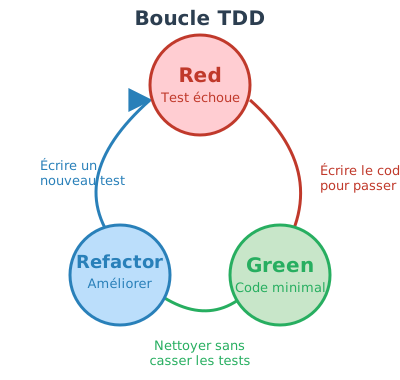
Test-Driven Development (TDD) is organized into short, iterative cycles:
Each cycle adds a small increment of functionality. A typical cycle lasts between 2 and 10 minutes. On a real project, dozens of cycles follow one another to gradually build a complete feature.
TDD:
TDD is not suitable for all situations. It is particularly effective for algorithmic code or well-defined APIs. It is less natural for exploratory code (prototyping) or heavily dependent on external resources (GPU, network, graphical interfaces).
v is non-zero, normalize(v) returns a
vector of norm 1,norm(v) > 0.#include <cassert>
#include <cmath>
struct vec3 { float x, y, z; };
float norm(vec3 const& v)
{
return std::sqrt(v.x*v.x + v.y*v.y + v.z*v.z);
}
vec3 normalize(vec3 const& v);
int main()
{
vec3 v{3.0f, 0.0f, 4.0f};
vec3 u = normalize(v);
assert(std::abs(norm(u) - 1.0f) < 1e-6f);
float dot = v.x*u.x + v.y*u.y + v.z*u.z;
assert(dot > 0.0f);
}#include <cassert>
#include <cmath>
vec3 normalize(vec3 const& v)
{
float n = norm(v);
assert(n > 0.0f && "normalize: vecteur nul");
return {v.x / n, v.y / n, v.z / n};
}Next, one can:
norm2,Tests constitute an automatic verification of a function’s contract. TDD provides a simple methodology for writing code:
define the behavior -> verify it automatically -> improve the implementation with confidence.
Used correctly, tests make the code more reliable, more readable and easier to evolve.
Testing only valid cases is insufficient: robust code must also correctly detect invalid usages. It is therefore essential to write tests that verify that:
These negative tests help ensure that the code contract is truly respected, and not only in ideal cases. They are particularly important during refactorings: an internal change should never turn a detected error into silent behavior.
According to the chosen error handling policy, a test can verify :
In practice, testing invalid cases is often as important as testing valid cases, because it is precisely in these situations that the most costly bugs appear.
assertWe revisit the function normalize(v) discussed earlier.
Its precondition is that the vector is not the zero
vector.
vec3 normalize(vec3 const& v)
{
float n = norm(v);
assert(n > 0.0f && "normalize: vecteur nul");
return {v.x / n, v.y / n, v.z / n};
}It is important to verify that this precondition is indeed detected.
// Test négatif : violation de précondition (doit échouer en debug)
int main()
{
vec3 zero{0.0f, 0.0f, 0.0f};
// Ce test n'est pas destiné à "passer" :
// en mode debug, l'assertion doit se déclencher.
// normalize(zero);
}Note :
If one wishes to handle invalid inputs without causing the program to fail, one can use a result type.
#include <optional>
std::optional<vec3> normalize_safe(vec3 const& v)
{
float n = norm(v);
if (n <= 0.0f)
return std::nullopt;
return vec3{v.x / n, v.y / n, v.z / n};
}Corresponding test:
#include <cassert>
int main()
{
vec3 zero{0.0f, 0.0f, 0.0f};
auto r = normalize_safe(zero);
assert(!r.has_value()); // le cas invalide est bien détecté
}Here, the test explicitly verifies that:
The creation of exhaustive tests is often a task repetitive and time-consuming. For a function or a non-trivial API, one generally needs to cover:
Moreover, when the code evolves (refactoring, API change, addition of parameters), tests must be updated in order to remain consistent with the new contract. This maintenance phase can represent a significant share of development time.
In this context, AI-assisted code generation tools can be used to accelerate and facilitate the setup of test suites. They are particularly useful for:
A robust program does not merely detect errors: it must classify them, report them correctly, and allow the caller to respond in an appropriate manner.
Error handling is an integral part of the design of the code and of its API.
In a C++ program, an unhandled error can have serious consequences: an invalid memory access can silently corrupt data, a buffer overflow can overwrite neighboring variables, and undefined behavior can produce different results depending on the compiler’s optimization level.
Unlike languages with a garbage collector and automatic checks, C++ does not protect the developer by default.
Without a clear error-handling strategy, we get:
Good error handling helps make failures visible and understandable, to separate the normal code path from the error-handling code, to explicitly test invalid behaviors, and to strengthen the contract between the caller and the function.
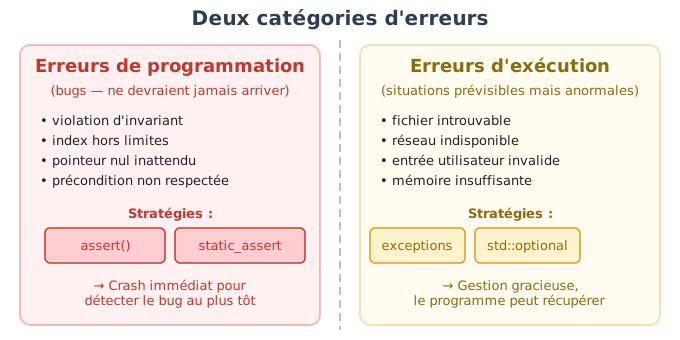
The first step is to distinguish the nature of the error.
These are situations that should never happen if the code is used correctly.
Examples:
These errors indicate a bug.
Recommended handling:
assert,static_assert,assert(index < data.size() && "index hors limites");These errors are generally not recoverable.
These are predictable situations, even if the code is correct.
Examples :
These errors must be reported to the caller.
Recommended handling :
optional, expected,
Result).The choice of a strategy depends on:
Exceptions allow you to clearly separate the normal code from
the error-handling code. The principle is that normal code is
written as if no error could occur, and errors are handled in separate
catch blocks. If an error occurs in a deeply nested
function, the exception automatically propagates up the call stack to an
appropriate catch, without each intermediate function
needing to propagate the error explicitly.
float parse_float(std::string const& s)
{
return std::stof(s); // peut lever std::invalid_argument ou std::out_of_range
}
// Utilisation :
try {
float val = parse_float(user_input);
process(val);
} catch (std::invalid_argument const& e) {
std::cerr << "Entrée invalide : " << e.what() << std::endl;
}Advantages :
if (error) checks on every
line,Disadvantages :
To be used with discipline: document the exceptions raised, and never use exceptions for normal control flow.
This is the C heritage approach, still widely used in system APIs and low-level libraries. The function returns a value indicating success or failure, and the result is passed via an output parameter.
bool read_file(std::string const& name, Data& out);
// Utilisation :
Data d;
if (!read_file("config.txt", d)) {
std::cerr << "Erreur de lecture" << std::endl;
return;
}Advantages :
Disadvantages :
[[nodiscard]]),bool does not say why the
operation failed.optional, expected, Result)A modern and expressive approach.
std::optional<float> parse_float_safe(std::string const& s);Or with error information :
std::expected<float, ParseError> parse_float(std::string const& s);Avantages :
Often the best compromise for modern APIs.
#include <fstream>
#include <optional>
#include <string>
#include <vector>
struct ReadError {
enum class Code { FileNotFound, ParseError };
Code code;
std::string message;
int line = -1;
};
template <typename T>
struct Result {
std::optional<T> value;
std::optional<ReadError> error;
static Result ok(T v) { return {std::move(v), std::nullopt}; }
static Result fail(ReadError e) { return {std::nullopt, std::move(e)}; }
};Reading a file containing a floating-point number per line:
Result<std::vector<float>> read_floats(std::string const& filename)
{
std::ifstream file(filename);
if (!file.is_open()) {
return Result<std::vector<float>>::fail(
{ReadError::Code::FileNotFound, "Impossible d'ouvrir le fichier"});
}
std::vector<float> values;
std::string line;
int line_id = 0;
while (std::getline(file, line)) {
++line_id;
try {
values.push_back(std::stof(line));
} catch (...) {
return Result<std::vector<float>>::fail(
{ReadError::Code::ParseError, "Erreur de parsing", line_id});
}
}
return Result<std::vector<float>>::ok(std::move(values));
}Minimal test :
auto r = read_floats("data.txt");
assert(r.value.has_value() || r.error.has_value());An API (Application Programming Interface) is the communication interface between a piece of code and its users (other functions, other modules, or other developers). It describes how to use the code, which operations are available, which parameters are expected, and which results or errors can be produced.
In C++, an API most often corresponds to the
set of declarations visible in header files
(.hpp).
These files describe what the code allows you to do,
without exposing how it does it.
Concretely, a C++ API consists of: - functions and their signatures, - classes and their public methods, - types (structures, enumerations, aliases), - exposed constants and namespaces.
The API user only needs to read the header files to understand: - how to call a function, - which parameters to provide, - which values or errors to expect, - and what rules (preconditions) must be respected.
The source files (.cpp) contain the internal
implementation and can evolve freely as long as the API, defined by the
headers, remains unchanged.
Thus, in C++, designing a good API essentially comes down to
designing good header files: clear, coherent, and hard to
misuse.
A well-designed API must be:
An API should clearly indicate how errors are signaled.
float normalize(vec3 const& v); // que se passe-t-il si v est nul ?Here:
std::optional<vec3> normalize(vec3 const& v);Usage :
auto r = normalize(v);
if (!r) {
// cas invalide : v est nul
}The error is part of the API : it cannot be accidentally ignored.
vec3 normalize(vec3 const& v); // précondition : norm(v) > 0Here:
assert.Choose explicitly whether the error is recoverable or not.
Types should carry meaning, not just values.
void load(int mode); // que signifie mode ?The API allows invalid values (mode = 42).
enum class LoadMode { Fast, Safe };
void load(LoadMode mode);Usage :
load(LoadMode::Fast);Advantages :
void draw(bool wireframe); // que signifie true ?Best design :
enum class RenderMode { Solid, Wireframe };
void draw(RenderMode mode);A good API makes invalid states impossible or difficult to represent.
struct Image {
unsigned char* data;
int width;
int height;
};Here, nothing prevents:
data == nullptr,width <= 0,class Image {
public:
Image(int w, int h)
: width(w), height(h), data(w*h*4)
{
assert(w > 0 && h > 0);
}
unsigned char* pixels() { return data.data(); }
private:
int width, height;
std::vector<unsigned char> data;
};Advantages :
The API should expose what the code does, not how it does it.
.hpp) :
interface// image.hpp
class Image {
public:
Image(int w, int h);
void clear();
void save(const std::string& filename) const;
};.cpp) :
implementation// image.cpp
#include "image.hpp"
void Image::clear()
{
// détails internes invisibles pour l'utilisateur
}Advantages:
A function should not modify global states in an unexpected way.
void render()
{
global_state.counter++; // effet de bord caché
}void render(RenderContext& ctx)
{
ctx.counter++;
}Dependencies are explicit and testable.
bool, undocumented
ints),A good API prevents errors before the program runs.
It guides the user toward proper usage, makes errors explicit, and facilitates testing, maintenance, and evolution of the code.
Generic programming allows writing code that is type-independent, while preserving the performance of compiled C++. In C++, this paradigm relies mainly on templates, which allow defining functions and classes parameterized by types (or values). The standard library (STL) is ubiquitous in the Standard Library (STL) and constitutes a fundamental tool for writing reusable, expressive, and efficient code.
To understand why templates exist, consider a concrete problem. Imagine we want to write a function that adds two values. Without templates, we would be forced to write a version for each type:
int add(int a, int b) { return a + b; }
float add(float a, float b) { return a + b; }
double add(double a, double b) { return a + b; }These three functions have exactly the same logic — only the type changes. This code duplication is a source of bugs (if we fix one version but not the others) and makes maintenance more burdensome. Templates solve this problem by allowing the logic once to be written, independently of the type.
An template is a code template that is not directly compiled as such. It defines a pattern that the compiler uses to generate automatically a specialized version of the code whenever a new type is used. The template can be seen as a “mold”: the mold itself produces nothing, but it allows one to manufacture as many parts as necessary, each adapted to a particular type.
template <typename T>
T add(T a, T b) {
return a + b;
}The syntax template <typename T> introduces a
type parameter named T. This
T is a placeholder: it will be replaced by a
concrete type at the moment of use. The keyword typename
indicates that T represents a type (one can also write
class in its place — the two are equivalent in this
context, but typename is more explicit).
Usage:
int a = add(2, 3); // T = int
float b = add(1.5f, 2.5f); // T = floatWhen the compiler encounters add(2, 3), it deduces that
T = int and generates a function
int add(int a, int b). For add(1.5f, 2.5f), it
generates float add(float a, float b). Each generated
version is optimized native code, no runtime overhead at
all compared to a function manually written for that type —
unlike dynamic polymorphism (virtual functions) which introduces an
indirection at runtime.
Function templates allow writing generic algorithms without duplicating code. The compiler checks that the type used supports the operations required by the template.
template <typename T>
T maximum(T a, T b) {
return (a > b) ? a : b;
}This function works for any type that supports the >
operator:
maximum(3, 5); // int
maximum(2.0f, 1.5f); // floatIf the type does not support the required operator, the error is
detected at compile time. For example, calling
maximum with a structure that does not have an
> operator will trigger a compiler error at the moment
of template instantiation — and not at runtime. This is an important
property: template-related errors are compilation errors, never runtime
errors.
Templates can also be used to define classes (or
struct) generic. The principle is the same
as for functions: the class is parameterized by one or more types, and
the compiler generates a concrete version for each combination of types
used.
template <typename T>
struct Box {
T value;
explicit Box(T v) : value(v) {}
};Usage :
Box<int> a(3);
Box<float> b(2.5f);Unlike template functions (where the compiler often deduces
T automatically from the arguments), template classes
generally require you to explicitly specify the type between angle
brackets <>. Here, Box<int> and
Box<float> are two completely distinct
types in the eyes of the compiler: they have no inheritance
relationship between them, and a variable of type
Box<int> cannot be assigned to a variable of type
Box<float>.
That is exactly the mechanism underpinning the containers of the
standard library: std::vector<int>,
std::vector<std::string>,
std::map<std::string, double> are all instantiations
of class templates.
In computer graphics, templates are widely used for:
float,
double).Example of a generic vector:
template <typename T>
struct vec3 {
T x, y, z;
vec3(T x_, T y_, T z_) : x(x_), y(y_), z(z_) {}
T norm2() const {
return x*x + y*y + z*z;
}
};Usage:
vec3<float> vf(1.0f, 2.0f, 3.0f);
vec3<double> vd(1.0, 2.0, 3.0);Template parameters are not limited to types. A template can also take constant values (integers, booleans, pointers, etc.) known at compile time. These untyped parameters allow encoding information such as a dimension, a buffer size, or a configuration flag directly into the type, without runtime cost.
template <typename T, int N>
struct Array {
T data[N];
T& operator[](int i) { return data[i]; }
T const& operator[](int i) const { return data[i]; }
};Usage :
Array<float, 3> v; // taille connue à la compilationHere, N is not an argument passed to the constructor —
it’s the parameter of the type itself.
Array<float, 3> and
Array<float, 4> are distinct types, and the size of
the internal array data is fixed at compile time. The
compiler can thus allocate exactly the right amount of memory on the
stack, without dynamic allocation. That is exactly the principle behind
std::array<T, N> of the standard library.
A template defines a general behavior, but it happens that this behavior is not suitable for certain specific types. The specialization allows providing an alternative implementation for a given type, without modifying the generic template. The compiler automatically selects the most specific available version.
template <typename T>
struct Printer {
static void print(T const& v) {
std::cout << v << std::endl;
}
};
// spécialisation pour bool
template <>
struct Printer<bool> {
static void print(bool v) {
std::cout << (v ? "true" : "false") << std::endl;
}
};When we call Printer<int>::print(5), the compiler
uses the generic version. When we call
Printer<bool>::print(true), it uses the
specialization. This choice is entirely resolved at compile time.
Specialization is a powerful mechanism that will be described in more
detail later in this chapter.
The compilation of templates in C++ follows specific rules, different from those of non-template code. Understanding these principles is essential for interpreting the compiler’s error messages and properly organizing one’s code.
Templates rely on a principle called duck typing static.
The principle is as follows:
A type is valid if it provides all the operations used in the template.
For example:
template <typename T>
T square(T x) {
return x * x;
}This template imposes no explicit constraint on
T. However, during instantiation, the compiler requires
that the type used possesses the * operator.
square(3); // OK : int supporte *
square(2.5f); // OK : float supporte *On the other hand:
struct A {};
square(A{}); // ERREUR de compilationThe error appears at the moment when the template is instantiated, and not during its definition. This is a key characteristic of templates:
This mechanism explains why errors related to templates can be long and complex: the compiler tries to instantiate the code with a given type and fails when a required operation does not exist.
A template is not compiled until it is used. The actual compilation occurs during instantiation, that is to say when the compiler encounters a concrete usage:
add<int>(2, 3);
add<float>(1.5f, 2.5f);Each instantiation generates :
Thus :
Box<int>
Box<float>They are two distinct types, with no inheritance relationship between them.
For the compiler to instantiate a template, it must have access to the complete implementation of the template at compile time.
This has a major consequence for the organization of files.
.hpp)Unlike classic functions and classes, the body of templates must be visible everywhere they are used. That is why:
.hpp),.hpp / .cpp.Correct example :
// vec.hpp
#pragma once
template <typename T>
T add(T a, T b) {
return a + b;
}// main.cpp
#include "vec.hpp"
int main() {
int a = add(2, 3);
}If the body of the template were placed in a .cpp, the
compiler would not be able to generate the specialized versions, because
the implementation would not be visible at the time of
instantiation.
In classic code:
.o) from a
.cpp,With templates:
The compiler cannot therefore produce in advance a single generic version of the template. It must see both:
There exist advanced techniques (explicit instantiation) that allow partial separation of the implementation, but they remain complex; in practice, the simple rule is:
Every template must be fully defined in a header file.
The static metaprogramming designates the set of
techniques that enable performing calculations at compile
time, even before the program’s execution. In C++, templates
and the constexpr expressions allow moving a portion of the
program’s logic to the compiler. The result is code faster at
runtime, because certain decisions and calculations are already
resolved.
The central idea is the following:
use the compiler as a calculation engine.
The values produced by metaprogramming:
Non-type template parameters (integers) are the first tool of metaprogramming.
template <int N>
int static_square()
{
return N * N;
}Usage :
int main()
{
const int a = static_square<5>(); // évalué à la compilation
float buffer[static_square<3>()]; // taille connue statiquement
std::cout << a << std::endl;
std::cout << sizeof(buffer) / sizeof(float) << std::endl;
}Here:
static_square<5>() is calculated by the
compiler,constexpr
: calculations evaluated by the compilerSince C++11, the keyword constexpr allows you to
explicitly request a compile-time evaluation, if the
arguments are constant.
constexpr int square(int N)
{
return N * N;
}The compiler:
Comparison with a traditional function:
int runtime_square(int N)
{
return N * N;
}Usage in a template parameter :
template <int N>
void print_value()
{
std::cout << N << std::endl;
}
int main()
{
print_value<square(5)>(); // OK : expression constante
// print_value<runtime_square(5)>(); // ERREUR : non constante
}Templates and constexpr allow writing
recursive calculations evaluated at compile time.
Example: factorial calculation.
constexpr int factorial(int N)
{
return (N <= 1) ? 1 : N * factorial(N - 1);
}Use as a template parameter:
template <typename T, int N>
struct vecN
{
T data[N];
};
int main()
{
vecN<float, factorial(4)> v;
for (int k = 0; k < factorial(4); ++k)
v.data[k] = static_cast<float>(k);
}The calculation of 4! is performed entirely at
compile time.
Before constexpr, metaprogramming relied exclusively on
recursive templates.
template <int N>
struct Factorial {
static constexpr int value = N * Factorial<N - 1>::value;
};
template <>
struct Factorial<0> {
static constexpr int value = 1;
};Usage :
int size = Factorial<5>::value; // évalué à la compilationThis technique is more complex and less readable, but it is historically important and still present in some libraries.
Static metaprogramming is used for:
if constexpr in
C++17),Example with if constexpr:
template <typename T>
void process(T v)
{
if constexpr (std::is_integral_v<T>)
std::cout << "Entier" << std::endl;
else
std::cout << "Non entier" << std::endl;
}
Note: `std::is_integral_v` est fourni par l'en-tête `<type_traits>`.The non-relevant branch is removed at compile time.
One of the major goals of generic programming is to make code both generic and readable. In C++, the compiler is able to automatically deduce the template parameters in many cases, from the arguments provided at the call site. Understanding when this deduction works — and when it fails — is essential for writing efficient generic interfaces.
When a template is used without explicitly specifying its parameters, the compiler tries to deduce them from the argument types.
template <typename T>
T add(T a, T b)
{
return a + b;
}Usage :
int a = add(2, 3); // T déduit comme int
float b = add(1.2f, 3.4f); // T déduit comme floatHere, the compiler automatically deduces T from the
arguments passed to the function.
Type deduction works only from the function parameters. It does not work from the return type.
template <typename T>
T identity();This template cannot be called without specifying
T, as the compiler has no information to deduce it.
// identity(); // ERREUR
identity<int>(); // OKLet us consider a generic dot product function:
template <typename TYPE_INPUT, typename TYPE_OUTPUT, int SIZE>
TYPE_OUTPUT dot(TYPE_INPUT const& a, TYPE_INPUT const& b)
{
TYPE_OUTPUT val = 0;
for (int k = 0; k < SIZE; ++k)
val += a[k] * b[k];
return val;
}Usage :
vecN<float,3> v0, v1;
// Appel lourd et peu lisible
float p = dot<vecN<float,3>, float, 3>(v0, v1);In this case:
TYPE_INPUT, TYPE_OUTPUT and
SIZE cannot be automatically deduced,The deduction fails because:
TYPE_OUTPUT only appears in the return
type,SIZE only appears as a template
parameter, not in the function arguments.The compiler can only deduce a template parameter if it is directly tied to the types of the arguments.
A solution is to explicitly expose the template parameters in the generic class.
template <typename TYPE, int SIZE>
class vecN
{
public:
using value_type = TYPE;
static constexpr int size() { return SIZE; }
TYPE& operator[](int index);
TYPE const& operator[](int index) const;
private:
TYPE data[SIZE];
};We can then write a much more readable function:
template <typename V>
typename V::value_type dot(V const& a, V const& b)
{
typename V::value_type val = 0;
for (int k = 0; k < V::size(); ++k)
val += a[k] * b[k];
return val;
}Usage :
float p = dot(v0, v1); // types et taille déduits automatiquementHere:
V is deduced as vecN<float,3>,V::value_type,V::size().typenameWhen a type depends on a template parameter, it must be preceded by
typename to indicate to the compiler that it is indeed a
type.
typename V::value_typeWithout typename, the compiler cannot know whether
value_type is a type or a static value.
Templates can also use default parameters to reduce verbosity :
template <typename T, int N = 3>
struct vecN;This mechanism helps to simplify certain uses, but does not replace good interface design.
auto
and C++17+Since C++17, auto can be used to deduce the return type
of a template function:
template <typename V>
auto norm2(V const& v)
{
auto val = typename V::value_type{};
for (int k = 0; k < V::size(); ++k)
val += v[k] * v[k];
return val;
}This improves readability while preserving genericity.
The template specialization enables adapting the behavior of a generic template to a particular case, without modifying the general implementation. It is used when, for a given type or parameter, the default behavior is not suited, inefficient, or incorrect.
The specialization is a mechanism resolved at compile time, and is an integral part of generic programming in C++.
We start by defining a generic template (general case), then we provide a specialized implementation for a given type or value.
template <typename T>
struct Printer
{
static void print(T const& v)
{
std::cout << v << std::endl;
}
};This template works for any type compatible with
operator<<.
A complete specialization entirely replaces the template’s implementation for a specific type.
template <>
struct Printer<bool>
{
static void print(bool v)
{
std::cout << (v ? "true" : "false") << std::endl;
}
};Usage :
Printer<int>::print(5); // utilise la version générique
Printer<bool>::print(true); // utilise la spécialisationThe compiler automatically selects the most specific available version.
Function templates can also be specialized, but their use is more delicate.
template <typename T>
void display(T v)
{
std::cout << v << std::endl;
}
template <>
void display<bool>(bool v)
{
std::cout << (v ? "true" : "false") << std::endl;
}Here too, the specialized version is used when
T = bool.
The partial specialization allows specializing a template for a family of types, but it is only allowed for class templates, not for functions.
Example: specialization based on an integer parameter.
template <typename T, int N>
struct Array
{
T data[N];
};Partial specialization for N = 0:
template <typename T>
struct Array<T, 0>
{
// tableau vide
};Here, all types Array<T,0> use this specific
version.
Another classic example:
template <typename T>
struct is_pointer
{
static constexpr bool value = false;
};
template <typename T>
struct is_pointer<T*>
{
static constexpr bool value = true;
};Usage :
is_pointer<int>::value; // false
is_pointer<int*>::value; // trueThis type of specialization is widely used in the STL
(std::is_pointer, std::is_integral, etc.).
The full specialization consists in providing a specific implementation for an entirely fixed combination of the template parameters (types and/or values). For this particular combination, the generic template is not used at all: the specialization replaces it entirely.
In the context of generic vectors, this allows, for example:
We first define a generic template for a vector of an arbitrary size known at compile time.
template <typename T, int N>
struct vec
{
T data[N];
T& operator[](int i) { return data[i]; }
T const& operator[](int i) const { return data[i]; }
};This template works for any type T and
any size N.
Suppose that we want a particular treatment for 2D vectors, for example:
x and y,We then define a total specialization:
template <typename T>
struct vec<T, 2>
{
T x, y;
vec() : x(0), y(0) {}
vec(T x_, T y_) : x(x_), y(y_) {}
T& operator[](int i)
{
return (i == 0) ? x : y;
}
T const& operator[](int i) const
{
return (i == 0) ? x : y;
}
};Here :
vec<T,2> is a completely different
type from vec<T,N>,data[N] no longer exists,N = 2.vec<float, 3> v3;
v3[0] = 1.0f;
v3[1] = 2.0f;
v3[2] = 3.0f;
vec<float, 2> v2(1.0f, 4.0f);
std::cout << v2[0] << " " << v2[1] << std::endl;vec<float,3> uses the generic
template,vec<float,2> uses the full
specialization.The choice is made at compile time, without any run-time tests.
It is also possible to specialize for a specific type and size.
template <>
struct vec<float, 3>
{
float x, y, z;
vec() : x(0.f), y(0.f), z(0.f) {}
vec(float x_, float y_, float z_) : x(x_), y(y_), z(z_) {}
float norm2() const
{
return x*x + y*y + z*z;
}
};Usage :
vec<float,3> v(1.f, 2.f, 3.f);
std::cout << v.norm2() << std::endl;Here :
vec<float,3>,vec<double,3>,
vec<float,4>, etc.) use the generic template.Full specialization All template parameters are
fixed (vec<float,3>). → a single case, behavior
entirely redefined.
Partial specialization Only a portion of the
parameters is fixed (vec<T,2>). → a family of types
sharing a specific behavior.
It is common to confuse overloading (overloading) and template specialization, but these are two distinct mechanisms that occur at different moments in the compilation. Understanding their order of priority is essential to avoid surprising behaviors.
The fundamental principle:
Overloading is resolved before template specialization.
In other words, the compiler first chooses which function to call first, and only then which template version to instantiate.
When several functions share the same name, the compiler first applies the classical overload resolution rules:
Example:
void display(int x)
{
std::cout << "fonction normale int\n";
}
template <typename T>
void display(T x)
{
std::cout << "template generique\n";
}Call:
display(3);Result :
fonction normale intA non-template function always takes precedence over a template function if it matches exactly.
If no non-template function matches, the compiler considers the template functions and tries to deduce the parameters.
template <typename T>
void display(T x)
{
std::cout << "template generique\n";
}
display(3.5); // T = doubleHere, the template is selected because no regular function matches.
Once a template has been chosen, the compiler checks whether there exists a more specific specialization for the deduced parameters.
template <typename T>
void display(T x)
{
std::cout << "template generique\n";
}
template <>
void display<bool>(bool x)
{
std::cout << "specialisation bool\n";
}Calls :
display(5); // template générique
display(true); // spécialisation boolResult:
template generique
specialisation boolTemplate specialization does not participate in overloading. It is selected after the generic template has been chosen.
Let us now consider:
template <typename T>
void display(T x)
{
std::cout << "template generique\n";
}
template <>
void display<int>(int x)
{
std::cout << "specialisation int\n";
}
void display(int x)
{
std::cout << "fonction normale int\n";
}Call:
display(3);Result :
fonction normale intExplanation :
display(int)
→ higher-priority,A specialization can never beat a non-template overload.
Because:
C++ therefore imposes a strict hierarchy.
Lors d’un appel de fonction :
Sélection des fonctions candidates (nom, portée).
Résolution de surcharge :
Si un template est choisi :
Instanciation du code correspondant.
The overload selects the function. The specialization selects the implementation of the template.
En pratique, on utilisera la surcharge pour proposer des interfaces différentes, et la spécialisation pour adapter un comportement interne à un template. Mieux vaut éviter de mélanger les deux sur un même nom sans raison claire.
typedef and using)Type aliases enable giving a more readable or more expressive name to a type, often complex. They play a central role in generic programming, because they facilitate the type deduction, the writing of generic functions and the readability of interfaces.
In C++, there are two equivalent mechanisms:
typedef (historical),using (modern, recommended).typedef (historical form)typedef unsigned int uint;This mechanism works, but quickly becomes hard to read with complex types, especially in the presence of templates.
using
(modern form)Since C++11, we prefer to use using, which is clearer
and more powerful.
using uint = unsigned int;This syntax is equivalent to typedef, but much more
readable, especially with templates.
Aliases are very often used inside template classes to expose their internal parameters.
Example with a generic vector:
template <typename T, int N>
class vec
{
public:
using value_type = T;
static constexpr int size() { return N; }
T& operator[](int i) { return data[i]; }
T const& operator[](int i) const { return data[i]; }
private:
T data[N];
};Here:
vec<T,N>::value_type gives access to the stored
type,vec<T,N>::size() gives access to the size known
at compile time.These aliases render the class self-descriptive and facilitate its use in generic code.
With aliases, one can write generic functions without explicitly knowing the template parameters.
template <typename V>
typename V::value_type sum(V const& v)
{
typename V::value_type s = 0;
for (int i = 0; i < V::size(); ++i)
s += v[i];
return s;
}Usage :
vec<float,3> v;
v[0] = 1.0f; v[1] = 2.0f; v[2] = 3.0f;
float s = sum(v);Here :
value_type,typename)When accessing a dependent alias of a template parameter, it is
necessary to use the keyword typename to indicate that it
is indeed a type.
typename V::value_typeWithout typename, the compiler cannot know whether
value_type is a type or a static value.
The aliases themselves can be templates, which makes it possible to simplify very complex types.
template <typename T>
using vec3 = vec<T, 3>;Usage :
vec3<float> a;
vec3<double> b;Here:
vec3<float> is equivalent to
vec<float,3>,Aliases are widely used in the STL :
value_type,iterator,reference,const_reference.Respecting these conventions helps make one’s classes compatible with generic algorithms.
Example:
template <typename Container>
void print_container(Container const& c)
{
for (typename Container::value_type const& v : c)
std::cout << v << " ";
}This chapter shows that everything we have seen in programming — variables, types, arithmetic operations, memory, pointers — ultimately relies on a single physical component: the transistor.
A transistor is a tiny electronic switch. Like a wall switch, it has two states: conducting (current flows) or blocked (current does not flow). The crucial difference with a mechanical switch is that it is controlled by an electrical signal (a voltage), not manually. A transistor can therefore be controlled by another transistor — it is this property that makes the construction of complex circuits possible.
In practice, a transistor has three terminals:
In summary:
0.1.It is this correspondence between electrical state and binary value that is the foundation of all computing.
On electronic schematics, MOSFET transistors are represented by the
following symbols. The NMOS conducts when the gate
voltage is high (1), the PMOS conducts
when it is low (0). The small circle on the PMOS gate
indicates this inversion. Both types are used in a complementary manner
in CMOS (Complementary MOS) technology, which is used
in all modern processors.
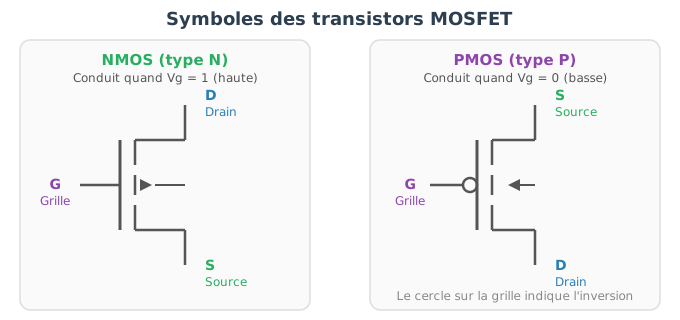
The first computers (1940s-1950s) used vacuum tubes — bulbs the size of a thumb that played the same role of controlled switch. But they were bulky, fragile, and consumed enormous amounts of energy. The invention of the semiconductor transistor (1947, Bell Labs) changed everything: it is tiny, reliable, fast, and consumes very little power. Since then, we have learned to etch billions of them onto a silicon chip of a few square centimeters.
Modern processors use MOSFET (Metal-Oxide-Semiconductor Field-Effect Transistor) transistors. Their key characteristic is that the gate is insulated from the channel by a thin oxide layer: applying a voltage (an electric field) is sufficient to control the current flow, without any current flowing through the gate itself. This considerably reduces power consumption, which makes it possible to pack billions of them without the chip melting.
The operation of a transistor relies on the electrical properties of silicon, a semiconductor material. In its pure state, silicon conducts current very poorly: its electrons are bound to atoms by covalent bonds and are not free to move. But its conductivity can be modified in a controlled manner through a process called doping.
Doping consists of introducing a tiny amount of foreign atoms into the silicon crystal:
The conductivity of doped silicon depends on the concentration of impurities, which allows it to be controlled with great precision during manufacturing.
An N-type MOSFET transistor (the most common in processors) consists of:
Between the source (N-doped) and the drain (N-doped), the substrate is P-doped. At the interface between the N and P zones, free electrons and holes recombine, creating a depletion zone (depleted of carriers). This zone acts as a barrier: no current flows between source and drain.
When a positive voltage is applied to the gate, the electric field generated through the oxide repels the holes in the P substrate (which move away from the surface) and attracts minority electrons toward the surface, just beneath the oxide. If this voltage exceeds a critical threshold called the threshold voltage (\(V_{th}\)), the electron concentration beneath the gate becomes sufficient to form a thin N-type conductive channel between the source and the drain. Current can then flow.
01The switching between these two states is what makes it possible to represent binary information.
The insulating oxide beneath the gate is the fundamental characteristic of the MOSFET. Thanks to this insulation:
Older bipolar transistors required a continuous current to maintain the control signal, which made them much more power-hungry.
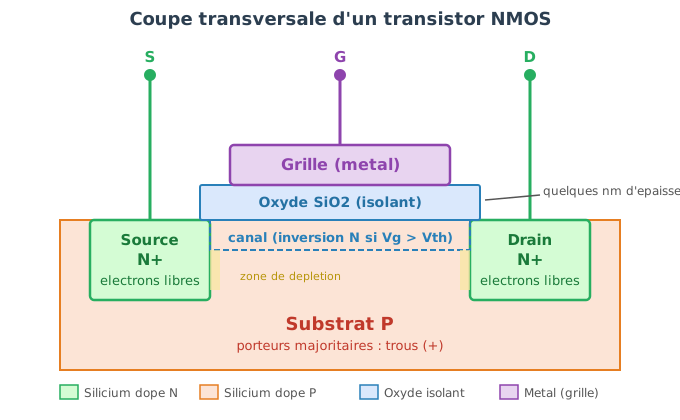
As transistors are miniaturized, the oxide layer becomes so thin (a few atoms thick) that quantum phenomena appear:
These constraints explain why processor frequencies stopped increasing around 2005 (~4 GHz) and why the industry shifted toward multi-core architectures.
Orders of magnitude:
A single transistor does not do much on its own. But by combining two or three transistors, one can build circuits that perform logical operations on bits. These elementary circuits are called logic gates.
This is the simplest gate: it inverts a signal. If the input is
1, the output is 0, and vice versa.
It is built with 2 transistors (one N-type, one P-type) arranged so that:
1), the bottom transistor
conducts and pulls the output to 0;0), the top transistor conducts
and pulls the output to 1.| Input | Output |
|---|---|
| 0 | 1 |
| 1 | 0 |
The AND gate takes two inputs and produces 1 only if
both inputs are 1. It requires
approximately 6 transistors.
| A | B | A AND B |
|---|---|---|
| 0 | 0 | 0 |
| 0 | 1 | 0 |
| 1 | 0 | 0 |
| 1 | 1 | 1 |
In C++, this is exactly the & (bitwise) or
&& (logical) operator.
The OR gate produces 1 if at least one
of the inputs is 1. It also requires approximately
6 transistors.
| A | B | A OR B |
|---|---|---|
| 0 | 0 | 0 |
| 0 | 1 | 1 |
| 1 | 0 | 1 |
| 1 | 1 | 1 |
In C++, this is the | (bitwise) or ||
(logical) operator.
The XOR (exclusive or) gate produces 1 if the two inputs
are different. It is essential for binary addition.
| A | B | A XOR B |
|---|---|---|
| 0 | 0 | 0 |
| 0 | 1 | 1 |
| 1 | 0 | 1 |
| 1 | 1 | 0 |
In C++, this is the ^ operator.
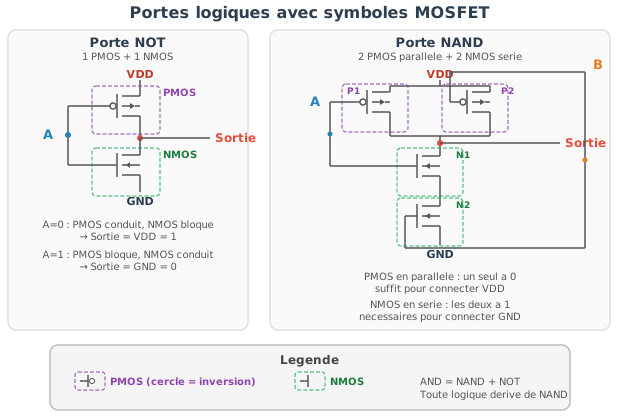
The bitwise operations seen in the encoding chapter
(&, |, ^, ~,
<<, >>) correspond
directly to hardware logic gates. When we write
a & b in C++, the processor literally activates an AND
circuit that compares each pair of bits of the two operands. There is no
intermediate abstraction: the C++ code translates into a machine
instruction, which activates a physical logic gate.
The operation a + b in C++ translates into a circuit
built from logic gates.
To add two bits A and B, we need two
results:
The truth table for adding two bits is:
| A | B | Sum (S) | Carry (C) |
|---|---|---|---|
| 0 | 0 | 0 | 0 |
| 0 | 1 | 1 | 0 |
| 1 | 0 | 1 | 0 |
| 1 | 1 | 0 | 1 |
The results correspond to: S = A XOR B and
C = A AND B. A half adder is built with one XOR
gate and one AND gate, roughly ten transistors.
To add multi-bit numbers, each position must also take into account the carry in from the previous position. A full adder takes three inputs (A, B, carry in) and produces two outputs (sum, carry out). It is built with approximately 28 transistors.
To add two 32-bit integers (an int in C++), 32
full adders are chained together, each receiving the carry from
the previous one. It is a cascade: the result at each
position depends on the carry from the lower position. In modern
processors, techniques such as carry-lookahead allow carries to
be computed in parallel to speed up the operation.
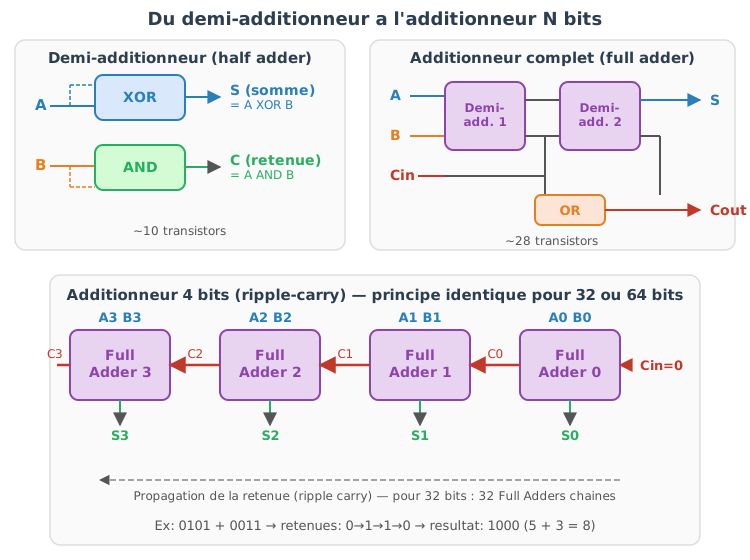
Thus, a simple addition a + b in C++ mobilizes
approximately one thousand transistors working in
concert.
Subtraction a - b is not implemented as a separate
operation. As seen in the encoding chapter, thanks to two’s
complement, subtracting b amounts to adding the
complement of b. The processor inverts the bits of
b, adds 1, then uses the same addition circuit. This is why
addition and subtraction are equally fast.
When we write if (a < b) in C++, the processor
actually performs the subtraction a - b and examines the
resulting flags: the sign bit (is the result
negative?), the zero bit (is the result zero?), etc. The operators
<, >, ==, !=
are therefore not distinct operations — they are tests on the result of
a subtraction.
Multiplication is more complex: it relies on partial additions and shifts, similar to the long multiplication taught in school. Modern processors have dedicated and highly optimized multiplication units, but the operation remains more expensive than an addition (typically 3 to 5 cycles instead of 1).
Division is the most expensive arithmetic operation. It is generally performed by an iterative algorithm internal to the processor, and can take 20 to 40 cycles. This is why compilers often replace divisions by constants with equivalent multiplications.
All these circuits (addition, subtraction, logical operations, comparisons, shifts) are grouped together in a unit called the ALU (Arithmetic Logic Unit). The ALU receives:
Operations on floating-point numbers are handled by a separate unit, the FPU (Floating Point Unit), which performs exponent alignment, mantissa operations, normalization, and IEEE 754 rounding. These operations are more expensive than integer operations, but entirely hardwired in hardware.
Modern processors also have vector units (SIMD —
Single Instruction, Multiple Data) capable of applying the same
operation to multiple data simultaneously. For example,
an SSE instruction can add 4 float values in parallel in a
single cycle. This mechanism is massively used in computer graphics,
signal processing, and scientific computing.
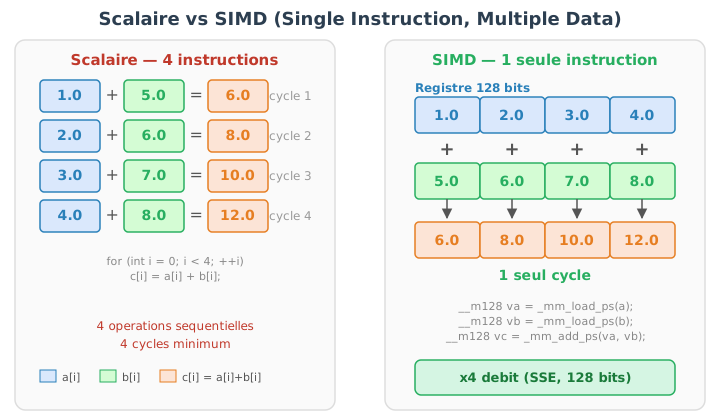
Beyond computation, a processor must also store
results. Storing a bit requires a circuit capable of maintaining a state
(0 or 1) in a stable manner. Transistors can
do this too, but with a different arrangement than that of logic
gates.
The fundamental idea is feedback: the output of one
logic gate is connected to the input of another, and vice versa. The two
gates maintain each other in a stable state — either 0 or
1. This arrangement is called a latch (or
flip-flop).
A basic latch uses two cross-coupled NOR (or NAND) gates, roughly 8 to 12 transistors to store a single bit. As long as the circuit is powered, the bit is preserved without intervention. To modify it, a signal is sent to the control inputs.
This is the principle underlying the processor’s registers and cache memory.
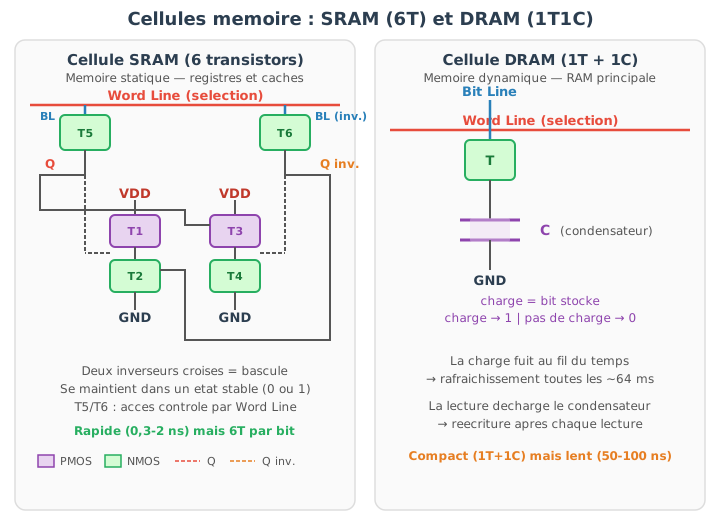
SRAM (Static RAM) uses latches — typically 6 transistors per bit (6T cell). It is:
This is why SRAM is reserved for processor registers and cache memories (L1, L2, L3), where speed is critical and the amount of data is relatively small.
DRAM (Dynamic RAM) uses a radically different approach: each bit is stored as an electrical charge in a tiny capacitor, controlled by a single transistor. This is much more compact (1 transistor + 1 capacitor per bit, versus 6 transistors for SRAM), which allows storing gigabytes on a single memory module.
The trade-off:
This is the memory commonly referred to as the computer’s “RAM.” When
we write int a = 42; in C++, the value 42 is
stored somewhere in this grid of capacitors.
Flash memory (SSD, USB drives) relies on a modified transistor with a floating gate that is electrically insulated. Electrons are trapped in it via high-voltage injection. These electrons remain trapped even without power — this is what makes the memory non-volatile. Reading is slower (50–100 µs), writing even more so (200 µs to a few ms), and the number of write cycles is limited, but persistence without power is essential for data storage.
| Type | Volatile | Structure per bit | Speed | Usage |
|---|---|---|---|---|
| SRAM | yes | 6 transistors | 0.3 – 2 ns | registers, caches |
| DRAM | yes | 1 transistor + 1 cap. | 50 – 100 ns | main memory |
| Flash | no | 1 transistor (modified) | 50 – 100 µs | persistent storage |
The processor can perform an addition in 1 cycle (approximately 0.3 ns at 3 GHz). But accessing data in RAM takes 100 to 300 cycles. Without an intermediate mechanism, the CPU would spend most of its time waiting for memory, idle.
This is the fundamental problem of modern architecture: the processor is much faster than memory.
The cache is a small amount of SRAM integrated directly into the processor, which stores copies of recently used memory blocks. Its efficiency relies on two principles: temporal locality (recently used data is very likely to be reused) and spatial locality (if a memory address is accessed, neighboring addresses will likely be used as well).
Modern processors typically have three levels of cache:
| Level | Typical size | Latency | Shared |
|---|---|---|---|
| L1 | 32 – 64 KB | 3 – 5 cycles | per core |
| L2 | 256 KB – 1 MB | ~10 cycles | per core |
| L3 | 8 – 64 MB | ~30 cycles | between cores |
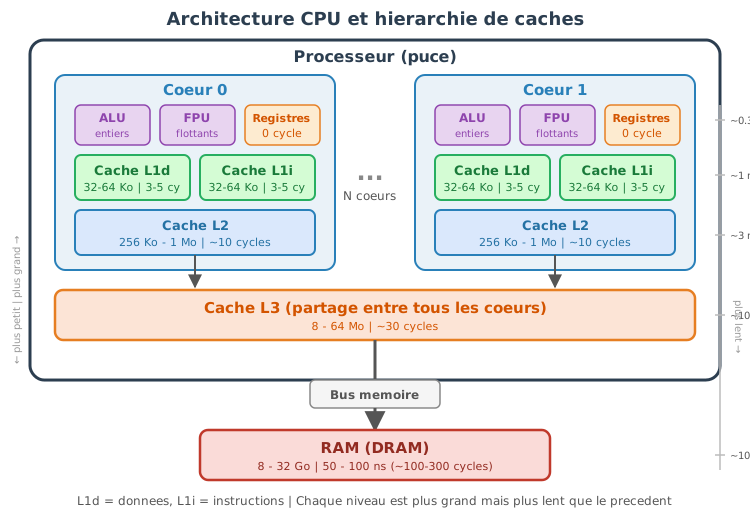
When the processor needs data, it first looks in L1. If it is not there (cache miss), it looks in L2, then L3, and finally RAM. Each level is larger but slower than the previous one.
The cache hierarchy explains why certain code patterns are much faster than others, for the same number of operations:
Sequential access (cache-friendly):
// Very fast: contiguous access, excellent spatial locality
for (int i = 0; i < N; ++i)
sum += array[i];When the processor loads array[0] from RAM, it actually
loads an entire cache line (typically 64 bytes, i.e.,
16 int values). Subsequent accesses (array[1],
array[2], …) are therefore already in the cache — they are
nearly instantaneous.
Random access (cache-hostile):
// Much slower: each access can cause a cache miss
for (int i = 0; i < N; ++i)
sum += array[random_index[i]];Here, each access jumps to an unpredictable location in the array. The loaded cache line is rarely reused, and the processor spends its time waiting for RAM.
This is exactly why std::vector (memory contiguity) is
much more performant than std::list (elements scattered
across the heap), and why the AoS vs SoA organization (seen in the
chapter on pointers) has a major impact on performance.
int a = 42; to transistorsThe complete path from a line of C++ to the hardware:
int a = 5;
int b = 3;
int c = a + b;The compiler translates this code into machine instructions (assembly): “load 5 into register R1, load 3 into R2, add R1 and R2 and store in R3.”
The values 5 and 3 are
bit patterns (00000101 and 00000011) stored as electrical charges in
capacitors (DRAM) or latches (SRAM/registers) — in both cases,
transistors.
The addition is performed by the ALU: 32 chained full adders, each composed of XOR and AND gates, themselves made of transistors. Carries propagate from bit to bit (or are computed in parallel by a carry-lookahead circuit).
The result 8 (00001000) is stored
in a register (SRAM latches, 6 transistors per bit × 32 bits = 192
transistors for a single int).
If c is then used in a condition
(if (c > 0)), the processor performs the subtraction
c - 0, examines the sign flag, and decides which execution
path to follow.
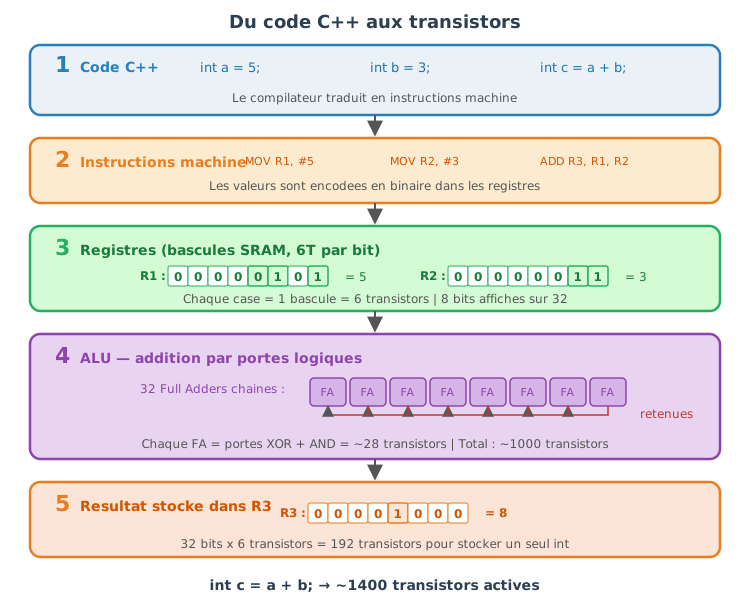
This chapter presents the fundamental methodological principles enabling the production of C++ code:
while respecting the performance and low-level constraints inherent to the language.
These principles apply to both small programs and complex projects (simulation, graphics engine, parallel computing).
Code quality is not measured by perceived elegance, but by practical criteria :
Note that when working in a team, the readability of the code should be the priority. Readable code :
In most cases, one should favor readability and simplicity over premature micro-optimizations. Efficiency can be pursued later, in a targeted and measured way, when a performance bottleneck is proven.
Best practices for readability: explicit names, short functions, comments when the code is not self-documenting, consistent formatting, and systematic code reviews.
Simple code is more reliable than complex code. Complexity is the main source of bugs in software: each level of indirection, each additional abstraction, each added special case increases the number of possible execution paths and makes reasoning harder.
In C++, the temptation to complexity is particularly strong: the language offers variadic templates, metaprogramming, SFINAE, concepts, multiple inheritance… These tools are powerful, but premature use often yields code that only the author understands — and sometimes even less after a few weeks.
In practice, KISS translates to:
Example (KISS):
// Version condensée et moins lisible : logique imbriquée, calcul d'index
// difficile à suivre, tout est condensé sur quelques lignes.
int count_neighbors_ugly(const std::vector<int>& grid, size_t w, size_t h,
size_t x, size_t y)
{
int c = 0;
// balayer un rectangle 3x3 centré sur (x,y) en jouant sur les bornes
size_t start = (y ? y - 1 : 0) * w + (x ? x - 1 : 0);
size_t end_y = (y + 1 < h ? y + 1 : h - 1);
size_t end_x = (x + 1 < w ? x + 1 : w - 1);
for (size_t idx = start;; ++idx) {
size_t cx = idx % w;
size_t cy = idx / w;
if (!(cx == x && cy == y)) c += grid[idx];
if (cy == end_y && cx == end_x) break; // logique subtle
}
return c;
}
// Version claire et simple : fonctions auxiliaires et boucles explicites
inline bool in_bounds(size_t x, size_t y, size_t w, size_t h) { return x < w && y < h; }
inline int at(const std::vector<int>& g, size_t w, size_t x, size_t y) { return g[y * w + x]; }
int count_neighbors(const std::vector<int>& grid, size_t w, size_t h,
size_t x, size_t y)
{
int c = 0;
size_t y0 = (y > 0) ? y - 1 : 0;
size_t y1 = (y + 1 < h) ? y + 1 : h - 1;
size_t x0 = (x > 0) ? x - 1 : 0;
size_t x1 = (x + 1 < w) ? x + 1 : w - 1;
for (size_t yy = y0; yy <= y1; ++yy) {
for (size_t xx = x0; xx <= x1; ++xx) {
if (xx == x && yy == y) continue; // ignorer la cellule centrale
c += at(grid, w, xx, yy);
}
}
return c;
}A piece of logic should exist in only one place. If the same operation is duplicated in two places in the code, any fix or evolution must be applied twice — and forgetting one of the two copies is a classic source of bugs. As the project grows, duplication becomes more costly.
In C++, templates and generic functions are the natural tools for factoring out duplicated code. However, DRY should not be applied blindly: eliminating all duplication can lead to artificial abstractions that make the code harder to understand. Two blocks of code that resemble each other today may evolve in different directions tomorrow. A local and simple duplication (2-3 lines) is sometimes preferable to a complex generalization that couples parts of the code that have no reason to exist.
Example (DRY) :
// Duplication (moins bon) : deux fonctions très similaires
double average_int(const std::vector<int>& v) {
if (v.empty()) return 0.0;
long sum = 0;
for (int x : v) sum += x;
return double(sum) / v.size();
}
double average_double(const std::vector<double>& v) {
if (v.empty()) return 0.0;
double sum = 0;
for (double x : v) sum += x;
return sum / v.size();
}
// Refactorisation (DRY) : une implémentation générique évite la duplication
template<typename T>
double average(const std::vector<T>& v) {
if (v.empty()) return 0.0;
long double sum = 0;
for (T x : v) sum += x;
return double(sum / v.size());
}
// Usage :
// std::vector<int> vi = {1,2,3};
// std::vector<double> vd = {1.0,2.0,3.0};
// double a1 = average(vi); // fonctionne pour int
// double a2 = average(vd); // fonctionne pour doubleDon’t implement ‘just-in-case’ features if they aren’t needed today. Each prematurely added feature has a cost: code to maintain, tests to write, added complexity to understand, and often a heavier API for all users — including those who will never use that feature.
In practice, developers frequently overestimate future needs. A 3D vector generally does not need to be generalized into an N-dimensional vector from the start. A file parser does not need to support 5 formats if only one is used. The right approach is to start with the simplest implementation that meets the current need, then generalize when the need actually manifests — not before.
This principle is particularly important in C++, where templates, genericity and metaprogramming make it very easy to construct layers of sophisticated abstraction even before having a concrete use case.
Example (YAGNI):
// Prématurément généralisé (YAGNI)
template <typename T = float, int N = 3>
struct vec { T data[N]; };
// Version simple et suffisante pour l'usage courant
struct vec3 { float x, y, z; };A robust program does not settle for “working in normal cases” : It explicitly expresses its assumptions and verifies that they are met.
These assumptions constitute what is called the contract of the code.
When a function is called, two points of view exist:
If these rules are implicit or only “in the developer’s head,” the code becomes fragile:
The contract allows these rules to be formalized. The set of these rules constitutes what is known as design by contract.
Three types of complementary rules are distinguished.
A precondition is a condition that must be true before the call of a function.
Examples:
A postcondition is a condition that must be true after the execution of the function.
Exemples :
An invariant is a property that must always be true for a valid object.
Examples:
Before we look at C++, here is a conceptual view of a stack’s contract.
Entité : Pile (Stack)
Invariant :
0 <= size <= capacity
Constructeur(capacity):
établit l'invariant
size := 0
capacity := capacity
push(value):
précondition : size < capacity
postcondition : top == value, size augmenté de 1
pop():
précondition : size > 0
postcondition : size diminué de 1The invariant must be true after every public call, regardless of the sequence of operations.
assert)The assertions allow you to verify these rules during runtime, primarily in the development phase.
In C++, assert is used to detect programming
errors.
#include <cassert>
float safe_div(float a, float b)
{
assert(b != 0.0f && "Division par zero");
return a / b;
}Here:
b != 0.0f is a precondition,asserts
used for?Assertions allow you to:
They are therefore a development tool, not a mechanism for handling user errors.
assertuse assert for programming errors.
The assert statements are theoretically “useless” for the
proper functioning of the program; they only serve to facilitate
programming by detecting unexpected/unforeseen cases that should never
occur.
do not use assert for :
missing files,
invalid user inputs,
recoverable errors
never write side effects:
assert(++i < 10); // interdit
// Ici la valeur de i est modifié après l'exécution de assert.
// Lors d'une compilation en mode "release", l'assertion n'est pas exécuté, et la valeur de i sera différente dans le programme.Provide an explicit message :
assert(ptr && "ptr ne doit pas être nul");asserts are activeNDEBUG)Note: The program must never rely on assertions to function correctly.
static_assert)Some rules can be checked even before execution, at compile time.
That is the role of static_assert.
#include <type_traits>
template <typename T>
T square(T x)
{
static_assert(std::is_arithmetic_v<T>,
"square attend un type arithmetique");
return x * x;
}Here:
static_assert ?General rule : prefer compile-time checks whenever possible.
#include <cassert>
#include <vector>
struct Stack {
std::vector<int> data;
size_t capacity;
// Invariant :
// 0 <= data.size() <= capacity
explicit Stack(size_t cap) : capacity(cap)
{
assert(capacity > 0 && "capacity doit être positive");
}
void push(int v)
{
// précondition
assert(data.size() < capacity && "push: pile pleine");
data.push_back(v);
// postcondition
assert(data.back() == v && "push: sommet incorrect");
}
int pop()
{
// précondition
assert(!data.empty() && "pop: pile vide");
int v = data.back();
data.pop_back();
// invariant toujours valide
assert(data.size() <= capacity && "invariant violé");
return v;
}
};A contract describes what the code expects and guarantees.
The preconditions are the responsibility of the caller.
The postconditions are the responsibility of the function.
The invariants define the valid states of an object.
assert verifies the contract at runtime
(debug).
static_assert verifies the contract at
compile-time.
Used correctly, they make the code:
The assert function remains fairly limited in terms of
functionality. Alternative tools can help express and verify contracts
in a more readable, safer, and more maintainable way for large-scale
codebases:
Expects() / Ensures() (macros or functions) to
document pre/postconditions, as well as not_null<T>
and span<T> for safe pointers and views.tl::expected / Outcome or
std::expected when available to explicitly represent
recoverable errors instead of exceptions or magic codes.static_assert /
constexpr : move checks to compile time when
possible (templates, type constraints), reducing the need for runtime
assertions.Boost.Contract
and other frameworks offer richer annotations for
require/ensure/invariant (activatable/deactivatable contracts,
centralized diagnostics).Expects(condition) allows standardizing
messages and enabling different behaviors depending on the configuration
(throw, abort, log).A program may seem correct on a few simple examples and yet be wrong
in edge cases or after a subsequent modification.
The tests allow automatic verification that the code
respects its expected behavior, and above all that this behavior
remains correct over time.
Testing does not consist in proving that the program is perfect, but in reducing the risk of error and in detecting problems as early as possible.
Without tests, the only way to verify that a program works is to run it manually and observe the results. This approach does not scale: as soon as the project exceeds a few hundred lines, it becomes impossible to manually verify all cases after every modification. Automated tests solve this problem by codifying the checks once for all.
Tests allow:
In a real project, tests are often run automatically at each change via a system of continuous integration (CI): at each commit, a server compiles the code and runs the entire test suite. If a test fails, the developer is immediately notified.
A good test is:
A unit test verifies a function or a class in isolation.
They are fast and very precise.
They are ideal for testing: - mathematical functions, - algorithms, -
data structures.
An integration test verifies the interaction between multiple components:
They are slower but closer to real-world behavior.
A regression test is added after a bug fix.
These tests are extremely valuable in the long term.
A readable test generally follows the following structure:
Example :
// Arrange
float x = -1.0f;
// Act
float y = clamp(x, 0.0f, 1.0f);
// Assert
assert(y == 0.0f);Cette structure améliore la lisibilité et la maintenance des tests.
Pour une fonction donnée, il est recommandé de tester :
Tester uniquement le cas nominal est rarement suffisant.
On peut écrire des tests avec assert, mais il est
souvent utile d’avoir des messages plus explicites, notamment pour les
flottants.
#include <iostream>
#include <cmath>
#include <cstdlib>
inline void check(bool cond, const char* msg)
{
if (!cond) {
std::cerr << "[TEST FAILED] " << msg << std::endl;
std::exit(1);
}
}
inline void check_near(float a, float b, float eps, const char* msg)
{
if (std::abs(a - b) > eps) {
std::cerr << "[TEST FAILED] " << msg
<< " (a=" << a << ", b=" << b << ")" << std::endl;
std::exit(1);
}
}clampThe function clamp(x, a, b) :
a if x < a,b if x > b,x otherwise.Precondition : a <= b.
#include <cassert>
float clamp(float x, float a, float b);
int main()
{
// cas nominal
assert(clamp(0.5f, 0.0f, 1.0f) == 0.5f);
// cas limites
assert(clamp(0.0f, 0.0f, 1.0f) == 0.0f);
assert(clamp(1.0f, 0.0f, 1.0f) == 1.0f);
// saturation
assert(clamp(-1.0f, 0.0f, 1.0f) == 0.0f);
assert(clamp( 2.0f, 0.0f, 1.0f) == 1.0f);
// violation de précondition (doit échouer en debug)
// clamp(0.0f, 1.0f, 0.0f);
}Implementation :
#include <cassert>
float clamp(float x, float a, float b)
{
assert(a <= b && "clamp: intervalle invalide");
if (x < a) return a;
if (x > b) return b;
return x;
}The precondition here falls under the contract: its violation is a programming error.
TDD is a methodology in which code is written in response to tests. It reverses the usual order: instead of writing the code and then testing it, we first write the test that describes the expected behavior, then we write the minimal code that satisfies that test.
This inversion has a deep impact on design: it forces thinking about the interface (how the function will be called, which parameters, which results) before thinking about the implementation. The result is generally code that is more modular, more testable and simpler.
TDD is organized into short, iterative cycles :
Each cycle adds a small increment of functionality. A typical cycle lasts between 2 and 10 minutes. In a real project, dozens of cycles follow one another to gradually build a complete feature.
Test-Driven Development (TDD):
Test-Driven Development is not suitable for all situations. It is particularly effective for algorithmic code or well-defined APIs. It is less natural for exploratory code (prototyping) or strongly tied to external resources (GPU, network, graphical interfaces).
v is non-zero, normalize(v) returns a
vector of norm 1,norm(v) > 0.#include <cassert>
#include <cmath>
struct vec3 { float x, y, z; };
float norm(vec3 const& v)
{
return std::sqrt(v.x*v.x + v.y*v.y + v.z*v.z);
}
vec3 normalize(vec3 const& v);
int main()
{
vec3 v{3.0f, 0.0f, 4.0f};
vec3 u = normalize(v);
assert(std::abs(norm(u) - 1.0f) < 1e-6f);
float dot = v.x*u.x + v.y*u.y + v.z*u.z;
assert(dot > 0.0f);
}#include <cassert>
#include <cmath>
vec3 normalize(vec3 const& v)
{
float n = norm(v);
assert(n > 0.0f && "normalize: vecteur nul");
return {v.x / n, v.y / n, v.z / n};
}Next, we can:
norm2,Tests constitute an automatic verification of a function’s contract. TDD provides a simple methodology for writing code:
define the behavior -> verify it automatically -> improve the implementation with confidence.
When used correctly, tests make the code more reliable, more readable, and easier to evolve.
Testing only valid cases is insufficient: robust code must also detect invalid usages correctly. It is therefore essential to write tests that verify that:
These negative tests help ensure that the code contract is actually respected, and not just in ideal cases. They are particularly important during refactorings: an internal change must never transform a detected error into silent behavior.
According to the chosen error-handling policy, a test may verify :
In practice, testing invalid cases is often as important as testing valid cases, because it is precisely in these situations that the most costly bugs appear.
assertWe revisit the function normalize(v) discussed
previously. Its precondition is that the vector is not
the zero vector.
vec3 normalize(vec3 const& v)
{
float n = norm(v);
assert(n > 0.0f && "normalize: vecteur nul");
return {v.x / n, v.y / n, v.z / n};
}It is important to verify that this precondition is indeed detected.
// Test négatif : violation de précondition (doit échouer en debug)
int main()
{
vec3 zero{0.0f, 0.0f, 0.0f};
// Ce test n'est pas destiné à "passer" :
// en mode debug, l'assertion doit se déclencher.
// normalize(zero);
}Note:
If one wishes to handle invalid inputs without causing the program to fail, one can use a result type.
#include <optional>
std::optional<vec3> normalize_safe(vec3 const& v)
{
float n = norm(v);
if (n <= 0.0f)
return std::nullopt;
return vec3{v.x / n, v.y / n, v.z / n};
}Corresponding test :
#include <cassert>
int main()
{
vec3 zero{0.0f, 0.0f, 0.0f};
auto r = normalize_safe(zero);
assert(!r.has_value()); // le cas invalide est bien détecté
}Here, the test explicitly verifies that:
The creation of exhaustive tests is often a repetitive and time-consuming task. For a non-trivial function or API, it is generally necessary to cover:
Moreover, when the code evolves (refactoring, API changes, addition of parameters), tests must be updated to remain consistent with the new contract. This maintenance phase can represent a significant portion of development time.
In this context, AI-assisted code generation tools can be used to accelerate and facilitate the setup of test batteries. They are particularly useful for:
A robust program does not merely detect errors: it must classify them, signal them correctly, and allow the caller to react in an appropriate manner.
Error handling is an integral part of the design of the code and of its API.
In a C++ program, an unhandled error can have serious consequences: an invalid memory access can silently corrupt data, a buffer overflow can overwrite neighboring variables, and undefined behavior can produce results that vary depending on the compiler optimization level. Unlike languages with garbage collector and automatic checks, C++ does not protect the developer by default.
Without a clear error-handling strategy, one obtains:
Effective error handling allows failures to be visible and understandable, to separate the normal code from the error-handling code, to explicitly test invalid behaviours, and to reinforce the contract between the caller and the function.
The first step is to distinguish the nature of the error.
These are situations that should never happen if the code is used correctly.
Examples:
These errors indicate a bug.
Recommended handling:
assert,static_assert,assert(index < data.size() && "index hors limites");These errors are generally not recoverable.
These are predictable situations, even if the code is correct.
Examples:
These errors must be reported to the caller.
Recommended handling :
optional, expected,
Result).The choice of a strategy depends on:
Exceptions allow you to clearly separate the normal code from
the error-handling code. The principle is that normal code is
written as if no error could occur, and errors are handled in separate
catch blocks. If an error occurs in a deeply nested
function, the exception automatically propagates up the call stack to an
appropriate catch, without each intermediate function
needing to propagate the error explicitly.
float parse_float(std::string const& s)
{
return std::stof(s); // peut lever std::invalid_argument ou std::out_of_range
}
// Utilisation :
try {
float val = parse_float(user_input);
process(val);
} catch (std::invalid_argument const& e) {
std::cerr << "Entrée invalide : " << e.what() << std::endl;
}Advantages :
if (error) checks on
every line,Disadvantages :
To be used with discipline : document the exceptions that may be raised, and never use exceptions for normal control flow.
This is the approach inherited from C, still widely used in system APIs and low-level libraries. The function returns a value indicating success or failure, and the result is passed via an output parameter.
bool read_file(std::string const& name, Data& out);
// Utilisation :
Data d;
if (!read_file("config.txt", d)) {
std::cerr << "Erreur de lecture" << std::endl;
return;
}Advantages :
Disadvantages :
[[nodiscard]]),bool does not say why
the operation failed.optional, expected, Result)A modern and expressive approach.
std::optional<float> parse_float_safe(std::string const& s);Or with error information :
std::expected<float, ParseError> parse_float(std::string const& s);Advantages :
Often the best compromise for modern APIs.
#include <fstream>
#include <optional>
#include <string>
#include <vector>
struct ReadError {
enum class Code { FileNotFound, ParseError };
Code code;
std::string message;
int line = -1;
};
template <typename T>
struct Result {
std::optional<T> value;
std::optional<ReadError> error;
static Result ok(T v) { return {std::move(v), std::nullopt}; }
static Result fail(ReadError e) { return {std::nullopt, std::move(e)}; }
};Reading a file containing a floating-point number per line:
Result<std::vector<float>> read_floats(std::string const& filename)
{
std::ifstream file(filename);
if (!file.is_open()) {
return Result<std::vector<float>>::fail(
{ReadError::Code::FileNotFound, "Impossible d'ouvrir le fichier"});
}
std::vector<float> values;
std::string line;
int line_id = 0;
while (std::getline(file, line)) {
++line_id;
try {
values.push_back(std::stof(line));
} catch (...) {
return Result<std::vector<float>>::fail(
{ReadError::Code::ParseError, "Erreur de parsing", line_id});
}
}
return Result<std::vector<float>>::ok(std::move(values));
}Minimal test :
auto r = read_floats("data.txt");
assert(r.value.has_value() || r.error.has_value());An API (Application Programming Interface) is the communication interface between a piece of code and its users (other functions, other modules, or other developers). It describes how to use the code, which operations are available, which parameters are expected, and which results or errors may be produced.
In C++, an API typically corresponds to the
set of declarations visible in header files
(.hpp).
These files describe what the code allows you to do,
without exposing how it does it.
Concretely, a C++ API consists of: - functions and their signatures, - classes and their public methods, - types (structures, enumerations, aliases), - constants and exposed namespaces.
The user of the API only needs to read the header files to understand: - how to call a function, - which parameters to provide, - which values or errors to expect, - and which rules (preconditions) must be respected.
Source files (.cpp) contain the internal implementation
and may evolve freely as long as the API, defined by the headers,
remains unchanged.
Thus, in C++, designing a good API essentially comes down to
designing good header files: clear, coherent, and hard to
misuse.
A well-designed API must be:
An API should clearly indicate how errors are signaled.
float normalize(vec3 const& v); // que se passe-t-il si v est nul ?Here :
std::optional<vec3> normalize(vec3 const& v);Usage :
auto r = normalize(v);
if (!r) {
// cas invalide : v est nul
}The error is part of the API: it cannot be ignored accidentally.
vec3 normalize(vec3 const& v); // précondition : norm(v) > 0Here:
assert.Choose explicitly whether the error is recoverable or not.
Types should carry meaning, not just values.
void load(int mode); // que signifie mode ?The API allows invalid values (mode = 42).
enum class LoadMode { Fast, Safe };
void load(LoadMode mode);Usage :
load(LoadMode::Fast);Advantages :
void draw(bool wireframe); // que signifie true ?Best design :
enum class RenderMode { Solid, Wireframe };
void draw(RenderMode mode);A good API makes invalid states impossible or difficult to represent.
struct Image {
unsigned char* data;
int width;
int height;
};Here, nothing prevents:
data == nullptr,width <= 0,class Image {
public:
Image(int w, int h)
: width(w), height(h), data(w*h*4)
{
assert(w > 0 && h > 0);
}
unsigned char* pixels() { return data.data(); }
private:
int width, height;
std::vector<unsigned char> data;
};Advantages:
The API must expose what the code does, not how it does it.
.hpp) :
interface// image.hpp
class Image {
public:
Image(int w, int h);
void clear();
void save(const std::string& filename) const;
};.cpp) :
implementation// image.cpp
#include "image.hpp"
void Image::clear()
{
// détails internes invisibles pour l'utilisateur
}Advantages :
A function should not modify global states in an unexpected way.
void render()
{
global_state.counter++; // effet de bord caché
}void render(RenderContext& ctx)
{
ctx.counter++;
}Dependencies are explicit and testable.
bool, int
undocumented),A good API prevents errors even before the program runs.
It guides the user toward proper use, makes errors explicit, and facilitates testing, maintenance, and the evolution of the code.
This chapter shows that everything we’ve seen in programming — variables, types, arithmetic operations, memory, pointers — ultimately rests on a single physical component: the transistor.
A transistor is a tiny electronic switch. Like a household switch, it has two states: conducting (the current flows) or blocked (the current does not flow). The crucial difference with a mechanical switch is that it is controlled by an electrical signal (a voltage), and not manually. A transistor can therefore be controlled by another transistor — it is this property that makes possible the construction of complex circuits.
In practice, a transistor has three terminals:
In summary:
0.1.It is this correspondence between electrical state and binary value that is at the heart of all computing.
On electronic schematics, MOSFET transistors are represented by the
following symbols. The NMOS conducts when the gate
voltage is high (1), the PMOS conducts
when it is low (0). The small circle on the PMOS gate
indicates this inversion. The two types are used complementarily in the
CMOS technology (Complementary MOS) which equips all modern
processors.
The first computers (the 1940s–1950s) used vacuum tubes — bulbs the size of a thumb that played the same role as a controlled switch. But they were bulky, fragile, and consumed a lot of energy. The invention of the solid-state transistor (1947, Bell Labs) changed everything: it is tiny, reliable, fast, and consumes very little. Since then, we have learned to etch billions of them on a silicon chip of a few square centimeters.
Modern processors use transistors of the MOSFET type (Metal-Oxide-Semiconductor Field-Effect Transistor). Their peculiarity is that the gate is isolated from the channel by a thin oxide layer: it is enough to apply a voltage (an electric field) to control the passage of current, without any current flowing in the gate itself. This greatly reduces energy consumption, which allows billions to be stacked on the chip without it melting.
The operation of a transistor relies on the electrical properties of silicon, a semiconductor material. In its pure state, silicon conducts electric current very poorly: its electrons are bound to atoms by covalent bonds and are not free to move. But its conductivity can be modified in a controlled manner by a process called doping.
Doping consists in introducing an infinitesimal amount of foreign atoms into the silicon crystal:
The conductivity of doped silicon depends on the impurity concentration, which allows it to be controlled with high precision during fabrication.
An N-type MOSFET transistor (the most common in processors) is composed of:
Between the source (N-doped) and the drain (N-doped), the substrate is doped P. At the interface between the N and P regions, free electrons and holes recombine, creating a depletion region (depleted of carriers). This region acts as a barrier: no current flows between source and drain.
When a positive voltage is applied to the gate, the electric field generated across the oxide repels holes in the P-substrate (which move away from the surface) and attracts minority electrons toward the surface, just beneath the oxide. If this voltage exceeds a critical threshold called threshold voltage (\(V_{th}\)), the electron concentration under the gate becomes sufficient to form a thin N-type conducting channel between the source and drain. The current can then flow.
01The switching between these two states is what enables the representation of binary information.
The insulating oxide under the gate is the fundamental characteristic of the MOSFET. Thanks to this insulation:
Old bipolar transistors required a DC current to maintain the drive, which made them much more energy-hungry.
As transistors are miniaturized, the oxide layer becomes so thin (a few atoms thick) that quantum phenomena appear:
These constraints explain why processor frequencies stopped increasing around 2005 (~4 GHz) and why the industry turned to multicore architectures.
Orders of magnitude:
A single transistor does not do much. But by combining two or three transistors, one can build circuits that perform logical operations on bits. These elementary circuits are called logic gates.
It is the simplest gate: it inverts a signal. If the input is
1, the output is 0, and vice versa.
It is built with 2 transistors (one of type N, one of type P) arranged so that :
1), the bottom transistor
conducts and pulls the output toward the 0 ;0), the top transistor conducts
and pulls the output toward the 1.| Input | Output |
|---|---|
| 0 | 1 |
| 1 | 0 |
The AND gate takes two inputs and produces 1 only if
both inputs are at 1. It requires about
6 transistors.
| A | B | A AND B |
|---|---|---|
| 0 | 0 | 0 |
| 0 | 1 | 0 |
| 1 | 0 | 0 |
| 1 | 1 | 1 |
In C++, it is exactly the operator & (bitwise) or
&& (logical).
The OR gate outputs 1 if at least one
of the inputs is 1. It also requires about 6
transistors.
| A | B | A OR B |
|---|---|---|
| 0 | 0 | 0 |
| 0 | 1 | 1 |
| 1 | 0 | 1 |
| 1 | 1 | 1 |
In C++, it’s the | (bitwise) or ||
(logical) operator.
The XOR gate (or exclusive) produces 1 if the two inputs
are different. It is essential for binary addition.
| A | B | A XOR B |
|---|---|---|
| 0 | 0 | 0 |
| 0 | 1 | 1 |
| 1 | 0 | 1 |
| 1 | 1 | 0 |
In C++, it’s the operator ^.
Bitwise operations seen in the encoding chapter (&,
|, ^, ~, <<,
>>) correspond directly to hardware
logic gates. When you write a & b in C++, the processor
literally activates an AND circuit that compares each pair of bits of
the two operands. There is no intermediate abstraction: the C++ code is
translated into a machine instruction, which activates a physical logic
gate.
The operation a + b in C++ is translated into a circuit
built from logic gates.
To add two bits A and B, we need two
results:
The truth table for adding two bits is:
| A | B | Sum (S) | Carry (C) |
|---|---|---|---|
| 0 | 0 | 0 | 0 |
| 0 | 1 | 1 | 0 |
| 1 | 0 | 1 | 0 |
| 1 | 1 | 0 | 1 |
The results correspond to: S = A XOR B and
C = A AND B. A half-adder is built with a XOR gate
and an AND gate, i.e., about ten transistors.
To add multi-bit numbers, each bit position must also take into account the carry-in from the previous position. A full adder takes three inputs (A, B, carry-in) and produces two outputs (sum, carry-out). It is built with about 28 transistors.
To add two 32-bit integers (an int in C++), we chain
together 32 full adders, each receiving the carry from
the previous one. This is a cascade: the result at each
bit position depends on the carry from the lower position. In modern
processors, techniques such as the carry-lookahead allow the
carries to be computed in parallel to speed up the operation.
Thus, a simple addition a + b in C++ mobilizes
approximately one thousand transistors working in
concert.
Subtraction a - b is not implemented as a separate
operation. As seen in the encoding chapter, thanks to the two’s
complement, subtracting b amounts to adding the
complement of b. The processor inverts the bits of
b, adds 1, and then uses the same addition circuit. That is
why addition and subtraction are as fast as each other.
When we write if (a < b) in C++, the processor
actually performs the subtraction a - b and examines the
resulting flags (flags): the sign bit (is the result
negative?), the zero bit (is the result zero?), etc. The operators
<, >, ==, !=
are therefore not distinct operations — they are tests on the result of
a subtraction.
Multiplication is more complex: it relies on partial additions and shifts, similar to long multiplication learned in school. Modern processors have dedicated and highly optimized multiplication units, but the operation remains more expensive than addition (typically 3 to 5 cycles instead of 1).
Division is the most expensive arithmetic operation. It is generally performed by an iterative algorithm internal to the processor, and can take 20 to 40 cycles. That is why compilers often replace divisions by constants with equivalent multiplications.
All these circuits (addition, subtraction, logical operations, comparisons, shifts) are grouped into a unit called the ALU (Arithmetic Logic Unit). The ALU receives:
Floating-point operations are handled by a separate unit, the FPU (Floating Point Unit), which performs exponent alignment, mantissa operations, normalization and IEEE 754 rounding. These operations are more costly than integer operations, but entirely wired in hardware.
Modern processors also have vector units (SIMD —
Single Instruction, Multiple Data) capable of applying the same
operation on several data elements simultaneously. For
example, an SSE instruction can add 4 float in parallel in
a single cycle. This mechanism is massively used in computer graphics,
signal processing, and scientific computing.
Beyond computation, a processor must also memorize
results. Storing a bit requires a circuit capable of maintaining a
stable state (0 or 1). Transistors also
accomplish this, but with a different arrangement from that of logic
gates.
The fundamental idea is the feedback: we connect the
output of one logic gate to the input of another, and vice versa. The
two gates mutually hold each other in a stable state — either
0, or 1. This arrangement is called a
latch (or latch).
An elementary latch uses two cross-coupled NOR gates (or NAND), approximately 8 to 12 transistors to store a single bit. As long as the circuit is powered, the bit is retained without intervention. To modify it, a signal is sent to the control inputs.
This is the principle underlying the processor’s registers and the cache memory.
The SRAM (Static RAM) uses flip-flops — typically 6 transistors per bit (6T cell). It is:
This is why SRAM is reserved for the processor’s registers and cache memories (L1, L2, L3), where speed is critical and the amount of data is relatively small.
The DRAM (Dynamic RAM) uses a radically different approach: each bit is stored as an electric charge in a tiny capacitor, controlled by a single transistor. It is much more compact (1 transistor + 1 capacitor per bit, versus 6 transistors for SRAM), which allows storing gigabytes on a single module.
The price to pay:
This is the memory commonly referred to as “RAM” in computers. When
you write int a = 42; in C++, the value 42 is
stored somewhere in this grid of capacitors.
The flash memory (SSDs, USB flash drives) relies on a modified transistor with an electrically isolated floating gate. Electrons are trapped there by high-voltage injection. These electrons remain trapped even without power — which is what makes the memory non-volatile. Read operations are slower (50–100 µs), write operations even more so (200 µs to a few ms), and the number of write cycles is limited, but persistence without power is essential for data storage.
| Type | Volatile | Bit-level structure | Speed | Usage |
|---|---|---|---|---|
| SRAM | yes | 6 transistors | 0.3 – 2 ns | registers, caches |
| DRAM | yes | 1 transistor + 1 capacitor | 50 – 100 ns | main memory |
| Flash | no | 1 transistor (modified) | 50 – 100 µs | persistent storage |
The processor is capable of performing an addition in 1 cycle (around 0.3 ns at 3 GHz). But accessing a data item in RAM takes 100 to 300 cycles. Without an intermediate mechanism, the CPU would spend most of its time waiting for memory, idle.
This is the fundamental problem of modern architecture: the processor is far faster than memory.
The cache is a small amount of SRAM integrated directly into the processor, which stores copies of memory blocks recently used. Its efficiency rests on two principles: the temporal locality (data recently used is likely to be reused) and the spatial locality (if you access a memory address, neighboring addresses are likely to be used as well).
Modern processors typically have three levels of cache:
| Level | Typical size | Latency | Shared |
|---|---|---|---|
| L1 | 32 – 64 KB | 3 – 5 cycles | per core |
| L2 | 256 KB – 1 MB | ~10 cycles | per core |
| L3 | 8 – 64 MB | ~30 cycles | between cores |
When the processor needs a piece of data, it first searches in the L1. If it’s not there (cache miss), it searches in the L2, then L3, and finally RAM. Each level is larger but slower than the previous one.
The cache hierarchy explains why some code patterns are much faster than others, for the same number of operations:
Sequential access (cache-friendly):
// Très rapide : accès contigus, excellente localité spatiale
for (int i = 0; i < N; ++i)
sum += array[i];When the processor loads array[0] from RAM, it actually
loads a full cache line (typically 64 bytes, i.e., 16 int).
The subsequent accesses (array[1], array[2],
…) are therefore already in the cache — they are almost
instantaneous.
Random access (cache-hostile):
// Beaucoup plus lent : chaque accès peut provoquer un cache miss
for (int i = 0; i < N; ++i)
sum += array[random_index[i]];Here, each access jumps to an unpredictable location in the array. The loaded cache line is rarely reused, and the processor spends its time waiting for RAM.
That is exactly why the std::vector (memory contiguity)
is much more performant than the std::list (elements
scattered on the heap), and why the AoS vs SoA organization (as
discussed in the chapter on pointers) has a major impact on
performance.
int a = 42; to transistorsThe complete path of a line of C++ to hardware:
int a = 5;
int b = 3;
int c = a + b;The compiler translates this code into machine instructions (assembly): “load 5 into the R1 register, load 3 into the R2 register, add R1 and R2 and store in R3”.
The values 5 and 3 are
bit configurations (00000101 and 00000011) stored as electrical charges
in capacitors (DRAM) or flip-flops (SRAM/registers) — in both cases,
transistors.
The addition is performed by the ALU: 32 chained full adders, each composed of XOR and AND gates, themselves made of transistors. The carries propagate from bit to bit (or are computed in parallel by a carry-lookahead).
The result 8 (00001000) is stored
in a register (SRAM flip-flops, 6 transistors per bit × 32 bits = 192
transistors for a single int).
If c is subsequently used in a condition
(if (c > 0)), the processor performs the subtraction
c - 0, checks the sign flag, and decides which execution
path to follow.