Render the scene to a texture and filter it
Goal: apply an image filter to the whole rendered scene, here an edge detector that gives a pencil-drawing look.
Starting point: the default project template (
src/scene.hpp,src/scene.cpp, see Your first scene). It already declares the shapessphereandcylinder, atimer, and the memberscamera_control,environmentandgui: reuse them, do not declare them again. The first comment of each code block says in which file and where its lines go: add means insert them, replace means replace the whole function by the one shown.
How it works
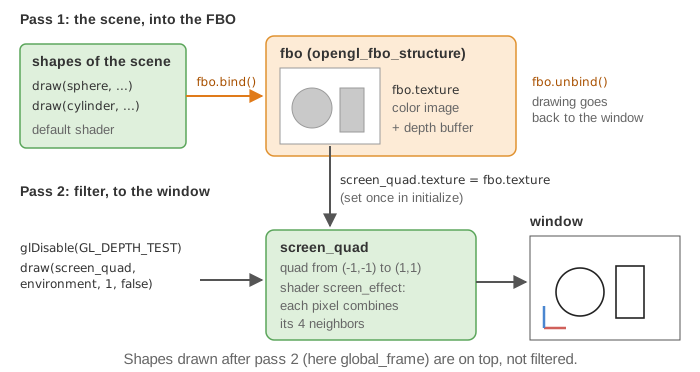
The frame is drawn in two passes:
- The scene is drawn as usual, but into a frame buffer object (FBO) whose result is a texture instead of the window.
- A quad covering the whole window is drawn with this texture and a custom shader: the fragment shader can read any pixel of the first image and combine its neighbors.
opengl_fbo_structure creates the FBO and its texture (fbo.texture); bind() and
unbind() redirect the drawing to it and back to the window.
1. Write the screen shaders
Create the folder shaders/screen_effect/ and the two files below. The quad is given directly in screen coordinates ([-1,1] in x and y), so the vertex shader
does not use any matrix:
// shaders/screen_effect/screen_effect.vert.glsl
#version 330 core
layout (location = 0) in vec4 vertex_position;
layout (location = 3) in vec2 uv;
out vec2 uv_frag;

void main()
{
    uv_frag = uv;
    gl_Position = vertex_position;
}
// shaders/screen_effect/screen_effect.frag.glsl
#version 330 core
in vec2 uv_frag;
uniform sampler2D image_texture;     // the texture of the quad = the first pass
layout(location=0) out vec4 FragColor;

void main()
{
    vec2 d = 1.0 / vec2(textureSize(image_texture, 0));     // size of one pixel
    vec4 laplacian = texture(image_texture, uv_frag + vec2(d.x, 0.0))
                   + texture(image_texture, uv_frag - vec2(d.x, 0.0))
                   + texture(image_texture, uv_frag + vec2(0.0, d.y))
                   + texture(image_texture, uv_frag - vec2(0.0, d.y))
                   - 4.0 * texture(image_texture, uv_frag);
    FragColor = abs(1.0 - laplacian);                        // dark edges on white
}
2. Create the FBO and the screen quad (once)
// scene.hpp - add in scene_structure
opengl_fbo_structure fbo;
mesh_drawable screen_quad;
// scene.cpp - add at the end of initialize()
fbo.initialize();

screen_quad.initialize_data_on_gpu(mesh_primitive_quadrangle({-1,-1,0}, {1,-1,0}, {1,1,0}, {-1,1,0}));
screen_quad.texture = fbo.texture;              // the quad shows the result of pass 1
screen_quad.shader.load(
    project::path + "shaders/screen_effect/screen_effect.vert.glsl",
    project::path + "shaders/screen_effect/screen_effect.frag.glsl");
3. Draw the two passes (every frame)
The draw calls of the template move into pass 1. The whole function:
// scene.cpp - replace display_frame()
void scene_structure::display_frame()
{
    environment.camera_view = camera_control.camera().matrix_view();
    environment.light = camera_control.camera_model.position();

    // Pass 1: the scene, drawn into the texture of the FBO
    fbo.update_screen_size(window.width, window.height);   // follow the window size
    fbo.bind();
    glClear(GL_COLOR_BUFFER_BIT | GL_DEPTH_BUFFER_BIT);
    draw(sphere, environment);
    cylinder.model.rotation = rotation_transform::from_axis_angle({1,0,0}, timer.t);
    draw(cylinder, environment);
    fbo.unbind();

    // Pass 2: the filtered image, on a quad covering the window
    glDisable(GL_DEPTH_TEST);
    draw(screen_quad, environment, 1, false);   // false: no warning for the unused matrices
    glEnable(GL_DEPTH_TEST);

    // Drawn after pass 2: on top of the image, not filtered
    if (gui.display_frame)
        draw(global_frame, environment);

    timer.update();
}
Shapes drawn after pass 2 (here the global frame) appear unfiltered on top of the image.
Common pitfalls
- The image is blurry or stretched: the FBO kept its initial size (800 x 800). Call
fbo.update_screen_size(window.width, window.height)at every frame; it only resizes the texture when the window size changes. - The previous frames remain visible, or nothing is drawn in pass 1: the FBO is not
cleared. Call
glClearafterfbo.bind(). - Warning "Try to send uniform variable [model] to a shader that doesn't use it": the
screen shader uses no matrix. Pass false as the fourth argument of
draw(expected uniforms). - The program stops on "Try to draw mesh_drawable without texture": the texture was
copied to the quad before
fbo.initialize(), when its id was still 0. Initialize the FBO first. - The quad does not cover the window: the vertex shader multiplies the position by
matrices. It must write the quad coordinates, already in [-1,1], to
gl_Position.
Variations
- Other effects only need another fragment shader: blur (average of the neighbors),
grayscale or sepia (combination of r, g, b), pixelation (round the uv coordinates), wave
deformation (offset the uv coordinates with a time uniform sent through
environment.uniform_generic). - Chain several filters: use two FBOs, draw the quad of filter 1 into the second FBO, then display the second texture with filter 2.
- Picture in picture: draw a second, smaller quad (for instance from (0.5,0.5,0) to (1,1,0)) with the same vertex shader and a fragment shader that only copies the texture color.
Source: EPITA Ani3D repository epita_ani3d_lab_code-2027, examples
06_multipass/01_image_filter (scene.cpp, multipass_structure.cpp,
screen_effect_convolution shaders), 06_multipass/02_image_filter_basic_effects (color,
contour and deformation effects) and 06_multipass/03_image_filters_chain (two filters in
sequence). Adaptation: the helper struct multipass_structure of the example is written
inline.
See also
- How-to: Cast shadows with a shadow map (same FBO, depth mode), Send a custom uniform to a shader
- Understand: Shaders and uniforms
- Reference:
opengl_texture_image_structure,opengl_shader_structure,mesh_drawable