Display JavaScript output
HTML
<
h1
>
Content of Webpage
</
h1
>
- No visual output of JavaScript
- Print on the browser' console
console.log('...')
equivalent to print('...') in Python
JS
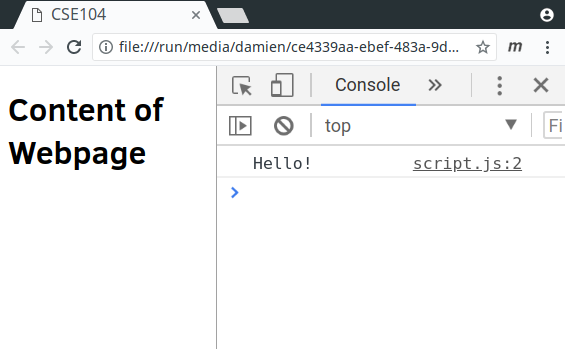
console.log("Hello");
12/41
1 - CSE104 Web Programming
2 - Introduction to JavaScript
3 - Why JavaScript
4 - Quick history
5 - Current state
6 - JavaScript: An Interpreted Language
7 - JavaScript: An Interpreted Language
8 - JavaScript: An Interpreted Language
9 - First steps in JavaScript
10 - Running JavaScript code
11 - Complete header template
12 - Display JavaScript output
13 - Loops, conditionals
14 - Modifying webpage through DOM in JS
15 - DOM: Document Object Model
16 - DOM is visible in the developer mode
17 - DOM access from JavaScript
18 - Modifying a webpage
19 - Modifying a webpage with a loop
20 - Adding elements
21 - Changing style
22 - User events
23 - Event based programming
24 - Event based programming: Listener
25 - Event based programming: Callback
26 - Event in practice: Mouse click
27 - Webpage modification in the callback function
28 - Callback parameters (event)
29 - Event Target
30 - Example
31 - Example fully defined in JS
32 - Events type
33 - JavaScript language
34 - Good practices
35 - Declaring variables in JS
36 - Good practices to declare variables
37 - Rem on const
38 - Typing
39 - Data structure
40 - Functions
41 - Equality