Walk on a plane with the keyboard
What it shows: a first-person camera that walks: the arrow keys move the eye forward, back and sideways, the mouse turns the head, and the height of the eye never changes, even when you look up or down. The scene is a large checkerboard ground with a regular field of thin poles, which makes the motion easy to perceive.
Controls. Click in the demo first, so that it receives the keys.
Input Effect Up / Down arrows, W / S (Z / S on AZERTY) walk forward / back (1.5 units per second) Left / Right arrows, A / D (Q / D on AZERTY) step left / right (half speed) Shift held with a key run (3 times faster) Left drag look around (left / right, up / down) Ctrl + left drag tilt the up axis (the walking plane tilts with it) Right drag walk forward / back Shift + C, Esc capture the cursor (the head follows the mouse without a click), release it
This page complements the how-to Explore a scene with a first-person camera, which was derived from this example and explains how to switch the camera of your own scene. Here: what the controller does to stay on the plane, and the differences of the complete program.
Source: examples/07_camera/02_camera_2d_displacement
of the public repository epita_ani3d_lab_code-2027, run unchanged in the demo above.
| File | Role |
|---|---|
src/scene.hpp, src/scene.cpp |
the scene: the controller, the ground, the poles, the callbacks |
assets/checkboard.png |
the 8 x 8 checkerboard of the ground |
1. A y-up scene
Unlike the how-to and the template (z up), this scene uses y as the vertical axis:
// src/scene.cpp - initialize
camera_control.initialize(inputs, window); // Give access to the inputs and window global state to the camera controler
camera_control.set_rotation_axis_y();
There is no look_at: the camera starts at the origin, looking toward . The ground is a
quadrangle in the plane , scaled by 50 and moved down by 0.5, so the eye is 0.5 above
it; the checkerboard image is stretched once over the 100 x 100 units of the quadrangle, so
each square is 12.5 units wide.
2. How the controller stays on the plane
camera_controller_2d_displacement is a camera_controller_first_person_euler (yaw and pitch
around a fixed axis, the horizon stays horizontal) whose displacements are constrained. In its
idle_frame, the front and right directions of the camera are projected on the plane
orthogonal to the rotation axis, and normalized:
// cgp/19_camera_controller/camera_controller_2d_displacement/camera_controller_2d_displacement.cpp - idle_frame
vec3 move_front = front - dot(front, up) * up;
if (float const len = norm(move_front); len > 1e-4f) move_front /= len;
// ... the same for move_right

if (inputs->keyboard.up || inputs->keyboard.is_pressed(GLFW_KEY_W))
    camera_model.position_camera += magnitude * move_front;
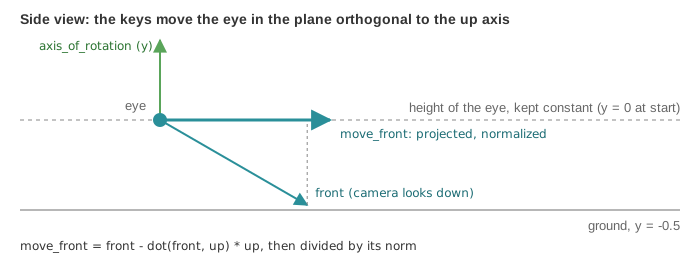
The first-person controller of CGP would move the eye along front itself
(manipulator_translate_front), and therefore into the ground when you look down. Here
magnitude is 1.5 times the duration of the frame (3 times more with Shift), and the right
drag of the mouse uses the same projected direction. Only the rotation axis defines the
plane: if you tilt it with Ctrl + left drag, the walk follows the tilted plane.
3. A field of poles drawn in a loop
// src/scene.cpp - display_frame
for (int kx = -20; kx < 20; kx+=2) {
	for (int kz = -20; kz < 20; kz+=2) {
		if (kx != 0 || kz != 0) {
			cylinder.model.translation = { kx,-0.5f, kz };
			draw(cylinder, environment);
		}
	}
}
One mesh_drawable (a cylinder of radius 0.05 and height 1) is drawn 399 times per frame,
with a new model translation before each draw: a grid with a spacing of 2, without the pole
at the origin, where the camera starts. Each draw is one draw call. For a few hundred copies
this is fine; for thousands, the GPU can draw all the copies in one call with instancing, see
Grass with per-instance positions.
As in the fly example, the light is placed at the camera position at every frame
(environment.light = camera_control.camera_model.position();). The "Wireframe" checkbox draws
nothing in the browser (see Display the wireframe).
Going further
- Walk on a terrain: after
camera_control.idle_frame(), set the height of the eye from the height of the ground below it. - Add collisions with the poles: before moving, reject a position closer than the radius to the nearest grid point.
- Compare with a camera that flies: Fly over a terrain.