Camera and matrices
Every vertex you draw goes through the same chain of transformations before it lands on the
screen. CGP computes three 4x4 matrices on the CPU (mat4) and sends them to the GPU as
uniform variables; the vertex shader multiplies them with each vertex position.
The result is in clip space, a 4D homogeneous point . The GPU then divides it by its fourth coordinate to get the normalized device coordinates (NDC), , in for the visible points, and finally maps to the pixels of the window.
| Matrix | Moves from | To | Set in CGP by |
|---|---|---|---|
| Model | local coordinates of the shape | world coordinates | mesh_drawable::model |
| View | world coordinates | camera coordinates | camera.matrix_view() |
| Projection | camera coordinates | clip space (NDC after the division by ) | camera_projection_perspective::matrix() |
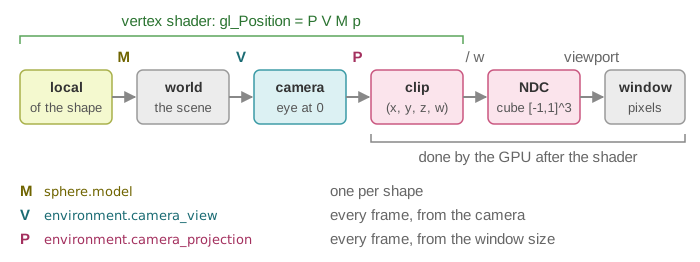
All coordinates are homogeneous: a 3D point is stored as so that translations and perspective can be written as matrix products.
1. Model matrix: placing the shape in the world
A mesh is defined once in its own local frame (for instance a unit cube or a sphere centered at the origin). The model matrix places, orients and scales this shape in the scene.
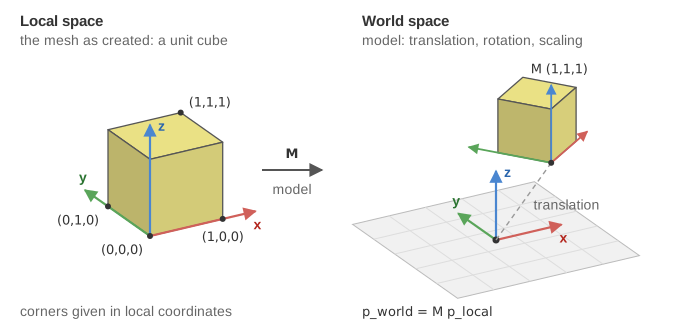
In CGP each mesh_drawable has a model field (an affine transform) that you set directly:
sphere.model.translation = {-0.5f, 0.75f, 0.0f};
sphere.model.rotation = rotation_transform::from_axis_angle({1,0,0}, 3.14f/4);
sphere.model.scaling = 0.5f;
The model matrix actually sent to the shader also includes two terms that are identity unless you use a hierarchy or set a custom matrix: see the model matrix of a drawable.
2. View matrix: looking from the camera
The camera is itself a frame in the world: a position (the eye) and three axes (right, up, back). The view matrix is the inverse of this camera frame: it expresses every world point in the camera coordinates, where the camera sits at the origin and looks towards .
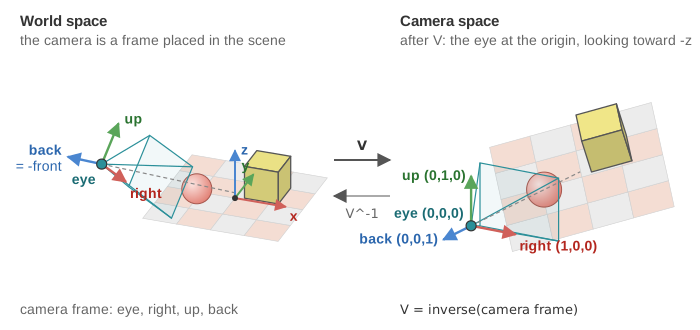
In CGP the camera model computes it for you (matrix_view() returns
inverse(to_frame()).matrix()), and the scene updates it at every frame:
environment.camera_view = camera_control.camera().matrix_view();
The camera controller (orbit, first person, fly mode...) only changes the camera frame from mouse and keyboard inputs; the view matrix follows.
3. Projection matrix: from 3D to the screen
The perspective projection, followed by the division by , maps the visible pyramid in front of the camera (the frustum, between the near and far planes) onto the cube of the normalized device coordinates. Points outside this cube are clipped.
![The perspective projection P, followed by the division by w, maps the frustum of camera space, between the near plane z = -n and the far plane z = -f, onto the NDC cube [-1,1]^3; each corner keeps its color, the near plane goes to z = -1 and the far plane to z = 1.](../../assets/frustum.svg)
With a vertical field of view , an aspect ratio (width / height) and near / far distances :
The last row copies into the fourth coordinate . The GPU then divides by : this perspective division is what makes distant objects smaller.
![After the division by w, visible points lie in the cube [-1,1]^3; the viewport maps x and y to the pixels of the window, from (0,0) at the bottom left to (width, height), and z is kept in the depth buffer.](../../assets/ndc.svg)
In CGP the parameters live in camera_projection_perspective (field_of_view, aspect_ratio,
depth_min, depth_max). The application rebuilds the matrix at every frame, before
calling display_frame(), so that it follows the size of the window (in
src/application.cpp, function animation_loop):
s.camera_projection.aspect_ratio = s.window.aspect_ratio();   // s: the scene
s.environment.camera_projection = s.camera_projection.matrix(); // calls projection_perspective(...)
Try it. The interactive demo above is a CGP program of the course CSC_43043: move the camera and change the field of view to see the frustum and its image in NDC.
4. From CGP to the GPU: uniform variables
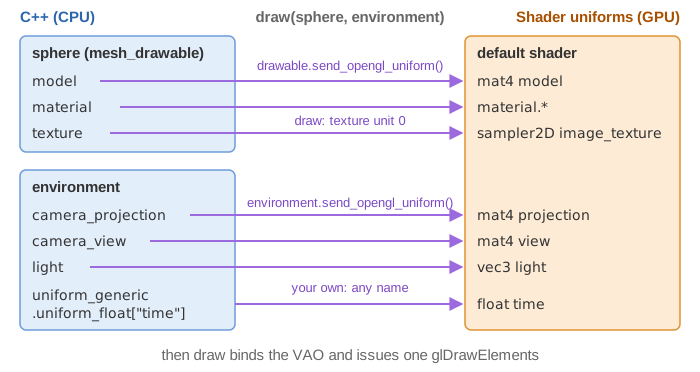
A uniform is a shader variable whose value is the same for every vertex of a draw call. The default CGP vertex shader declares the three matrices:
uniform mat4 model;      // shape -> world
uniform mat4 view;       // world -> camera
uniform mat4 projection; // camera -> clip space (NDC after the division by w)

void main() {
    vec4 position = model * vec4(vertex_position, 1.0);
    gl_Position = projection * view * position;
}
When you call draw(drawable, environment), CGP sends them before issuing the draw command:
model comes from the drawable, view and projection from the environment. Who sends which
uniform, in which order, and how to send your own values is explained once, in
Shaders and uniforms.
See also
- How-to: Draw a mesh with a camera
- Reference:
mat4,vec3,projection_perspective,opengl_uniform