An environment map on several shapes
What it shows: a mirror-like shape in the middle of the canyon skybox of the previous example. Buttons switch between a torus, a sphere, a cylinder and a camel loaded from a file: the same reflection shader is used by the four shapes. Turn the camera around the camel to see the reflection follow the curvature of the surface.
Concepts combined in this example:
- the skybox of A skybox around a y-up scene, built the same way;
- a fragment shader that reads the cube map in the reflected view direction;
- the cube map given to each shape as a supplementary texture
(
supplementary_texture["image_skybox"]); - a uniform shared by all the shapes, put in
environment.uniform_generic; - a
std::mapofmesh_drawableindexed by name, chosen by GUI buttons.
Source: examples/05_environment_map/02_environment_map
of the public repository epita_ani3d_lab_code-2027, run unchanged in the demo above (only
the sky image is resized). The step-by-step recipe, with one torus in the default template,
is Reflect the environment on a shape.
| File | Role |
|---|---|
src/scene.hpp, src/scene.cpp |
skybox, the four shapes, the shared shader, the buttons |
shaders/environment_map/environment_map.vert.glsl |
identical to the default shaders/mesh/mesh.vert.glsl |
shaders/environment_map/environment_map.frag.glsl |
the default fragment shader plus the reflection |
assets/skybox_01.jpg, assets/camel.obj |
the sky and the camel |
1. The reflection in the fragment shader
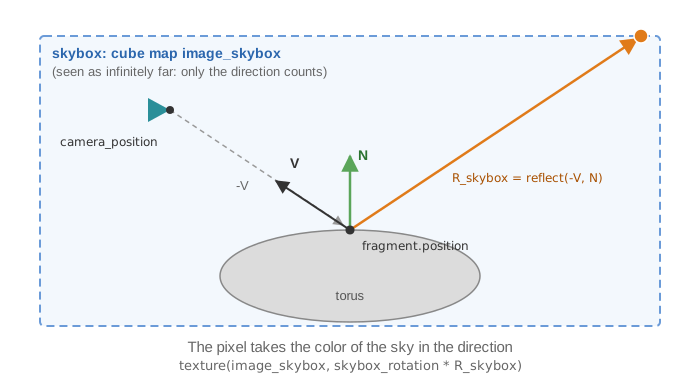
The shader is a copy of the default shaders/mesh/mesh.frag.glsl with three changes: two
uniforms, the direction to the camera V moved out of the specular block, and the lines
below.
// shaders/environment_map/environment_map.frag.glsl - main
// Get the color of the environment map
vec3 R_skybox = reflect(-V, N);
vec4 color_environment_map = texture(image_skybox, skybox_rotation*R_skybox);

// Compute the base color of the object based on: vertex color, uniform color, and texture
vec3 color_object  = fragment.color * material.color * color_image_texture.rgb * color_environment_map.rgb;
image_skybox is a samplerCube: it is read with a direction, not with uv coordinates.
The color read in the sky multiplies the base color of the object, which then goes
through the usual Phong shading (ambient + diffuse, plus a white specular highlight, with
the light at the camera position). The result is a tinted, shaded mirror rather than a
perfect one: the darker parts of the torus, away from the light, are the diffuse term at
work.
2. One shader for four shapes
// src/scene.cpp - initialize
shapes["torus"].initialize_data_on_gpu(mesh_primitive_torus());
shapes["sphere"].initialize_data_on_gpu(mesh_primitive_sphere());
shapes["cylinder"].initialize_data_on_gpu(mesh_primitive_cylinder());
shapes["camel"].initialize_data_on_gpu(mesh_load_file_obj(project::path+"assets/camel.obj"));
shapes["camel"].model.rotation = rotation_transform::from_axis_angle({ 1,0,0 }, -Pi / 2.0f);

opengl_shader_structure shader_environment_map;
shader_environment_map.load(project::path + "shaders/environment_map/environment_map.vert.glsl", project::path + "shaders/environment_map/environment_map.frag.glsl");

environment.uniform_generic.uniform_mat3["skybox_rotation"] = mat3::build_identity();
environment.default_expected_uniform = false;
for (auto& shape_it : shapes) {
	mesh_drawable& shape = shape_it.second;
	shape.shader = shader_environment_map;
	shape.supplementary_texture["image_skybox"] = skybox.texture;
}
shapesis astd::map<std::string, mesh_drawable>:shapes["torus"]creates the entry the first time. The GUI stores the name of the shape to draw ingui.shape_to_display, anddisplay_framedrawsshapes[gui.shape_to_display].- The camel of the file is modeled with z up; the rotation of around x turns its z
axis into the y axis, the up axis of this scene (the camera uses
set_rotation_axis_y, as in the skybox example). - The program is loaded once and copied into each shape: copying an
opengl_shader_structurecopies the id of the GPU program, not the program. supplementary_texturebinds the cube map, atdrawtime, to the GLSL sampler of the same name,image_skybox. The copy shares the texture of the skybox (same id).
Why default_expected_uniform = false. The rotation is put in
environment.uniform_generic, so every draw sends it, also to the global frame whose
default shader has no skybox_rotation: each of these draws would print a warning. Setting
the static flag environment_generic_structure::default_expected_uniform to false silences
the warnings of the environment uniforms for every shape. The how-to page avoids this with
the per-draw uniforms of draw (see
Reflect the environment, step 3).
The rotation is the identity because the sky is not rotated: if skybox.skybox_rotation
changes, this uniform must receive the same matrix, or the reflection no longer matches the
sky.
3. Drawing and GUI
// src/scene.cpp - display_frame
glDepthMask(GL_FALSE); // disable depth-buffer writing
draw(skybox, environment);
glDepthMask(GL_TRUE);  // re-activate depth-buffer write

draw(shapes[gui.shape_to_display], environment);
The skybox is drawn first, as in the previous example, then only the selected shape. The
buttons "Torus", "Sphere", "Cylinder" and "Camel" each set gui.shape_to_display; the
"Wireframe" checkbox draws the wireframe of the selected shape over it.
Going further
- Remove the Phong shading of the reflection: in the fragment shader, output
color_environment_mapdirectly, and compare the look with the shaded version. - Mix the reflection with a plain color, with a uniform coefficient controlled by a slider (see Send a custom uniform to a shader).
- Refraction: replace
reflect(-V, N)by the GLSL functionrefract(-V, N, 1.0/1.5)for a glass-like look.
See also
- Example: A skybox around a y-up scene
- How-to: Reflect the environment on a shape, Add a skybox
- Understand: Shaders and uniforms
- Reference:
mesh_drawable,skybox_drawable,opengl_shader_structure,uniform_generic_structure