Add a skybox
Goal: replace the plain background by a landscape that surrounds the scene in every direction and never gets closer when the camera moves.
Starting point: the default project template (
src/scene.hpp,src/scene.cpp, see Your first scene). It already declares the shapessphereandcylinder, atimer, and the memberscamera_control,environmentandgui: reuse them, do not declare them again. The first comment of each code block says in which file and where its lines go: add means insert them, replace means replace the whole function by the one shown.
How a skybox works
A skybox is a cube centered on the camera, textured with a cube map: six square images, one per face (-x, +x, -y, +y, -z, +z). Its shader removes the translation of the camera, so the sky only rotates with the view. It is drawn first, without writing the depth, so that every other shape is drawn in front of it.
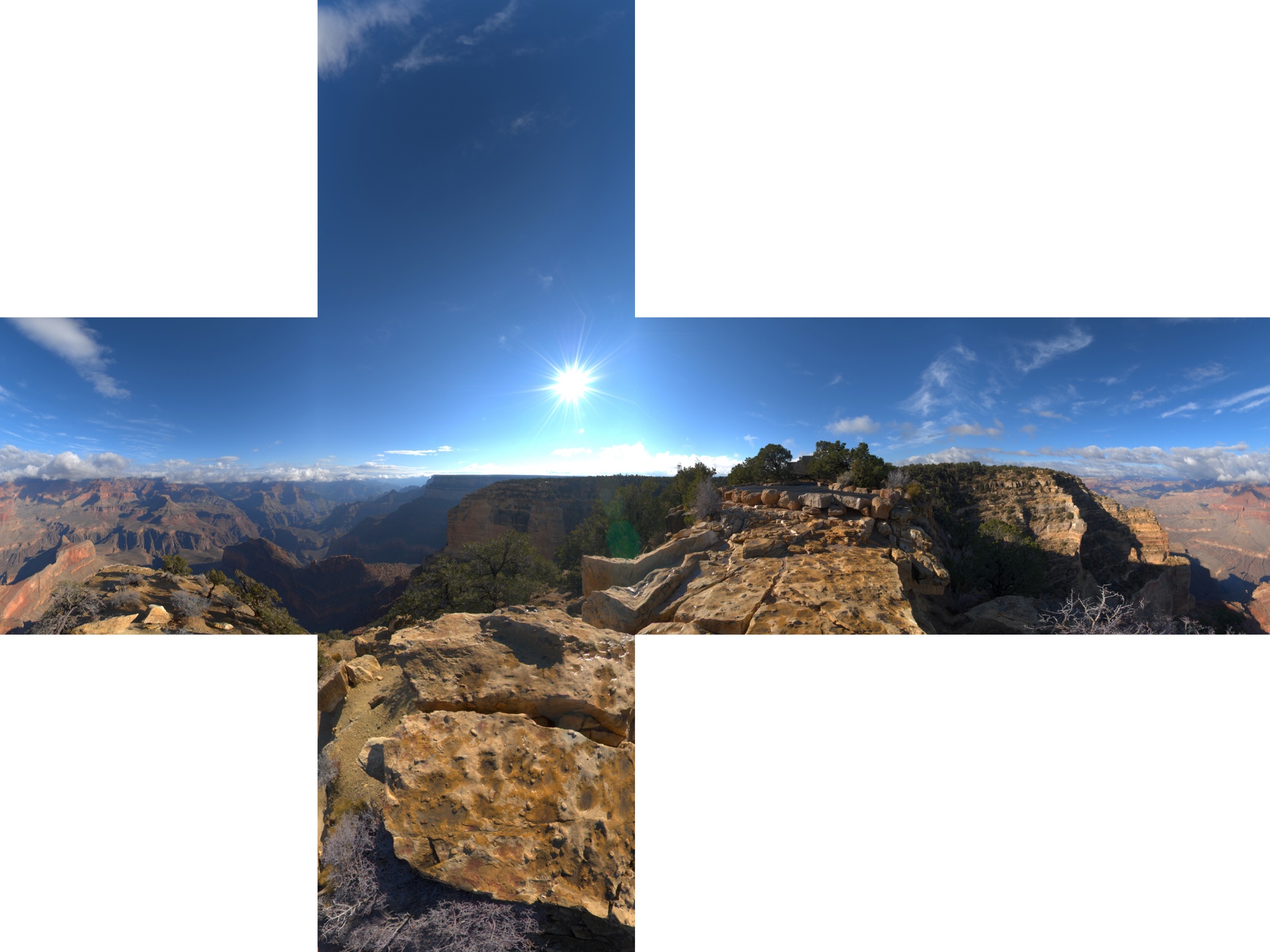
Sky images are often distributed as one picture in the shape of a cross, on a grid of 4 x 3 squares:
            [ +y ]
   [ -x ]   [ +z ]   [ +x ]   [ -z ]
            [ -y ]
![image_split_grid(image, 4, 3) cuts the cross into 12 squares, faces[row + 3*column] with row 0 at the top; six of them are the faces of the cube map.](../../assets/add-a-skybox-faces.svg)
1. Get a sky image
The template has no image. Use a sky image in the shape of a cross whose width and height
are multiples of 4 and 3, for instance skybox_01.jpg
(2048 x 1536, 510 KB, from the EPITA Ani3D repository given in the source below), and save
it as assets/skybox_01.jpg, in a folder assets/ at the root of the project, next to
shaders/.
2. Declare the skybox
// scene.hpp - add in scene_structure
skybox_drawable skybox;
3. Load the image and build the cube map (once)
// scene.cpp - add at the end of initialize()
image_structure const image_skybox = image_load_file(project::path + "assets/skybox_01.jpg");

// Cut the cross into 4 x 3 squares: faces[row + 3*column]
std::vector<image_structure> faces = image_split_grid(image_skybox, 4, 3);

skybox.initialize_data_on_gpu();
skybox.texture.initialize_cubemap_on_gpu(
    faces[1],  faces[7],    // -x, +x
    faces[5],  faces[3],    // -y, +y
    faces[10], faces[4]);   // -z, +z

// The cube map is y-up (OpenGL convention), the default scene is z-up: tilt the sky
skybox.skybox_rotation = rotation_transform::from_axis_angle({1,0,0}, -Pi / 2).matrix();
4. Draw it first (every frame)
The skybox is drawn right after the camera update, before every other shape. The whole function:
// scene.cpp - replace display_frame()
void scene_structure::display_frame()
{
    environment.camera_view = camera_control.camera().matrix_view();
    environment.light = camera_control.camera_model.position();

    glDepthMask(GL_FALSE);          // do not write the depth: the sky stays behind everything
    draw(skybox, environment);
    glDepthMask(GL_TRUE);

    if (gui.display_frame)          // then the shapes of the scene
        draw(global_frame, environment);
    draw(sphere, environment);
    cylinder.model.rotation = rotation_transform::from_axis_angle({1,0,0}, timer.t);
    draw(cylinder, environment);

    timer.update();
}
Common pitfalls
- The program stops in
image_split_grid: the size of the image is not a multiple of 4 x 3. Crop or resize it so that each square has the same integer size. - The sky hides the scene, or only the sky is visible: the skybox was drawn after
the other shapes, or with depth writing enabled. Draw it first, between
glDepthMask(GL_FALSE)andglDepthMask(GL_TRUE). - The horizon is vertical: the scene and the image do not agree on the up axis. Set
skybox_rotationas above for a z-up scene; leave it to the identity for a y-up scene (camera withset_rotation_axis_y()). - Visible seams or mismatched faces: the faces are not in the expected order. Load a debug image with the name of each face written on it to find the right indices.
- The program stops on an assertion in
initialize_cubemap_on_gpu: the six faces must be squares of the same size and of the same type (all RGB or all RGBA).
Variations
- Tint the sky (night, fog):
skybox.color_blending = {1.0f, 0.8f, 0.6f};andskybox.alpha_color_blending = 0.3f;(0 = image only, 1 = plain color). - Six separate files: load each with
image_load_fileand give them toinitialize_cubemap_on_gpuin the order -x, +x, -y, +y, -z, +z. - Make the shapes reflect the sky: see Reflect the environment on a shape.
Source: EPITA Ani3D repository epita_ani3d_lab_code-2027, example
05_environment_map/01_skybox (scene.cpp, and the image skybox_debug.png of its assets
for the face indices). Adaptation: the example uses a y-up camera; this page tilts the
cube map with skybox_rotation to match the z-up default scene.
See also
- How-to: Apply a texture image, Draw transparent objects (also uses
glDepthMask) - Understand: Camera and matrices
- Reference:
image_structure,opengl_texture_image_structure,rotation_transform