A chain of two image filters
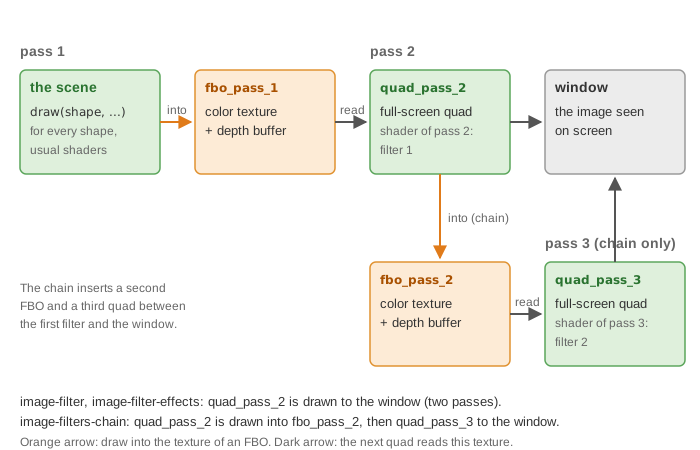
What it shows: the line drawing of An image filter on the whole scene, with lines made thicker by a second filter. Thickening a line needs the result of the edge filter at the neighboring pixels, and a fragment shader can read its input image but not what the other fragments write. So the edge image is drawn into a second texture, and a third pass applies the thickening filter to it. The "Thickness" slider sets the width of the lines.
Concepts combined in this example:
- two
opengl_fbo_structure: the output of one filter is the input of the next; - two full-screen quads that share the same GPU buffers but have their own texture and shader;
- a minimum filter over a neighborhood (an erosion of the bright image), whose size is a loop bound sent as an integer uniform;
- a GUI slider that edits the value stored in
environment.uniform_genericdirectly.
Source: examples/06_multipass/03_image_filters_chain
of the public repository epita_ani3d_lab_code-2027, run unchanged in the demo above.
| File | Role |
|---|---|
src/scene.hpp, src/scene.cpp |
the scene of the first filter example, the three passes, the slider |
src/multipass_structure/multipass_structure.* |
the helper of the first example, extended to a second FBO and a third pass |
shaders/screen_effect_convolution/ |
the edge filter (Laplacian), unchanged |
shaders/screen_effect_thickening/ |
the thickening filter |
1. A second FBO and a third quad
// src/multipass_structure/multipass_structure.cpp - initialize
fbo_pass_1.initialize();
fbo_pass_2.initialize();

// Initialize a simple quad used to display the result on the entire screen
quad_pass_2.initialize_data_on_gpu(mesh_primitive_quadrangle({ -1,-1,0 }, { 1,-1,0 }, { 1,1,0 }, { -1,1,0 }));
quad_pass_3 = quad_pass_2;

quad_pass_2.texture = fbo_pass_1.texture;
quad_pass_3.texture = fbo_pass_2.texture;
quad_pass_3 = quad_pass_2 copies the ids of the buffers: both quads draw the same GPU
geometry. The assignments that follow give each one its own texture, and
set_shader_pass_2 / set_shader_pass_3 its own shader: changing these members of one copy
does not affect the other (see
Copies, sharing and freeing).
update_screen_size now resizes both FBOs.
The only real change is where pass 2 draws:
// src/multipass_structure/multipass_structure.cpp
void multipass_structure::start_pass_2() {
	fbo_pass_2.bind();
	clear_screen();
}
void multipass_structure::end_pass_2()
{
	fbo_pass_2.unbind();
}
void multipass_structure::start_pass_3() {
	clear_screen();
}
In the first example, pass 2 drew to the window; here it is wrapped in
fbo_pass_2.bind() / unbind(), and pass 3 takes the role of the final pass:
draw_pass_3 draws quad_pass_3 with the depth test off, as draw_pass_2 does. In
display_frame, the three passes follow each other with the same start / draw / end
calls, and the global frame is drawn last, unfiltered.
2. The thickening filter
// shaders/screen_effect_thickening/screen_effect_thickening.frag.glsl
uniform int thickness;

void main()
{
	ivec2 image_size = textureSize(image_texture, 0);
	float dx = 1.0 / float(image_size.x);
	float dy = 1.0 / float(image_size.y);

	vec4 color = vec4(1.0, 1.0, 1.0, 1.0);
	for (int kx = -thickness; kx < thickness; kx++) {
		for (int ky = -thickness; ky < thickness; ky++) {
			color = min(color, texture(image_texture, uv_frag + vec2(float(kx)*dx,float(ky)*dy)));
		}
	}
	FragColor = color;
}
Each pixel takes the darkest value, channel by channel, of a square of
pixels around it (offsets from
-thickness to thickness - 1). A pixel near a dark line therefore becomes dark: every line
grows by about thickness pixels on each side. In image processing, this minimum is an
erosion of the white image, that is a dilation of the dark lines.
The cost grows as the square of the thickness: at 10, the shader reads the texture times per pixel. Try the slider at its maximum on a large window. A separable version (one pass for the minimum along x, a fourth pass along y) would need reads.
3. The thickness, from the slider to the shader
// src/scene.cpp - initialize
environment.uniform_generic.uniform_int["thickness"] = 5;
environment.default_expected_uniform = false;

// src/scene.cpp - display_gui
ImGui::SliderInt("Thickness", &environment.uniform_generic.uniform_int["thickness"], 1, 10);
uniform_int is a std::map<std::string, int>: the slider receives the address of the
value stored in the map and edits it in place, and every following draw sends the new
value. As in the effects example,
default_expected_uniform = false avoids a warning for each shape that receives
thickness without using it.
Going further
- Chain a third filter: a blur after the thickening, for softer lines. Generalize
multipass_structureto a vector of FBOs and quads instead of numbered members. - Make the thickening separable, as described above, and compare the frame rate at thickness 10.
- Color the thick lines: in the last pass, read the original image (the texture of
fbo_pass_1, given as a supplementary texture) and multiply it by the lines.