Procedural grass in the vertex shader
What it shows: the same meadow as
Grass with per-instance positions, but the positions are no longer
stored anywhere. The vertex shader computes the place and the orientation of each blade from
its index gl_InstanceID, and bends it with a wind that changes with time. The only
per-instance buffer left holds a random tint per blade. Two sliders change the number of
blades (up to 200000) and the size of the area they cover, without touching any buffer.
Concepts combined in this example:
- instancing with
gl_InstanceID: a pseudo-random function of the index gives each instance its offset and rotation; - an animation computed in the vertex shader, from a
timeuniform sent throughenvironment.uniform_generic; - a per-instance color buffer, allocated once at the maximal size, and a number of instances chosen at each frame by a GUI slider.
Source: examples/08_instancing/02_instancing_procedural
of the public repository epita_ani3d_lab_code-2027, run unchanged in the demo above. The
scene (camera, tree, ground) is the one of the previous example; this page describes what
changes.
| File | Role |
|---|---|
src/scene.hpp, src/scene.cpp |
the scene: the per-instance colors, the uniforms, the sliders |
shaders/instancing/instancing.vert.glsl |
placement, rotation and wind of each blade |
shaders/instancing/instancing.frag.glsl |
default fragment shader + discard of the transparent pixels (same as the previous example) |
assets/ |
palm tree and grass image, as in the previous example |
1. On the CPU: a color per instance, nothing more
// src/scene.cpp - initialize
grass.initialize_data_on_gpu(mesh_primitive_quadrangle({ -0.5f,0.0f,0.0f }, { 0.5f,0.0f,0.0f }, { 0.5f,0.0f,1.0f }, { -0.5f,0.0f,1.0f }));
// ... texture, phong = {1,0,0,1} and shader as in the previous example

numarray<vec3> instance_colors(gui.max_number_of_instances);
for(int i=0; i<instance_colors.size(); ++i)
	instance_colors[i] = { rand_uniform(), rand_uniform(), 1.f };
grass.initialize_supplementary_data_on_gpu(instance_colors, /*location*/ 4, /*divisor: 1=per instance, 0=per vertex*/ 1);
- A blade is now a single quad: the random rotation of each instance replaces the second, crossed quad.
- The color buffer is filled for the maximal number of instances (200000), once. The slider
"Instances" only changes the count passed to
draw, which never exceeds the size of the buffer, so nothing has to be reallocated when it moves. - Each color has random red and green and a blue of 1. In the shader it multiplies the color of the texture: the blades get various tints, from yellow-green to dark red.
At every frame the scene sends the two values the shader needs, then draws:
// src/scene.cpp - display_frame
environment.uniform_generic.uniform_float["time"] = timer.t;
environment.uniform_generic.uniform_float["scaling_grass"] = gui.scaling_grass;
// ...
draw(grass, environment, gui.number_of_instances);
2. In the vertex shader: place, turn and bend each blade
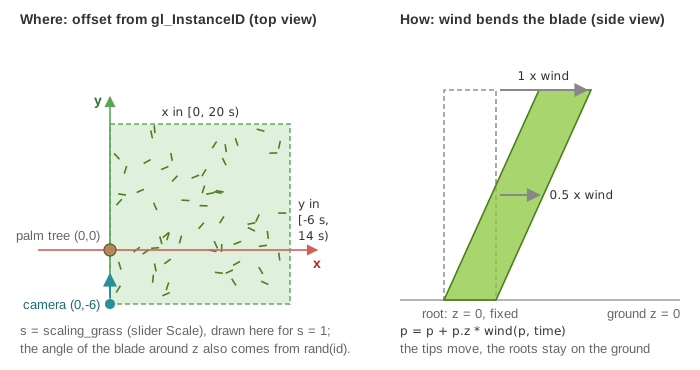
// shaders/instancing/instancing.vert.glsl - main
mat3 rotation_instance = rotation_z(rand(float(gl_InstanceID)*50.0+10.0) * 3.14);
vec3 offset = scaling_grass * vec3( rand(float(gl_InstanceID)-0.5) * 20.0, rand(float(gl_InstanceID) + 1.0) * 20.0 - 6.0, 0.0);

vec4 position = model * vec4(rotation_instance*vertex_position, 1.0);
position.xyz = position.xyz + offset; // offset of the instance
position.xyz = position.xyz + position.z * wind(position.xyz, time);
- Random but stable.
rand(n)is a hash of the numbern(the "gold noise" function cited in the shader): it returns a value in that looks random but is always the same for the samen. Blade number 42 is therefore at the same place at every frame, without any stored position. Three different arguments built from the index give three independent values: the angle and the two coordinates. - Where. The offset is with the slider "Scale": the blades cover the rectangle , which is why, at the start, the grass lies to the right of the tree only. Beyond the rectangle goes past the edge of the ground.
- Which way. Each blade turns around by an angle in . Note that
mat3(a, b, c)takes the columns of the matrix in GLSL: the matrix written inrotation_zis the rotation by minus the angle, which makes no difference for a random angle. The normal is turned by the same rotation. - The wind.
wind(p, t)is . Multiplied by the heightposition.z, it leaves the root () in place and moves the tip () by up to 0.2 along x and 0.1 along y. Since the phase depends on and , neighboring blades move almost together and a wave crosses the field. - The tint. The color sent to the fragment shader is
vertex_color * instance_color, read from the per-instance buffer at location 4.
3. Warnings in the console
Run natively, or open the console of the browser: the example prints, a limited number of times,
"Try to send uniform variable [time] to a shader that doesn't use it", and the same for
scaling_grass. Values of environment.uniform_generic are sent to every drawn shape, and the
tree, the ground and the frame use the default shader, which has no such uniforms. The drawing
is correct; to send them to the grass only, pass them as the additional_uniforms argument of
draw, see Send a custom uniform to a shader and
Shaders and uniforms.
Going further
- Push the slider "Instances" to 200000 and watch the frame rate: every vertex of every blade runs the wind function at every frame.
- Center the field on the tree: in the offset, use
* 20.0 - 10.0for both coordinates, so that the rectangle becomes . - Let the blades react to an object: send its position as a uniform and bend the blades away from it when they are close.
- Compare with the positions computed on the CPU: Grass with per-instance positions.
See also
- How-to: Draw thousands of copies with instancing (Variations), Send a custom uniform to a shader, Add GUI controls
- Understand: Shaders and uniforms, Time and animation
- Reference:
mesh_drawable,timer_basic