Draw thousands of copies with instancing
Goal: cover a ground with 6000 blades of grass, each at its own random position, while keeping a high frame rate.
Starting point: the default project template (
src/scene.hpp,src/scene.cpp, see Your first scene). It already declares the shapessphereandcylinder, atimer, and the memberscamera_control,environmentandgui: reuse them, do not declare them again. The first comment of each code block says in which file and where its lines go: add means insert them, replace means replace the whole function by the one shown.
Why instancing
Calling draw 6000 times in a loop (as in
Spawn objects periodically) costs one draw call, and one
upload of uniforms, per copy: it becomes slow beyond a few thousand shapes. With
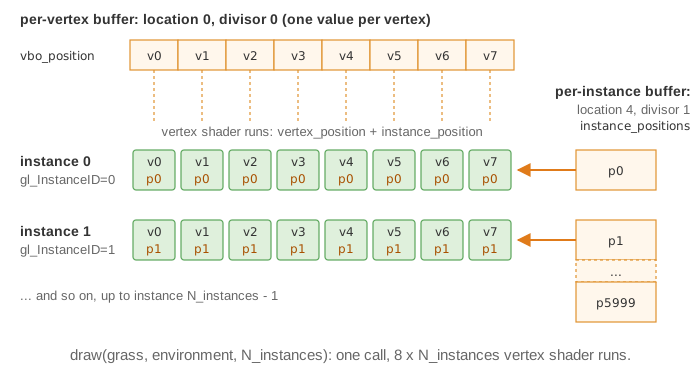
instancing, the GPU draws the mesh N times in one call. The vertex shader receives
gl_InstanceID (0 to N-1) and, optionally, per-instance data: here the position of each
blade, stored in an extra vertex buffer that advances once per instance instead of once
per vertex.
1. Write the vertex shader
Create the folder shaders/instancing/. Copy shaders/mesh/mesh.frag.glsl to
shaders/instancing/instancing.frag.glsl unchanged, and shaders/mesh/mesh.vert.glsl
to shaders/instancing/instancing.vert.glsl, in which you add
the per-instance input at location 4 (locations 0 to 3 are the position, normal, color
and uv of the mesh):
// shaders/instancing/instancing.vert.glsl (only the changed lines)
layout (location = 4) in vec3 instance_position;   // one value per instance

void main()
{
    vec4 position = model * vec4(vertex_position + instance_position, 1.0);
    // ... rest of the default shader unchanged
}
The fragment shader can stay the default one (here a copy that discards the transparent pixels of the grass image, see Variations).
2. Create the shape and its per-instance buffer (once)
The grass image assets/grass.png (a PNG with transparent pixels) is not in the
template: download grass.png (670 KB) or use your own, saved
in a folder assets/ at the root of the project.

// scene.hpp - add in scene_structure
mesh_drawable grass;
int N_instances = 6000;
// scene.cpp - add at the end of initialize()
mesh quad = mesh_primitive_quadrangle({-0.5f,0,0}, {0.5f,0,0}, {0.5f,0,1}, {-0.5f,0,1});
mesh quad_2 = quad;
quad_2.rotate({0,0,1}, Pi / 2);       // two crossed quads look like a tuft from any side
quad.push_back(quad_2);

grass.initialize_data_on_gpu(quad);
grass.texture.load_and_initialize_texture_2d_on_gpu(project::path + "assets/grass.png");
grass.material.phong = { 1, 0, 0, 1 };  // ambient only: no dark side
grass.shader.load(
    project::path + "shaders/instancing/instancing.vert.glsl",
    project::path + "shaders/instancing/instancing.frag.glsl");

numarray<vec3> instance_positions(N_instances);
float const L = 20.0f;
for (int k = 0; k < N_instances; ++k)
    instance_positions[k] = { rand_uniform(-L, L), rand_uniform(-L, L), 0.0f };
grass.initialize_supplementary_data_on_gpu(instance_positions, /*location*/ 4, /*divisor*/ 1);
The divisor tells OpenGL when to advance in the buffer: 1 = once per instance, 0 = once per vertex (an ordinary per-vertex attribute).
3. Draw all the instances (every frame)
// scene.cpp - add in display_frame(), before timer.update()
draw(grass, environment, N_instances);     // third argument: number of instances
Common pitfalls
- Only one blade is visible: the third argument of
drawwas omitted (it defaults to 1), or the shader does not useinstance_position. - All the blades are at the same place: the divisor is 0, so the buffer is read per vertex. Use 1.
- The program stops on an assertion "location >=4": locations 0 to 3 are used by the mesh. Use 4, 5, ... and the same number in the GLSL layout.
- Wrong positions for some instances: the buffer has fewer values than the number of instances drawn (reading past its end is undefined). Fill one value per instance.
- White rectangles around the grass: the default fragment shader keeps transparent
pixels. Add
if (color_image_texture.a < 0.5) discard;in a copy of the fragment shader, as the source example does (see Draw transparent objects).
Variations
- Per-instance color: fill a second
numarray<vec3>and send it at location 5,grass.initialize_supplementary_data_on_gpu(instance_colors, 5, 1);, read it aslayout (location = 5) in vec3 instance_color;and multiply the vertex color by it. - Moving instances: keep the array of positions in the scene, modify it, and re-send it at
every frame with
grass.update_supplementary_data_on_gpu(instance_positions, 4);. - Number of instances from the GUI:
ImGui::SliderInt("Instances", &n, 0, N_instances);thendraw(grass, environment, n);, with n not larger than the size of the buffer. - Fully procedural instances: without any buffer, compute the offset, rotation and wind
deformation of each blade in the vertex shader from
gl_InstanceIDand a time uniform. - Wireframe of all instances:
draw_wireframe(grass, environment, {0,0,1}, N_instances);.
Source: EPITA Ani3D repository epita_ani3d_lab_code-2027, examples
08_instancing/01_instancing_position (scene.cpp, instancing.vert.glsl) and
08_instancing/02_instancing_procedural (per-instance color, positions computed in the
shader from the instance index).
See also
- How-to: Spawn objects periodically, Send a custom uniform to a shader
- Understand: From CPU to GPU, Shaders and uniforms
- Reference:
mesh_drawable,mesh,numarray