An implicit surface edited live
What it shows: a surface defined implicitly, as the points where a scalar field equals an isovalue, is extracted with the marching cubes algorithm and recomputed at every change of a GUI slider: move the blobs, add noise, change the isovalue or the resolution of the grid. To stay interactive, the example reuses its GPU buffers instead of rebuilding the shape, and computes smooth normals from the gradient of the field.
Concepts combined in this example:
- a scalar field sampled on a
grid_3D<float>over aspatial_domain_grid_3D; - the low-level
marching_cube, which fills a vector of positions and tells on which edge of the grid each vertex lies; - normals interpolated from the gradient of the field (finite differences);
- a
triangles_drawablewhose buffers are updated in place (vbo_position.update); - a GUI that triggers two levels of update: the isovalue only, or the whole field.
Source: examples/02_marching_cubes/02_marching_cube_dynamic
of the public repository epita_ani3d_lab_code-2027, run unchanged in the demo above. For a
first, simpler use of marching cubes (one call that returns a mesh), start with
Mesh an implicit surface with marching cubes.
| File | Role |
|---|---|
src/scene.hpp, src/scene.cpp |
the scene: draws the surface, its wireframe (native build only: draw_wireframe draws nothing in WebGL, see Display the wireframe of a mesh) and the box of the domain |
src/implicit_surface/field_function.* |
the scalar field: three Gaussian blobs plus Perlin noise |
src/implicit_surface/implicit_surface.* |
sampling, gradient, marching cubes, GPU update |
src/implicit_surface/gui_helper.* |
the sliders, and which update each one triggers |
The folder field_function/ of the example is an older version of the field that no file
includes; it plays no role.
1. The scalar field
The field is a sum of three Gaussian "blobs" centered at pa, pb, pc, with the
magnitudes sa, sb, sc, plus an optional Perlin noise. The structure stores the
parameters edited by the GUI and evaluates the field at any point with its call operator:
// implicit_surface/field_function.cpp
float field_function_structure::operator()(cgp::vec3 const& p) const
{
	float value = 0.0f;
	value += sa * gaussian(p, pa, 1.0f);
	value += sb * gaussian(p, pb, 1.0f);
	value += sc * gaussian(p, pc, 1.0f);

	if (noise_magnitude > 0) {
		vec3 const offset = vec3{ noise_offset + 1000, 1000, 1000 };
		vec3 const p_noise = noise_scale * p + offset;
		value += noise_magnitude * noise_perlin(p_noise, noise_octave, noise_persistance);
	}
	return value;
}
where gaussian(p, p0, sigma) is . Around one blob alone, the
surface is a sphere; two close blobs merge into one smooth shape, which is what
makes this representation convenient to model organic shapes.
The field is then sampled once per change, at the nodes of a regular grid that covers the
domain (compute_discrete_scalar_field): domain.position({kx, ky, kz}) gives the position
of the node, and the value is stored in field(kx, ky, kz). The domain is built by
spatial_domain_grid_3D::from_center_length(center, length, samples); its border, drawn in
red, comes from domain.export_segments_for_drawable_border() and a curve_drawable.
2. From the samples to triangles
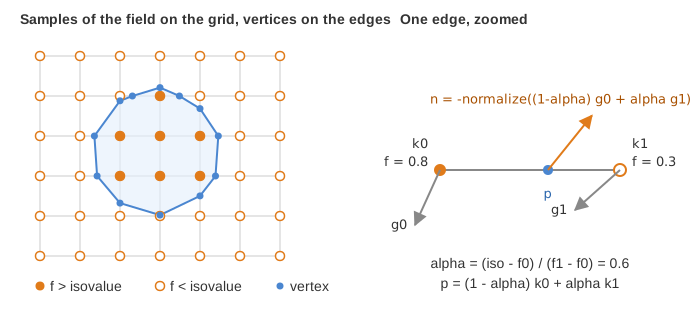
The marching cubes visit every cell of the grid. When the values at the two ends of an edge are on both sides of the isovalue, the surface crosses this edge: a vertex is placed on it by linear interpolation, and a table gives the triangles that connect these vertices inside the cell. The example calls the low-level version of the function:
// implicit_surface/implicit_surface.cpp - update_marching_cube
number_of_vertex = marching_cube(position, field.data.data, domain, isovalue, &relative_coord);
- The triangles are a soup: three new vertices per triangle, no shared vertex. That is
why the result goes into a
triangles_drawable(no connectivity) instead of amesh_drawable. positionis astd::vector<vec3>that is only enlarged, never shrunk: the function returns the number of valid vertices, and the end of the vector is left unused. Reusing the same vector from one call to the next avoids an allocation at every slider move.- The last argument receives, for each vertex, the edge it lies on (
k0,k1, the indices of its two ends in the grid) and its positionalphaalong this edge.
3. Normals from the gradient of the field
A triangle soup has no shared vertices, so normals computed from the triangles would show
every facet. The example uses the field instead: the gradient of is perpendicular to the
surface , and points toward the larger values, that is inside the blobs.
It is computed once per field by finite differences at every node of the grid
(compute_gradient), then interpolated on each edge with the same alpha as the position:
// implicit_surface/implicit_surface.cpp - update_normals
vec3 const& n0 = gradient.data[relative_coords[k].k0];
vec3 const& n1 = gradient.data[relative_coords[k].k1];
float const alpha = relative_coords[k].alpha;
normals[k] = -normalize((1 - alpha) * n0 + alpha * n1, { 1,0,0 });
The minus sign turns the normal outward. The second argument of normalize is the value
returned for a null vector, a case that happens far from the blobs where the field is flat.
4. Updating the GPU buffers without reallocation
// implicit_surface/implicit_surface.cpp - end of update_marching_cube
if (position.size() > previous_size) {
	// more vertices than the buffers can hold: rebuild them
	drawable_param.shape.clear();
	drawable_param.shape.initialize_data_on_gpu(position, normal);
}
else {
	// overwrite the beginning of the existing buffers
	drawable_param.shape.vbo_position.update(position, number_of_vertex);
	drawable_param.shape.vbo_normal.update(normal, number_of_vertex);
	drawable_param.shape.vertex_number = number_of_vertex;
}
This is the rule of From CPU to GPU: a
VBO can be overwritten (update) but not enlarged. The second argument of update limits
the copy to the valid vertices, and vertex_number tells draw how many to display. The
buffers are rebuilt only when the surface needs more vertices than ever before, which
quickly stops happening while the sliders move. clear() is safe here because this drawable
is not shared with another one (see
Copies, sharing and freeing).
5. Two levels of update
The GUI helper returns two flags, depending on the slider that moved:
| Change | Recomputed | Cost |
|---|---|---|
| isovalue | marching cubes, normals, buffers (update_marching_cube) |
small |
| blob, noise, domain, number of samples | sampled field, gradient, then the above (update_field) |
the sampling grows as samples^3 |
// implicit_surface/implicit_surface.cpp - gui_update
if (is_update_marching_cube)
	update_marching_cube(gui.isovalue);
if (is_update_field) {
	set_domain(gui.domain.samples, gui.domain.length);
	update_field(field_function, gui.isovalue);
}
Each flag is set with the update |= ImGui::Slider...(...) pattern of
Add GUI controls. Try "Samples" at 100: evaluations of
the field per change, and the noise makes each of them more expensive. The button
"Export mesh as obj" writes the current surface with mesh_save_file_obj (in the native
program; in the browser, the file stays in the memory of the page).
Going further
- Replace the blobs by your own function in
implicit_surface/field_function.cpp: a torus, a union (max) or an intersection (min) of shapes. - Animate the field: call
update_fieldindisplay_framewith a parameter driven by atimer_basic, and watch the frame rate as the resolution grows. - The same extraction works on any sampled data: a density of particles, a medical volume.
See also
- How-to: Mesh an implicit surface with marching cubes
- Understand: From CPU to GPU, Choose the right type (
grid_3D,triangles_drawable) - Reference:
grid_3D,triangles_drawable, marching cubes