Sketch curves with the mouse
Goal: draw strokes in the 3D scene by dragging the mouse with the left button, remove the last stroke with a button, and switch back to the camera rotation with a checkbox.
Starting point: the default project template (
src/scene.hpp,src/scene.cpp, see Your first scene). It already declares the shapessphereandcylinder, atimer, and the memberscamera_control,environmentandgui: reuse them, do not declare them again. The first comment of each code block says in which file and where its lines go: add means insert them, replace means replace the whole function by the one shown.
From a mouse position to a 3D point
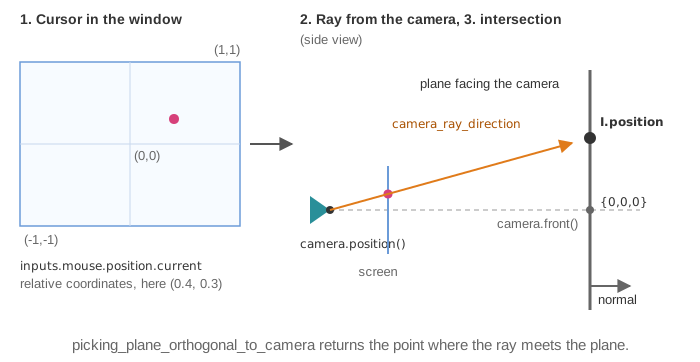
inputs.mouse.position.current is the cursor position in screen coordinates, in [-1,1]
for x and y. A screen point corresponds to a whole ray in 3D; to get one point, intersect
this ray with a surface. picking_plane_orthogonal_to_camera does it with the plane that
faces the camera and passes through a given point:
// scene.cpp - add at the end of the file
// helper used by the mouse callbacks, declared in scene_structure (step 1)
vec3 scene_structure::mouse_position_3d() const
{
    intersection_structure const I = picking_plane_orthogonal_to_camera(
        inputs.mouse.position.current, /*plane passes through*/ {0,0,0},
        camera_control.camera_model, camera_projection);
    return I.position;
}
1. Store the strokes
Each stroke is a curve_drawable_dynamic_extend: a curve whose GPU buffer grows when a
point is added with push_back.
// scene.hpp - add in gui_parameters
bool sketch_mode = true;
// scene.hpp - add in scene_structure
std::vector<curve_drawable_dynamic_extend> strokes;
vec3 mouse_position_3d() const;
2. Start a stroke on click, extend it on move
Replace the two callbacks of the template:
// scene.cpp - replace mouse_click_event()
void scene_structure::mouse_click_event()
{
    if (gui.sketch_mode && !inputs.mouse.on_gui
        && inputs.mouse.click.last_action == last_mouse_cursor_action::click_left) {
        strokes.push_back(curve_drawable_dynamic_extend());   // new stroke
        strokes.back().initialize_data_on_gpu();
        strokes.back().color = { 0,0,0 };
        strokes.back().push_back(mouse_position_3d());
    }
    else
        camera_control.action_mouse_click();
}
// scene.cpp - replace mouse_move_event()
void scene_structure::mouse_move_event()
{
    if (gui.sketch_mode) {
        if (inputs.mouse.click.left && !inputs.mouse.on_gui && !strokes.empty())
            strokes.back().push_back(mouse_position_3d());     // extend the current stroke
    }
    else if (!inputs.keyboard.shift)
        camera_control.action_mouse_move();
}
3. Draw the strokes and the GUI (every frame)
// scene.cpp - add in display_frame(), before timer.update()
for (auto const& stroke : strokes)
    draw(stroke, environment);      // draws the valid points only
// scene.cpp - add in display_gui()
ImGui::Checkbox("Sketch mode", &gui.sketch_mode);
if (ImGui::Button("Remove last stroke") && !strokes.empty()) {
    strokes.back().clear();         // free the GPU buffer
    strokes.pop_back();
}
Common pitfalls
- Clicking on the GUI starts a stroke: test
inputs.mouse.on_gui, true when the cursor is over an ImGui window. - The camera rotates while drawing: the camera controller still receives the mouse
events. In sketch mode, do not call
camera_control.action_mouse_move(). - The strokes look flat or far away after rotating the camera: they lie on the plane that faced the camera when they were drawn (here through the origin). Choose the point of the plane according to your scene, or intersect another surface (see Variations).
- Points are missing in a fast stroke: one point is added per mouse event; a fast move gives distant points. Resample the stroke if you need regular spacing.
Variations
- Draw on the ground plane z=0 instead: compute the ray and intersect it yourself,
vec3 const ray = camera_ray_direction(camera_control.camera_model.matrix_frame(), camera_projection.matrix_inverse(), inputs.mouse.position.current);thenintersection_ray_plane(camera_control.camera_model.position(), ray, {0,0,0}, {0,0,1}); keep the point only if thevalidfield of the result is true. - Pick a sphere among several (selection of particles, of control points):
picking_spheres(inputs.mouse.position.current, centers, radius, camera_control.camera_model, camera_projection)returns the index of the clicked sphere; see Select and drag objects with the mouse. - Number of points of a stroke: its member
N_valid_points. - 2D drawing application: use an orthographic projection (declare
camera_projection_orthographic camera_projection;) and unproject withcamera_projection.matrix_inverse(), as in the source example.
Source: EPITA Ani3D repository epita_ani3d_lab_code-2027, example 04_sketch/02_2d_curve
(scene.cpp). Adaptation: the example unprojects the cursor at a fixed depth in front of the
camera; this page uses picking_plane_orthogonal_to_camera so that the strokes stay in
the scene when the camera moves.
See also
- How-to: Draw curves, segments and trajectories, Add GUI controls, Select and drag objects with the mouse
- Understand: Camera and matrices
- Reference:
curve_drawable,camera_projection_perspective