Scene structure
A CGP program is not a single main function that you write from scratch. Every project (the
template in src/, and every lab of the course) has the same skeleton of five files, and
you only write the scene. The rest is plumbing that opens the window, runs the frame loop
and calls your functions at the right time. This page is the reference of this skeleton: the
order of the calls and the structure of the template. For a guided tour of the same template
(where to find what you see on screen, a first modification and its expected result), see
Your first scene.
| File | Contains | Do you edit it? |
|---|---|---|
src/main.cpp |
creates the scene and the application, starts the loop | no |
src/application.cpp (+ .hpp) |
application_structure: window, default shaders, frame loop, input routing |
rarely |
src/scene.cpp (+ .hpp) |
scene_structure: your shapes, your camera, what to draw |
yes |
src/environment.cpp (+ .hpp) |
environment_structure (camera matrices, light, extra uniforms) and global settings project::... |
sometimes |
These files are a template, not part of the library: you can change them freely. The library
itself is in cgp/ and is included everywhere with #include "cgp/cgp.hpp".
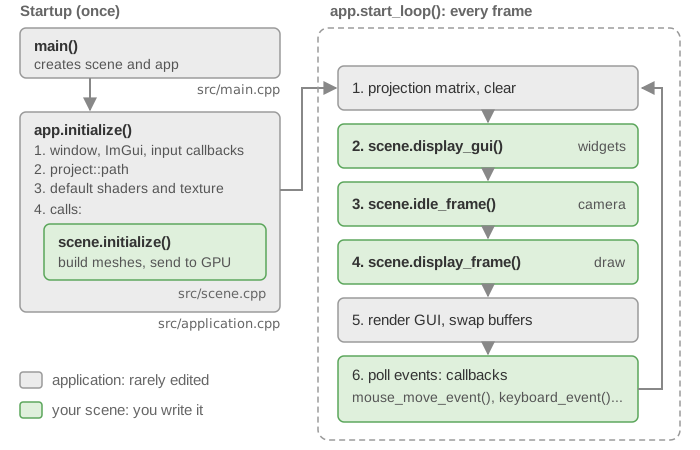
1. From main to the scene
The main function is three lines:
int main(int, char* argv[])
{
    scene_structure scene;
    application_structure app;
    app.initialize(argv[0], &scene);   // window + default shaders + scene.initialize()
    app.start_loop();                  // calls the scene at every frame until the window closes
    return 0;
}
application_structure::initialize does, in this order:
- creates the GLFW window ("CGP Display", half the width and half the height of the screen
by default, see
project::initial_window_size_widthbelow), the ImGui context, and registers the input callbacks; - finds the root of the project (the folder containing
shaders/) from the path of the executable, and stores it inproject::path(seeproject_path_find), so that files can be loaded fromshaders/andassets/; - loads the default shaders of
mesh_drawable(shaders/mesh/mesh.vert.glslandshaders/mesh/mesh.frag.glsl, stored inmesh_drawable::default_shader), oftriangles_drawableand ofcurve_drawable, and a 1x1 white image intomesh_drawable::default_texture; - calls your
scene.initialize().
Since the window and the OpenGL context exist before scene.initialize() is called, you can
send data to the GPU there (initialize_data_on_gpu, texture loading, shader loading).
2. What you write: scene_structure
The scene is a struct that derives from scene_inputs_generic. The header of the template,
src/scene.hpp, is organized in blocks:
struct gui_parameters {
    bool display_frame = false;   // set to true in initialize(): the frame is shown at startup
};

struct scene_structure : cgp::scene_inputs_generic {
    // Standard functions (called by the application)
    void initialize();     // once, before the loop
    void display_frame();  // at every frame: draw the shapes
    void display_gui();    // at every frame: ImGui widgets

    // Context
    environment_structure environment; // camera matrices, light, extra uniforms
    window_structure window;           // the GLFW window and its size
    input_devices inputs;              // mouse, keyboard, time_interval
    gui_parameters gui;                // your own GUI variables

    // Camera
    camera_controller_orbit_euler camera_control;     // position/orientation (extrinsic)
    camera_projection_perspective camera_projection;  // field of view, near/far (intrinsic)

    // Elements of the scene
    mesh_drawable global_frame;
    mesh_drawable sphere;
    mesh_drawable cylinder;
    timer_basic timer;

    // Callbacks (called on input events)
    void mouse_move_event();
    void mouse_click_event();
    void keyboard_event();
    void idle_frame();
};
Rule of thumb: allocate in initialize, draw in display_frame. Anything costly
(building a mesh, loading a file, sending buffers to the GPU) belongs to initialize and is
stored as a member of the scene; display_frame mostly calls draw on existing data.
Everything you want to keep from one frame to the next (shapes, parameters, simulation state)
is a member of this structure: a local variable of display_frame() disappears at the end of
the frame. A value edited in the GUI that is not a field of an existing object goes in
gui_parameters, read through gui.
The template functions
initialize() sets the camera, then creates the shapes and sends them to the GPU:
camera_control.initialize(inputs, window);
camera_control.set_rotation_axis_z();          // the camera turns around the z axis
camera_control.look_at({3.0f, -2.0f, 1.5f},    // camera position
                       {0, 0, 0},              // targeted point
                       {0, 0, 1});             // ignored by this controller (see below)
display_info();                                // prints the camera controls in the terminal

global_frame.initialize_data_on_gpu(mesh_primitive_frame());
gui.display_frame = true;                      // the "Frame" checkbox starts ticked

sphere.initialize_data_on_gpu(mesh_primitive_sphere(0.25f));
sphere.model.translation = {-0.5f, 0.75f, 0.0f};
sphere.material.color = {1.0f, 0.0f, 0.0f};
// cylinder: same pattern, green, at {0.5f, -0.75f, 0.0f}
The comment of the template calls the third argument of look_at the "up" direction, but the
template controller, camera_controller_orbit_euler, ignores it: the up direction is the
rotation axis chosen by set_rotation_axis_z(). Only the other controllers
(camera_controller_orbit, camera_controller_first_person, camera_controller_fly_mode)
use it, see Mouse, keyboard and camera controllers.
display_frame() is shown in section 4. display_gui() adds the widgets of the scene to the
GUI window, with Dear ImGui:
ImGui::Checkbox("Frame", &gui.display_frame);
Who calls what
| Function of the scene | Called by | When |
|---|---|---|
initialize() |
application_structure::initialize |
once, after the window and default shaders exist |
display_gui() |
application_structure::animation_loop |
every frame, inside the ImGui window "GUI" |
idle_frame() |
application_structure::animation_loop |
every frame, before display_frame |
display_frame() |
application_structure::animation_loop |
every frame |
mouse_move_event() |
GLFW cursor callback | when the mouse moves, unless it is over the GUI |
mouse_click_event() |
GLFW button callback | on press / release, unless the mouse is over the GUI |
mouse_scroll_event() |
GLFW scroll callback | on wheel scroll, unless the mouse is over the GUI |
keyboard_event() |
GLFW key callback | on key press / repeat / release, unless ImGui uses the keyboard |
The five callbacks have an empty default version in scene_inputs_generic: if your scene
does not declare one (the template does not declare mouse_scroll_event), the empty version
is used. They are not virtual functions: the application knows the exact type
scene_structure and calls the version you wrote.
Before forwarding an event, the application updates inputs (mouse position in relative
coordinates, buttons, shift/ctrl state), so your callback only has to read it. The
template callbacks simply hand the event to the camera controller, which is what lets you
rotate, zoom and move the camera with the mouse:
void scene_structure::mouse_move_event() {
    if (!inputs.keyboard.shift)          // Shift + mouse is left free for your own interaction
        camera_control.action_mouse_move();
}
void scene_structure::idle_frame() {
    camera_control.idle_frame();   // continuous motion (e.g. keys held down)
}
The state of the devices, the code of every callback of the template and the controls of each camera controller are in Mouse, keyboard and camera controllers.
Two shortcuts are handled by the application itself: Shift+F toggles full screen (this key
is not passed to the scene), and Shift+V prints the current camera position, its frame
matrix and its view matrix in the terminal.
3. The environment
environment_structure (in src/environment.hpp) gathers everything a draw call needs that does
not belong to one particular shape:
struct environment_structure : environment_generic_structure {
    vec3 background_color = {1,1,1};  // used by the application to clear the screen
    mat4 camera_view;                  // view matrix       -> uniform "view"
    mat4 camera_projection;            // projection matrix -> uniform "projection"
    vec3 light = {1,1,1};              // light position    -> uniform "light"
    uniform_generic_structure uniform_generic;  // your own extra uniforms, empty by default

    void send_opengl_uniform(opengl_shader_structure const& shader, bool expected) const override;
};
You pass it to every draw(drawable, environment), and draw sends its fields to the shader
of the drawable through send_opengl_uniform (in src/environment.cpp). Since the
environment struct is in your project (not in the library), you can add fields to it and send
them in send_opengl_uniform; the base class environment_generic_structure sends nothing.
What is sent, by whom and in which order is detailed once, in
Shaders and uniforms.
The camera itself is not in the environment: the environment only receives the two matrices computed from it. See Camera and matrices for their meaning.
The struct project (same file) holds global settings, with their values in
src/environment.cpp:
float project::gui_scale = 1.0f;                    // size of the GUI
bool  project::fps_limiting = true;                 // limit the frame rate ...
float project::fps_max = 60.0f;                     // ... to this value
bool  project::vsync = true;                        // synchronize with the screen refresh
float project::initial_window_size_width  = 0.5f;   // ratio of the screen if < 1,
float project::initial_window_size_height = 0.5f;   // size in pixels otherwise
project::path (the root folder of the project) is set at startup, see section 1.
4. One frame, step by step
start_loop repeats animation_loop until the window is closed (and sleeps when the frame
rate is limited to project::fps_max, 60 by default). One iteration of animation_loop does:
 1. camera_projection.aspect_ratio = window.aspect_ratio()
    environment.camera_projection  = camera_projection.matrix()
 2. glViewport, clear color + depth buffers with environment.background_color, enable depth test
 3. measure the elapsed time -> inputs.time_interval (and fps in the window title)
 4. open the ImGui window "GUI"
      display_gui_default()   frame rate, "Window" section (full screen, GUI scale,
                              frame-rate limit, vsync)
      scene.display_gui()     your widgets
 5. scene.idle_frame()        continuous camera update
 6. scene.display_frame()     your draw calls
 7. close the GUI window, render it on top of the 3D image
 8. glfwSwapBuffers           show the new image
 9. glfwPollEvents            -> mouse/keyboard callbacks of the scene
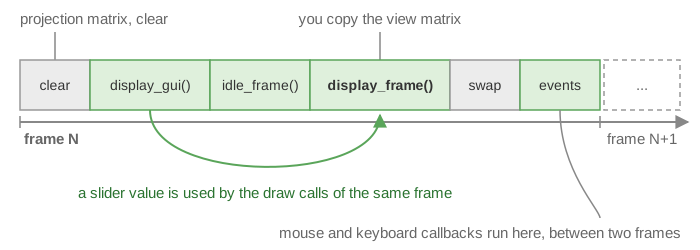
A few consequences:
-
The projection matrix is updated for you at step 1 (the aspect ratio follows the window size). The view matrix is not:
display_framemust start by copying it from the camera controller, as in the template:void scene_structure::display_frame() { environment.camera_view = camera_control.camera().matrix_view(); environment.light = camera_control.camera_model.position(); // light at the camera if (gui.display_frame) draw(global_frame, environment); draw(sphere, environment); cylinder.model.rotation = rotation_transform::from_axis_angle({1,0,0}, timer.t); draw(cylinder, environment); timer.update(); }
Older scenes of the course also set
environment.camera_projectionindisplay_frame; this is harmless (the same value is computed twice). -
display_guiruns beforedisplay_framein the same frame, so a value changed by a slider is already used by the draw calls of this frame. Sincedisplay_guiis called inside an ImGui window, you can callImGui::SliderFloat,ImGui::Checkbox... directly. -
Input callbacks run at the end of a frame (step 9), between two
display_frame. -
Time:
timer_basicmeasures real time; calltimer.update()once per frame and readtimer.t(elapsed time) ortimer.scaleto speed up / slow down animations.inputs.time_intervalholds the duration of the previous frame.
5. Summary
main
 '-> application_structure::initialize
 |     window + ImGui + callbacks, project::path, default shaders/texture
 |     '-> scene.initialize()                 (you: build meshes, send them to the GPU)
 '-> application_structure::start_loop
       repeat every frame (animation_loop):
         projection matrix, clear screen
         scene.display_gui()                  (you: widgets)
         scene.idle_frame()                   (camera)
         scene.display_frame()                (you: view matrix, draw calls)
         swap buffers, poll events
           '-> scene.mouse_move_event() / mouse_click_event() / keyboard_event() ...
See also
- Your first scene: the guided tour of this template, with a first modification.
- From CPU to GPU: what
initialize_data_on_gpuanddrawreally do. - Shaders and uniforms: how the environment reaches the shader.
- Camera and matrices: the view and projection matrices.
- Mouse, keyboard and camera controllers: the input callbacks in detail.
- How-to: Draw a mesh with a camera
- Course lab of CSC_43043 (public version):
00_test_installation(smallest complete scene).