Time and animation
An animation is a sequence of images, each computed from the state of the scene at a given time. The frame loop of CGP does not run at a fixed rate: a frame lasts about 16 ms at 60 fps, but it can take much longer when the scene is heavy, the window is moved, or the program just started. An animation that looks the same on every computer must therefore depend on the measured time, not on the number of frames.
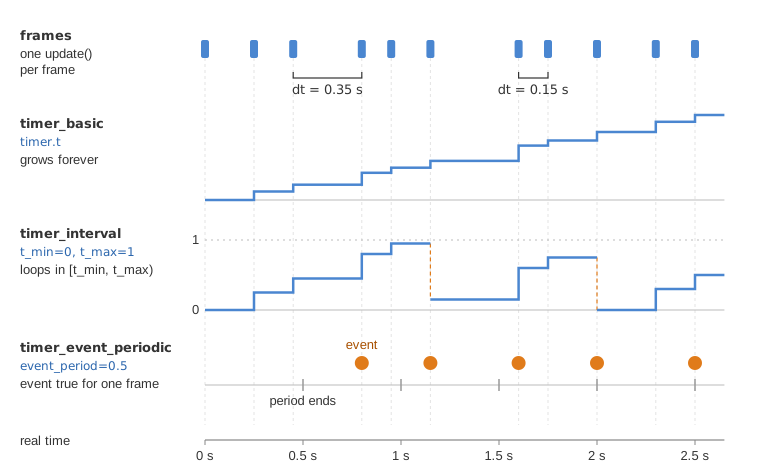
CGP provides three timers, all measuring real time in seconds:
| Timer | Its t |
Extra members | Typical use |
|---|---|---|---|
timer_basic |
grows without limit | scale, start(), stop() |
continuous motion, physics |
timer_interval |
loops in [t_min, t_max) |
t_min, t_max |
cyclic animation, key frames |
timer_event_periodic |
grows without limit | event, event_period, t_periodic |
do something every N seconds |
The two last ones derive from timer_basic, so they also have t, scale, update(),
start() and stop().
1. How a timer works
A timer does not run by itself: its value changes only when you call update(). Each call
reads the clock of the computer, computes the time elapsed since the previous call, and adds
it to t:
// What timer_basic::update() does (simplified)
float timer_basic::update() {
    if (!running) return 0.0f;                     // stopped: t does not change
    double const now = timer_current_time();       // seconds, steady clock
    float const dt = scale * (now - time_previous);
    time_previous = now;
    t += dt;
    return dt;                                     // the increment, in seconds
}
Consequences:
tis constant between two calls toupdate(). Call it once per frame: calling it twice in the same frame does not make the animation faster, the second call returns almost 0.- The value returned by
update()is the duration dt of the last step, already multiplied byscale.scale = 2plays the animation twice faster,scale = 0.5in slow motion,scale = 0freezes it. - A timer starts at its first
update():tstarts at 0 (t_minfor atimer_interval) and the first call returns 0, so the time spent between the construction and the first frame (window, shaders, yourinitialize) is not counted. There is no need to callstart(). stop()makesupdate()return 0 and freezest.start()resumes from the current value, without a jump: the time spent while stopped is not counted.tandscaleare public members: you can write them, for instance from an ImGui slider, to scrub an animation (timer.t = 0restarts it).
timer_interval
timer_interval adds t_min and t_max (constructor arguments, default 0 and 1). After
each update(), t is brought back into [t_min, t_max) by subtracting a whole number of
periods: the animation loops. It is the natural timer for key-frame animation, where the
key times bound the interval.
If you set t_min and t_max after the construction, also set timer.t = timer.t_min.
timer_event_periodic
timer_event_periodic adds a boolean event, true during the single frame where a period of
event_period seconds has elapsed (constructor argument, default 1), and false at every other
frame. t_periodic holds the time elapsed in the current period. It is the timer used to
emit particles or spawn objects at a regular rate (see
Spawn objects periodically).
2. Where the scene updates the timers
The scene template declares one timer_basic timer; in scene_structure, and updates it at
the end of display_frame (src/scene.cpp):
void scene_structure::display_frame()
{
    environment.camera_view = camera_control.camera().matrix_view();
    // ...
    cylinder.model.rotation = rotation_transform::from_axis_angle({1,0,0}, timer.t);
    draw(cylinder, environment);

    timer.update();   // the new value of t is used by the next frame
}
Calling update() at the beginning of display_frame works as well; most how-to pages do it
there, so that the frame uses the time at which it is drawn. What matters is a single call
per frame, always at the same place. You may also update your timers and your simulation in
idle_frame(), which the application calls at every frame just before display_frame()
(see Scene structure); the template uses it only for the camera.
The application also measures the duration of each frame on its own and stores it in
inputs.time_interval (in seconds, before display_gui is called). The camera controllers
use this value to move at a constant speed while a key is held down. It ignores your
timers: it is not affected by scale or stop().
3. Time-based versus frame-based animation
Compare two ways of making a cylinder spin:
// Frame-based: +0.01 radian per frame
angle += 0.01f;                                    // 0.6 rad/s at 60 fps, 1.44 rad/s at 144 fps

// Time-based: 1 radian per second, whatever the frame rate
float const dt = timer.update();
angle += 1.0f * dt;                                // or directly: angle = timer.t
The frame-based version runs at a speed proportional to the frame rate. By default the
template limits the frame rate to 60 fps (project::fps_limiting, project::fps_max), but a
heavy scene, a slower computer, or the Web version (which follows the refresh rate of the
screen) changes it. The
Window section of the GUI has an "FPS limiting" checkbox and an "FPS limit" slider: set it
to 20 then to 200 to check that your animation is truly time-based.
There are two ways to make an animation depend on time:
- Closed form: the state is a function of
t(position = f(t)). Use it when the motion is known in advance: rotationangle = omega * t, oscillationstd::sin(2 * Pi * frequency * t), interpolation of key frames at timet. It never drifts, and settingtjumps anywhere in the animation. See Animate a shape with time. - Incremental: the state at the next frame is computed from the state at the current frame
and the step dt returned by
update(). Use it when the motion depends on what happens (forces, collisions, user input): this is a simulation.
4. Integrating motion with dt
A point with position , velocity and acceleration follows and . Over a small step dt, the derivatives are replaced by differences (Euler integration):
// scene.hpp - in scene_structure
vec3 p = {0, 0, 1};      // position
vec3 v = {1, 0, 3};      // velocity
timer_basic timer;

// scene.cpp - scene_structure::display_frame()
float const dt = std::min(timer.update(), 0.05f);  // see the pitfalls below
vec3 const g = {0, 0, -9.81f};

v = v + dt * g;          // first the velocity...
p = p + dt * v;          // ...then the position with the new velocity (semi-implicit Euler)
if (p.z < 0 && v.z < 0)
    v.z = -0.8f * v.z;   // bounce on the ground z=0, losing 20% of the speed

sphere.model.translation = p;
draw(sphere, environment);
The result is the same at 30 and at 120 fps, up to the integration error: the error grows with dt, and a too large dt can make a stiff simulation (springs, cloth) explode. When the frame is long compared to the time step the physics needs, split it into substeps:
float const dt = timer.update();
int const N_substeps = 1 + int(dt / 0.005f);  // steps of at most 5 ms
for (int k = 0; k < N_substeps; ++k)
    simulate(dt / N_substeps);                // your own function: forces, then v, then p
Pausing the simulation is free: when the timer is stopped (or scale is 0), update()
returns 0 and nothing moves.
5. Pitfalls
- A long dt after a freeze. When the window is moved or the program paused in a debugger,
the next
update()returns the whole frozen duration, and an incremental simulation jumps. Clamp dt as above. - timer_interval drops a step longer than the interval. If the time elapsed since the
previous
update()is larger thant_max - t_min, the step is ignored:tkeeps its value andupdate()returns 0 (this is what happens after the window was frozen). The animation simply resumes from where it was. - At most one event per update. If several periods of a
timer_event_periodicelapse during one frame (a period shorter than the frame, or a long frame),eventis true only once andt_periodicrestarts at 0: the extra events are lost. - Frame-rate dependence can hide in a factor. Any quantity changed by a constant at each
frame depends on the frame rate, not only positions:
speed *= 1.02fat every frame grows more than twice as fast at 144 fps as at 60 fps. Write a growth factor as a power of dt,speed *= std::pow(1.02f, 60 * dt)(1.02 per frame at 60 fps), as the fly-mode camera does. - Several timers drift apart. Each timer starts at its own first update and advances at its
own
update()calls. Motions that must stay synchronized should read the same timer. - Calling update() through a base reference.
update()is not virtual: on atimer_intervalseen as atimer_basic&, the call runstimer_basic::update(), andtno longer loops. Pass the timer by its own type.
See also
- How-to: Animate a shape with time, Spawn objects periodically, Add GUI controls
- Understand: Scene structure (one frame, step by step)
- Reference:
timer_basic,timer_interval,timer_event_periodic