3/10
3. JavaScript as a language
JavaScript, at the opposite of HTML and CSS, is a standard programming language able to automatize tasks. JavaScript is interpreted by the browser, which means that the browser parse and analyze directly the textual code, and then run it dynamically. Javascript is thus an interpreted language (like Python), at the opposite of compiled languages which are first transformed into byte code, later executed by the processor (like C, C++) or virtual machine (like Java).
-
Dowload the following examples containing the codes that are discussed in the following parts.
Declaration
The code in examples/01_declaration describes different ways of declaring variables.
-
Run the code in your browser and observe the printed results in the console. Compare the printed results with the code in
script.jsfile.
Note that semicolons at the end of the line may be omitted when there is no ambiguity. It is recommended to keep explicit semicolons after every statement.
Use strict
Note the first line "use strict";.
This line indicates that the JavaScript code conforms to the more recent standard (ECMAScript 6). Note that the recent standard is stricter than the old one, limiting odd behaviors and bad practices.
As good practice, you should always conform to the most recent standard, thus adding "use strict"; and following this standard.
Variable
Note the three ways of declaring variables in JavaScript: const, let, var.
var is the old way of declaring variables (very commonly found on examples code on internet), while const/let are the new norm.
While explained in more details later, you should follow the following priority in declaring your variables:
1. Use const by default for your variable
1. If you need to re-assigned your variable, use let
1. If in some situation, you need a function-scop variable, use var
Note. As good practice to help code lisibility, your variables should have
-
the shortest possible scope
-
store only one value in its life-time if appropriate (especially avoid storing different types in the same variable).
-
declared only when needed
String
Run and observe the code from the second directory examples/02_string.
JavaScript Strings can be defined using simple or double quotes. Starting by simple/double quote must however respectively be ended with the same type of quote.
Note that template literals are an efficient and readable way of mixing text with values.
Conditionals and loops
Run and observe the code from the directory examples/03_conditional_loop. Note the influence of the scope delimited by { … } on the different type of variable declaration.
Arrays
Run and observe the code from the directory examples/04_array for example of use of JavaScript arrays.
Note that JavaScript arrays are naturally sparse container (actualy dictionary) that can handle non consecutive, and even negative indexing. Take care to not confound with negative indexing in Python related to backward iteration. Index of JavaScript array can simply be seen as a key of a dictionary.
You may use dedicated functions on arrays such as find, slice, splice, fill, filter, concat, indexOf, etc.
Dictionary
Every JavaScript object can actually be seen as a dictionary, i.e. a set of property/key and value.
Run and observe the code from the directory examples/05_dictionary.
Function
Run and observe the code from the directory examples/06_function.
Note that JavaScript functions are treated a normal variables. Functions are stored text, and are dynamically interpreted when called.
Exercises
Exercise 1
Create a JavaScript function that computes the samples of an arbitrary function of one variable on a given interval.
The function will receive the following parameters:
-
func: A function of one variable
-
a: the starting parameter
-
b: the ending parameter
-
n: the number of samples
Your function will return an array containing the n samples of the function func on the interval [a,b].
Print on the console the result of some function. Examples:
console.log( sample( x=>x*x, -2, 2, 9 ) );
console.log( sample( x=>Math.sqrt(x), 0, 2, 5 ) );Note: basic mathematical functions (sqrt, cos, sin, etc) can be accessed using the built-in object Math (ex. Math.cos).
Exercise 2
Extend your program to show the result in your browser instead of the console.
For instance, create the function showSample such that the following lines
showSample( x=>x*x, -2, 2, 9 );
showSample( x=>Math.sqrt(x), 0, 2, 5 );
result in this rendering in your browser
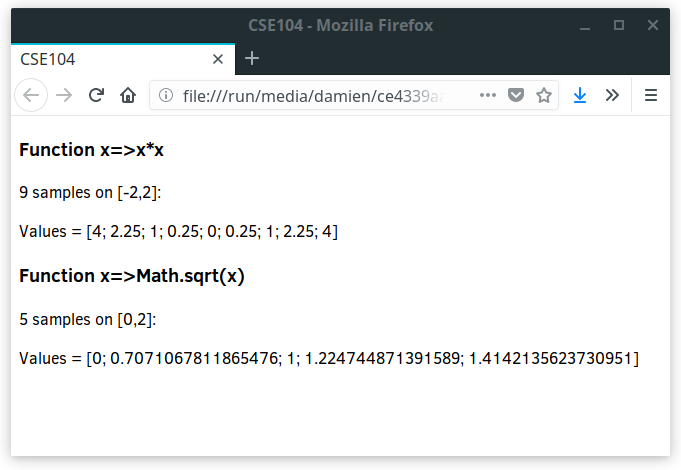
Hint: join allows to concatenate an array into a string and set the separator between elements.
Exercise 3
-
Create a program showing the history of the images which are clicked by the user similarily to the following example (link to images)
-
The images can be selected when the user click on them.
-
Every time the user click on an image, the text describing the history of the selected images is updated.
-
A possibility to cancel and erase the history of memory is proposed. The cancel button can be clicked only when there is an existing history to cancel.
Note:
-
You can select all the elements satisfying a given selector using querySelectorAll.
-
In the function triggered by the
clickevent, the selected object can be accessed using the property currentTarget. -
The appearance should be described in the CSS file. You can switch appearance in adding/removing CSS class to elements from the JavaScript code. Avoid setting explicit appearance (such as color, border, etc) in your JavaScript code.