16/21
6. Projection
So far, no explicit projection was applied. In practice, it is similar to perform an orthographic projection along \(z\) direction. \((x,y) \in [-1,1]\) are used as screen space coordinates, and \(z\in[-1,1]\) relates to depth.
Orthographic projection doesn’t convey depth impression. In real world, objects that are far away appear smaller due to perspective, while orthographic projection doesn’t model this effect.
Perspective projection is usually modeled using the following convention.
-
Projection maps a frustum (truncated pyramid) of 3D into the normalized cube \([-1,1]^3\).
-
The frustum is defined by
-
Its angle of view \(\theta\), also called field of view (fov)
-
The smallest distance from which objects will be viewed \(z_{near}\)
-
The furthest distance from which objects will be viewed \(z_{far}\)
-
Possibly the aspect ratio (\(a=width/height\)), when dealing with rectangular window.
-
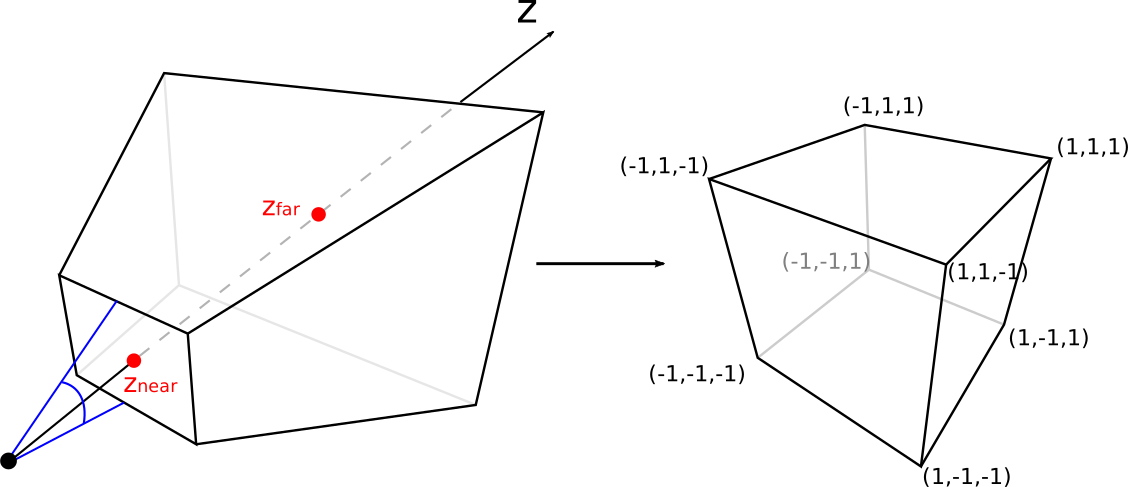
-
The following perspective matrix model is commonly used
\(\mathrm{P}= \left( \begin{array}{rrrr} f_x & 0 & 0 & 0 \\ 0 & f_y & 0 & 0 \\ 0 & 0 & C & D \\ 0 & 0 & -1 & 0 \\ \end{array} \right)\), with \(\left\{ \begin{array}{l} f_y = 1/\tan(\theta/2) \\ f_x = f_y/a \\ L = z_{near}-z_{far} \\ C = (z_{far}+z_{near})/L \\ D = 2\,z_{far}\,z_{near}/L \end{array} \right.\).
Application
This code implements a perspective projection in the following way
-
Perspective matrix is built in the C++ program and send to shader
/** Create a perspective matrix */
std::array<float,16> perspective_matrix(float angle_of_view, float image_aspect, float z_near, float z_far)
{
    const float fy = 1/std::tan(angle_of_view/2);
    const float fx = fy/image_aspect;
    const float L = z_near-z_far;

    const float C = (z_far+z_near)/L;
    const float D = (2*z_far*z_near)/L;

    return {
        fx,0,0,0,
        0,fy,0,0,
        0,0,C,D,
        0,0,-1,0
    };

}
// Perspective projection matrix
const auto perspective = perspective_matrix( 45.0f*M_PI/180.0f, 1.0f, 0.01f, 500.0f);
glUniformMatrix4fv(glGetUniformLocation(shader_program, "perspective"), 1, GL_TRUE, &perspective[0]);-
Perspective matrix is applied to each vertex position in the vertex shader
#version 430 core

layout (location = 0) in vec4 position;
layout (location = 1) in vec4 color;

layout (location = 0) out vec4 color_out;

uniform mat4 perspective;

void main()
{
    color_out = color;
    gl_Position = perspective * position;
}
-
Change the z coordinates of the shape and observe the perspective effect: the further the object is placed, the smaller it appears (note that the frustum is, by default, looking along negative z values).