6/13
4. Brief introduction to JavaScript
JavaScript is a dynamic language, all variables are dynamically allocated and typed. Properties and functions applying on variables can be set and adapted dynamically, allowing to script complex operations in a few lines.
At the opposite of common programming language, JavaScript (when used as client web programming language) is executed directly on the browser, and not from the command line.
To allow information printing and debug, web browsers implement console where you can print the content of any variable using the command console.log. The console of the web browser (as well as other debugging tools) is commonly accessible through a developer mode. In Firefox and Google Chrome, the keyboard shortcut 'F12' allows to access to the developer mode.
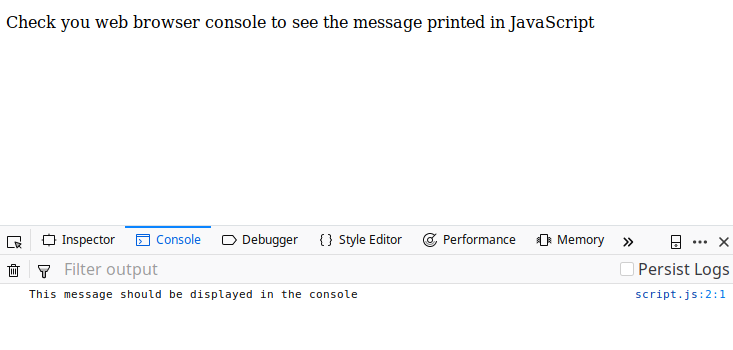
As JavaScript is a highly dynamic language, is it essential that your print regularly the content of your variables, so that you can check their content and understand them. Thanks to their dynamic nature, every JavaScript variables can be natively displayed and inspected in the console.
Following JavaScript current standard
JavaScript has been designed to be a highly flexible language. One of the drawback of such flexibility is the lack of control and automatic check, that may lead to unexpected and hard to debug code. Furthermore, there is multiple JavaScript interpreter depending on your web browser (Firefox, Google Chrome, Safari, Edge, have all different JavaScript engines) and may interpret code differently if it doesn’t follow a well-defined norm.
Today, JavaScript behavior is defined by the ECMAScript standard. The recent standard has proposed to add more constraints to the language to improve its robustness (it is said to be more strict). However, Web browser usually try their best to allow compatibility with outdated and non-standard code to render a large number of websites.
To ensure that your web browser conform to the most recent standard, the line "use strict"; should be added in the beginning of the JavaScript script. Incompatible code will then lead to an error that will be easy to debug.
As good practice in JavaScript, start all your code with the "use strict"; command to enable strict compatibility with the newest ECMASCript standard. More generally in JS, try to follow the strictest rules to avoid incorrect code to be interpreted and being hard to debug later on.
Declaring variables
The following example shows a basic JavaScript code declaring and displaying set of different variables. Note that the messages displayed in JavaScript should be observed in the console.
"use strict"; // Always start your JavaScript code with this line

// This is a JavaScript comment

/* This is another comment.
   This comment can span several lines */


// ================================ //
// Declaring variables
// ================================ //

// Using let
// *********** //
let a = 5;
let b = a+5;
let c = 'Hello Javascript';

console.log('a=',a);
console.log('b=',a);
console.log('c=',a);

// Variables declared using let can be re-assigned, potentially using other types
a = 12;
b = 'some string'; // types are automatically infered

console.log('a=',a);
console.log('b=',b);

// Using const
// *********** //
const d = 10;
console.log('d=',d);

// Uncommenting the following statement would be a JavaScript error
// d = 15;

// Using var
// *********** //
var e = 10;
console.log('e=',e);

// Variables declared as var can be re-assigned.
// const/let have block scope, while var has function scope
// As a good practice, prefer smaller scope declaration (const/let), and avoid using var declaration
Note that semicolons at the end of the line may be omitted when there is no ambiguity. It is, however, recommended keeping explicit semicolons after every statement.
String
JavaScript Strings can be defined using simple or double quotes. Starting by simple/double quote must, however, respectively be ended with the same type of quote.
Note that template literals are an efficient and readable way of mixing text with values.
"use strict";


// ================================ //
// String
// ================================ //

const s1 = 'strings can be declared between simple quote';
const s2 = "or also between double quote";

const s3 = 'Simple quote can have "double quote inside". ';
const s4 = "Conversely, 'simple' quote can be inside double quote";

console.log(s1,s2);
console.log(s3,s4);

const s5 = 'adding string results in ';
const s6 = 'concatenation';
const s7 = s5+s6+'!';
console.log(s7);

const some_variable = 15;
// template literals can be used to insert variables inside string
const s8 = `3+7=${3+7}, value of some_variable=${some_variable}`;
console.log(s8);
Conditional, loop, block and scope
In addition to common if/else, and loop statements, note the influence of the scope delimited by { … } on the different type of variable declaration.
"use strict";


// ************************ //
// Syntax
// ************************ //

const a = 12;

// Syntax for conditional
// else is optionnal
if( a>15 ) {
  console.log("a is greater than 15");
}
else if( a>=10 ) {
  console.log("a is between 10 and 15");
}
else {
  console.log("a is less than 10");
}


// Syntax for loop
// for(initialization; endCondition; iteration)
for( let k=2; k<10; k++ ) {

  if( k%2 ===0 ) {
    console.log(k,' is even');
  }
  else {
    console.log(k,' is odd');
  }

}


// ************************ //
// variable scope
// ************************ //

// let and const have block-scope

{
  const b = 15;
  let c = 16;
  var d = 17;

  // b,c,d exist in this block of code
} // b and c are erased at the termination of the bloc

// d still exists outside of this bloc.
// variables declared as 'var' have function-scope
console.log(d);
// console.log(b); // doesn't work here
// console.log(c); // doesn't work here

// Good practice rules:
// ----------------------
// - Prefer const variable (smaller scope, non re-assignable)
// - If the variable should be re-assigned, use let (smaller scope than var)
// - In exceptional case, var can be used when function scope brings advantage
Array
JavaScript Arrays are naturally sparse containers (actually dictionary) that can handle non-consecutive, and even negative indexing. Take care to don’t confound with negative indexing in Python related to backward iteration. Index of JavaScript array can simply be seen as a key of a dictionary.
You may use dedicated functions on arrays such as find, slice, splice, fill, filter, concat, indexOf, etc.
"use strict";

// Declaration of an array
const a = [1,3,4,5];
console.log(a);

// Arrays are 0-indexed
a[0] = 8;
a[1] = 0;
a[3] = -2;
console.log(a);

// Arrays have dynamic size
a.push(9);
a.push(12);
console.log(a);

// Arrays are sparsed
// they are stored internaly as dictionar (not as consecutive table)
a[201] = 4;
a[-45] = 8;
console.log(a);

// Arrays can contain mix elements
const b = [7,'elephant',1.4,['another array',9]];
console.log(b);

// Arrays declared as const cannot be re-assigned, but their content can still be modified
b[0] = -12;
b[1] = b[1]+' girafe';
console.log(b);
//b = [1,4,5]; //doesn't work as b is const: it would be a re-assignment

// Length of an array
console.log( "a.length = ",a.length);
console.log( "b.length = ",b.length);

// Looping over an array
const array = [4,8,-4.1,'value',-1];
for( const k in array ) {
  console.log(`k=${k}, array[${k}]=${array[k]}`)
}
Dictionary
Every JavaScript object can be seen as a dictionary, i.e. a set of property/key and value.
"use strict";

// General objects in JavaScript can be seen as dictionary
const a = { property:"value" }; // declare a JavaScrip Object

console.log( a ); // print the object
console.log( a.property );    // print the value (structure style)
console.log( a["property"] ); // print the value (array style)

// Dictionary can contains arbitrary number of properties
const p = {x:0, y:0};
p.x=12;
p.y=25;
console.log(p);

// Properties can be dynamically added to the object
p.z = -1;
console.log(p);

// Loop over properties of the object
for( const prop in p ) {
  console.log("property: ",prop );
  console.log(`p[${prop}] = ${p[prop]}`);
}

// Dictionary can contain other dictionaries
const general_variable = {
  position: {x:0, y:5, z:8} ,
  radius: 1.4,
  name: "My Data",
  values: {
    field: [7,4,3,2],
    empty_space:null,
  },
}

console.log( general_variable );
console.log( general_variable.position.z );
console.log( general_variable.values.field[2] );

// Note:
//  a 'null' value should indicate the absence of value (ex. initializing a value without setting the value).
//  a 'undefined' value indicates an error (ex. accessing a field that doesn't exists).
Note that instanciating a variable using {…} syntax allocates a new object (of type Object). When using named classes, the operator new MyObjectName can be used.
Function
JavaScript Functions are handled as normal variables. Functions are stored text, and are dynamically interpreted when called.
"use strict";

// ********************************* //
// Standard function syntax
// ********************************* //

// declaration of function
function myFunction(a,b) {

  console.log('first variable a=',a);
  console.log('second variable b=',b);


  // optional return value
  return 12;
}

// Call the function
myFunction(1,2);
console.log( myFunction("elephant",[7,5]) );

// Function can be called with less arguments than expected
console.log("====== Not enough arguments ======");
myFunction(1); // the second argument is undefined


// ********************************* //
// Function as variable
// ********************************* //

// Functions are treated as basic variables
const a = myFunction;
console.log("====== Function as variable ======");
a(7,8);
console.log(a);

// Functions can be declared inline
const square = function(x) { return x*x; }
console.log("5^2=", square(5) );

// Short arrow-function
const power3 = (x)=>x*x*x;
console.log("5^3=", power3(5) );

// Arrow function modeling a dot product between two vectors
const dot = (a,b) => a.x*b.x + a.y*b.y;
const p1 = {x:5, y:1};
const p2 = {x:7, y:-2};
console.log( "p1.p2 = ",dot(p1,p2) );


// As simple variables, functions can be stored in dictionary
const behavior = {
  printHello : () => console.log("Hello!"), // arrow-function without argument
  areaDisc : (radius) => radius*radius*Math.PI,
}

behavior.printHello();
console.log("area of disc with radius",3," : ",behavior.areaDisc(3));
Interacting with HTML DOM
One of the main interest of JavaScript is its ability to interact with the HTML DOM (Document Object Model). It means that new elements displayed by the browser can be added, or modified, by the JS code.
A simple example shows the addition of some text content in the browser (note that this time the result is directly shown in the web browser display and not in its console).
"use strict";

// ********************************* //
// Interacting with the HTML DOM
// ********************************* //

// Get the variable corresponding to the <div> element with id 'container' in the HTML file
const containerElement = document.querySelector('#container');
// Note that the 'document' variable is a global variable automatically filled by the web browser

// Create a paragraph of text
const newParagraph = document.createElement('p');
newParagraph.textContent = 'Some text created in JavaScript';

// Add dynamically a paragraph of text in this container to be displayed
containerElement.appendChild(newParagraph);


// Any JavaScript result can be displayed on the HTML page
// Exemple, displaying odd numbers between 2 to 25

const N = 25;
const displayingNumber = document.createElement('p');
displayingNumber.textContent  = `Display odd numbers between 2 to ${N} : `;

displayingNumber.textContent += '[';
for( let k=2; k<=N; k++ ) {
  if( k%2==1 ) {
    displayingNumber.textContent += k+' '
  }
}
displayingNumber.textContent += ']';
containerElement.appendChild(displayingNumber);
More advanced behavior such as event user response (mouse click, keyboard pressed, resizing window, etc) can be handled similarly.