13/13
8. Transformations
Functions to apply transformation
Applying transformation (translation, rotation, scaling) on 3D objects in Three.js can be performed in two ways
On Geometry class
-
Translation
-
Rotation
-
rotateX(angle: Float) (resp. rotateY, rotateZ)
-
-
Scaling
-
General transformation
On Object3D class
-
Translation
-
Rotation
-
rotateX(angle:Float) (resp. rotateY, rotateZ)
-
setRotationFromAxisAngle(axis:Vector3, angle:Float) (set an orientation independently of the previous one), and alternatively setRotationFromEuler, setRotationFromMatrix, setRotationFromQuaternion.
-
-
Scaling
-
scale - Direct access to values (scale.x=x; scale.y=y; scale.z=z;)
-
-
General transformation
Usage
-
Applying transformation on Geometry leads to direct modification of the vertex coordinates of the shape. In practice, this is a costly operation (JavaScript loop over all vertices) that can be performed at the initialization, but should be avoided during an animation loop.
-
Conversely, applying a transformation on Object3D doesn’t change the coordinates, but modifies a \(4\times 4\) transformation matrix [1]. This matrix is sent to the graphics card when drawing the object, and is thus applied in parallel on the vertices directly by the GPU. Applying such transformation is a fast operation that is designed to be applied at interactive speed.
Order of transformation
-
Functions translate and rotate applying transformation into the transformation matrix are computed as matrix post-multiplication, i.e. the order in which, i.e. the order in which each operation is called is the opposite order in which each operation is applied on vertices (similar to reading transformation composition from left to right).
// Example of transformation order
object.rotateX(Math.PI/2); // R1
object.translateY(1);      // T2
object.rotateZ(Math.PI/4); // R3


// Equivalent mathematically to apply R1 o T2 o R3 to vertices
Example of transformation
Scene setup
Let us consider the scene with the following parameters
-
A cylinder (in green) has its central axis positioned between the points \((1,1,1)\) and \((1,3,1)\).
-
The cylinder should rotate around its base point \((1,1,1)\) and around the \(x\)-direction.
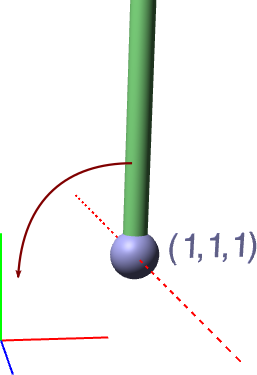
Note:
-
The cylinder has an initial length of \(2\) and is centered around \((0,0,0)\).
-
Its initial positioning is performed by the following code
cylinder.translateX(1.0).translateY(2.0).translateZ(1.0);Cylinder rotation
-
Consider first to apply directly a rotation around the x direction on the cylinder in the
computeFramefunction, and observe that the behavior doesn’t correspond to the objective.
function computeFrame( time ) {
    ...
    cylinder.rotateZ(0.01);
    ...
}Explanation
Let us call \(T\) the initial translation, and \(R\) the rotation. The transformation applied to the cylinder is \(T \circ R\), meaning that the rotation is first applied on the shape (remember that rotation always rotates objects around the origin), and then the translation.
-
Initially, the shape is centered around \((0,0,0)\) (from Three.js convention). Thus, the rotation makes the cylinder rotates around its center.
-
Then the translation is applied, leading to a translated cylinder rotating around its axis.
Correct transformation
Let us consider the object in its local centered frame, and call \(i\) the center of rotation in this local frame. The general idea to apply a rotation around \(i\) is to center the object at \(i\) before applying the rotation, and then offset it by \(-i\). This can be done in three steps
-
Translates the object along the vector \(-i\).
-
Apply the rotation
-
Translates the object along the vector \(i\).
-
In the case of the cylinder, the center of rotation \(i=(0,-1,0)\) with respect to the initial cylinder shape. Consider now to apply the following transformation in the
computeFramefunction and observe the new behavior
-
function computeFrame( time ) {
// ...
    cylinder.translateY(+1); // translation -i
    cylinder.rotateZ(0.01);
    cylinder.translateY(-1); // translation +i
// ...
}Hierarchy
It is often convenient to express transformation of complex object using a hierarchy. This allows to express only local transformation with respect to a parent shape that may have itself its own transformation (ex. for a human character: the rotation of the hand expressed locally in the referential of the arm, expressed itself with respect to the elbow, etc).
Three.js handles natively hierarchical transformation in its scene graph. So far, we only added objects in the scene graph root, but every shape can be used as a parent of another object. Three.js will automatically compute the global transformation matrix as the product of the local transformation matrix with the one from the parents.
Example
-
Add a second cylinder align along the \(x\) axis as a child element of the first cylinder.
    const cylinder2Geometry = new THREE.CylinderGeometry(0.1, 0.1, 2.0, 25, 1);
    const cylinder2Material = new THREE.MeshPhongMaterial( {color:'rgb(255,100,100)'} );
    const cylinder2 = new THREE.Mesh( cylinder2Geometry, cylinder2Material );
    cylinder2.rotateZ(Math.PI/2);
cylinder.add(cylinder2);-
Note that instead of
sceneGraph.add(cylinder2), we setcylinder.add(cylinder2)to indicate that cylinder2 is a child of cylinder. -
Observe that the second cylinder is automatically placed with respect to the first cylinder.
-
Modify the code such that you model the following behavior with a rotation applied to the second cylinder
[webpage]
Hints
-
It may help to first place the elements in a static scene (comment out the animation of the rotation).
-
When working with
post-multiplication, keep in mind that you always apply transformation in the local frame of the object (and locally with respect to its parent).
-
Complete your scene with two more children rotating around the red cylinder.
[webpage]