An implicit surface meshed once
What it shows: the smallest complete program around marching cubes. A scalar field, the
sum of two Gaussian "blobs", is sampled on a 50 x 50 x 50 grid, and the surface where it
equals 0.5 is extracted once, in initialize(), as an ordinary mesh. The GUI only
switches the display of the surface, its wireframe and the box of the domain.
Concepts combined in this example:
- the field written in its own source file, as a function of a
spatial_domain_grid_3Dthat returns agrid_3D<float>; - the high-level
marching_cube(field, domain, isovalue), which returns ameshwhose vertices are shared between neighbor triangles; - normals computed from the triangles, as for any
mesh; - the border of the domain drawn as segments with a
curve_drawable.
Source: examples/02_marching_cubes/01_marching_cube_simple
of the public repository epita_ani3d_lab_code-2027, run unchanged in the demo above. The
step-by-step version of the same code is the how-to
Mesh an implicit surface with marching cubes; the
next example, An implicit surface edited live, recomputes the
surface at every change of a slider.
| File | Role |
|---|---|
src/scene.hpp, src/scene.cpp |
the scene: builds the surface in initialize(), draws it |
src/field_function/field_function.hpp, src/field_function/field_function.cpp |
the field and its sampling on the grid |
1. The field, in its own file
The header exposes one function, compute_scalar_field, which fills a grid of the size of
the domain. The field itself stays private to src/field_function/field_function.cpp:
// src/field_function/field_function.cpp - field_evaluate
float field_evaluate(vec3 const& p)
{
	float value = 0.0f;
	value += blob(p, { -1,0,0 });
	value += blob(p, { +1,0,0 });

	return value;
}
where blob(p, p0) is . To model another shape, only this file
changes: the scene does not know the formula.
2. One call, a mesh with shared vertices
// src/scene.cpp - initialize
spatial_domain_grid_3D domain = spatial_domain_grid_3D::from_center_length({ 0,0,0 }, length, samples);
grid_3D<float> field = compute_scalar_field(domain);

// Compute the mesh using marching cube
mesh meshed_surface = marching_cube(field, domain, isovalue);
visual_surface.initialize_data_on_gpu(meshed_surface);
with length = {5,3,3}, samples = {50,50,50} and isovalue = 0.5f. The domain, the field
and the mesh are local variables: once the surface is on the GPU, only visual_surface and
domain_box remain.
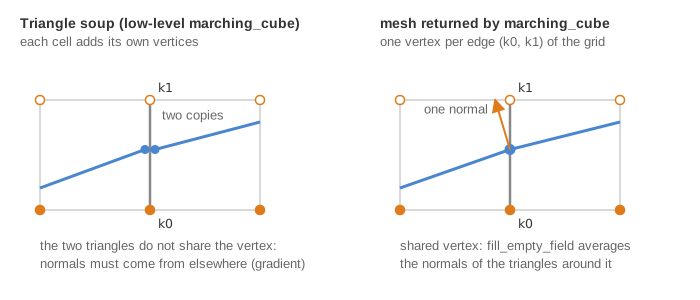
This is the difference with the interactive example. Internally, marching_cube first
produces a triangle soup (three new vertices per triangle), then welds it: each vertex
lies on an edge of the grid, identified by the indices of its two end nodes, and a map
(unique_edge in the CGP source) keeps only the first vertex created on each edge. The
result is a connected mesh, about six times smaller than the soup, and its normals are
computed by fill_empty_field as the average of the normals of the triangles around each
vertex: the surface looks smooth without any knowledge of the field. The interactive
example keeps the soup, to update the GPU buffers quickly, and must take its normals from
the gradient of the field instead.
3. Display options
// src/scene.cpp - display_frame
if (gui.display_plain)    // Display the implicit surface
	draw(visual_surface, environment);

if (gui.display_wireframe) // Display the wireframe of the implicit surface
	draw_wireframe(visual_surface, environment, { 0,0,0 });

if (gui.display_domain)    // Display the boundary of the domain
	draw(domain_box, environment);
Uncheck "Plain" and check "Wireframe" to see the triangles, in black (third argument). In the
browser, draw_wireframe draws nothing (WebGL has no line polygon mode): run the example
natively, or see Display the wireframe for a version
that works in both builds.
Going further
- Add a third blob, or subtract one (a negative weight digs a hole).
- Print
meshed_surface.position.size()andmeshed_surface.connectivity.size(): about half as many vertices as triangles, as for any closed triangle mesh. - Change the isovalue, then compare with the interactive example, where a slider does it.
See also
- How-to: Mesh an implicit surface with marching cubes, Display the wireframe
- Example: An implicit surface edited live
- Reference:
grid_3D,mesh, marching cubes