Two textures mixed in a shader
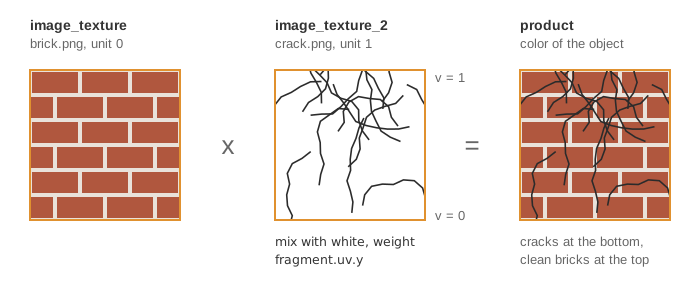
What it shows: a square covered by bricks that are cracked at the bottom and clean at the
top. The drawable carries two textures: the usual one (assets/brick.png) and a second one
(assets/crack.png) attached under a name of your choice. A custom fragment shader reads both at
the same texture coordinates, fades the cracks out along the vertical direction of the
image, and multiplies the two colors.
Concepts combined in this example:
- the map
supplementary_textureofmesh_drawable: each entry is a texture, and its key is the name of thesampler2Duniform that receives it in the shader; - texture units:
drawbinds the main texture to unit 0 and the supplementary ones to the next units; - a fragment shader that combines several images with the texture coordinates as a weight.
Source: examples/03_shaders/02_multi_texture
of the public repository epita_ani3d_lab_code-2027, run unchanged in the demo above. For a
single texture (loading, uv coordinates, wrap modes), see
Apply a texture image.
| File | Role |
|---|---|
src/scene.hpp, src/scene.cpp |
the scene: one quad, two textures, the custom shader |
shaders/mesh_multi_texture/mesh_multi_texture.frag.glsl |
the default fragment shader plus the second texture and the blend |
shaders/mesh_multi_texture/mesh_multi_texture.vert.glsl |
identical to the default vertex shader |
assets/brick.png, assets/crack.png |
the two images |
1. Two textures on one drawable
// src/scene.cpp - initialize
shape.initialize_data_on_gpu(mesh_primitive_quadrangle());

shape.shader.load(project::path + "shaders/mesh_multi_texture/mesh_multi_texture.vert.glsl", project::path + "shaders/mesh_multi_texture/mesh_multi_texture.frag.glsl");

// Load first texture
shape.texture.load_and_initialize_texture_2d_on_gpu(project::path + "assets/brick.png");

// Load second texture
shape.supplementary_texture["image_texture_2"].load_and_initialize_texture_2d_on_gpu(project::path + "assets/crack.png");
mesh_primitive_quadrangle() without arguments is the unit square from to
, with uv equal to . The operator[] of the map creates the entry
"image_texture_2", then the image is loaded into it. At each draw, CGP binds
shape.texture to texture unit 0 and sends 0 to the uniform image_texture, then binds each
entry of supplementary_texture to units 1, 2, ... and sends this number to the uniform
named by its key. The fragment shader only has to declare the samplers with the same names:
// shaders/mesh_multi_texture/mesh_multi_texture.frag.glsl - uniforms
uniform sampler2D image_texture;   // Texture image identifiant
uniform sampler2D image_texture_2;
A key with no matching uniform prints the usual "doesn't use it" warning (see Shaders and uniforms), and the texture is ignored.
2. Mixing the two images
// shaders/mesh_multi_texture/mesh_multi_texture.frag.glsl - main
// Get the second texture color
vec4 color_image_texture_2 = texture(image_texture_2, uv_image);

// Blend the crack texture with a white image along the y direction
float blending_parameter = fragment.uv.y;
color_image_texture_2 = blending_parameter * vec4(1.0, 1.0, 1.0, 1.0) + (1.0 - blending_parameter) * color_image_texture_2;

// Finally multiply the color of the two textures
color_image_texture = color_image_texture * color_image_texture_2;
- Both images are read at
uv_image, the uv of the fragment flipped in v as for the default texture (material.texture_settings.inverse_v), so they stay aligned. - The weight is the raw
fragment.uv.y, which goes from 0 at the bottom edge of the quad () to 1 at the top: the cracks are fully visible at the bottom and fade to white, that is to "no change", at the top. The expression is the linear interpolation that GLSL also offers asmix(color_image_texture_2, vec4(1.0), blending_parameter). - Multiplying by white keeps the bricks unchanged; multiplying by the dark lines of the cracks darkens them. The product then replaces the texture color in the rest of the default shader (Phong shading, alpha).
The scene also builds a 200 x 200 grid, mesh_grid, that it never uses (the same line
creates the surface of the deformation example).
Going further
- Drive the weight with a third texture (a grayscale mask) instead of
fragment.uv.y: add a key"mask"tosupplementary_textureand auniform sampler2D mask;to the shader. - Repeat the cracks at a different scale: read them at
4.0 * uv_image, and loadassets/crack.pngwithGL_REPEATas wrap mode (see Apply a texture image). - Animate the crack front with a
timeuniform: usefragment.uv.y - timeas the weight, clamped to .
See also
- How-to: Apply a texture image, Send a custom uniform to a shader
- Understand: Shaders and uniforms
- Reference:
mesh_drawable,opengl_texture_image_structure