Two cameras in one image
What it shows: the view matrix is only a value of the environment, read at each draw.
The example draws a cube with the camera driven by the mouse, then changes the view matrix,
the light and the transform of the cube, and draws it again. The second cube is seen by a
second, fixed camera: it turns on itself but stays at the same place on the screen,
whatever you do with the mouse.
Concepts combined in this example:
- two camera controllers (
camera_controller_orbit_euler), of which only one receives the mouse; environment.camera_viewandenvironment.lightchanged between twodrawcalls of the same frame;- the
modeltransform of amesh_drawablereset and changed between two draws; - a rotation driven by a
timer_basic.
Source: examples/07_camera/03_multiple_cameras
of the public repository epita_ani3d_lab_code-2027, run unchanged in the demo above. The view
matrix itself is explained in Camera and matrices.
| File | Role |
|---|---|
src/scene.hpp, src/scene.cpp |
the scene: two controllers, one cube drawn twice |
assets/wood.jpg |
the texture of the cube |
1. Two controllers, one connected to the mouse
// src/scene.hpp - scene_structure
camera_controller_orbit_euler camera_control;  // default camera
camera_controller_orbit_euler camera2_control; // camera for the environment 2
Both are initialized with initialize(inputs, window), but the callbacks of the scene
(mouse_move_event, keyboard_event, idle_frame) only call camera_control: the second
camera never moves with the inputs. It is placed by a look_at at every frame.
Note on the up axis: the example calls look_at with a third argument {0,0,1}, but the
orbit_euler controller ignores it (its look_at(eye, center, up) keeps only the eye and the
center), and set_rotation_axis_z() is not called. Both cameras therefore keep the default
rotation axis of camera_orbit_euler, : in the demo the green axis of the frame points up.
2. One frame, two passes
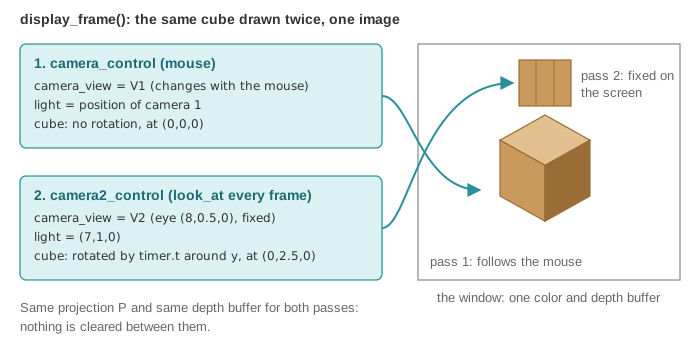
// src/scene.cpp - display_frame (wireframe lines omitted, banner comments shortened)
environment.light = camera_control.camera_model.position();
timer.update(); // Update the time

// Reset the transformation applied to the cube
cube.model.rotation = rotation_transform();
cube.model.translation = { 0,0,0 };

// first camera
environment.camera_view = camera_control.camera_model.matrix_view();
if (gui.display_frame)
	draw(global_frame, environment);
draw(cube, environment);

// second camera
camera2_control.look_at({ 8,0.5,0 }, { 0,0,0 }, { 0,0,1 }); // change the camera2 position
environment.camera_view = camera2_control.camera_model.matrix_view();
environment.light = { 7,1,0 }; // change the light position
cube.model.rotation = rotation_transform::from_axis_angle({ 0,1,0 }, timer.t);
cube.model.translation = { 0,2.5,0 };
draw(cube, environment);
drawsends the uniforms (view,light,model...) at the moment it is called (see Shaders and uniforms): changing the environment between two draws changes what the next draw sees, not the previous one.- The second cube is placed at in the world and seen from by a
camera that never moves: its position on the screen is constant. It turns around by
timer.tradians, one radian per second. - The cube is a single
mesh_drawable: itsmodelkeeps the last values set. That is whydisplay_framestarts by resetting the rotation and the translation before the first pass. - The light is also set back to the camera position at the start of the next frame.
3. What is shared between the two passes
Only the view matrix (and the light) change. The projection matrix is the same (it is set by
the application before display_frame, from camera_projection), and so are the color and
depth buffers: nothing is cleared between the passes. When you orbit until the two cubes
overlap on the screen, the depth test decides which one is visible with depths computed from
two different cameras, as if both cubes were in the same scene.
Going further
- Split screen: before each pass, restrict the drawing to one half of the window with
glViewport, and replaceenvironment.camera_projectionby a projection with the aspect ratio of the half window (the application computes it for the whole window). - An overlay that is never hidden: clear the depth buffer before the second pass
(
glClear(GL_DEPTH_BUFFER_BIT)). - A real picture-in-picture or a security-camera screen: render the second camera into a texture, then draw it on a quad, see Render to a texture.
- Let the second camera be controlled too, with Ctrl held for instance: forward the events to
camera2_controland remove itslook_atfromdisplay_frame.
See also
- How-to: Explore a scene with a first-person camera (variation with a second, fixed camera), Render to a texture
- Understand: Camera and matrices, Shaders and uniforms, Mouse, keyboard and camera controllers
- Reference:
camera_controller_orbit_euler,camera_orbit_euler,timer_basic