From CPU to GPU
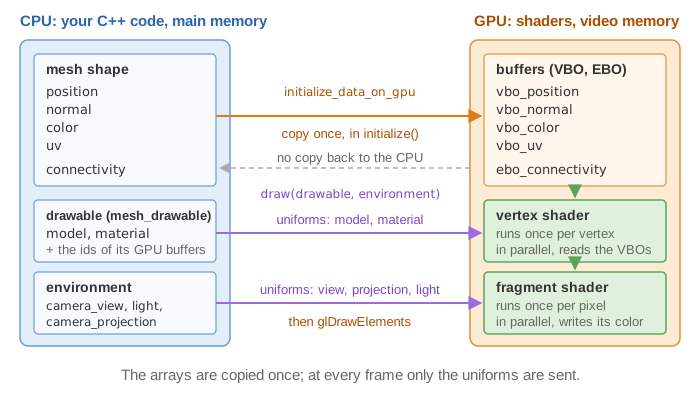
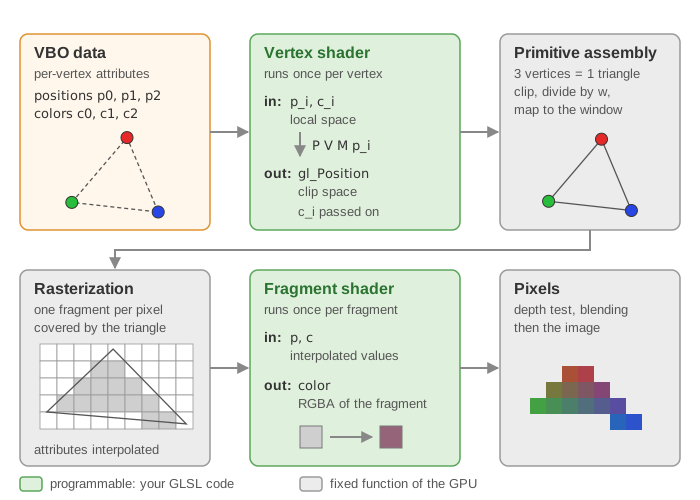
Your C++ code runs on the CPU and stores its data in the main memory (RAM). The images are computed by the GPU, which has its own memory and runs the shaders in parallel on every vertex and every pixel. Before anything can be drawn, the data must be copied from the CPU memory to the GPU memory. CGP makes this copy explicit with two different types:
mesh |
mesh_drawable |
|
|---|---|---|
| Lives in | CPU memory | GPU memory (the struct only stores OpenGL ids) |
| Contains | arrays position, normal, color, uv, connectivity |
VBOs, EBO, VAO, shader, texture, model, material |
| You can | read and modify every vertex in C++ | draw it with draw(drawable, environment) |
| You cannot | draw it directly | read its vertices back in C++ |
1. mesh: data on the CPU
A mesh is a plain container of per-vertex arrays plus the triangles:
struct mesh {
    numarray<vec3> position;      // one entry per vertex
    numarray<vec3> normal;
    numarray<vec3> color;
    numarray<vec2> uv;
    numarray<uint3> connectivity; // one entry per triangle: 3 vertex indices
    // + helper functions: fill_empty_field(), normal_update(), translate(), ...
};
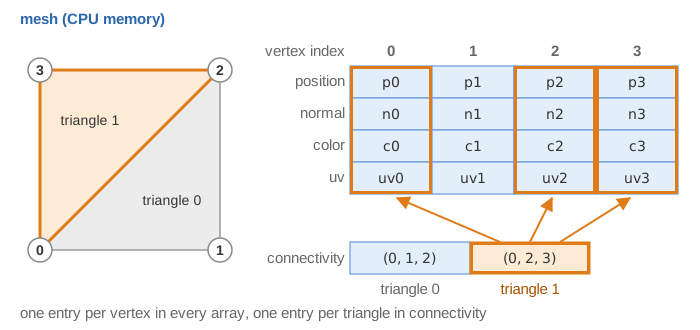
You get one from a primitive (mesh_primitive_sphere, mesh_primitive_grid...), from a file
(mesh_load_file_obj), or by filling the arrays yourself. All per-vertex arrays must have the
same size: if you build a mesh by hand with positions and connectivity only, call
fill_empty_field() to fill normals, colors (white) and uv (zero) before sending it to the
GPU. Otherwise mesh_check reports the missing buffers and the program stops.
2. mesh_drawable: buffers on the GPU
A mesh_drawable is what the GPU needs to draw a shape. Its members, from the header:
| Member | What it is |
|---|---|
vbo_position, vbo_normal, vbo_color, vbo_uv |
one Vertex Buffer Object per attribute: a GPU array, identified by an id |
ebo_connectivity |
the Element Buffer Object: the triangle indices |
vao |
the Vertex Array Object: tells the GPU how to read the VBOs (which buffer goes to which shader input) |
shader |
the GPU program used to draw (default_shader unless you set another one) |
texture |
the image (texture) applied on the surface (default_texture, a 1x1 white image, unless set) |
model |
the transform placing the shape in the world (sent as a uniform) |
material |
color, transparency, Phong coefficients, texture settings (sent as uniforms) |
The buffer structures (opengl_vbo_structure, opengl_ebo_structure) store only the OpenGL
id, the number of elements size, and the memory layout. There is no copy of the vertex
positions inside a mesh_drawable.
3. initialize_data_on_gpu: the copy
mesh sphere_mesh = mesh_primitive_sphere(0.25f);   // CPU
sphere.initialize_data_on_gpu(sphere_mesh);         // CPU -> GPU
sphere.model.translation = {-0.5f, 0.75f, 0.0f};    // uniforms: set after the initialization
sphere.material.color = {1.0f, 0.0f, 0.0f};
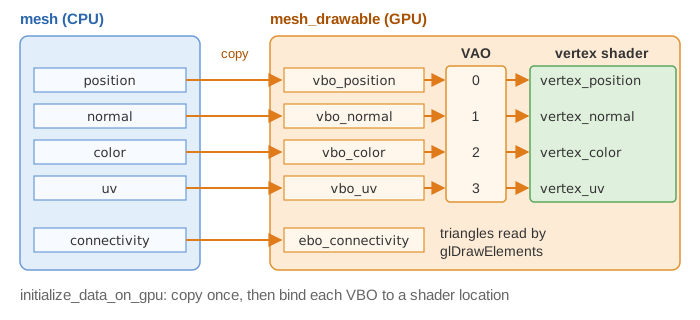
mesh_drawable::initialize_data_on_gpu does:
- checks the mesh (
mesh_check): non-empty, all arrays of the same size, valid indices; - sets
shaderandtexture(the default ones, unless given as arguments or already set); - resets
model,materialandsupplementary_model_matrixto their default values; - creates the four VBOs and the EBO: each one calls
glBufferData, which allocates GPU memory and copies the array into it; - creates the VAO and binds each VBO to a fixed location of the shader input: position -> 0, normal -> 1, color -> 2, uv -> 3.
Consequences:
- Set
modelandmaterialafterinitialize_data_on_gpu, or they are overwritten. - Call it once, in
initialize(). Calling it again on a drawable that already has buffers prints a warning: the previous GPU memory is lost (callclear()first if you really want to rebuild the drawable). Never call it indisplay_frame: it would allocate new GPU memory at every frame. - The
meshcan be a temporary: once copied, the drawable no longer needs it. Keep it as a member of the scene only if you want to modify it later (next section). - Copying a
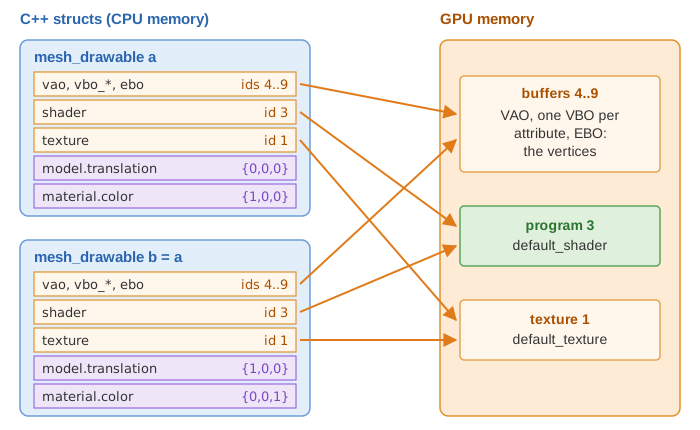
mesh_drawable(cube2 = cube1) copies the ids, not the buffers: both drawables share the same GPU data but have their ownmodelandmaterial. This is how you draw the same shape many times at different positions; see Copies, sharing and freeing for what the copies share.
At each frame, draw only sends the uniforms, binds the VAO and the texture and issues one
glDrawElements: no vertex data travels from the CPU to the GPU.
4. Updating the buffers
To animate the shape (not just its position), modify the CPU mesh, then overwrite the
content of the existing VBOs with opengl_vbo_structure::update. This is the pattern of the
Perlin noise terrain of the course:
// scene.hpp: keep both
mesh terrain_mesh;
mesh_drawable terrain_drawable;

// when a parameter changes
for (int k = 0; k < terrain_mesh.position.size(); ++k)
    terrain_mesh.position[k].z = height(terrain_mesh.position[k]);  // 1. modify on the CPU
terrain_mesh.normal_update();                                       // 2. recompute normals
terrain_drawable.vbo_position.update(terrain_mesh.position);        // 3. copy to the GPU
terrain_drawable.vbo_normal.update(terrain_mesh.normal);
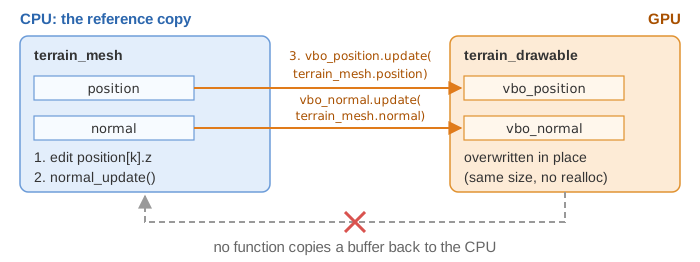
updatecallsglBufferSubData: it rewrites the buffer without reallocating it. The new array cannot be larger than the one used at the initialization (CGP stops with an error otherwise); to change the number of vertices or triangles,clear()and initialize again.- Moving vertices changes the normals: call
mesh::normal_update(recomputes per-vertex normals from the triangles) and updatevbo_normaltoo, otherwise the lighting stays the one of the old shape. - Only update the buffers that changed (positions and normals, here; colors if you edit them).
- If only the position, rotation or scale of a rigid shape changes, do not touch the
buffers: change
model, which is a uniform and costs nothing to update.
Extra per-vertex or per-instance arrays can be attached at locations 4 and above with
initialize_supplementary_data_on_gpu(data, location) and updated with
update_supplementary_data_on_gpu.
5. Textures: from an image on the CPU to a texture on the GPU
Textures follow the same pattern. An image is first a CPU array (an image_structure
loaded from a .png/.jpg file, or a grid_2D<vec3> of colors you compute); it is then copied
into an OpenGL texture held by an opengl_texture_image_structure, which again only stores
an id, the size and the format.
// load a file and send it to the GPU in one call
ground.texture.load_and_initialize_texture_2d_on_gpu(project::path + "assets/checkerboard.png");

// or: compute a CPU image, then send it
grid_2D<vec3> img;  // filled by your code
quad.texture.initialize_texture_2d_on_gpu(img, GL_CLAMP_TO_EDGE, GL_CLAMP_TO_EDGE,
                                          false, GL_NEAREST, GL_NEAREST);
// at each frame, after modifying img on the CPU:
quad.texture.update(img);
initialize_texture_2d_on_gpuallocates the texture and copies the pixels (and builds the mipmaps unless the 4th argument is false); the wrap mode (GL_CLAMP_TO_EDGE,GL_REPEAT...) and the filters are chosen here.opengl_texture_image_structure::updateoverwrites the pixels of the existing texture (same size).- The texture is read in the fragment shader at the
uvcoordinates of the mesh. The image is flipped vertically by default (material.texture_settings.inverse_v, true by default). - To go back to a plain color, set
material.texture_settings.active = false.
6. Why the data cannot be read back
A mesh_drawable holds ids, not arrays: sphere.vbo_position has no [k] operator, and CGP
provides no function to copy a buffer or a texture back from the GPU to the CPU. This is
deliberate:
- the GPU works asynchronously; reading its memory forces the CPU to wait until all pending commands are finished, which ruins the frame rate;
- the useful data already exists on the CPU: you created it there.
So the rule is: the CPU is the reference copy. Keep the mesh (or the image) as a member
of the scene whenever you need to read or modify it later, apply your changes there, and send
them to the GPU with update. Likewise, what a vertex shader computes (for instance a wave
displacement in GLSL) exists only on the GPU, for the current frame: the C++ code cannot read
the displaced positions, e.g. for collisions.
7. Copies, sharing and freeing
A mesh_drawable, an opengl_texture_image_structure and an opengl_shader_structure are
handles: small C++ structs that hold the id of an OpenGL object. Copying the struct copies
the id, never the GPU object.
mesh_drawable a;
a.initialize_data_on_gpu(mesh_primitive_cube());
mesh_drawable b = a;               // same buffers, same shader, same texture as a
b.model.translation = {1, 0, 0};   // only b moves
b.material.color = {0, 0, 1};      // only b turns blue
What an operation on b does to a:
| Operation on b | Effect on a | Why |
|---|---|---|
change b.model, b.material |
none | values stored in b, sent as uniforms at each draw |
b.shader = other_shader, b.texture = other_texture |
none | b now holds other ids; a keeps its own |
b.vbo_position.update(...) |
a changes shape too | one buffer for both |
b.texture.update(image) |
a changes too | one texture for both |
b.clear() |
a is broken | the buffers of a are deleted: a keeps ids that no longer exist, and drawing it is an OpenGL error |
b.shader.clear() |
every drawable using this program is broken | with the default shader, that is every shape of the scene |
b.texture.clear() |
every drawable using this texture is broken | the same for default_texture |
So, to give a copy its own shape, do not clear() it: start from an empty drawable,
b = mesh_drawable();, then b.initialize_data_on_gpu(other_mesh). a keeps its buffers.
Freeing works on the same ids:
mesh_drawable::clear()deletes the VAO, the VBOs and the EBO, and resetsshader,texture,modelandmaterialin the struct. It does not delete the shader program nor the texture: they are usually shared (the default ones by all the drawables). Delete your own shader or texture once, with its ownclear(), when no drawable uses it any more.- These structs have no destructor: a drawable that goes out of scope leaves its buffers on
the GPU until the program ends. Declare the drawables as members of the scene and
initialize them once; never create one in
display_frame. - The same rules hold for the other drawables (
curve_drawable,triangles_drawable...) and for the nodes of ahierarchy_mesh_drawable, which store copies of the drawables passed toadd.
See also
- Scene structure: where
initializeanddisplay_frameare called. - Shaders and uniforms: how the VBOs and uniforms are read on the GPU.
- How-to: Draw a mesh with a camera
- Course labs of CSC_43043 (public version, without the solutions):
05_shaders/a_shader_manipulation(mesh vs mesh_drawable),07_texture/c_perlin_noise(buffer update),03_classes/c_dynamic_image(texture update).