8/13
4. Class and ID
Classes and ID allows to attach a label to HTML elements. This label can be used in the CSS to refine the selection of a subset of elements.
ID
ID are used to identify a unique element (The ID should be unique in the entire webpage).
For instance an element <p> with an id label is defined in the HTML as
<p id="label"> Some text </p>Specific ID can then be selected in the CSS code using #label
ex.
#label {
        color: red;
}
Classes
Classes are used to identify a subset of element, and at the opposite of ID, may be reused on different elements. Example of <p> and <h1> elements with a class
<h1 class="label"> My title </h1>
<p class="label"> My text </p>
Classes are selected in the CSS using .label.
ex.
.label {
        color: red;
}-
Note: you can define several classes for one HTML element (ex. class='label1 label2').
Application
Consider the following code
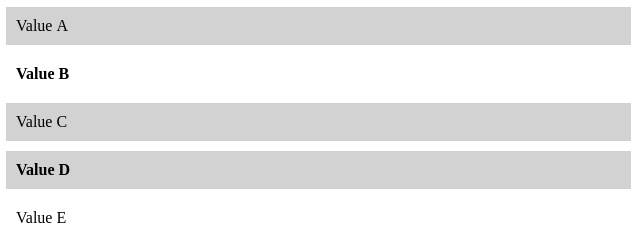
<p class="c1"> Value A </p>
<p class="c2"> Value B </p>
<p class="c1"> Value C </p>
<p class="c1 c2"> Value D </p>
<p> Value E </p>
And this incomplete CSS
p {
        margin: 10px;
        padding: 10px;
}
XX {
        background-color: lightgray;
}
YY {
        font-weight: bold;
}-
Set
XX, andYYin order to obtain this result
Selectors with classes
Classes can be combined with names of elements to refine the selection. Given an html element e and classes c, the CSS selector e.l selects only elements e with the class l.
Note: It is usually useless to refine the selection of an ID, as it defines a unique element.
Examples (make sure to understand well their differences):
-
e.label: Select e elements with the classlabel. -
e, .label: Select all e elements, and all elements with classlabel. -
p .label: Select elements which are children of p and have a classlabel.
Application: Explain in full text which elements would be selected by these selectors
h1.main, .second
h2 .main, #selected, p em.red
body p.selected strong
Pseudo classes
Pseudo-classes are used to define a state of an element, for instance to indicate when the user pass the mouse over the element. Pseudo classes allow CSS to interact (in a limited way) with the action of the user.
Pseudo classes are used by default on link element <a> that change color when the mouse passes over it, and once the link has been visited. Pseudo classes can however be used on any elements using CSS.
-
Experiment with the following examples
HTML
<a href="https://www.polytechnique.edu/"> Link </a>CSS
body {
        text-align: center;
        font-size: 200%;

}
a {
        color: blue;
        text-decoration: none; /* take away the default underline */
}

/* The mouse is over the element */
a:hover {
        color: red;
        font-weight: bold;
}

/* The mouse click on the element */
a:active {
        background-color: black;
}
Exercises
Menu
Considering the following HTML body code to model a menu, create the associated CSS that mimics the following appearance.
<a id="selected" href=""> Home </a>
<a href=""> News </a>
<a href=""> Contact </a>
<a href=""> About </a>
Note the change of color when the mouse pass over an entry of the menu
Note 2: It is ok to have some white margin between each menu entry
Dynamic buttons
Create a webpage that reproduce the behavior of following one Note the behavior of the boxes when you pass and click on the boxes