13/14
6. Vertex attributes
Passing attributes between vertex to fragment shaders
So far, the only information associated to a vertex was its position used directly in the vertex shader. Variables computed in vertex shader can also be passed as input to fragment shaders.
In such case, values received by the fragment shader correspond to the linear interpolation of values associated to the vertices over the primitive (usually a triangle).
The principle to "share" a variable between vertex to fragment shader is the following * The variable should be declared as out attribute of the vertex shader at a given layout index. * The corresponding input variable in the fragment shader should be declared as in at the same layout index.
Note that the correspondance between variable is performed by the layout index (variables may have different name in the vertex and fragment shaders).
Example
Let us consider the example of passing the position attribute to the fragment shader.
-
Vertex shader
#version 330 core

// This value is received from the VBO data
layout (location = 0) in vec4 position;

// This value will be passed to the fragment shader
out vec4 position_frag;

uniform mat4 R;
void main()
{
    position_frag = position;
    gl_Position = R*position;
}-
Fragment shader
#version 330 core

// Input value received from vertex shader
in vec4 position_frag;

out vec4 FragColor;

void main()
{
    FragColor = abs(2*position_frag);
}
[ source ]
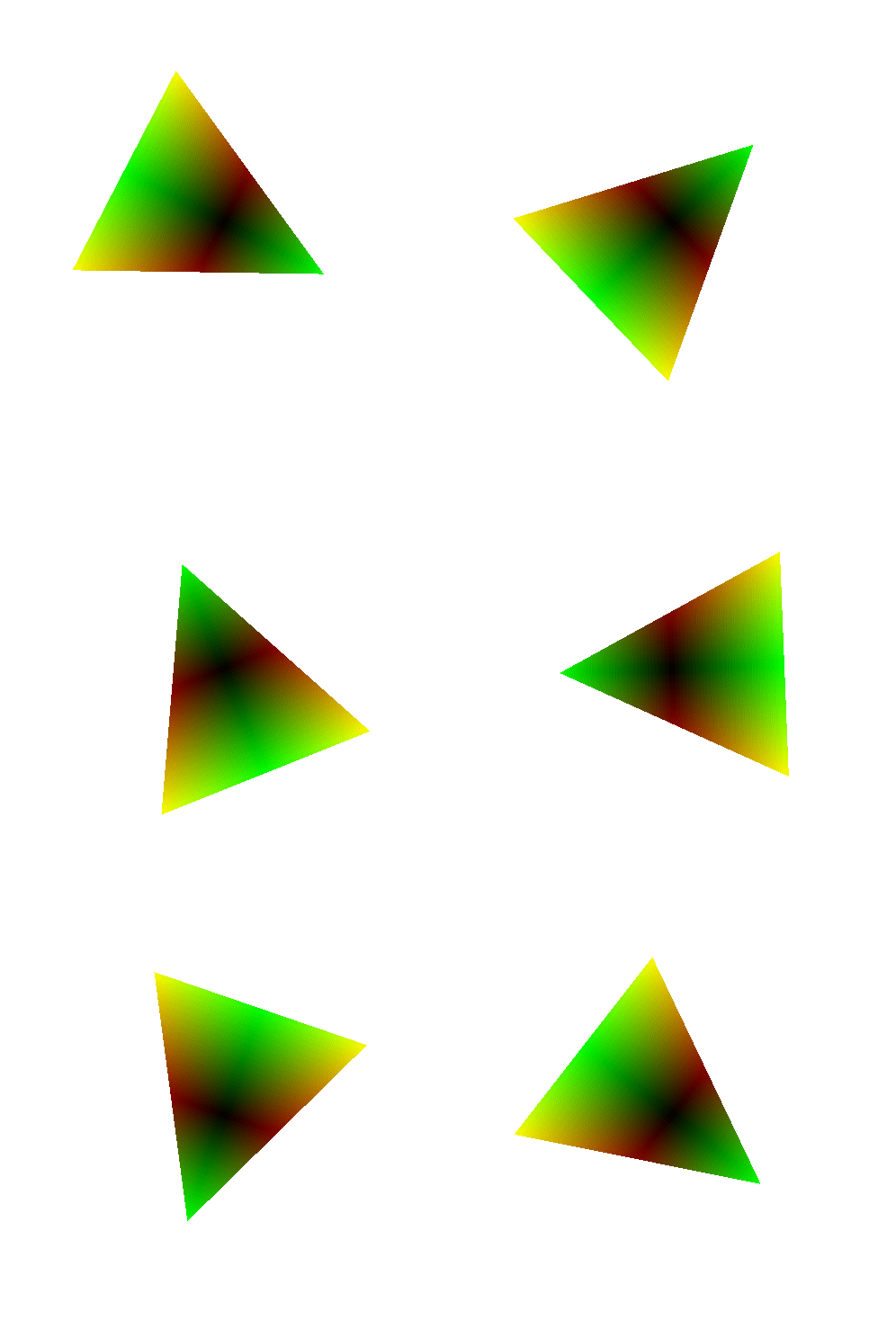
In this case, the initial 3D position of vertices is used to set the color on fragment.
-
Make sure you understand was the triangle are displayed with these colors. Note in particular the linear interpolation of values received as input parameter of the fragment shader.
-
What happens if you consider the following code in the vertex shader
position_frag = R*position;Explain the color displayed on the triangle.
-
These examples illustrates the special case where the color applied to the element is a function of the position. Note that you can apply any function you want, try for instance the following code in the fragment shader.
void main()
{
    float a = pow(cos(position_frag.x*40),2.0);
    float b = position_frag.y+0.5;
    FragColor = vec4(a,b,b,1);
}
Sending attributes
In general, colors and other attributes are not be a procedural function of the position, and should be send separately as input per-vertex parameter from the main C++ program to the shader. To this end, attributes has to be send using VBO.
Let us consider the case where each vertex of the triangle is associated to the respectively red, green, and blue color.
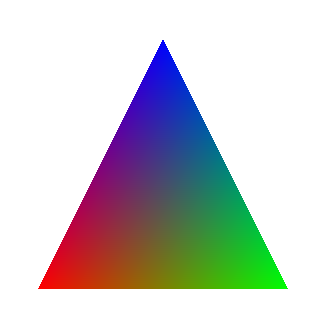
The corresponding vertex and fragment shaders are the following
-
Vertex shader
#version 330 core

layout (location = 0) in vec4 position;
layout (location = 1) in vec4 color;

out vec4 color_frag;


void main()
{
    color_frag = color;
    gl_Position = position;
}-
Fragment shader
#version 330 core

in vec4 color_frag;

out vec4 FragColor;

void main()
{
    FragColor = color_frag;
}
Different memory organizations are possible to send position and colors between C++ structure to GPU VBO. We given example of three of them. Note that for sake of simplicity, we consider an example of static triangle without the rotation.
Multiple VBO
One possibility is to create two buffers
-
One buffer for the position
-
One buffer for the color
    // ********************************* //
    // Create data
    // ********************************* //

    // Positions
    const std::vector<GLfloat> position = {
        -0.5f, -0.5f, 0.0f, // position 0
         0.5f, -0.5f, 0.0f, // position 1
         0.0f,  0.5f, 0.0f  // position 2
    };

    // Colors
    const std::vector<GLfloat> color = {
         1.0f, 0.0f, 0.0f, // color 0 - red
         0.0f, 1.0f, 0.0f, // color 1 - green
         0.0f, 0.0f, 1.0f  // color 2 - blue
    };

    // ********************************* //
    // Send data on the GPU
    // ********************************* //

    // Fill VBO for position
    GLuint vbo_position = 0;
    glGenBuffers(1, &vbo_position);
    glBindBuffer(GL_ARRAY_BUFFER, vbo_position);
    glBufferData(GL_ARRAY_BUFFER, position.size()*sizeof(GLfloat), &position[0], GL_STATIC_DRAW );
    glBindBuffer(GL_ARRAY_BUFFER, 0);

    // Fill VBO for color
    GLuint vbo_color = 0;
    glGenBuffers(1, &vbo_color);
    glBindBuffer(GL_ARRAY_BUFFER, vbo_color);
    glBufferData(GL_ARRAY_BUFFER, color.size()*sizeof(GLfloat), &color[0], GL_STATIC_DRAW );
    glBindBuffer(GL_ARRAY_BUFFER, 0);

    // ********************************* //
    // Set shader attributes
    // ********************************* //

    glGenVertexArrays(1,&vao);
    glBindVertexArray(vao);

    // position at layout 0
    glBindBuffer(GL_ARRAY_BUFFER, vbo_position);
    glEnableVertexAttribArray( 0 );
    glVertexAttribPointer( 0, 3, GL_FLOAT, GL_FALSE, 0, nullptr );

    // color at layout 1
    glBindBuffer(GL_ARRAY_BUFFER, vbo_color);
    glEnableVertexAttribArray( 1 );
    glVertexAttribPointer( 1, 3, GL_FLOAT, GL_FALSE, 0, nullptr );

    glBindBuffer(GL_ARRAY_BUFFER, 0);
    glBindVertexArray(0);
Stacked data
Another possibility is to stack data as a large buffer. First all positions, followed by all colors.
    // ********************************* //
    // Create data
    // ********************************* //

    const std::vector<GLfloat> vertex_data = {
        -0.5f, -0.5f, 0.0f, // position 0
         0.5f, -0.5f, 0.0f, // position 1
         0.0f,  0.5f, 0.0f, // position 2

         1.0f, 0.0f, 0.0f,  // color 0 - red
         0.0f, 1.0f, 0.0f,  // color 1 - green
         0.0f, 0.0f, 1.0f   // color 2 - blue
    };


    // ********************************* //
    // Send data on the GPU
    // ********************************* //

    // Fill VBO for position and color
    GLuint vbo = 0;
    glGenBuffers(1, &vbo);
    glBindBuffer(GL_ARRAY_BUFFER, vbo);
    glBufferData(GL_ARRAY_BUFFER, vertex_data.size()*sizeof(GLfloat), &vertex_data[0], GL_STATIC_DRAW );
    glBindBuffer(GL_ARRAY_BUFFER, 0);

    // ********************************* //
    // Set shader attributes
    // ********************************* //

    glGenVertexArrays(1,&vao);
    glBindVertexArray(vao);
    glBindBuffer(GL_ARRAY_BUFFER, vbo);

    // position at layout 0
    glEnableVertexAttribArray( 0 );
    glVertexAttribPointer( 0, 3, GL_FLOAT, GL_FALSE, 0, nullptr );

    // color at layout 1
    glEnableVertexAttribArray( 1 );
    glVertexAttribPointer( 1, 3, GL_FLOAT, GL_FALSE, 0, (GLvoid*)(3*3*sizeof(GLfloat)) );

    glBindBuffer(GL_ARRAY_BUFFER, 0);
    glBindVertexArray(0);
Interleaved data
Finally, a third possibility consists to interleave position and color data in the buffer.
    // ********************************* //
    // Create data
    // ********************************* //

    const std::vector<GLfloat> vertex_data = {
        -0.5f, -0.5f, 0.0f, // position 0
         1.0f, 0.0f, 0.0f,  // color 0 - red
         0.5f, -0.5f, 0.0f, // position 1
         0.0f, 1.0f, 0.0f,  // color 1 - green
         0.0f,  0.5f, 0.0f, // position 2
         0.0f, 0.0f, 1.0f   // color 2 - blue
    };


    // ********************************* //
    // Send data on the GPU
    // ********************************* //

    // Fill VBO for position and color
    GLuint vbo = 0;
    glGenBuffers(1, &vbo);
    glBindBuffer(GL_ARRAY_BUFFER, vbo);
    glBufferData(GL_ARRAY_BUFFER, vertex_data.size()*sizeof(GLfloat), &vertex_data[0], GL_STATIC_DRAW );
    glBindBuffer(GL_ARRAY_BUFFER, 0);

    // ********************************* //
    // Set shader attributes
    // ********************************* //

    glGenVertexArrays(1,&vao);
    glBindVertexArray(vao);
    glBindBuffer(GL_ARRAY_BUFFER, vbo);

    // position at layout 0
    glEnableVertexAttribArray( 0 );
    glVertexAttribPointer( 0, 3, GL_FLOAT, GL_FALSE, 2*3*sizeof(GLfloat), nullptr );

    // color at layout 1
    glEnableVertexAttribArray( 1 );
    glVertexAttribPointer( 1, 3, GL_FLOAT, GL_FALSE, 2*3*sizeof(GLfloat), (GLvoid*)(3*sizeof(GLfloat)) );

    glBindBuffer(GL_ARRAY_BUFFER, 0);
    glBindVertexArray(0);
Comparisons
These three common memory setups have both pro/cons depending on the context.
-
Multiple VBO
-
() Allows to separate the treatment of position and color in different arrays. Fits well to conceptual algorithms and C+ structure.
-
(-) Slowest computation on the GPU: each access on attributes of a given vertex (position and color) requires to access different memory location.
-
-
Stacked buffer
-
(+) Still allows to treat position and color as simple arrays of values. Although less flexible than with multiple VBO.
-
(-) Each access on attribute of a given vertex attributes still requires to access non contiguous memory (beginning and end of the buffer).
-
-
Interleaved buffer
-
(+) Faster GPU access to data. Each vertex has all attributes locally accessible in memory.
-
(-) Less convenient structure to handle in high level C++ code. Need to handle offset and stride.
-
In practice, common application viewed in this class can use any representation without any performance penalty. For flexibility and lisibility, we will prefer the use of multiple VBO, one for each attribute.
In production case scenario where code must be optimized for speed (ex. game development), interleaved buffer is the solution to privilegiate.