An image filter on the whole scene
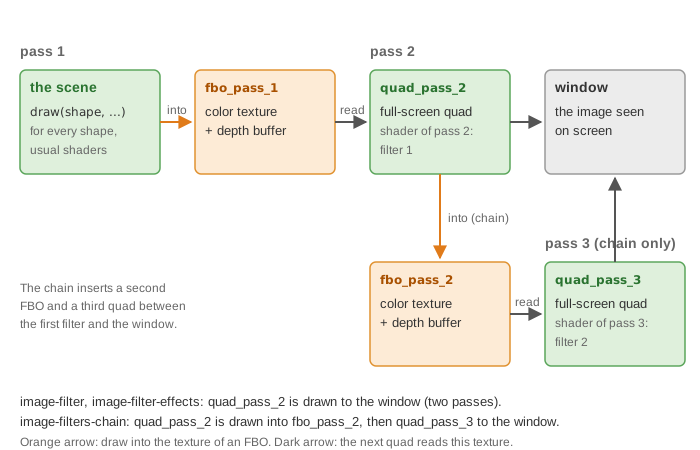
What it shows: a camel and a cube rendered as a line drawing: dark edges on white. The
scene is first drawn into a texture, then displayed on a quad that covers the window, with
a fragment shader that computes a discrete Laplacian of the image. The two passes are
wrapped in a small helper, multipass_structure, reused by the next two examples.
Concepts combined in this example:
- an
opengl_fbo_structurethat redirects the drawing into its texture; - a full-screen quad built with
mesh_primitive_quadranglein screen coordinates, whose texture is the texture of the FBO; - a 3 x 3 convolution in a fragment shader, with
textureSizeto find the size of a pixel; - the helper struct
multipass_structure, which hides the OpenGL calls of each pass.
Source: examples/06_multipass/01_image_filter
of the public repository epita_ani3d_lab_code-2027, run unchanged in the demo above. The
step-by-step recipe, with the same filter written inline in the default template, is
Render the scene to a texture and filter it; this page
explains how the complete program organizes the passes.
| File | Role |
|---|---|
src/scene.hpp, src/scene.cpp |
the camel and the cube, the two passes in display_frame |
src/multipass_structure/multipass_structure.* |
the FBO, the screen quad and the start / draw / end functions of each pass |
shaders/screen_effect_convolution/screen_effect_convolution.vert.glsl |
passes the quad through, without matrices |
shaders/screen_effect_convolution/screen_effect_convolution.frag.glsl |
the Laplacian filter |
assets/camel.obj |
the camel |
1. The helper struct
// src/multipass_structure/multipass_structure.hpp
struct multipass_structure {
	cgp::opengl_fbo_structure fbo_pass_1;
	cgp::mesh_drawable quad_pass_2;

	void initialize();
	void set_shader_pass_2(cgp::opengl_shader_structure const& shader);
	void update_screen_size(int width, int height);
	void clear_screen(cgp::vec3 const background_color = { 1,1,1 }) const;

	void start_pass_1(cgp::vec3 const background_color = { 1,1,1 });
	void end_pass_1();

	void start_pass_2(cgp::vec3 const background_color = {1,1,1});
	void draw_pass_2(cgp::environment_generic_structure const& environment);
	void end_pass_2();
};
initialize creates the FBO (800 x 800 pixels by default), the quad from to
, and connects them:
// src/multipass_structure/multipass_structure.cpp - initialize
fbo_pass_1.initialize();
quad_pass_2.initialize_data_on_gpu(mesh_primitive_quadrangle({ -1,-1,0 }, { 1,-1,0 }, { 1,1,0 }, { -1,1,0 }));
quad_pass_2.texture = fbo_pass_1.texture;
The order matters: the texture of the FBO gets its id in fbo_pass_1.initialize(), and the
quad copies this id. Each pass then has a start and an end function:
| Function | OpenGL calls |
|---|---|
start_pass_1 |
fbo_pass_1.bind(), then clear_screen: viewport, clear color and depth, depth test on |
end_pass_1 |
fbo_pass_1.unbind(): back to the window |
start_pass_2 |
clear_screen of the window |
draw_pass_2 |
depth test off, draw(quad_pass_2, environment, 1, false), depth test on |
end_pass_2 |
nothing (kept for symmetry, filled in the chain example) |
update_screen_size resizes the texture of the FBO when the window size changes, and copies
the texture structure again into the quad so that its stored width and height follow (the
id does not change).
2. The two passes in display_frame
// src/scene.cpp - display_frame
multipass_rendering.update_screen_size(window.width, window.height);

// 1- Activate the rendering on the FBO
multipass_rendering.start_pass_1();

// 2- Display the object of the scene
draw(camel, environment);
draw(cube, environment);
// (and their wireframes if the checkbox is set)

// 3- Stop the rendering on the FBO
multipass_rendering.end_pass_1();

multipass_rendering.start_pass_2();
multipass_rendering.draw_pass_2(environment); // Apply the screen effect at that time
multipass_rendering.end_pass_2();

// Can display any shape in the scene (displayed on top of the quad)
if (gui.display_frame)
	draw(global_frame, environment);
The shapes of pass 1 are drawn with their usual shader: they do not know that the result
goes into a texture. The global frame is drawn after pass 2, on top of the quad, and is
therefore not filtered: in the demo, it is the only colored element. The fourth argument of
draw in draw_pass_2, false, turns off the warnings for the uniforms that the screen
shader does not use (model, view, projection...).
3. The filter
The vertex shader writes the quad coordinates, already in , to gl_Position
and passes the uv coordinates to the fragment shader, which samples the 3 x 3 neighborhood
of its pixel:
// shaders/screen_effect_convolution/screen_effect_convolution.frag.glsl
float kernel[9] = float[](
	0.0, 1.0, 0.0,
	1.0,-4.0, 1.0,
	0.0, 1.0, 0.0
);

void main()
{
	ivec2 image_size = textureSize(image_texture, 0);
	float dx = 1.0 / float(image_size.x);
	float dy = 1.0 / float(image_size.y);
	// offset[9]: the 9 neighbors (-dx, dy) ... (dx, -dy), in the order of the kernel

	vec4 color = vec4(0.0, 0.0, 0.0, 0.0);
	for(int i = 0; i < 9; i++) {
		color += kernel[i] * texture(image_texture, uv_frag+offset[i] );
	}
	FragColor = abs(1.0-color);
}
The kernel is the discrete Laplacian: .
Its weights sum to zero, so it is zero where the color is constant (the white background,
the smooth inside of a shaded surface) and large where the color jumps, on the silhouettes
and the sharp edges. abs(1.0 - color) turns zero into white and the jumps into dark
lines. dx and dy are the size of one pixel in uv coordinates, computed from the actual
size of the texture: the filter stays one pixel wide whatever the window size.
Going further
- Change the kernel: a 3 x 3 average (all weights 1/9) blurs the image, a Sobel kernel gives oriented edges.
- Draw the global frame inside pass 1 instead, and see it filtered too (the next example does so).
- More effects with the same structure: Image effects: colors, contours, deformations; two filters in sequence: A chain of two image filters.
See also
- How-to: Render the scene to a texture and filter it
- Understand: Shaders and uniforms
- Reference:
opengl_fbo_structure,mesh_drawable,opengl_texture_image_structure