Shadows with a shadow map
What it shows: a camel and a cube cast shadows on the ground and on each other. The scene is drawn twice per frame: once from the light, keeping only the depth, then from the camera with a shader that compares each pixel with this depth. The two passes are wrapped in a small helper struct, and the shadows are softened by reading 25 samples of the depth map.
In the demo, the light is fixed where the camera starts: turn the camera with the mouse and the shadows stay in place, seen from other viewpoints.
Concepts combined in this example:
- an
opengl_fbo_structurein depth mode: the target of the first pass is a depth texture; - a helper struct that draws any
mesh_drawablewith the depth shader, without modifying it; - the light matrices sent to every shader with
environment.uniform_generic; - the shadow map passed to the shapes as a
supplementary_texture; - percentage-closer filtering (PCF): the fraction of 25 samples in shadow.
Source: examples/06_multipass/04_shadow_mapping
of the public repository epita_ani3d_lab_code-2027, run unchanged in the demo above. The
principle, the step-by-step recipe and the common pitfalls (resolution, acne, size of the
box of the light) are in Cast shadows with a shadow map, which
writes the same technique inline in the default template; this page explains how the
complete program is organized.
| File | Role |
|---|---|
src/scene.hpp, src/scene.cpp |
the shapes, the light matrices, the two passes in display_frame |
src/shadow_mapping/shadow_mapping.* |
the helper struct: the depth FBO and the functions of the first pass |
shaders/depth_map/depth_map.vert.glsl, .frag.glsl |
first pass: position seen by the light, depth only |
shaders/mesh_with_shadow/mesh_with_shadow.vert.glsl, .frag.glsl |
second pass: Phong shading attenuated by the shadow |
assets/camel.obj |
the camel |
1. The light: a view matrix and an orthographic box
// src/scene.cpp - end of initialize()
view_light = camera_control.camera_model.matrix_view();
environment.uniform_generic.uniform_mat4["projection_light"] = projection_orthographic(-10.0f, 10.0f, -10.0f, 10.0f, 0.0f, 30.0f);
The view matrix of the light is a copy of the view matrix of the camera at the end of
initialize(), just after look_at({3,2,2}, {0,0,0}): the light looks at the origin from
the point , and keeps this pose for the whole run. The projection is orthographic,
a box of 20 x 20 units across and 30 units deep: the rays of the light are parallel, as for
the sun. Both matrices reach every shader through environment.uniform_generic
(view_light is set again at every frame in display_frame).
The fragment shader also derives the position of the light from this matrix, for the
diffuse and specular terms, instead of using environment.light:
// shaders/mesh_with_shadow/mesh_with_shadow.frag.glsl - main
vec3 light = vec3(inverse(view_light)*vec4(0,0,0,1.0));
so the lighting and the shadows agree: both come from the same point.
2. The helper struct
// src/shadow_mapping/shadow_mapping.cpp
void shadow_mapping_structure::initialize(opengl_shader_structure const& shader_depth_map_arg)
{
	fbo_shadow_map.width = 2048;
	fbo_shadow_map.height = 2048;
	fbo_shadow_map.mode = opengl_fbo_mode::depth;   // a depth texture, no color
	fbo_shadow_map.initialize();
	shader_depth_map = shader_depth_map_arg;
}

void shadow_mapping_structure::start_pass_depth_map_creation()
{
	glViewport(0, 0, fbo_shadow_map.width, fbo_shadow_map.height);
	fbo_shadow_map.bind();
	glClear(GL_DEPTH_BUFFER_BIT);
}

void shadow_mapping_structure::draw_depth_map(cgp::mesh_drawable drawable, cgp::environment_generic_structure const& environment) const
{
	drawable.shader = shader_depth_map;
	draw(drawable, environment, 1, 0);
}
- The viewport follows the target. The shadow map is 2048 x 2048 pixels, not the size of
the window:
start_pass_depth_map_creationsets the viewport to the FBO, anddisplay_framesets it back to the window before the second pass. Forgetting the secondglViewportdraws the scene into a 2048 x 2048 area of which the window shows only the lower-left part. draw_depth_maptakes the drawable by value. The parameter is a copy of themesh_drawable: it shares the GPU buffers of the original but has its ownshaderfield (see Copies, sharing and freeing). The copy is drawn with the depth shader, and the shape of the scene keeps its own shader for the second pass. Copying a drawable costs nothing on the GPU: only ids are copied.draw(drawable, environment, 1, 0): one instance, and expected_uniforms false. The depth shader uses onlymodel,view_lightandprojection_light; without this flag, CGP would warn at every frame that the material and the camera matrices are sent to a shader that does not use them.
The depth shader writes nothing but the depth: its vertex shader projects the vertex with
projection_light * view_light * model, and its fragment shader outputs
gl_FragCoord.z, the depth that the FBO stores.
3. The two passes
// src/scene.cpp - display_frame()
environment.uniform_generic.uniform_mat4["view_light"] = view_light;

// 1st pass: the depth map, seen from the light
shadow_mapping.start_pass_depth_map_creation();
shadow_mapping.draw_depth_map(camel, environment);
shadow_mapping.draw_depth_map(cube, environment);
shadow_mapping.draw_depth_map(ground, environment);
if (gui.display_frame)
	shadow_mapping.draw_depth_map(global_frame, environment);
shadow_mapping.end_pass_depth_map_creation();

// 2nd pass: the scene, seen from the camera
glViewport(0, 0, window.width, window.height);
glClearColor(1,1,1, 1.0f);
glClear(GL_COLOR_BUFFER_BIT | GL_DEPTH_BUFFER_BIT);
glEnable(GL_DEPTH_TEST);
draw(camel, environment);
draw(cube, environment);
draw(ground, environment);
if (gui.display_frame)
	draw(global_frame, environment, 1, 0);
Two lists decide who takes part in the shadows:
| Casts a shadow (drawn in pass 1) | Receives shadows (shader with the shadow map) | |
|---|---|---|
| camel, cube, ground | yes | yes |
| global frame | yes, when displayed | no: default shader |
The three shapes receive the shadow map in initialize(), with the shadow shader:
// src/scene.cpp - initialize()
camel.shader = shader_mesh_with_shadow;
camel.supplementary_texture["depth_map_texture"] = shadow_mapping.get_depth_map_texture();
draw binds every texture of supplementary_texture and sends it to the uniform sampler of
the same name, here depth_map_texture in the fragment shader. The frame keeps the default
shader: it casts a shadow (look under the axes) but is never shadowed. It is drawn with
expected_uniforms false because view_light and projection_light, sent to every shader,
are not used by the default one.
4. Soft shadows: 25 samples of the depth map
The vertex shader of the second pass also projects each vertex into the box of the light
(fragment.position_lightspace = projection_light * view_light * position). In the fragment
shader, these coordinates are brought from to : xy is where to read the
shadow map, z is the depth of the pixel seen from the light.
// shaders/mesh_with_shadow/mesh_with_shadow.frag.glsl - ShadowCalculation
float bias = max(0.002 * (1.0 - dot(N, L)), 0.005);
float shadow = 0.0;
vec2 texelSize = vec2(1.0 / float(textureSize(depth_map_texture, 0).x), 1.0 / float(textureSize(depth_map_texture, 0).y));
for(int x = -2; x <= 2; ++x)
{
    for(int y = -2; y <= 2; ++y)
    {
        float closestDepth = texture(depth_map_texture, projCoords.xy + 0.5*vec2(x, y) * texelSize).r;
        shadow += currentDepth-bias > closestDepth  ? 1.0 : 0.0;
    }
}
shadow /= 25.0;
if(projCoords.z > 1.0)
   shadow = 0.0;
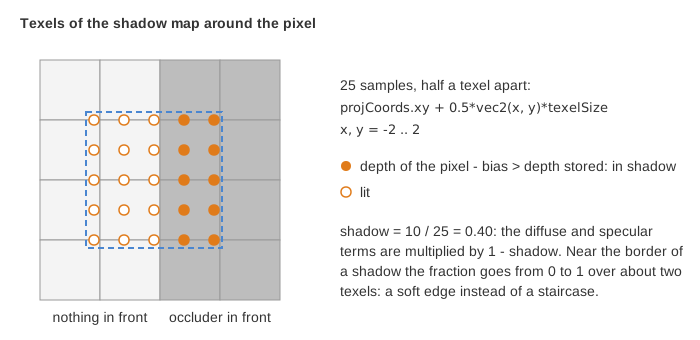
- A single sample gives a binary answer, and the border of the shadow shows the square texels of the map. With 25 samples, the result is the fraction of them in shadow, from 0 to 1: a soft border about two texels wide.
- The bias prevents a surface from shadowing itself (shadow acne, see the how-to). As
written, it is always 0.005: the first term of
maxis at most 0.004 (when ), so it never wins. A slope-dependent bias would use a first term larger than the second, for instancemax(0.05 * (1.0 - dot(N, L)), 0.005). - A pixel beyond the far side of the box of the light (
projCoords.z > 1.0) is never in shadow.
The shadow then attenuates the diffuse and specular terms, never the ambient one, so the
shadowed areas keep 30% of their color (the default material.phong.ambient):
// shaders/mesh_with_shadow/mesh_with_shadow.frag.glsl - main
vec3 color_shading = (Ka + Kd * (1.0-shadow) * diffuse_component) * color_object + Ks * (1.0-shadow) * specular_component * vec3(1.0, 1.0, 1.0);
The checkbox "Wireframe" of the GUI has no effect in the browser: draw_wireframe draws
nothing in WebGL (see Display the wireframe of a mesh).
Going further
- Move the light: build
view_lightat every frame from an angle that grows with time, withcamera_frame_look_atas in step 4 of the how-to. - Tighten the box of
projection_orthographicaround the shapes (the scene fits in a few units, the box is 20 units wide): each object gets more texels, the shadows get sharper. - Display the depth map on a quad, as in An image filter on the whole scene, to see what the light sees.
See also
- How-to: Cast shadows with a shadow map, Render the scene to a texture and filter it
- Examples: An image filter on the whole scene (an
opengl_fbo_structurein its default image mode) - Understand: Camera and matrices, Shaders and uniforms
- Reference:
opengl_fbo_structure,mesh_drawable