A skybox around a y-up scene
What it shows: the smallest program with a skybox. The scene contains only the global frame, surrounded by a photograph of a canyon that never gets closer when you move the camera. One image in the shape of a cross is cut into the six faces of a cube map, and the skybox is drawn first, before the frame. The camera turns around the y axis, which is also the up axis of the cube map: the sky needs no rotation.
Concepts combined in this example:
image_load_fileandimage_split_grid, which cut the image into 4 x 3 squares;- a
skybox_drawablewhose texture is a cube map built withinitialize_cubemap_on_gpu; glDepthMaskto draw the sky without writing the depth;- an orbit camera set to the y-up convention with
set_rotation_axis_y.
Source: examples/05_environment_map/01_skybox
of the public repository epita_ani3d_lab_code-2027, run unchanged in the demo above (only
the image is resized, to 2048 x 1536). The step-by-step recipe, for the z-up default
template, is Add a skybox; this page explains what differs in
the complete program.
| File | Role |
|---|---|
src/scene.hpp |
declares the member skybox (a skybox_drawable) |
src/scene.cpp |
builds the cube map in initialize, draws the sky first in display_frame |
assets/skybox_01.jpg |
the sky, a cross of 4 x 3 squares |
assets/skybox_02.jpg, assets/skybox_debug.png |
other images of the repository, named in comments only (not in the demo) |
1. One image, six faces
// src/scene.cpp - initialize
image_structure image_skybox_template = image_load_file(project::path+"assets/skybox_01.jpg");

// Split the image into a grid of 4 x 3 sub-images
std::vector<image_structure> image_grid = image_split_grid(image_skybox_template, 4, 3);

skybox.initialize_data_on_gpu();
skybox.texture.initialize_cubemap_on_gpu(image_grid[1], image_grid[7], image_grid[5], image_grid[3], image_grid[10], image_grid[4]);
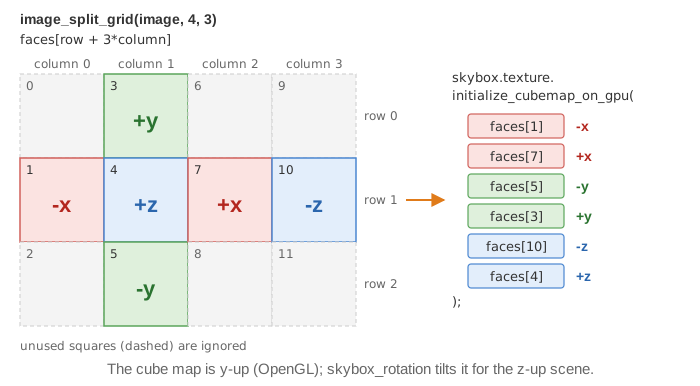
image_split_grid numbers the squares column by column: square
is image_grid[row + 3*column]. The six arguments of initialize_cubemap_on_gpu are the
faces -x, +x, -y, +y, -z, +z, so the indices 1, 7, 5, 3, 10, 4 pick the left, right, bottom
and top squares of the cross, then the far right one and the center. The image
assets/skybox_debug.png of the repository writes the index on each square: load it instead of
assets/skybox_01.jpg (the comments of initialize show the line) to check another sky image.
2. Why the sky needs no rotation here
A cube map follows the OpenGL convention: +y is up. The example sets the camera to the same convention:
// src/scene.cpp - initialize
camera_control.set_rotation_axis_y();
camera_control.look_at({ 3.0f, 2.0f, 2.0f }, {0,0,0}, {0,0,1});
set_rotation_axis_y makes the orbit camera turn around the y axis and keep it vertical on
screen. The third argument of look_at is ignored by camera_controller_orbit_euler (the
up direction is its rotation axis), so the horizon of the sky is horizontal and
skybox.skybox_rotation keeps its default value, the identity. In the default template,
z-up, the how-to page tilts the cube map instead with
skybox_rotation (Add a skybox, step 3).
The green axis of the global frame (y) points up in the demo.
3. Drawn first, without writing the depth
// src/scene.cpp - display_frame
//  Must be called before drawing the other shapes and without writing in the Depth Buffer
glDepthMask(GL_FALSE); // disable depth-buffer writing
draw(skybox, environment);
glDepthMask(GL_TRUE);  // re-activate depth-buffer write

// Can now draw the other shapes of the scene
if (gui.display_frame)
	draw(global_frame, environment);
The skybox_drawable is a cube of size 2 centered on the camera: its vertex shader keeps
only the rotation of the view matrix (mat3(view*model)), so the cube moves with the camera
and the sky only turns. Its fragment shader reads the cube map in the direction of the
fragment. This cube is very close to the camera: if it wrote its depth, every shape behind
it, that is every shape of the scene, would fail the depth test. With glDepthMask(GL_FALSE)
the sky only paints the color buffer, and the frame drawn afterwards covers it.
The "Wireframe" checkbox comes from the template; nothing reads display_wireframe in this
example, so it has no effect.
Going further
- Add a shape after the skybox and make it reflect the sky: the next example, An environment map on several shapes.
- Tint the sky with
skybox.color_blendingandskybox.alpha_color_blending(0: image only, 1: plain color), for a night or a fog effect. - Switch the camera to
set_rotation_axis_z()and watch the horizon become vertical: this is the case whereskybox_rotationis needed.
See also
- How-to: Add a skybox, Reflect the environment on a shape
- Understand: Camera and matrices
- Reference:
skybox_drawable,image_structure,opengl_texture_image_structure,camera_controller_orbit_euler