A pine tree with cut-out foliage
What it shows: a pine tree made of three OBJ models: a textured trunk, plain branches, and a foliage made of about 12 500 small quads, each covered by the image of a pine frond with a transparent background. Instead of blending, a custom fragment shader discards the pixels where the image is transparent: the remaining pixels are fully opaque, so the quads can be drawn in any order, without sorting them at every frame.
Concepts combined in this example:
- three models loaded with
mesh_load_file_obj, two of them textured withload_and_initialize_texture_2d_on_gpu(PNG with an alpha channel for the foliage); - a custom shader loaded on one drawable only (
foliage.shader.load), the others keep the default shader; - the
discardinstruction of GLSL, an alternative to blending for images whose pixels are either opaque or transparent; - the material of the foliage without specular highlight (
material.phong); - an orbit camera that turns around the y axis, the vertical axis of this model.
Source: examples/01_transparent_billboards
of the public repository epita_ani3d_lab_code-2027, run unchanged in the demo above (its
models and images are reduced for the web, see demos/transparent-billboards/origin.txt).
For transparency with blending (semi-transparent windows, smoke), see
Draw transparent objects.
| File | Role |
|---|---|
src/scene.hpp, src/scene.cpp |
the scene: loads the three parts of the tree and draws them |
shaders/mesh_transparency/mesh_transparency.frag.glsl |
the default fragment shader plus the alpha test |
shaders/mesh_transparency/mesh_transparency.vert.glsl |
identical to the default vertex shader |
assets/trunk.obj, assets/trunk.png |
the trunk and its bark image |
assets/branches.obj |
the branches, without texture |
assets/foliage.obj, assets/pine.png |
the quads of the foliage and the frond image (RGBA) |
1. Three parts, three drawables
Each part of the tree is a separate OBJ file, loaded into its own mesh_drawable:
// src/scene.cpp - initialize
trunk.initialize_data_on_gpu(mesh_load_file_obj(project::path + "assets/trunk.obj"));
trunk.texture.load_and_initialize_texture_2d_on_gpu(project::path + "assets/trunk.png");

branches.initialize_data_on_gpu(mesh_load_file_obj(project::path + "assets/branches.obj"));
branches.material.color = { 0.45f, 0.41f, 0.34f }; // no textures on branches

foliage.initialize_data_on_gpu(mesh_load_file_obj(project::path + "assets/foliage.obj"));
foliage.texture.load_and_initialize_texture_2d_on_gpu(project::path + "assets/pine.png");
The foliage file holds about 12 500 independent quads (4 vertices and 2 triangles each) spread in the crown with various orientations, all mapped with the full image (uv from 0 to 1). They are ordinary geometry: nothing in the code turns them toward the camera.
The model is modeled with y as the vertical axis (its height goes from 0 to about 3.9 along
y). The scene therefore calls camera_control.set_rotation_axis_y(), so that horizontal
mouse moves turn the camera around the trunk. The third argument of look_at (the up
vector {0,0,1}) is ignored by camera_controller_orbit_euler.
2. Cut out the transparent pixels
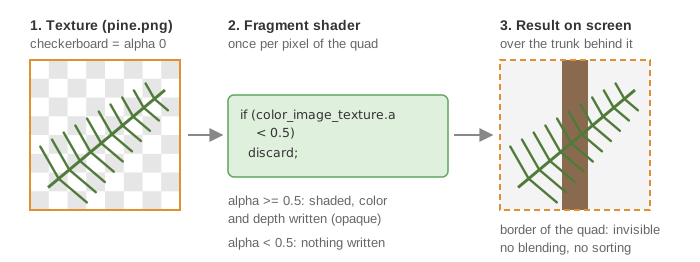
The fragment shader shaders/mesh_transparency/mesh_transparency.frag.glsl is a copy of the
default one (see Shaders and uniforms)
with three more lines after the texture is read:
// shaders/mesh_transparency/mesh_transparency.frag.glsl - main
// Fully discard the pixel if the alpha value is less than a given threshold.
if(color_image_texture.a < 0.5){
	discard;
}
discard stops the fragment shader: the pixel writes neither a color nor a depth, as if the
triangle did not cover it. The kept pixels are drawn like any opaque surface, with the depth
test (enabled by the template) and the depth writing (on by default in OpenGL). Hence:
- no
glEnable(GL_BLEND)and noglDepthMask(false)in the scene; - no sorting: whatever the order, the depth buffer keeps the nearest needle at each pixel. Sorting 12 500 quads by depth at every frame, as blending would require (see Draw transparent objects), is avoided;
- the price: a pixel is either fully opaque or fully transparent. This suits foliage, grass or fences, not tinted glass or smoke, which need blending.
The shader is loaded on the foliage only, after its initialization. Its specular term is turned off, since a flat quad with a highlight would reveal its shape:
// src/scene.cpp - initialize
foliage.shader.load(project::path + "shaders/mesh_transparency/mesh_transparency.vert.glsl", project::path + "shaders/mesh_transparency/mesh_transparency.frag.glsl"); // set the shader handling transparency for the foliage
foliage.material.phong = { 0.4f, 0.6f, 0, 1 };  // remove specular effect for the billboard
The four values are, in order, the ambient, diffuse and specular coefficients and the specular exponent (defaults: 0.3, 0.6, 0.3, 64).
3. Draw
// src/scene.cpp - display_frame
draw(trunk, environment);
draw(branches, environment);

if (gui.display_pines)
	draw(foliage, environment);
The three parts are drawn like opaque shapes. The checkbox "Pines" hides the foliage to show the branches inside the crown; "Frame" shows the axes at the foot of the tree.
Going further
- Remove the three lines of
discardfrom the shader: every quad becomes an opaque square, showing the color stored in the transparent pixels of the image. - Change the threshold 0.5: a lower value keeps the semi-transparent edges of the needles (thicker fronds), a higher one thins them.
- Plant a forest: draw the three parts several times, changing their
model.translationbetween the calls (see Move, rotate and scale a shape).
See also
- How-to: Draw transparent objects, Load a 3D model from an OBJ file, Apply a texture image
- Understand: Shaders and uniforms
- Reference:
mesh_drawable,opengl_texture_image_structure