Move, rotate and scale a shape
Goal: place the same cube at a given position, tilted and resized, by changing only
its model transform.
Starting point: the default project template (
src/scene.hpp,src/scene.cpp, see Your first scene). It already declares the shapessphereandcylinder, atimer, and the memberscamera_control,environmentandgui: reuse them, do not declare them again. The first comment of each code block says in which file and where its lines go: add means insert them, replace means replace the whole function by the one shown.
The model transform of a drawable
Every mesh_drawable has a model member of type affine. It is sent to the shader as
the model matrix at each draw call and applied to every vertex on the GPU:
p_world = translation + rotation * (scaling * scaling_xyz * p_local)
| Member | Type | Default |
|---|---|---|
model.translation |
vec3 |
{0,0,0} |
model.rotation |
rotation_transform |
identity |
model.scaling |
float (uniform scaling) | 1 |
model.scaling_xyz |
vec3 (scaling per axis) |
{1,1,1} |
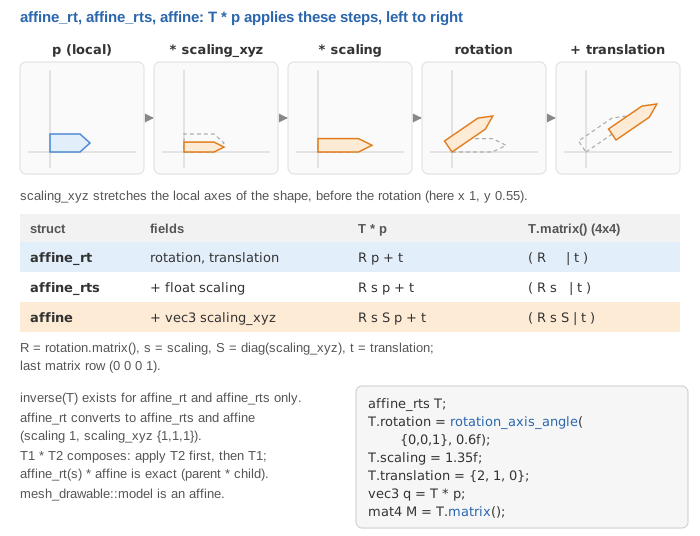
The mesh on the CPU is never modified: changing model is free and can be done at
every frame.
1. Declare the drawable
// scene.hpp - add in scene_structure
mesh_drawable cube;
2. Create it and set its transform (once)
// scene.cpp - add at the end of initialize()
cube.initialize_data_on_gpu(mesh_primitive_cube({0,0,0}, 1.0f));

cube.model.translation = {1.0f, 0.5f, 0.0f};                              // position
cube.model.rotation = rotation_transform::from_axis_angle({0,0,1}, Pi/4); // 45 deg around z
cube.model.scaling = 0.5f;                                                // half size
rotation_transform::from_axis_angle(axis, angle) builds a rotation from an axis
(normalized internally) and an angle in radians. The constant Pi is defined by CGP.
3. Draw (every frame)
// scene.cpp - add in display_frame(), before timer.update()
draw(cube, environment);
Common pitfalls
- The rotation is not around the center of the shape: the rotation is applied around
the origin of the local frame of the mesh, before the translation. Build the mesh
centered at
{0,0,0}(mostmesh_primitive_*functions take a center argument) and move it withmodel.translation. - Angle in degrees:
from_axis_angleexpects radians; write30 * Pi / 180. scaling_xyzstretches the shape along its own axes: it is applied before the rotation, so a cube scaled with{2,1,1}stays a box when it turns.
Variations
- Combine rotations:
rotation_transformvalues can be multiplied,R = R2 * R1applies R1 first. - Rotate one vector into another:
rotation_transform::from_vector_transform({0,0,1}, normalize(direction))(both vectors must have a unit norm: the function stops on an assertion otherwise). - Draw the same drawable at several places: change
model.translationbetween twodrawcalls (no need for several drawables). - Bake a transform into the vertices instead (CPU, done once):
mesh::translate,mesh::scale,mesh::rotate, theninitialize_data_on_gpu.
Source: course labs of CSC_43043 (public version, without the solutions): 00_test_installation and 08_project (scene.cpp).
See also
- How-to: Draw a mesh with a camera, Animate a shape with time, Create basic shapes
- Understand: Camera and matrices
- Reference:
rotation_transform,affine,mesh_drawable