Create basic shapes (mesh primitives)
Goal: pick the mesh_primitive_* function that builds the shape you need, know what its
parameters mean, and display all of them side by side.
Starting point: the default project template (
src/scene.hpp,src/scene.cpp, see Your first scene). It already declares the shapessphereandcylinder, atimer, and the memberscamera_control,environmentandgui: reuse them, do not declare them again. The first comment of each code block says in which file and where its lines go: add means insert them, replace means replace the whole function by the one shown.
What a primitive gives you
Every mesh_primitive_* function returns a mesh on the CPU, with all its per-vertex arrays
filled: positions, normals, uv coordinates, white colors and triangles. Upload it once with
initialize_data_on_gpu, as for any mesh (see Draw a mesh with a camera):
// scene.hpp - add in scene_structure
mesh_drawable cone;
// scene.cpp - add at the end of initialize()
cone.initialize_data_on_gpu(mesh_primitive_cone(0.3f, 0.8f, {0,0,0.6f}));   // radius, height, center of the base
cone.material.color = {1.0f, 0.6f, 0.2f};
All parameters have default values, so mesh_primitive_sphere() alone is a valid call. The
shape is built in world units around the points you give: move it later with
model.translation rather than rebuilding it (see Move, rotate and scale a shape).
Sampling parameters. Nu, Nv (or N) are numbers of vertices along the two directions of the surface. More samples give a smoother shape and more triangles; the sphere has 40 x 20 samples by default.
In the pictures below, each shape is built with the call written under it (default values), seen from the direction of the template camera. The edges of the triangles show the sampling, the orange points are the points given as parameters, and the axes x (red), y (green) and z (blue) start at the origin, with a length of 0.6.
Curved closed shapes
Sphere
mesh mesh_primitive_sphere(float radius=1.0f, vec3 const& center={0,0,0}, int Nu=40, int Nv=20);
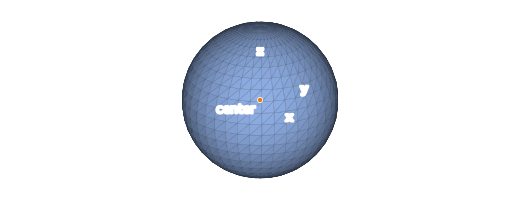
Nu samples go around the z axis (longitude), Nv from the south pole to the north pole (latitude), plus one vertex per triangle at each pole. The uv coordinates follow these two angles, so a texture wraps around the sphere once.
Ellipsoid
mesh mesh_primitive_ellipsoid(vec3 scale=vec3{1.0f, 1.0f, 1.0f}, vec3 const& center={0,0,0}, int Nu=40, int Nv=20);
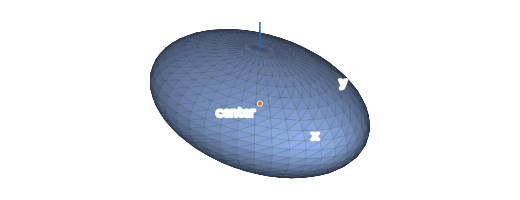
A sphere of radius 1 stretched by scale along x, y and z: scale holds the three semi-axes.
With the default {1,1,1} it is a unit sphere. The normals are computed for the stretched
shape (not just scaled), so the lighting is correct.
Torus
mesh mesh_primitive_torus(float r_max=1.0f, float r_min=0.25f, vec3 const& center={0,0,0}, vec3 const& axis_orientation={0,0,1}, int Nu=55, int Nv=15);
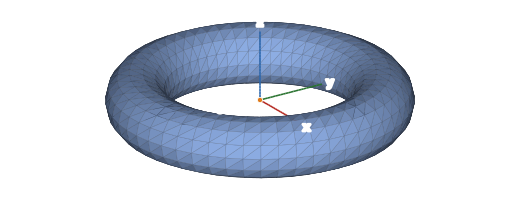
r_max is the radius of the ring (from the center to the middle of the tube), r_min the radius of the tube. The ring turns around axis_orientation (z by default). Nu samples go around the ring, Nv around the tube.
Boxes
Cube
mesh mesh_primitive_cube(vec3 const& center={0,0,0}, float edge_length=1.0f);
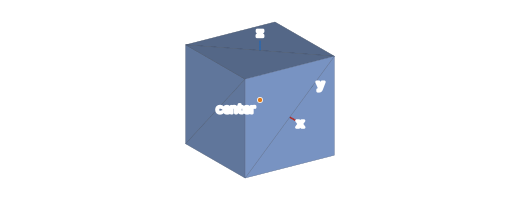
Six faces of two triangles, each face with its own four vertices (24 vertices): the normals
are not averaged across the edges, so the cube looks sharp. The faces are aligned with the
axes; turn the cube with model.rotation.
Cubic grid
mesh mesh_primitive_cubic_grid(vec3 const& p000={0,0,0}, vec3 const& p100={1,0,0}, vec3 const& p110={1,1,0}, vec3 const& p010={0,1,0},
                               vec3 const& p001={0,0,1}, vec3 const& p101={1,0,1}, vec3 const& p111={1,1,1}, vec3 const& p011={0,1,1},
                               int Nx=10, int Ny=10, int Nz=10);
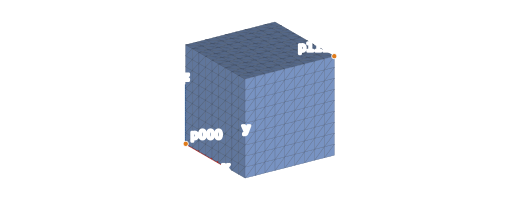
A box given by its eight corners (pXYZ is the corner at x = X, y = Y, z = Z for a unit
cube), whose faces are regular grids with Nx, Ny, Nz samples along x, y and z. Use it
instead of mesh_primitive_cube when the vertices must move (deformation, displacement): the
cube has no vertex inside its faces. Moving the corners gives any hexahedron.
Shapes along an axis
Cylinder
mesh mesh_primitive_cylinder(float radius=0.2f, vec3 const& p0={0,0,0}, vec3 const& p1={0,0,1}, int Nu=10, int Nv=20, bool is_closed=false);


The axis goes from p0 to p1 (any direction). Nu samples go along the axis, Nv
around it. By default the cylinder is open: the inside is visible through the ends, and
dark because it is lit from the back. is_closed=true adds a disc at each end. p0 and p1
must differ (Cylinder has 0 length otherwise).
Cone
mesh mesh_primitive_cone(float radius=0.5f, float height=1.0f, vec3 const& center_of_base={0,0,0}, vec3 const& axis_direction={0,0,1}, bool is_closed_base=true, int Nu=20, int Nv=10);
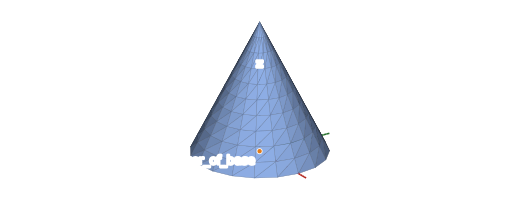
The base is a circle of radius centered at center_of_base, the apex is at height along
axis_direction. Watch the order of the samples: for the cone, Nu goes around the axis
and Nv along the height, the opposite of the cylinder. The base is closed by a disc by
default.
Arrow
mesh mesh_primitive_arrow(vec3 const& p0={0,0,0}, vec3 const& p1={1,0,0}, float cylinder_radius=0.05f, float cone_height_scale=4.0f, float cone_radius_scale=2.5f, int N=18);

A cylinder ended by a cone, from p0 to the tip at p1. The size of the cone is relative to
the radius of the cylinder: length cone_height_scale * cylinder_radius, radius
cone_radius_scale * cylinder_radius. The arrow must be longer than its cone
(Too short arrow otherwise): for a short arrow, reduce cylinder_radius.
Coordinate frame
mesh mesh_primitive_frame(frame const& f=frame(), float scale=1.0f, vec3 const& color_ux={1,0,0}, vec3 const& color_uy={0,1,0}, vec3 const& color_uz={0,0,1},
                          vec3 const& color_sphere={1,1,1}, float frame_thickness=0.025f);

Three arrows along the axes of the frame f (the world axes by default) and a sphere at its
origin. This is the global_frame of the template. The colors are per-vertex colors
(mesh.color), multiplied by material.color: keep the material white to see them (see
Change the color of a shape).
Flat shapes
Disc
mesh mesh_primitive_disc(float radius=1.0f, vec3 const& center={0,0,0}, vec3 const& normal={0,0,1}, int N=40);
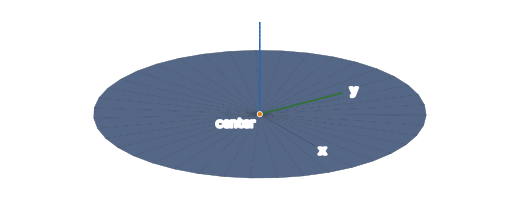
A fan of triangles from the center to N vertices on the circle (the first and the last are
at the same place), in the plane orthogonal to normal. All the normals are equal to
normal: the other side is dark.
Grid
mesh mesh_primitive_grid(vec3 const& p00={0,0,0}, vec3 const& p10={1,0,0}, vec3 const& p11={1,1,0}, vec3 const& p01={0,1,0}, int Nu=10, int Nv=10);
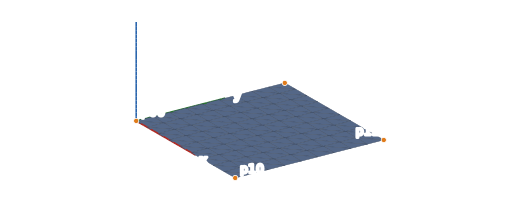
A surface sampled as a regular grid of Nu x Nv vertices between four corners (bilinear
interpolation: the corners need not be in a plane). The vertex at the sample (ku, kv) is
position[kv + Nv * ku], with uv (ku/(Nu-1), kv/(Nv-1)). This is the starting point of
terrains and deformable surfaces: change the positions, then normal_update() (see
Update a mesh at every frame).
Quadrangle
mesh mesh_primitive_quadrangle(vec3 const& p00={0,0,0}, vec3 const& p10={1,0,0}, vec3 const& p11={1,1,0}, vec3 const& p01={0,1,0});
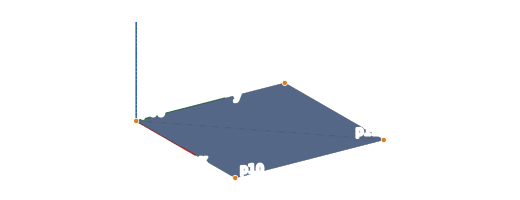
Four vertices and two triangles (p00, p10, p11) and (p00, p11, p01), with uv (0,0),
(1,0), (1,1), (0,1) at the corners: the usual support of an image (billboard, screen
quad). Give the corners counter-clockwise when seen from the side that must be lit.
Triangle
mesh mesh_primitive_triangle(vec3 const& p0={0,0,0}, vec3 const& p1={1,0,0}, vec3 const& p2={0,1,0});
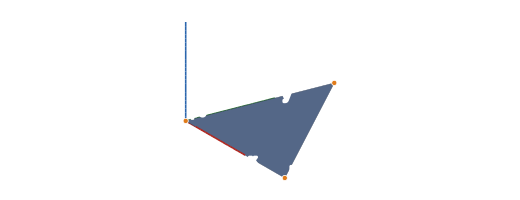
One triangle, with the normal normalize(cross(p1-p0, p2-p0)) on its three vertices.
Tetrahedron
mesh mesh_primitive_tetrahedron(vec3 const& p0={0,0,0}, vec3 const& p1={1,0,0}, vec3 const& p2={0,1,0}, vec3 const& p3={0,0,1});

Four triangles, each with its own three vertices (flat faces). The default corners give
outward normals; with other corners, keep p3 on the side where cross(p1-p0, p2-p0) points,
or the faces are inside out.
Display all of them side by side
The demo at the top of this page runs the code below: one mesh_drawable per primitive,
in a grid of five columns. From left to right and from the back row to the front row:
sphere, ellipsoid, cube, cubic grid, closed cylinder; cone, torus, disc, grid, quadrangle;
triangle, tetrahedron, arrow, frame. The sizes are chosen so that every shape fits in a
cell of side 1.6 centered on its position.
// scene.hpp - add in scene_structure
std::vector<mesh_drawable> primitives;
// scene.cpp - add at the end of initialize()
std::vector<mesh> const shapes = {
    mesh_primitive_sphere(0.5f),
    mesh_primitive_ellipsoid({0.6f, 0.4f, 0.3f}),
    mesh_primitive_cube({0,0,0}, 0.8f),
    mesh_primitive_cubic_grid().centered(),                 // unit cube moved to the origin
    mesh_primitive_cylinder(0.25f, {0,0,-0.5f}, {0,0,0.5f}, 10, 20, true),
    mesh_primitive_cone(0.4f, 1.0f, {0,0,-0.5f}),
    mesh_primitive_torus(0.45f, 0.15f),
    mesh_primitive_disc(0.5f),
    mesh_primitive_grid({-0.5f,-0.5f,0}, {0.5f,-0.5f,0}, {0.5f,0.5f,0}, {-0.5f,0.5f,0}),
    mesh_primitive_quadrangle({-0.5f,-0.5f,0}, {0.5f,-0.5f,0}, {0.5f,0.5f,0}, {-0.5f,0.5f,0}),
    mesh_primitive_triangle({-0.5f,-0.5f,0}, {0.5f,-0.5f,0}, {0,0.5f,0}),
    mesh_primitive_tetrahedron({-0.4f,-0.4f,-0.4f}, {0.5f,-0.4f,-0.4f}, {-0.4f,0.5f,-0.4f}, {-0.4f,-0.4f,0.5f}),
    mesh_primitive_arrow({-0.5f,0,0}, {0.5f,0,0}),
    mesh_primitive_frame(frame(), 0.5f)
};
for (size_t k = 0; k < shapes.size(); ++k) {
    mesh_drawable drawable;
    drawable.initialize_data_on_gpu(shapes[k]);
    drawable.model.translation = {1.6f * (k % 5) - 3.2f, 1.6f - 1.6f * (k / 5), 0.0f};
    if (k < 13)
        drawable.material.color = {0.6f, 0.75f, 1.0f};   // the frame keeps its per-vertex colors
    primitives.push_back(drawable);
}
gui.display_frame = false;   // the world frame would hide the shape at the center
// scene.cpp - replace the camera_control.look_at call in initialize()
camera_control.look_at({0.0f, -4.8f, 4.2f} /*eye*/, {0,-0.2f,0} /*target*/, {0,0,1});
Draw them instead of the template sphere and cylinder:
// scene.cpp - replace display_frame()
void scene_structure::display_frame()
{
    environment.camera_view = camera_control.camera().matrix_view();
    environment.light = camera_control.camera_model.position();

    if (gui.display_frame)
        draw(global_frame, environment);

    for (mesh_drawable const& shape : primitives)
        draw(shape, environment);

    timer.update();
}
Copying a mesh_drawable into the vector copies the ids of its GPU buffers, not the buffers:
the copies share the data uploaded once by initialize_data_on_gpu.
Common pitfalls
- The shape looks faceted: increase Nu / Nv (the cube, the quadrangle, the triangle and the tetrahedron are flat by construction).
- One side of a flat shape (disc, grid, quadrangle) is dark: its normals point to the
other side. Swap two corners (or
flip_connectivity()and negate the normals), or setmaterial.texture_settings.two_sided = true. - The cone has too few samples around its axis: Nu is around the axis for the cone but along the axis for the cylinder.
- The program stops in
mesh_primitive_cylinderormesh_primitive_arrow: a zero length axis, or an arrow shorter than its tip (see Troubleshooting). - A shape created in
display_frame()makes the program slow: build the mesh and callinitialize_data_on_gpuonce, ininitialize().
Variations
- Combine primitives into one mesh:
mesh m = mesh_primitive_cylinder(...); m.push_back(mesh_primitive_sphere(...));(one drawable, one draw call). - Change the mesh before uploading it:
translate,scale,rotate,centered,normalize_size_to_positionare methods ofmesh. - Shapes made of several parts that move relative to each other: a hierarchy.
- A shape no primitive gives: Build a mesh by hand, mesh an implicit surface or load an OBJ file.
The figures of this page are drawn from the meshes built by the CGP functions themselves
(tools/figures/primitives/ in the documentation sources).
See also
- How-to: Draw a mesh with a camera, Change the color of a shape, Display the wireframe of a mesh
- Reference:
mesh(all themesh_primitive_*functions),frame