Troubleshooting and error messages
This page lists the messages that CGP prints when something goes wrong while the program runs, with their cause and the fix. Search for the first line of your message, or for the symptom (nothing displayed, black shape, segmentation fault). Problems of installation and compilation are in Install and compile.
How to read a CGP error
When a check fails, CGP stops the program and prints a block like this one (here, a missing file):
libc++abi: terminating due to uncaught exception of type std::logic_error:
===============
ERROR detected !

Error found at this point of the code:
-------------------------------------
  - File: cgp/03_files/files.cpp
  - Line: 50
  - Function: assert_file_exist
  - Error message: Error cannot access the following file path
    "assets/missing.obj"
...
>> Please check all the error messages above on the command line to help you understand the issue.
- The first line depends on the system: the template builds define
CGP_ERROR_EXCEPTION, so the error is a C++ exception (std::logic_error). macOS printslibc++abi: terminating due to uncaught exception of type std::logic_error, Linux (GCC) printsterminate called after throwing an instance of 'std::logic_error'followed bywhat():, and Visual Studio stops in the debugger. - File, Line, Function are where the check is, inside CGP: the mistake is in your code that called this function. Run the program in a debugger (VS Code, Visual Studio, lldb or gdb) and look at the call stack to find the line of your code.
- Assert failed on the condition is the test that failed (for instance
L>1e-6f), and Error message explains it. - Read also the lines printed just before the block: some functions (shader compilation, mesh check) print the details there.
Warnings do not stop the program. They start with [Warning cgp] and the same warning is
printed at most 4 times (set cgp_warning::max_warning to change it; 0 removes them).
In the web build (Emscripten), the assertions are disabled (CGP_NO_DEBUG): the same mistake
gives no CGP message, but a wrong drawing or a crash reported in the console of the browser.
Debug in the desktop build first.
At start-up
The program failed to locate the ressource directory
[Parameters ERROR] The program failed to locate the ressource directory designed as: shaders/
Please check if this directory exists.
Cause: the program looks for the folder shaders/ from the folder it is run from (and up
to four parent folders), and does not find it. Fix: run the program from the root of the
project, or from a build folder inside it; in an IDE, set the working directory of the run
configuration. See Run the program from the right folder.
Error: No monitor found (glfwGetPrimaryMonitor)
Error: No monitor found (glfwGetPrimaryMonitor).
The program needs access to a display: run it from a graphical session (not over SSH without display forwarding).
Cause: the program has no access to a screen (remote session over SSH, process started outside the desktop session). Fix: run it from the desktop session.
Error: Failed to Initialize GLFW / Failed to create GLFW Window
Error: Failed to Initialize GLFW.
If you are using WSL or Linux without graphical server, you need to start a X-server
Failed to create GLFW Window
	 Possible error cause: Incompatible OpenGL version (requesting OpenGL 3.3)
Cause: no graphical server (WSL, Linux console), or a graphics driver without OpenGL 3.3 (virtual machine, remote desktop, outdated driver). Fix: start an X server under WSL, update the graphics driver, or use the computer directly instead of a remote session.
Files
Error cannot access the following file path
  - Error message: Error cannot access the following file path
    "assets/texture.png"

    => If the file exists, you may need to adapt the path from which you run the program
Cause: a file loaded by CGP (image, OBJ, shader) does not exist at this path. Most of the
time the file exists, but the path is relative to the folder the program is run from.
Fix: always build the paths with project::path, which points to the root of the
project wherever the program is run from:
image_structure image = image_load_file(project::path + "assets/texture.png");
mesh shape = mesh_load_file_obj(project::path + "assets/model.obj");
Check also the spelling and the case of the name (Linux and the web build are case
sensitive), and, for the web build, that the file is in assets/ when you compile: the folder
is packed into the .data file at build time.
Warning: Cannot read the vertex shader at location
Warning: Cannot read the fragment shader at location shaders/my_shader/my_shader.frag.glsl
If this file exists, you may need to adapt the directory from where your program is executed
Same cause and fix as above, for a shader loaded with opengl_shader_structure::load; the
program then stops with the error block of the missing file.
Shaders
Failed to compile the Fragment Shader (or the Vertex Shader)
[Info from shader compilation]
ERROR: 0:77: ... (message of the graphics driver)
Compilation Failed
===> Failed to compile the Fragment Shader [shaders/my_shader/my_shader.frag.glsl]
The error message from the compiler should be listed above. The program will stop.
Cause: an error in the GLSL code. The message of the compiler, printed after
[Info from shader compilation], depends on the graphics driver; 0:77 means line 77 of the
file (ERROR: 0:77: ...). The line given is often the one after the mistake (a missing ;).
Fix: correct the shader at this line; no need to recompile the C++ code when you only
change a shader, just run the program again.
The web build compiles the shaders as GLSL ES 3.00 (CGP replaces the first line
#version 330 core by #version 300 es), which is stricter: no implicit conversion from
int to float (write 1.0, not 1, for a float). A shader that compiles on the desktop can fail in the browser.
Failed to link the shaders into a fragment program
Failed to link the shaders into a fragment program with the following shaders [...vert.glsl,...frag.glsl]
Cause: the two shaders compile but do not fit together, typically an in variable of the
fragment shader without a matching out of the vertex shader (different name or type).
Fix: read the lines after [Info from shader Link] and make the declarations match.
Try to send uniform variable [...] to a shader that doesn't use it
[Warning cgp] Try to send uniform variable [my_time] to a shader that doesn't use it.
 Either change the uniform variable to expected=false, or correct the associated shader (id=3).
Cause: the C++ code sends a uniform that the shader does not have, either because it is not
declared, its name differs, or it is declared but not used: the GLSL compiler removes
unused uniforms. Fix: check the name and use the uniform in the shader, or pass
expected = false when the uniform is optional (see
Send a custom uniform to a shader).
Drawing
Try to draw mesh_drawable without shader
  - Assert failed on the condition: drawable.shader.id != 0
  - Error message: Try to draw mesh_drawable without shader
Cause: the drawable has no shader program. Typically a custom shader was passed to
initialize_data_on_gpu before it was loaded (its id was still 0), or the shader was
replaced by an empty opengl_shader_structure. The same message exists for curve_drawable
(Try to draw curve_drawable without shader). Fix: load the shader first, then
initialize the drawable with it, or assign it after loading: shape.shader = my_shader;.
Try to draw mesh_drawable with incorrect shader means that the id is not a valid program
anymore: the shader was deleted (clear()) while drawables still use it.
Try to draw mesh_drawable without texture is the same problem for the texture (a texture
passed to initialize_data_on_gpu before it was loaded).
Calling initialize_data_on_gpu() on a mesh_drawable with non zero VBOs
[Warning cgp] Calling initialize_data_on_gpu() on a mesh_drawable with non zero VBOs
  > You are calling initialize_data_on_gpu on an non-empty mesh_drawable
[Warning cgp] Calling [vbo].initialize_data_on_gpu() on a non empy VBO
Cause: initialize_data_on_gpu is called a second time on the same drawable, most often
in display_frame(), so at every frame. Each call allocates new GPU buffers and loses the
old ones: the program slows down and its memory grows. Fix: call it once in
initialize(). To change the shape later, update the buffers
(shape.vbo_position.update(...), see Update a mesh at every frame),
or call shape.clear() before a new initialization. If the drawable is a copy of another
one, assign shape = mesh_drawable(); instead: clear() would delete the buffers of the
other one too (see Copies, sharing and freeing).
Warning try to generate mesh_drawable with 0 vertex
The mesh given to initialize_data_on_gpu is empty: a file that loaded nothing, a mesh
filled after the upload, or a marching cubes without any surface in the domain. The drawable
stays empty and draws nothing.
Warning [mesh_check] ... Cannot send this mesh data to GPU
Warning [mesh_check]: Mesh has incoherent size of per-vertex color
  - Assert failed on the condition: mesh_check(data)
  - Error message: Cannot send this mesh data to GPU in initializing mesh_drawable
Cause: a mesh built by hand whose arrays do not match: normal, color or uv with a
size different from position, or a triangle using an index beyond the number of vertices
(Triangle ... has index triplet ... exceeding the size of the position). Fix: fill all
the arrays with the same size, or call fill_empty_field() after setting position and
connectivity (see Build a mesh by hand).
OpenGL ERROR detected
  - Error message: OpenGL ERROR detected
	File ...
	Function ...
	OpenGL Error: GL_INVALID_OPERATION
Cause: an OpenGL call failed; CGP checks the error state after its own calls, so the failing call may be one of yours just before (wrong buffer, uniform of the wrong type, texture parameter...). Fix: look at the call stack, and at your OpenGL calls made since the previous CGP call.
Indices, vectors and shapes
Out-of-bounds access on container
  - Function: check_index_bounds
  - Error message:
	> Out-of-bounds access on container numarray<vec3>
	>    - index = 3 is outside the valid range [0, 2]  (axis size = 3)
	> The index reached or exceeded the size of the container.
	  Help: indices start at 0; a typical loop runs from index=0 while index<size().
Cause: an index outside a numarray, a vec3 (v[3]), a matrix or a grid
(grid_2D reports the axis: x = 4 is outside the valid range). With a negative index, the
message says A container cannot be accessed with a negative index; with an empty container,
The container is empty. Fix: find the access in the call stack; check the bounds of the
loop (< and not <=), and that the container was resized before.
Accesses through std::vector are not checked by CGP: an index out of bounds there is a
segmentation fault or a silent bug.
Tried to normalize a vector with very small norm
  - Function: normalize
  - Error message: Tried to normalize a vector vec3[0.000000 0.000000 0.000000] with very small norm (0.000000)
Cause: normalize of a null vector, often the difference of two equal points, a cross
product of parallel vectors, or a velocity at rest. Fix: test the norm before normalizing.
Vector ... must have a unit norm
  - Function: from_vector_transform
  - Assert failed on the condition: is_equal(norm(e_source), 1.0f)
  - Error message: Vector e_source=0.000000 0.000000 2.000000 must have a unit norm (2.000000)
rotation_transform::from_vector_transform expects unit vectors: normalize them first.
Cylinder has 0 length, Too short arrow
  - Function: mesh_primitive_cylinder
  - Assert failed on the condition: L>1e-6f
  - Error message: Cylinder has 0 length
The two points of mesh_primitive_cylinder are equal. For mesh_primitive_arrow,
Too short arrow - length of cone > length of array: the arrow is shorter than its tip,
reduce its radius. The other primitives check their radius and their number of samples the
same way (see Create basic shapes).
Hierarchies
Error: cannot find element [...] in hierarchy_mesh_drawable
Error: cannot find element [arm] in hierarchy_mesh_drawable
Possibles element names are: [body]
Cause: hierarchy["arm"] with a name that was never added (spelling, case, or the
element is added later in initialize()). Fix: use one of the names listed.
Error: Hierarchy not valid ... used before being defined
Error: Hierarchy not valid
Element (arm,1) has parent name (missing_parent) used before being defined

Display hierarchy for debugging:
Element [0] body has parent: global_frame
Element [1] arm has parent: missing_parent
Cause: an element is added with a parent that is not in the hierarchy yet: the parent
name is misspelled, or the parent is added after its child. Fix: add the elements from the
root to the leaves; only the first element has a parent outside the hierarchy (by default
global_frame). See Hierarchies of shapes.
Camera
Assert failed on the condition: inputs != nullptr
  - Function: is_ready
  - Assert failed on the condition: inputs != nullptr
Cause: the camera controller was used before camera_control.initialize(inputs, window);
this happens when the controller of the template is replaced by another type and the
initialization line is removed. Fix: keep camera_control.initialize(inputs, window); at
the beginning of initialize() (see Explore a scene with a first-person camera).
Symptoms without a message
These bugs print nothing: the program runs, but the image is wrong. The figures below come from the demo of this section: the left sphere is correct, the right one shows the symptom. Choose a symptom in its GUI to compare them from every side.
When the cause is not obvious, simplify until the image is right again, one step at a time:
set material.color to a bright color and material.texture_settings.active = false
(color and texture are out of the question), draw the shape with the default shader (your
shader is out of the question), then display its wireframe (see
Display the wireframe of a mesh): the geometry is out
of the question when it looks right.
Nothing is displayed
The window shows only the background color (white by default):
draw(shape, environment)is not called indisplay_frame(), orinitialize_data_on_gpuwas not called: drawing an emptymesh_drawablesilently does nothing.- The shape is outside the view: behind the camera, farther than the far plane (1000), or
much larger than the scene so that the camera is inside it (you see its inner side, dark,
or nothing). Print its position, and look at it with
camera_control.look_at. model.scalingis 0, ormaterial.alphais 0 with blending enabled.- The scene is drawn with your own shader that writes no color, or puts the vertices outside
the screen (check
gl_Positionand the order of the matrices).
A shape is black or very dark
The default shader multiplies the vertex color, material.color and the texture, then
applies the lighting (see Change the color of a shape):
-
One color factor is zero:
material.colorset to{0,0,0}, vertex colors left at zero, or a texture that did not load as expected. -
The normals are wrong: a mesh built by hand without normals (all null), or normals pointing inside the shape. The diffuse and specular terms vanish and only the ambient term remains (30% of the color): the shape is dark and flat, with no highlight.
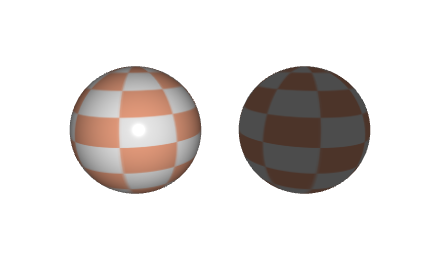
Left: correct normals. Right: the same sphere with its normals reversed (pointing inside): only the ambient term of the lighting remains, the shape is dark and has no highlight. Null normals give the same image. Tap to enlarge. Fix: compute the normals with
normal_update()after fillingpositionandconnectivity; if they point inside, reverse the order of the triangle indices (flip_connectivity()) and callnormal_update()again. -
You see the back of a surface: the inside of an open cylinder, the lower side of a grid or a disc. Its normals point away from the light: only the ambient term remains. Set
material.texture_settings.two_sided = true, or orient the surface toward the camera. -
The light is not where you think: the template moves
environment.lightto the camera at every frame; without this line the light stays at{1,1,1}and may be inside or behind your shape.
The texture is uniform, or looks wrong
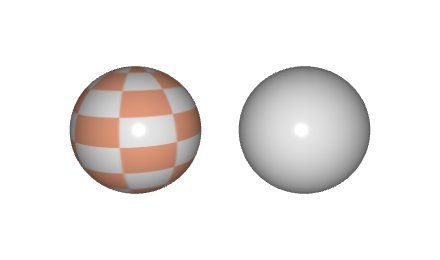
- One uniform color: the
uvcoordinates are missing or all equal (a mesh built by hand that fillspositionbut notuv): every pixel reads the same texel. Filluv, one coordinate in [0,1]^2 per vertex (see Build a mesh by hand). - Upside down: CGP flips the image vertically by default
(
material.texture_settings.inverse_v, true). Set it to false for an image whose first row is the bottom one. - Stretched or tiled where you do not expect it: the uv go beyond [0,1] and the wrap
mode decides what happens there (
GL_CLAMP_TO_EDGEby default,GL_REPEATto tile); see Apply a texture image. - White, or the plain color of the material: the drawable still uses the default 1 x 1
white texture: the texture was loaded into a variable but never assigned to the drawable
(
shape.texture = ...), ormaterial.texture_settings.activeis false.
The lighting does not follow a deformation
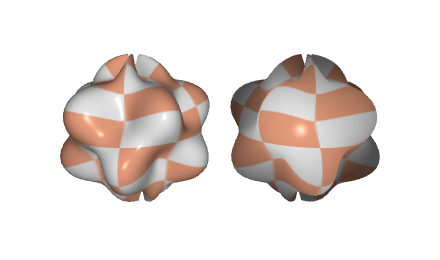
The vertices were moved (on the CPU, then vbo_position.update) but the normals were not
recomputed: the shape changes, its shading does not. Call normal_update() on the mesh after
moving the vertices, and update vbo_normal too (see
Update a mesh at every frame). A deformation
computed in a vertex shader has the same problem: the shader must also compute the new normal.
A transparent shape hides what is behind it
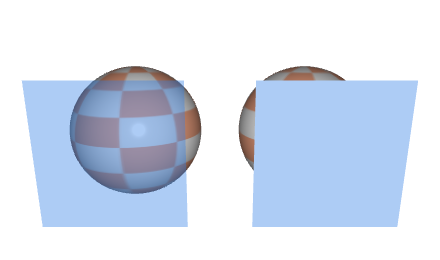
The transparent shape was drawn before the shapes behind it, with depth writing on: the
depth buffer then rejects everything behind it, which is never drawn. Draw the opaque shapes
first, then the transparent ones from the farthest to the nearest, with glDepthMask(false)
during the transparent ones (see Draw transparent objects).
A shape with material.alpha below 1 but no visible transparency: blending is not enabled
(glEnable(GL_BLEND)), or its texture has no alpha channel (JPEG).
Changing one shape changes another
Two drawables share their GPU data when one is a copy of the other (b = a, or
hierarchy.add(a, ...), which stores a copy): updating the buffers of one (vbo_position.update)
deforms both, and clear() on one breaks the other. Their model and material stay
separate. See Copies, sharing and freeing.
Segmentation fault, or the program closes without a message
- An index out of bounds in a
std::vector, a C array, or in a CGP container compiled withCGP_NO_DEBUG(always the case in the web build): no check, so a crash or a silent bug. - OpenGL used before the window exists:
initialize_data_on_gpu,loadof a shader or a texture called in a constructor or in the initializer of a global variable. The OpenGL functions are loaded when the window is created, just beforeinitialize(): do all GPU work ininitialize()or later. - A reference or pointer to an element of a container that grew: after
push_back, the references to the elements of astd::vectoror anumarraymay be invalid.
To find the line, run the program in a debugger and read the call stack at the crash
(lldb ./project then run and bt in a terminal, or the debugger of the IDE).
The program is slow
Look for initialize_data_on_gpu, mesh_primitive_*, image_load_file or load called in
display_frame(): build and upload once, in initialize(). The frame rate is limited to 60
by default (GUI, Window > FPS limiting), and a debug build is several times slower than a
release build.
A key does nothing, or the wrong key reacts
GLFW key codes are positions on a US keyboard: on an AZERTY keyboard GLFW_KEY_Z is the key
labeled W. See Mouse, keyboard and camera controllers.
See also
- Get started: Install and compile, Your first scene
- How-to: Draw a mesh with a camera (common pitfalls)