Build a mesh by hand
Goal: create a textured square from its 4 vertices and 2 triangles, then generalize to a surface sampled on an N x N grid.
Starting point: the default project template (
src/scene.hpp,src/scene.cpp, see Your first scene). It already declares the shapessphereandcylinder, atimer, and the memberscamera_control,environmentandgui: reuse them, do not declare them again. The first comment of each code block says in which file and where its lines go: add means insert them, replace means replace the whole function by the one shown.
What a mesh contains
A mesh is a set of arrays (numarray) stored on the CPU:
| Field | Type | One entry per | Role |
|---|---|---|---|
position |
numarray<vec3> |
vertex | 3D coordinates |
normal |
numarray<vec3> |
vertex | normal used for lighting |
color |
numarray<vec3> |
vertex | RGB color, multiplied by material.color |
uv |
numarray<vec2> |
vertex | texture coordinates |
connectivity |
numarray<uint3> |
triangle | the 3 vertex indices of the triangle |
All per-vertex arrays must have the same size. Indices start at 0.
1. Fill positions, uv and triangles
// scene.cpp - add at the end of initialize()
mesh quad;
quad.position     = { {-1,-1,0}, {1,-1,0}, {1,1,0}, {-1,1,0} };
quad.uv           = { {0,0}, {1,0}, {1,1}, {0,1} };
quad.connectivity = { {0,1,2}, {0,2,3} };   // two triangles, counter-clockwise
 3 ---- 2      triangle {0,1,2}
 |    / |      triangle {0,2,3}
 |  /   |
 0 ---- 1      (seen from +z)
2. Complete the missing fields
// scene.cpp - add at the end of initialize(), after the lines of step 1
quad.fill_empty_field();
fill_empty_field fills every per-vertex array that is shorter than position: normals
are computed from the triangles, colors are set to white and uv to {0,0}. Without it,
initialize_data_on_gpu stops with an error because the buffers do not have the same
size.
3. Upload and draw
// scene.hpp - add in scene_structure
mesh_drawable shape;
// scene.cpp - add at the end of initialize(), after the lines of step 2
shape.initialize_data_on_gpu(quad);
shape.model.translation = {0, 0, -0.5f};   // under the sphere and the cylinder of the template
shape.texture.load_and_initialize_texture_2d_on_gpu(project::path + "assets/checkerboard.png");
// scene.cpp - add in display_frame(), before timer.update()
draw(shape, environment);
The image assets/checkerboard.png is the one of
Apply a texture image, which explains where to download it and
where to put it; any PNG or JPEG image works.
Generalization: a surface on an N x N grid
For a surface p(u,v), sample (u,v) on a grid, store vertex (ku,kv) at index
kv + N*ku, and create two triangles per cell:
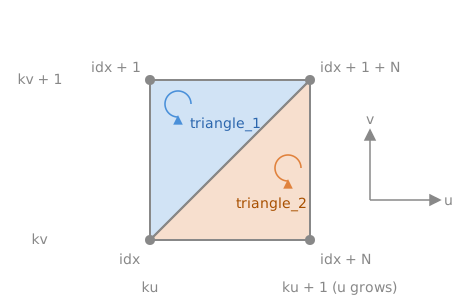
To try it, add the function to src/scene.cpp, before initialize(), and replace quad by
create_surface(50) in step 3.
// scene.cpp - add before initialize()
mesh create_surface(int N)
{
    mesh m;
    m.position.resize(N*N);
    m.uv.resize(N*N);
    for (int ku = 0; ku < N; ++ku) {
        for (int kv = 0; kv < N; ++kv) {
            float const u = ku / (N - 1.0f);
            float const v = kv / (N - 1.0f);
            float const x = 2*u - 1, y = 2*v - 1;
            m.position[kv + N*ku] = { x, y, 0.3f * std::exp(-4*(x*x + y*y)) }; // a bump
            m.uv[kv + N*ku] = { u, v };
        }
    }
    for (int ku = 0; ku < N-1; ++ku) {
        for (int kv = 0; kv < N-1; ++kv) {
            unsigned int const idx = kv + N*ku;
            uint3 const triangle_1 = { idx, idx + 1 + N, idx + 1 };
            uint3 const triangle_2 = { idx, idx + N, idx + 1 + N };
            m.connectivity.push_back(triangle_1);
            m.connectivity.push_back(triangle_2);
        }
    }
    m.fill_empty_field();
    return m;
}
Common pitfalls
- The surface is dark or black from the camera side: the triangles are oriented the
wrong way, so the computed normals point away from the camera. List the vertices
counter-clockwise as seen from the visible side, or call
flip_connectivity()on the mesh. - Error at
initialize_data_on_gpu: an index inconnectivityis larger than the number of vertices, or a per-vertex array has the wrong size.mesh_check(m)prints what is wrong. - Faceted or wrong lighting after moving vertices: the normals are not updated
automatically; call
normal_update()(see Update a mesh at every frame).
Variations
- Per-vertex colors: fill
color(same size asposition) beforefill_empty_field. - Merge two meshes into one:
m.push_back(other)concatenates the vertices and shifts the indices of the added triangles. - Ready-made grid:
mesh_primitive_grid(p00, p10, p11, p01, Nu, Nv)builds the flat grid with positions, normals, uv and triangles; then move its vertices.
Source: course labs of CSC_43043 (public version, without the solutions): 07_texture/a_uv_texture (scene.cpp, textured quadrangle) and
06_modeling (terrain.cpp, grid of N x N vertices).
See also
- How-to: Apply a texture image, Draw a mesh with a camera, Create basic shapes (the primitives), Change the color of a shape (per-vertex colors)
- Understand: From CPU to GPU
- Reference:
mesh,numarray,vec3