Cast shadows with a shadow map
Goal: make a sphere and a cylinder cast shadows on the ground and on each other, from a directional light.
Starting point: the default project template (
src/scene.hpp,src/scene.cpp, see Your first scene). It already declares the shapessphereandcylinder, atimer, and the memberscamera_control,environmentandgui: reuse them, do not declare them again. The first comment of each code block says in which file and where its lines go: add means insert them, replace means replace the whole function by the one shown.
In the demo, the slider Light angle turns the light around the vertical z axis (step 4), so that you can watch the shadows move. The checkbox Frame displays the axes of the world.
How it works
Shadow mapping takes two passes per frame:
- Depth pass: the scene is drawn from the point of view of the light into a depth texture (the shadow map): each pixel stores the distance to the closest surface seen by the light.
- Normal pass: each shape is drawn from the camera with a shader that projects the pixel into the view of the light. If the pixel is farther from the light than the value stored in the shadow map, something is in between: the pixel is in shadow and loses its diffuse and specular light.
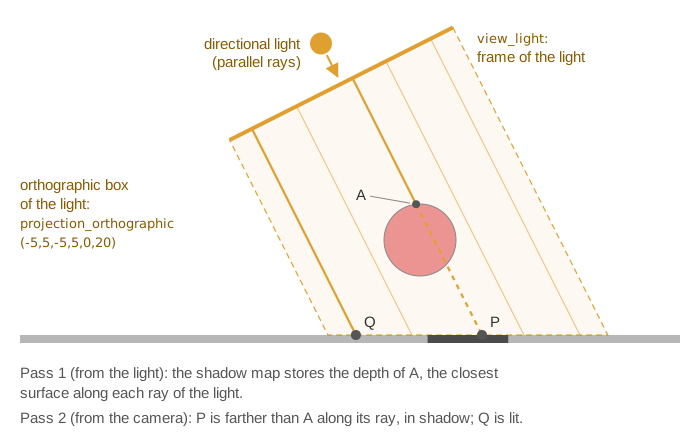
opengl_fbo_structure in depth mode provides the shadow map; the light view and
projection are two matrices sent as uniforms. The projection of the light is orthographic:
its rays are parallel, as for the sun, so the shadows have the same size wherever the
objects are. The diffuse and specular shading still use a light position, the origin of
the light frame, as in the default shader.
1. Write the shaders
The depth pass only needs the position seen from the light:
// shaders/depth_map/depth_map.vert.glsl
#version 330 core
layout (location = 0) in vec3 vertex_position;
uniform mat4 model;
uniform mat4 view_light;
uniform mat4 projection_light;

void main()
{
    gl_Position = projection_light * view_light * model * vec4(vertex_position, 1.0);
}

// shaders/depth_map/depth_map.frag.glsl
#version 330 core
layout(location = 0) out float fragment_depth;
void main() { fragment_depth = gl_FragCoord.z; }
The shader of the shapes is a copy of the default one (shaders/mesh/mesh.vert.glsl and
shaders/mesh/mesh.frag.glsl, copied to shaders/mesh_with_shadow/) with these changes:
// mesh_with_shadow.vert.glsl: also output the position in the view of the light
uniform mat4 view_light;
uniform mat4 projection_light;
// in the fragment_data struct:   vec4 position_lightspace;
// in main():
fragment.position_lightspace = projection_light * view_light * position;

// mesh_with_shadow.frag.glsl
uniform sampler2D depth_map_texture;   // the shadow map
uniform mat4 view_light;               // replaces "uniform vec3 light"

float shadow_amount(vec4 p_light, vec3 L, vec3 N)
{
    vec3 p = p_light.xyz / p_light.w * 0.5 + 0.5;          // to [0,1]: uv and depth
    if (p.z > 1.0) return 0.0;                             // beyond the light frustum
    float bias = max(0.002 * (1.0 - dot(N, L)), 0.005);    // avoids "shadow acne"
    vec2 texel = 1.0 / vec2(textureSize(depth_map_texture, 0));
    float shadow = 0.0;
    for (int x = -2; x <= 2; ++x)                          // 5x5 samples: soft border
        for (int y = -2; y <= 2; ++y)
            shadow += (p.z - bias > texture(depth_map_texture, p.xy + 0.5 * vec2(x, y) * texel).r) ? 1.0 : 0.0;
    return shadow / 25.0;
}

void main()
{
    vec3 light = vec3(inverse(view_light) * vec4(0.0, 0.0, 0.0, 1.0));   // light position
    // ... default code computing N, L, diffuse_component, specular_component ...
    float shadow = shadow_amount(fragment.position_lightspace, L, N);
    vec3 color_shading = (Ka + Kd * (1.0 - shadow) * diffuse_component) * color_object
                       + Ks * (1.0 - shadow) * specular_component * vec3(1.0, 1.0, 1.0);
    // ... rest unchanged
}
2. Create the shadow map and set the shaders (once)
// scene.hpp - add in scene_structure
opengl_fbo_structure shadow_fbo;
opengl_shader_structure shader_depth_map;
mesh_drawable ground;
// scene.cpp - add at the end of initialize()
shadow_fbo.mode = opengl_fbo_mode::depth;        // store depth only
shadow_fbo.width = 2048;                         // resolution of the shadow map
shadow_fbo.height = 2048;                        //  (800 x 800 if not set)
shadow_fbo.initialize();

shader_depth_map.load(
    project::path + "shaders/depth_map/depth_map.vert.glsl",
    project::path + "shaders/depth_map/depth_map.frag.glsl");
opengl_shader_structure shader_with_shadow;
shader_with_shadow.load(
    project::path + "shaders/mesh_with_shadow/mesh_with_shadow.vert.glsl",
    project::path + "shaders/mesh_with_shadow/mesh_with_shadow.frag.glsl");

ground.initialize_data_on_gpu(mesh_primitive_quadrangle({-5,-5,-0.5f}, {5,-5,-0.5f}, {5,5,-0.5f}, {-5,5,-0.5f}));
for (mesh_drawable* shape : { &ground, &sphere, &cylinder }) {     // shapes receiving shadows
    shape->shader = shader_with_shadow;
    shape->supplementary_texture["depth_map_texture"] = shadow_fbo.texture;
}

// Light: placed at (2,1,4), looking at the origin, orthographic box of 10 x 10 x 20
vec3 const light_position = { 2.0f, 1.0f, 4.0f };
mat4 const view_light = inverse(camera_frame_look_at(light_position, {0,0,0}, {0,0,1})).matrix();
environment.uniform_generic.uniform_mat4["view_light"] = view_light;
environment.uniform_generic.uniform_mat4["projection_light"] = projection_orthographic(-5, 5, -5, 5, 0, 20);
3. Draw the two passes (every frame)
The depth pass draws each shape with the depth shader, through a small helper:
// scene.cpp - add before initialize()
// Draw a copy of the shape with the depth shader (the shape keeps its own shader)
void draw_in_depth_map(mesh_drawable drawable, opengl_shader_structure const& shader_depth_map, environment_structure const& environment)
{
    drawable.shader = shader_depth_map;
    draw(drawable, environment, 1, false);   // 1 instance, false: no warning for unused uniforms
}
The draw calls of the template move into the two passes. The whole function:
// scene.cpp - replace display_frame()
void scene_structure::display_frame()
{
    environment.camera_view = camera_control.camera().matrix_view();

    // Pass 1: depth seen from the light, for every shape that casts a shadow
    shadow_fbo.bind();
    glClear(GL_DEPTH_BUFFER_BIT);
    draw_in_depth_map(ground, shader_depth_map, environment);
    draw_in_depth_map(sphere, shader_depth_map, environment);
    draw_in_depth_map(cylinder, shader_depth_map, environment);
    shadow_fbo.unbind();

    // Pass 2: normal drawing from the camera
    draw(ground, environment);
    draw(sphere, environment);
    draw(cylinder, environment);

    if (gui.display_frame)     // default shader: false, no warning for view_light
        draw(global_frame, environment, 1, false);

    timer.update();
}
bind() sets the viewport to the size of the shadow map and unbind() restores the one
of the window.
4. Turn the light with a slider (optional)
To move the light, recompute its view matrix and update the uniform; here when the slider changes, by rotating the position (2,1,4) around the z axis:
// scene.hpp - add in gui_parameters
float light_angle = 0.0f;
// scene.cpp - add in display_gui()
if (ImGui::SliderFloat("Light angle", &gui.light_angle, -Pi, Pi)) {
    vec3 const light_position = rotation_transform::from_axis_angle({0,0,1}, gui.light_angle) * vec3{ 2.0f, 1.0f, 4.0f };
    environment.uniform_generic.uniform_mat4["view_light"] =
        inverse(camera_frame_look_at(light_position, {0,0,0}, {0,0,1})).matrix();
}
Common pitfalls
- Blocky, jagged shadow borders: the shadow map is too coarse. Increase
widthandheight, or tighten the orthographic box around the scene to give more texels to each object. - Stripes of shadow everywhere ("shadow acne"): a surface shadows itself because of the limited depth precision. Increase the bias in the shader.
- Shadows are cut or missing at the border of the scene: the objects are outside the
orthographic box of the light. Enlarge
projection_orthographic(left, right, bottom, top, near, far). - A shape casts no shadow: it is not drawn in pass 1. A shape receives no shadow:
it does not use the shadow shader, or the shadow map is missing from its
supplementary_texture. - Warning "Try to send uniform variable [view_light] to a shader that doesn't use it":
the light matrices are in
environment.uniform_generic, sent to every shape. Draw the shapes using the default shader withdraw(global_frame, environment, 1, false);(third argument: number of instances, fourth: expected_uniforms, false silences the warning), or silence the warnings withcgp_warning::max_warning = 0;.
Variations
- Light moving on its own: recompute the view matrix of the light as in step 4 at every frame, before
pass 1, from an angle that grows with
timer.t. - Spot light: replace the orthographic matrix by a perspective one,
camera_projection_perspective light_projection; ... light_projection.matrix(). - Debug view: display
shadow_fbo.textureon a quad (see Render the scene to a texture and filter it) to see what the light sees.
Source: EPITA Ani3D repository epita_ani3d_lab_code-2027, example
06_multipass/04_shadow_mapping (scene.cpp, shadow_mapping.cpp, depth_map and
mesh_with_shadow shaders), after the tutorial on learnopengl.com. Adaptations: the helper
struct of the example is written inline, the light view is built with
camera_frame_look_at instead of copying the initial camera.
See also
- How-to: Render the scene to a texture and filter it, Send a custom uniform to a shader
- Understand: Camera and matrices, Shaders and uniforms
- Reference:
opengl_texture_image_structure,frame,mat4