Rotations, frames and affine transforms
Placing a shape, orienting a camera or animating a joint all come down to the same few
operations: rotate, scale, translate, and chain them. A mat4 can do all of it, but a 4x4
matrix is hard to read, hard to animate and easy to break (12 numbers that must stay
consistent: change one coefficient of the rotation part and it is no longer a rotation). CGP therefore stores transforms as small structs with named fields, and only
builds the mat4 at the last moment, when it is sent to the shader.
| Type | Stores | Represents | Inverse |
|---|---|---|---|
rotation_transform |
a unit quaternion |
a 3D rotation | yes |
frame |
orientation, position |
an origin and three orthonormal axes | yes |
affine_rt |
rotation, translation |
rigid motion | yes |
affine_rts |
rotation, translation, scaling (float) |
rigid motion + uniform scaling | yes |
affine |
rotation, translation, scaling, scaling_xyz |
+ scaling along each local axis | no |
The last one is the type of mesh_drawable::model; the second to last is the type of the
local transforms of a hierarchy (see Hierarchies of shapes).
1. Rotations: rotation_transform
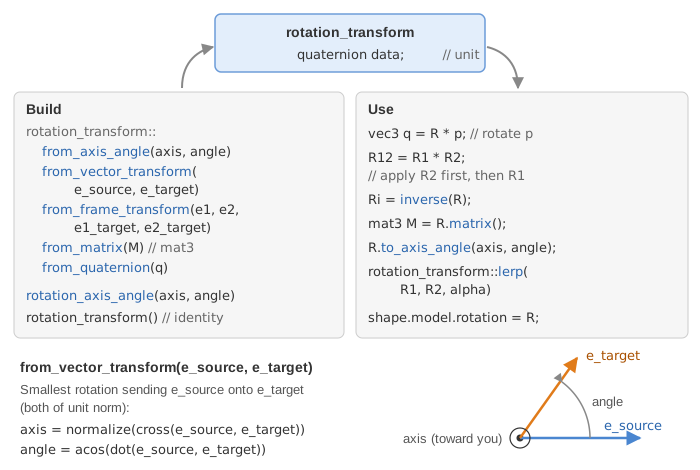
A rotation_transform hides how the rotation is stored (a unit quaternion in its field
data) and behaves like a rotation matrix: you multiply it with vectors, matrices and
other rotations. You never fill it by hand; you build it from the description you have:
// axis + angle in radians (the axis is normalized for you)
rotation_transform R1 = rotation_transform::from_axis_angle({0,0,1}, Pi/2);

// the rotation that sends one unit vector onto another
rotation_transform R2 = rotation_transform::from_vector_transform({0,0,1}, normalize(direction));

// the rotation that sends a pair of orthonormal vectors onto another pair
rotation_transform R3 = rotation_transform::from_frame_transform({1,0,0},{0,1,0}, u, v);

// from a 3x3 rotation matrix, or from a unit quaternion
rotation_transform R4 = rotation_transform::from_matrix(M);
Then:
| Operation | Code | Result |
|---|---|---|
| rotate a vector | R * v |
vec3 |
| compose | R1 * R2 |
rotation_transform, applies R2 first |
| invert | inverse(R) |
the opposite rotation |
| matrix | R.matrix() |
mat3 |
| image of the axes | R.matrix_col_x(), matrix_col_y(), matrix_col_z() |
vec3 |
| interpolate | rotation_transform::lerp(R1, R2, alpha) |
rotation between R1 (alpha=0) and R2 (alpha=1) |
| back to axis/angle | R.to_axis_angle(axis, angle) |
fills its two arguments (a vec3 and a float) |
Two details save debugging time:
from_vector_transformandfrom_frame_transformrequire unit vectors (andfrom_frame_transformorthogonal ones): they assert it with a tolerance of 1e-5, so always passnormalize(...)of a direction.- To accumulate a small rotation dR at every frame, the side matters.
R = R * dRrotates the object around one of its own axes (dR acts in local coordinates, before R);R = dR * Rrotates it around a world axis.
Quaternions
A quaternion is a vec4 whose scalar part is stored last: . The
rotation of angle around the unit axis is
. The product of two quaternions composes the
rotations, and rotating a vector computes .
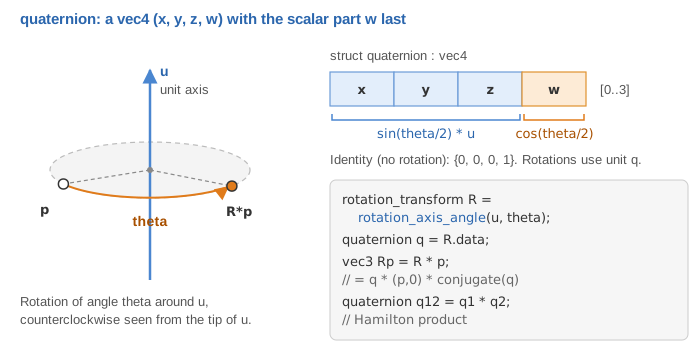
You rarely need them directly: R.get_quaternion() reads the one inside a rotation and
rotation_transform::from_quaternion(q) builds a rotation from one (it asserts that
has a unit norm). Their main advantages are compactness (4 floats instead of 9) and
interpolation: rotation_transform::lerp interpolates the two quaternions, flips the sign
of the second one if needed so that it takes the shortest path, and normalizes the result.
2. Frames
A frame is a local coordinate system: an origin position and three orthonormal axes,
the columns of the rotation orientation, returned by ux(), uy() and uz(). The point
of local coordinates is .
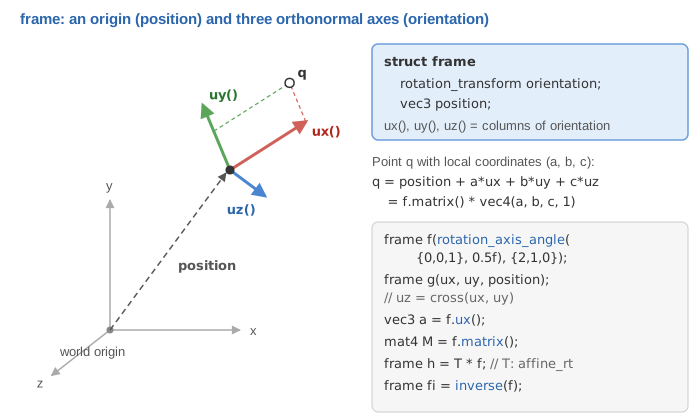
frame f(rotation_transform::from_axis_angle({0,0,1}, Pi/4), {1,0,0});
vec3 const front = f.ux();      // first axis, in world coordinates
mat4 const M = f.matrix();      // local -> world, the same matrix as affine_rt(orientation, position)
frame const g = inverse(f);     // world -> local
A frame and an affine_rt hold the same data: frame(T) converts one into the other, and
T * f moves a frame by a rigid transform. The difference is the meaning: a frame is a
place (the camera, a joint), a transform moves things. The camera of CGP is a frame:
matrix_view() returns inverse(to_frame()).matrix() (see
Camera and matrices). The constructor frame(ux, uy, position)
builds the orientation from two axes; like from_frame_transform, it requires them to be
unit and orthogonal.
3. The affine family: what T * p computes
The three affine types add a translation (and scalings) to a rotation. Applied to a point, they all compute scale, then rotate, then translate:
| Type | T * p |
|---|---|
affine_rt |
|
affine_rts |
|
affine |
, with |
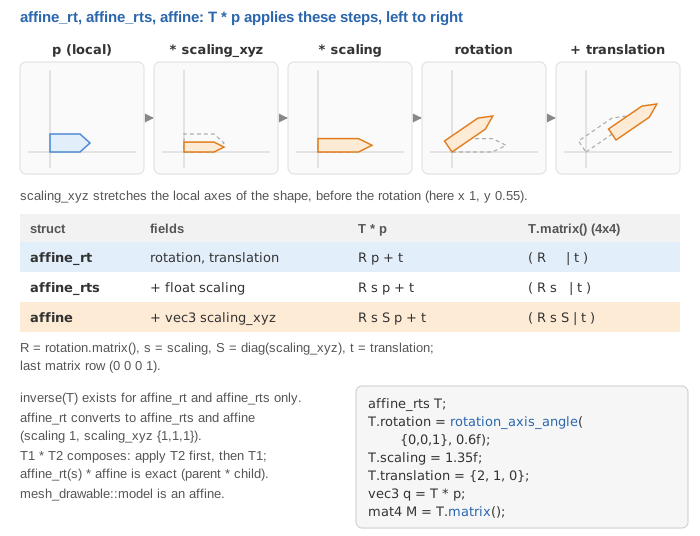
Since the scaling comes first, scaling_xyz stretches the shape along its own axes: a
cube scaled by {2,1,1} is a box twice as long along its local x axis, and it stays the
same box whatever its rotation. The matching matrix is
All three types also apply to a vec4: the translation is multiplied by , so a
direction () is rotated and scaled but not translated.
Each type has setters that return the transform itself, handy to build one in a single
expression: affine().set_translation({1,0,0}).set_scaling(0.5f).
4. Composition: T1 * T2 applies T2 first
Products follow the matrix convention: in T1 * T2, the transform on the right is
applied first. (T1 * T2) * p equals T1 * (T2 * p).
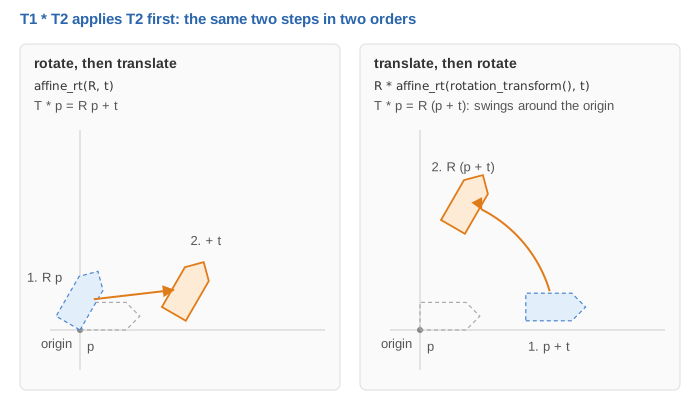
The product exists between the rigid and similarity types, and returns the smallest type that can hold the result:
| Product | Result | Exact? |
|---|---|---|
rotation_transform * rotation_transform |
rotation_transform |
yes |
affine_rt * affine_rt (and with a rotation on either side) |
affine_rt |
yes |
affine_rts * affine_rts, affine_rts * affine_rt, affine_rt * affine_rts |
affine_rts |
yes |
affine_rts * affine, affine_rt * affine |
affine |
yes |
affine * affine_rts, affine * affine_rt |
affine |
only if the left scaling_xyz is uniform (asserted) |
affine * affine |
not defined | use T1.matrix() * T2.matrix() |
The reason for the last two lines: a non-uniform scaling followed by a rotation is a
shear, which an affine cannot store (it always scales before it rotates). A rigid or
similarity transform applied after an affine is fine: this is the useful case, a
stretched shape (an affine) placed inside a parent frame (an affine_rts).
A common composition has its own function: rotation_around_center(R, center) returns the
affine_rt that rotates around a point instead of around the origin,
.
5. Inverse
inverse exists for rotation_transform, frame, affine_rt and affine_rts, and is
exact: for affine_rts, .
There is no inverse(affine), on purpose. The inverse of is : the
scaling would have to come after the rotation, which the affine struct cannot express.
Rather than return a silently wrong result, CGP does not offer it. When you need to invert
a transform (to go from world to local coordinates, to pick an object with the mouse...),
store it as an affine_rt or affine_rts, or invert its matrix with inverse(T.matrix()).
6. To mat4, and the model matrix of a drawable
Every transform has matrix(), which returns the mat4 above (a mat3 for a
rotation). The other way, affine::from_matrix(M) and affine_rt::from_matrix(M) read
the translation and the rotation back from a matrix (affine also recovers the scalings).
A mesh_drawable stores its placement in the field model, an affine. Since affine
can be built from an affine_rt or an affine_rts, you can assign either one to it:
// an arrow (a mesh of length 1 along z) going from point a to point b
vec3 const d = b - a;
arrow.model = affine_rts(rotation_transform::from_vector_transform({0,0,1}, normalize(d)), a, 1.0f);
arrow.model.scaling_xyz = {1, 1, norm(d)};   // stretch along the local z axis only
draw(arrow, environment);
The mat4 is built only inside draw, by mesh_drawable::send_opengl_uniform:
model (uniform) = hierarchy_transform_model.matrix() * supplementary_model_matrix * model.matrix()
                    affine_rts, set by a hierarchy     mat4, identity          affine, yours
model.matrix()is applied first, in the local frame of the mesh.supplementary_model_matrixis a rawmat4(identity by default) for whatever the affine types cannot express: a shear, a reflection, a projection.hierarchy_transform_modelis the global transform computed by ahierarchy_mesh_drawable; it is identity for a drawable outside a hierarchy.
The vertex shader then transforms the normals with , so lighting stays correct
with a non-uniform scaling_xyz.
Common pitfalls
- Rotation around the wrong point. Every rotation turns around the origin of the frame
it acts in. Build the mesh around its pivot (its center, or the joint) and move it with
the translation, or use
rotation_around_center. - Degrees.
from_axis_angletakes radians: write30 * Pi / 180. - Reading products backwards.
T_world * T_localplaces a local transform inside a parent;T_local * T_worldis almost never what you want. - Non-unit vectors.
from_vector_transform({0,0,1}, b - a)aborts on an assertion: passnormalize(b - a).
See also
- How-to: Move, rotate and scale a shape
- Understand: Camera and matrices (model, view and projection), Hierarchies of shapes (composing transforms along a tree)
- Reference:
rotation_transform,quaternion,frame,affine_rt,affine_rts,affine,mat4