Mouse, keyboard and camera controllers
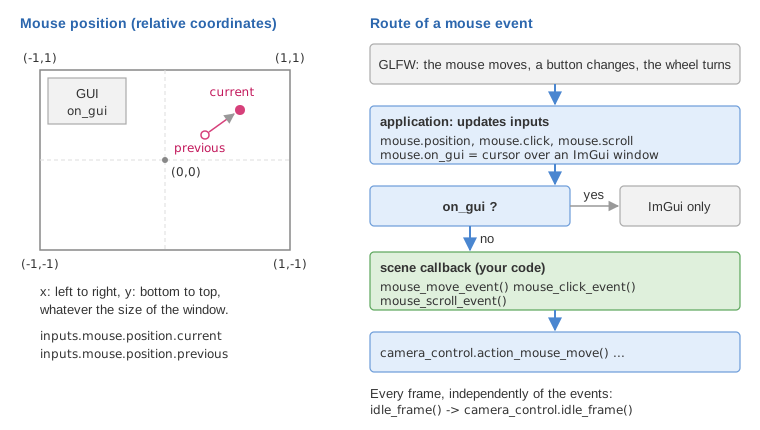
The scene does not poll the mouse and the keyboard itself. The application receives the
events from GLFW, stores the state of the devices in inputs (an
input_devices), and calls a function of the scene. In the
template these functions simply forward the event to the camera controller, the object that
turns mouse drags and keys into camera motion. Interacting with your own objects means adding
code to the same functions, and deciding when the camera should not move.
1. The state of the devices: input_devices
scene_structure has a member input_devices inputs;, updated by the application before
each callback:
| Member | Type | Meaning |
|---|---|---|
inputs.mouse.position.current |
vec2 | cursor position, in [-1,1] x [-1,1] |
inputs.mouse.position.previous |
vec2 | position at the previous mouse move event |
inputs.mouse.click.left, inputs.mouse.click.right |
bool | true while the button is held down |
inputs.mouse.click.last_action |
enum | last button change, of type last_mouse_cursor_action: click_left, click_right, release_left or release_right |
inputs.mouse.scroll |
float | vertical offset of the wheel during the last frame (0 if the wheel did not turn) |
inputs.mouse.on_gui |
bool | true when the cursor is over an ImGui window |
inputs.keyboard.shift, inputs.keyboard.ctrl |
bool | true while Shift / Ctrl (left or right) is held |
inputs.keyboard.up, down, left, right |
bool | true while an arrow key is held |
inputs.keyboard.is_pressed(key) |
bool | true while this key is held |
inputs.keyboard.last_action |
struct | last key change: key, action, is_pressed(key), is_released(key) |
inputs.time_interval |
float | duration of the previous frame, in seconds |
Relative coordinates. The position is not in pixels: x goes from -1 (left border) to 1
(right border), y from -1 (bottom) to 1 (top), as in the normalized device coordinates of
OpenGL (see Camera and matrices). The center of the window is (0,0)
whatever its size. The pixel to relative conversion is
window.convert_pixel_to_relative_coordinates.
Two ways to name a key. is_pressed accepts a GLFW key code or a character:
inputs.keyboard.is_pressed(GLFW_KEY_W)  // the key at the place of W on a US (QWERTY) keyboard,
                                         // labeled Z on a French (AZERTY) keyboard
inputs.keyboard.is_pressed('w')         // the key labeled w on the keyboard in use
GLFW key codes describe a position on the keyboard: WASD on a QWERTY keyboard and ZQSD on an AZERTY keyboard are the same four keys. The character version asks GLFW for the name of the key in the current layout, so it follows the letters printed on the keys (letters and digits only, not Shift or the arrows).
Held or just pressed. inputs.keyboard.is_pressed(key) stays true as long as the key is
down: test it in idle_frame for a continuous action. inputs.keyboard.last_action.is_pressed(key)
is true only for the event of the press itself (not for the auto-repeat): test it in
keyboard_event for a one-shot action such as a toggle.
2. The callbacks of the scene template
The template (src/scene.hpp) declares four callbacks; the base class scene_inputs_generic
provides an empty default for a fifth one, mouse_scroll_event. When each one is called (and
why mouse events are dropped over the GUI) is in the table of
Scene structure; here is what the template does in each:
| Callback | Template code |
|---|---|
mouse_move_event() |
if (!inputs.keyboard.shift) camera_control.action_mouse_move(); |
mouse_click_event() |
camera_control.action_mouse_click(); |
mouse_scroll_event() |
not declared: the empty default does nothing |
keyboard_event() |
camera_control.action_keyboard(); |
idle_frame() |
camera_control.idle_frame(); (at every frame, before display_frame()) |
The events arrive at the end of a frame, after display_frame (see
Scene structure). Two points of the template are worth noticing:
mouse_move_eventdoes not forward the motion to the camera while Shift is held. This is the convention of the course: Shift + drag is free for your own interaction (sketching, picking, deforming), plain drag moves the camera.- Keys held down are handled in
idle_frame, not inkeyboard_event: a key event only arrives when a key changes state, while a held key must move the camera a little at every frame (by a distance proportional toinputs.time_interval, see Time and animation).
A minimal example, a key that toggles a pause and the mouse wheel that zooms:
// scene.hpp - in scene_structure
bool paused = false;
void mouse_scroll_event();             // declare it to replace the empty default

// scene.cpp
void scene_structure::keyboard_event()
{
    camera_control.action_keyboard();
    if (inputs.keyboard.last_action.is_pressed(GLFW_KEY_SPACE))
        paused = !paused;
}
void scene_structure::mouse_scroll_event()
{
    // orbit controllers: the wheel changes the distance to the center of rotation
    camera_control.camera_model.manipulator_scale_distance_to_center(-0.1f * inputs.mouse.scroll);
}
3. Camera controllers
A camera controller owns a camera model (camera_control.camera_model) and modifies it in its
four functions action_mouse_move(), action_mouse_click(), action_keyboard() and
idle_frame(). display_frame then copies the view matrix with
camera_control.camera().matrix_view(). All controllers derive from
camera_controller_generic_base and keep pointers to inputs and window, set by
camera_control.initialize(inputs, window) at the beginning of initialize().
| Controller | Camera model | Motion |
|---|---|---|
camera_controller_orbit_euler (default) |
camera_orbit_euler |
turns around a center, keeps an up axis |
camera_controller_orbit |
camera_orbit |
turns around a center, free arcball rotation |
camera_controller_first_person_euler |
camera_first_person_euler |
turns around its own position, keeps an up axis |
camera_controller_first_person |
camera_first_person |
turns around its own position, free rotation |
camera_controller_fly_mode |
camera_first_person |
always moves forward, steered like a plane |
The euler versions store yaw and pitch angles around a fixed axis (set_rotation_axis_z() for
the z-up scenes of the course): the horizon stays horizontal. The other versions store a
quaternion and can reach any orientation, at the price of a horizon that tilts.
Controls, as coded
Letters are GLFW key positions (QWERTY names, AZERTY labels in parentheses). "Drag" means moving the mouse with the button held; for the right button only the vertical motion is used.
| Input | orbit_euler (default) | orbit | first_person_euler | first_person | fly_mode |
|---|---|---|---|---|---|
| Left drag | rotate around the center | arcball rotation around the center | look around | look around | pitch and roll |
| Ctrl + left drag | pan camera and center | pan camera and center | tilt the up axis | roll | (as left drag) |
| Right drag | move closer / farther from the center | move closer / farther | move forward / back | move forward / back | - |
| Ctrl + right drag | move camera and center forward / back | move camera and center forward / back | (as right drag) | (as right drag) | - |
| K + left drag | as right drag (also with Ctrl) | - | - | - | - |
| Up / Down arrows | - | - | forward / back (Ctrl: up / down) | forward / back | pitch |
| Left / Right arrows | Shift: tilt the up axis | roll | move left / right | move left / right | roll |
| W / S (Z / S) | - | - | forward / back | forward / back | pitch |
| A / D (Q / D) | - | - | move left / right | move left / right | roll |
| R / F | Shift + R: tilt the up axis (Shift + F is the full screen) | roll | move up / down | move up / down | speed up / down (also keypad + / -) |
| Q / E (A / E) | - | - | tilt the up axis | roll | - |
| Shift + C, Esc | - | - | capture / release the cursor | capture / release the cursor | capture / release the cursor |
Notes from the code:
- The texts printed at start-up by
doc_usage()(function display_info of the template) are summaries of this table. - Shift + F toggles the full screen: the template does not pass it to the scene nor to the controller, so it does not also move the camera.
- The K of the orbit_euler controller is tested with
is_pressed("k"), so it is the key labeled K in the current layout, unlike the other letters, which are positions. - In the default template, Shift + drag never reaches the controller (see section 2), but
Shift + Left / Right arrows does, since it is handled in
idle_frame. - When the cursor is captured (Shift + C, first-person controllers and fly mode only), the cursor is hidden and the camera turns with the mouse without any click. The mouse position is then no longer bounded to [-1,1].
- The keyboard speeds are proportional to
inputs.time_interval. The first-person controller scales them withtranslation_speedandrotation_speed; the fly mode moves forward atspeedunits per second, betweenspeed_minandspeed_max. - No controller uses the mouse wheel: add a
mouse_scroll_eventas in section 2 if you want it.
Switching controller
Change the type of the member in src/scene.hpp; the callbacks and display_frame stay the same:
// scene.hpp - in scene_structure
camera_controller_orbit camera_control;    // instead of camera_controller_orbit_euler
Then adapt the initialization: the euler controllers have set_rotation_axis_z() and a
look_at(eye, center) that ignores a third argument; camera_controller_orbit,
camera_controller_first_person and camera_controller_fly_mode have no rotation axis and
need the up vector:
// scene.cpp - scene_structure::initialize()
camera_control.initialize(inputs, window);
camera_control.look_at({3.0f, -2.0f, 1.5f} /*eye*/, {0,0,0} /*center*/, {0,0,1} /*up*/);
The how-to Explore a scene with a first-person camera walks through this change for a walking camera.
Disabling the camera
Every function of a controller starts by testing its public member is_active. Set it to false
to freeze the camera, and back to true to release it:
camera_control.is_active = false; // mouse and keys no longer move the camera
The view matrix is still read in display_frame; only the reactions to the inputs stop. The
other options are to hold Shift during your own interaction (the template convention), or not to
call camera_control.action_mouse_move() in a given mode, as in
Sketch curves with the mouse.
4. Picking: from the mouse to a 3D object
A point of the screen is not a 3D point but a ray: all the points that project on this pixel.
Picking casts this ray from the camera position and intersects it with the scene.
picking_spheres finds the sphere under the cursor among a set of spheres,
picking_plane_orthogonal_to_camera gives the 3D point under the cursor on the plane facing
the camera through a given point; both take the cursor position in relative coordinates
(section 1), the camera model and camera_projection. The ray itself is given by
camera_ray_direction. The how-to
Select and drag objects with the mouse uses them
to drag spheres while the camera is disabled (section 3), and
Sketch curves with the mouse to draw in 3D.
5. Pitfalls
- The camera moves while you interact. The controller still receives the events: hold
Shift, set
camera_control.is_active = false, or stop callingaction_mouse_move. - A click on a slider also acts on the scene. The application does not call the mouse
callbacks when the cursor is over the GUI, but the position and the buttons in
inputsare still updated. Code that readsinputsoutside the callbacks (inidle_frame, for instance) must testinputs.mouse.on_guiitself. - Keys typed in a text field. While ImGui uses the keyboard (a text input is active),
keyboard_eventis not called and key presses are not recorded ininputs.keyboard; key releases are, so a key released at that moment is no longer seen as pressed. - A one-shot action repeats.
inputs.keyboard.is_pressed(key)tested inidle_frameis true at every frame while the key is down. Useinputs.keyboard.last_action.is_pressed(key)inkeyboard_eventfor a toggle. - The wrong key on a French keyboard. GLFW key codes are positions:
is_pressed(GLFW_KEY_Z)is the key labeled W on an AZERTY keyboard. Use the character version,is_pressed('z'), when the letter matters more than its position. - Nothing happens when the keys are held.
idle_frame()must callcamera_control.idle_frame(): the keyboard motion of all controllers is applied there.
See also
- How-to: Select and drag objects with the mouse, Sketch curves with the mouse, Explore a scene with a first-person camera
- Understand: Scene structure (who calls the callbacks),
Camera and matrices (view matrix, NDC),
Time and animation (
inputs.time_interval) - Reference:
input_devices,camera_controller_orbit_euler,camera_controller_first_person,camera_projection_perspective