Shaders and uniforms
A shader is a small program written in GLSL that runs on the GPU. CGP draws every
mesh_drawable with a pair of shaders:
- the vertex shader runs once per vertex: it reads the vertex attributes stored in the VBOs and computes the position of the vertex on the screen;
- the fragment shader runs once per pixel covered by a triangle (a fragment): it computes its color.
Between the two, the GPU assembles the triangles, finds the pixels they cover (rasterization) and interpolates the outputs of the vertex shader at each of these pixels.
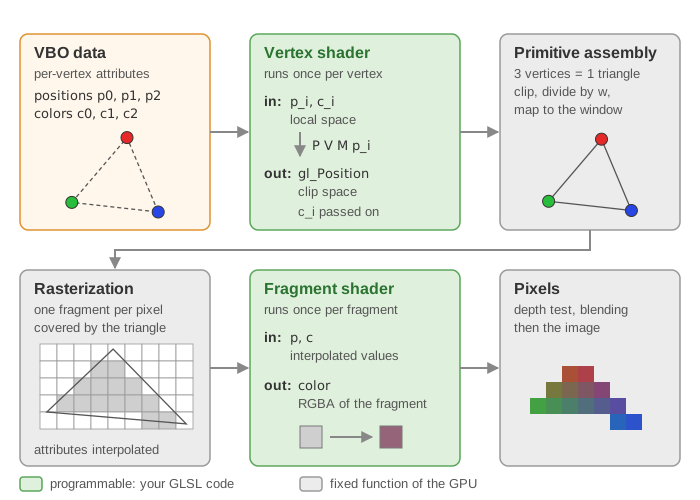
Shaders receive data in two ways:
| Per-vertex attribute (GLSL keyword in) | Uniform variable (GLSL keyword uniform) | |
|---|---|---|
| Value | different for every vertex | the same for the whole draw call |
| Stored in | a VBO, copied once by initialize_data_on_gpu |
sent by draw before each draw call |
| Examples | position, normal, color, uv | model, view, projection, light, material |
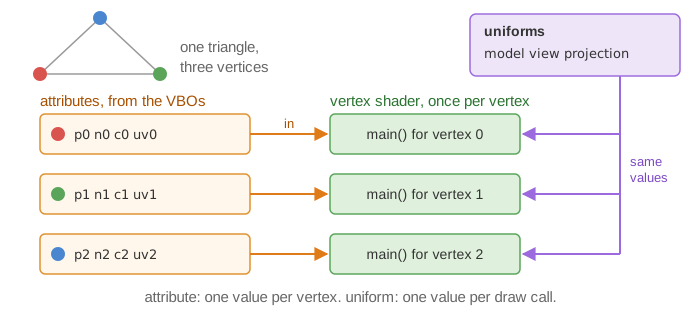
The default shaders are in shaders/mesh/ of every project, loaded at startup into
mesh_drawable::default_shader (see Scene structure).
1. The default vertex shader
#version 330 core

// Inputs coming from VBOs (locations fixed by mesh_drawable)
layout (location = 0) in vec3 vertex_position;
layout (location = 1) in vec3 vertex_normal;
layout (location = 2) in vec3 vertex_color;
layout (location = 3) in vec2 vertex_uv;

// Outputs, interpolated and sent to the fragment shader
out struct fragment_data {
    vec3 position; // world space
    vec3 normal;   // world space
    vec3 color;
    vec2 uv;
} fragment;

uniform mat4 model;
uniform mat4 view;
uniform mat4 projection;

void main()
{
    vec4 position = model * vec4(vertex_position, 1.0);         // local -> world
    mat4 modelNormal = transpose(inverse(model));
    vec4 normal = modelNormal * vec4(vertex_normal, 0.0);       // normals: inverse transpose

    fragment.position = position.xyz;
    fragment.normal   = normal.xyz;
    fragment.color    = vertex_color;
    fragment.uv       = vertex_uv;

    gl_Position = projection * view * position;                 // world -> clip space
}
The location numbers are the link with the C++ side: initialize_data_on_gpu binds
vbo_position to location 0, vbo_normal to 1, vbo_color to 2 and vbo_uv to 3. A custom
shader for a mesh_drawable must use the same locations. The names of the input variables are
free; only the location matters.
The vertex shader must write gl_Position. The matrices are explained in
Camera and matrices. Normals are transformed by the inverse
transpose of the model matrix so that they stay perpendicular to the surface under a
non-uniform scaling.
2. The default fragment shader
The fragment shader receives the interpolated struct of the vertex shader (same declaration, with the keyword in instead of out) and writes one color:
layout(location=0) out vec4 FragColor;

uniform sampler2D image_texture;  // the texture of the drawable (texture unit 0)
uniform mat4 view;                // used to recover the camera position
uniform vec3 light;               // light position

struct phong_structure {
    float ambient;
    float diffuse;
    float specular;
    float specular_exponent;
};
struct texture_settings_structure {
    bool use_texture;
    bool texture_inverse_v;
    bool two_sided;
};
struct material_structure {
    vec3 color;
    float alpha;
    phong_structure phong;
    texture_settings_structure texture_settings;
};
uniform material_structure material;
Its main function computes a Phong illumination:
- the camera position is recovered from the
viewmatrix; - diffuse term , with the unit direction towards
light; specular term , with the reflection of and the direction towards the camera; - the base color is the product
fragment.color * material.color * texture color; - final color ,
and alpha
material.alphathe alpha of the texture.
So a shape can be colored in three ways, which multiply: per-vertex colors (mesh::color), one
uniform color (material.color), and a texture.
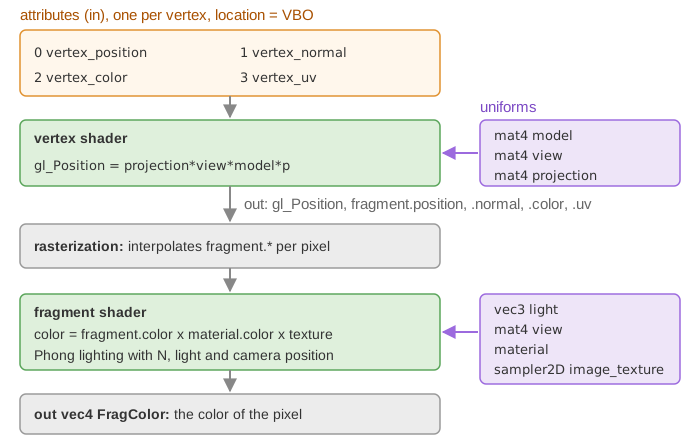
3. Three levels of uniforms
This section is the reference for the uniforms sent by draw; the other pages link here.
When you call draw(drawable, environment), CGP activates the shader of the drawable and
sends the uniforms in this order (a later value of the same name overwrites an earlier one):
| Level | Sent by | Uniforms (GLSL names) | You set them with |
|---|---|---|---|
| Drawable | drawable.send_opengl_uniform() |
model, material.* |
sphere.model, sphere.material |
| Environment | environment.send_opengl_uniform(shader) |
projection, view, light |
environment.camera_projection, environment.camera_view, environment.light |
| User | the end of environment.send_opengl_uniform, which sends environment.uniform_generic |
any name you choose | environment.uniform_generic.uniform_float["time"] = ... |
| Per draw call | draw, from its additional_uniforms argument |
any name you choose | draw(water, environment, 1, true, water_uniforms) |
| Texture | draw |
image_texture (unit 0), one sampler per entry of supplementary_texture |
sphere.texture, sphere.supplementary_texture["name"] |
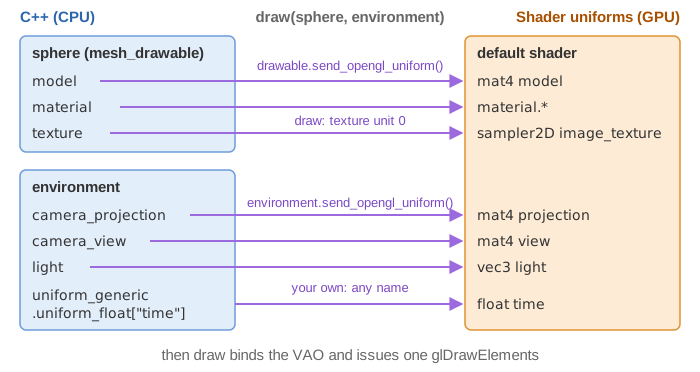
Then the VAO is bound and one draw command is issued. Every value ends up in a call to
opengl_uniform(shader, "name", value), a wrapper of glUniform* that finds the location of
name in the shader (with a cache) and sends the value. You can also call opengl_uniform yourself with the
shader of a drawable: it sets the value in the program currently in use (it does not call
glUseProgram), so outside of draw call glUseProgram(shader.id) first; the value then
stays in the program until it is changed. For most needs, uniform_generic (below) is simpler.
Drawable uniforms: model and material
mesh_drawable::send_opengl_uniform sends the model matrix (built from model and two
optional terms, see
the model matrix of a drawable)
and the material. The C++ struct material_mesh_drawable_phong maps to the GLSL struct as follows:
C++ (sphere.material...) |
GLSL uniform | Default |
|---|---|---|
color |
material.color |
(1,1,1) |
alpha |
material.alpha |
1 |
phong.ambient, phong.diffuse, phong.specular, phong.specular_exponent |
material.phong.ambient ... |
0.3, 0.6, 0.3, 64 |
texture_settings.active |
material.texture_settings.use_texture |
true |
texture_settings.inverse_v |
material.texture_settings.texture_inverse_v |
true |
texture_settings.two_sided |
material.texture_settings.two_sided |
false |
Note that two C++ names differ from their GLSL names (active / use_texture,
inverse_v / texture_inverse_v).
Environment uniforms: view, projection, light
They are the same for every shape of the frame, so they live in the environment, which you
fill at the beginning of display_frame (see Scene structure). You can
add your own fields to environment_structure and send them in its send_opengl_uniform.
User uniforms: uniform_generic
To send an extra value without touching the C++ structures, put it in one of the maps of
uniform_generic_structure: uniform_int, uniform_float, uniform_vec2, uniform_vec3,
uniform_vec4, uniform_mat2, uniform_mat3, uniform_mat4. The key is the GLSL name; the
map decides the type. Each C++ entry needs a matching declaration in the shader:
// C++ (display_frame or display_gui)
environment.uniform_generic.uniform_float["time"] = timer.t;
environment.uniform_generic.uniform_float["coeff_ambient"] = gui.ambient;
environment.uniform_generic.uniform_vec3["light_color"] = gui.light_color;
// GLSL (vertex or fragment shader)
uniform float time;
uniform float coeff_ambient;
uniform vec3 light_color;
The entries stay in the map: they are sent again at every draw until you change them.
Try it. In this demo a flat grid is drawn with a custom vertex shader that displaces its vertices with a wave. The C++ code only sets three user uniforms,
uniform_float["time"],uniform_float["amplitude"]anduniform_vec3["wave_color"]: move the slider or pick a color and the whole surface changes at once, without touching its VBOs.
Uniforms of environment.uniform_generic are sent to every shader that is drawn with
this environment, including the default shader that does not declare time. When a shader
does not use a uniform it receives, opengl_uniform prints the warning "Try to send uniform
variable [time] to a shader that doesn't use it" (at most cgp_warning::max_warning times,
4 by default). This is harmless; the course labs silence it with
cgp_warning::max_warning = 0; in initialize(). Two other options:
- a separate environment for the shapes that use the custom shader;
- per-draw uniforms: the fifth argument of
draw(drawable, environment, instance_count, expected_uniforms, additional_uniforms)is auniform_generic_structuresent only for this call, e.g.draw(water, environment, 1, true, water_uniforms): 1 instance (the default), true to keep the warning for uniforms the shader does not use (false silences it for this call), then the extra uniforms.
Note also that the GLSL compiler removes a uniform that is declared but not used in the computation: it then counts as "not used" and triggers the same warning.
4. Loading your own shader
A shader program is held by an opengl_shader_structure, which only stores the OpenGL id.
Write the two files (for instance shaders/mesh_custom/mesh_custom.vert.glsl and
shaders/mesh_custom/mesh_custom.frag.glsl, starting from a copy of the default ones), then in initialize():
opengl_shader_structure shader_custom;
shader_custom.load(
    project::path + "shaders/mesh_custom/mesh_custom.vert.glsl",
    project::path + "shaders/mesh_custom/mesh_custom.frag.glsl");

cube.initialize_data_on_gpu(cube_mesh);
cube.shader = shader_custom;     // copies the id: several drawables can share the program
sphere.shader = shader_custom;
Alternatively, pass it at the initialization:
cube.initialize_data_on_gpu(cube_mesh, shader_custom).
opengl_shader_structure::loadreads, compiles and links the two files; it stops the program with the compilation error if the GLSL is wrong. Shaders are loaded at run time, so a change in a .glsl file does not require recompiling the C++ code, only restarting it.- Use
project::pathto build the file paths: it points to the root of the project whatever the folder you run the executable from. - Loading directly into a drawable also works, even after
initialize_data_on_gpu:drawable.shader.load(...)gives this drawable a new program and leaves the default shader of the other shapes untouched.loadnever releases the program previously held by the struct, because copies of it (other drawables) may still use it; callopengl_shader_structure::clearexplicitly to release a program that no drawable uses any more. - For the web version (Emscripten),
loadconverts the#version 330 coreheader to OpenGL ES automatically. load_from_inline_textbuilds a shader from two strings instead of files.
A custom shader for a mesh_drawable keeps the input locations 0 to 3. It may drop uniforms
it does not need (e.g. material); draw will then print the "doesn't use it" warning for
them, as explained above.
See also
- From CPU to GPU: how the VBOs read by the vertex shader are filled.
- Camera and matrices:
model,viewandprojection. - Scene structure: where the environment is filled.
- Change the color of a shape: the material color, per-vertex colors and Phong coefficients in practice.
- Troubleshooting: shader compilation errors and the uniform warning.
- Course lab of CSC_43043 (public version, without the solutions):
05_shaders/b_shading_effect(Phong in a custom fragment shader driven byuniform_generic).